





Linguafoeda
Members
-
Joined
-
Last visited
Everything posted by Linguafoeda
-
Is there a way to disable Fix Common Problems from checking for updates that are already queue'd to be installed? I keep getting notifications of "x docker app has an update available for it" and want to minimize those discord alerts since it will get auto-updated at 5am. Is there anywhere else to tweak exact notifications that Fix Common Problems sends out?
-
i'm a beginner so apologies for dumb question. i just installed this but don't want to use any of the VPN features, just use rtorrent as normal client. I tried launching the webUI (i set "password" for both RPC2_PASS and WEBUI_PASS but the WebUI doesn't launch (tried [localhost]:9080/9443/5000/8118...all no dice). what do i need to do to make rtorrent work like a standard client? Edit: nvm, just changed KEY_1 to "no" to disable vpn feature
-
How do i get audio working? I only have an Intel CPU (with UHD 630 graphics). Do i need to pass this through or is there another way to passthrough audio? I want to make sure that while my VM is running, my Intel UHD 630 integrated GPU is available for transcoding on anything on the Plex docker. I had always thought you cannot both passthrough an integrated Intel GPU and have it available for Plex to transcode. When i close the VM, and select the "Intel Comet Lake PCH cAVS (00:1f.3) as my sound card (note- graphics card is still set to "VNC"); then i get the following error when trying to start the VM: internal error: qemu unexpectedly closed the monitor: 2021-07-21T05:47:41.905637Z qemu-system-x86_64: -device vfio-pci,host=0000:00:1f.3,id=hostdev0,bus=pci.7,addr=0x1: vfio 0000:00:1f.3: group 10 is not viable Please ensure all devices within the iommu_group are bound to their vfio bus driver.
-
I think it just started happening, maybe it was after updating to Unraid 6.9.2?
-
I'm also having this issue. Do you know the step by step of what i need to do to fix this, or is it better to just stop using Docker Folders?
-
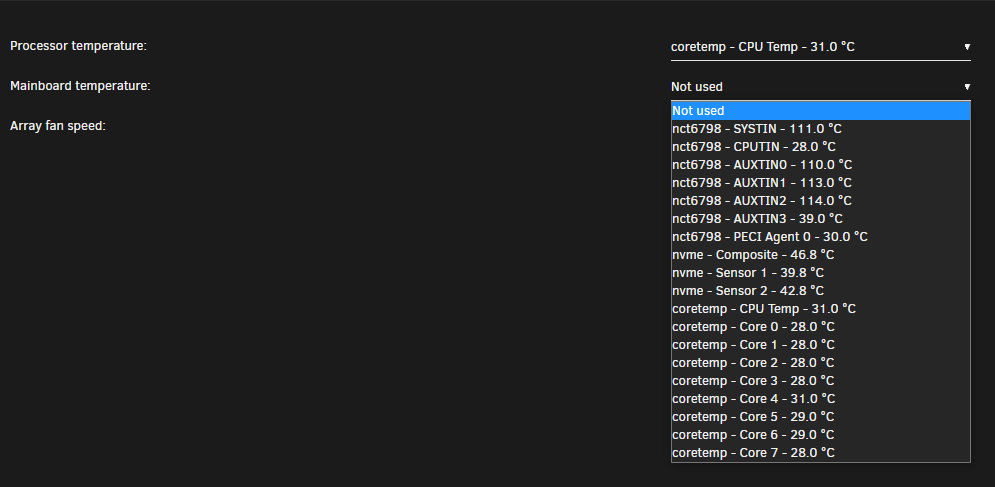
Hello - I'm new to unraid and just getting everything setup. How do I know which of the various listed line items represents my "mainboard temperature"? Is it AUXTIN3, PECI Agent 0 or something else? I had to reboot to get the "coretemp" ones listed, otherwise when I installed the app it only showed CPUTIN, AUXTIN3 and PECI Agent O Edit: when I check my motherboard, it shows CPU as ~32C and motherboard as ~39C so I assume AUXTIN3 is the motherboard. I have my BIOS chassis (i.e. HDD) fan curves set to monitor the motherboard temperature. Should I change this to monitor the CPU temperature? Is there a way to have the fans monitor individual hard drives instead?
-
I'm leaning towards Option 4 but I honestly haven't setup all my drives yet / still waiting on a few server parts to arrive. My game plan right now is to try a full move to Unraid, see if it works and if it doesn't I go with Option 3 because Windows gets unstable over time and I need Unraid running on the top since this is a remote server without IPMI. Do you have any thoughts to any of the points I raised in Option 4?
-
Hi - I have this same question. Should I not be using Unassigned Devices? I currently have a 1TB NVMe SSD and a separate 500GB 2.5" SSD. I'm confused how I should have both of my SSDs setup to optimize for my use case. Should I be setting each as a "cache pool" and then specify Plex/VMs/appdata/Docker containers to be installed only on the NVMe "cache pool" and make sure this cache pool isn't also set to cache files on the array, while the 2.5 SSD "cache pool" is set as a traditional cache under each of the array settings? 1TB SK Hynix Gold P31 NVMe SSD: Plex metadata with thumbnails + 20-30 docker containers + the associated appdata + 1-2 VMs sitting on the NVMe drive 500GB Samsung EVO 850 2.5" SSD: used as a traditional "cache" drive, where all my downloads / torrents / scratch files sit, and files are written here before the the mover moves them onto my 8-disk HDD array (using without parity)
-
very helpful, thank you so much. Your knowledge is invaluable!
-
Ah thank you so much. Does this imply that 350MB/s per drive for the JMB585 should pose no real world issues if I'm only dealing with JBOD 5400RPM HDDs? I'm building a server that I will likely use for the next 5-10 years and down the line I'd like to add 10GbE networking for transferring files in and out of the SSD cache, but my understanding is that 5400RPM HDDs in non-RAID/stripe wouldn't even be able to keep up with something like 350MB/s limit imposed by the controller unless I switch my entire array over to maybe 15k SAS drives or SSDs? For reference, I usually see these drives write speeds at ~125MB/s copying between my 5400 spinners in an external USB-C DAS, so I assume there's no real world issues on either reads or writes if connecting them to a controller that can only handle 350MB/s max per drive. Also is this 350MB/s speed only applicable if all 5 drives were being accessed at the same time? Would it be significantly faster if I was only writing to 1 drive at any moment in time?
-
Hi - is there any downsides at all to using this I/O Crest M.2 card vs. a dedicated LSI HBA like the 9207-8i? I only have 1 PCI slot so I'm trying to save that slot for a GPU or flash accelerator SSD, and would love to use this little M.2 adapter if there's no performance difference driving 5x 5400rpm HDDs
-
bump
-
@HellDiverUK would you be able to comment on my new thread below for those QNAP users looking to transition to a fully Unraid install?
-
Current Plex / General Purpose Server i7-4770 / GTX 1060 / 32GB RAM / 48TB *external USB3.0 DAC* array running StableBits DrivePool Why Am I Upgrading I'm at that point where I'm contemplating how best to move forward with upgrading my 8 year old server. Everything performance-wise runs perfectly fine on the system today (1080p transcoding, I don’t expose my 4K library to anyone except my Apple TV) but I’ve put off upgrading to a larger chassis (for more drives) / server-grade components / potentially new OS for many years under the mantra “if it ain't broke, don't fix it” which generally in life has served me well. I’ve now filled up the entire DAS array and instead of buying a larger DAS and shoving more 12TBs in there, I’d rather just build out a 16-24 bay server chassis with Dual Xeons / P2000 / 32-64GB RAM / 120TB *internal* array to future proof. In terms of “needs”, the upgrades are more so to future proof as well as make transcoding large TV season packs to H265 go faster. I don’t plan on allowing other users to transcode my 4K library, but that is certainly a “nice-to-have” feature that I would consider a plus as I figure out which environment to run my server in. Core Programs I Use in Current Server Plex Emby Stablebits DrivePool Stablebits Scanner qBittorrent uTorrent Sonarr / Radarr / Lidarr / Ombi / Jackett / PlexPy / Trakt Scrobbler Plugin etc. No-IP DNS rClone + rClone Browser Various Transcoding and Audio/Video Editing Software (Vidcoder / MKVToolnix / JMkvpropedit / FlacSquisher / DTS Encoder Suite etc.) TagScanner Bulk Rename Utility Chatzilla jDownloader iTunes Chrome Teamviewer + AnyDesk Teamviewer is used almost daily to interact with all the above programs as well as transfer files from my local PC via drag-n-drop to the remote server Upgrade Options This is where I’m looking for some wisdom from this great forum, especially those maybe in my shoes who were thinking about migrating from a Windows 10 Server to an unRAID based system. I have a few options – 1) Simple hardware upgrade and keeping mostly all software the same (Win10 -> Win10) 2) Upgrade to Windows Server 2019 3) Build system with unRAID core and virtualize Windows 10 with mostly everything running inside the VM 4) Migrate to unRAID + Docker-based Solution Option 1) Windows 10 This is the most simple, no-nonsense “if it ain't broke, don't fix it” approach. I won’t be able to simply clone my SSD to the new server but setting up Windows 10 should be relatively straight forward to configure the various ports, install my programs needed above, copy and paste Plex’s %appdata% and keep the DrivePool integrity the same except for the fact that it goes from external pool of drives via USB 3.0 DAC to an array of internal drives. Option 2) Upgrade to Windows Server 2019 There is something inside of me that says: “why would you buy all this nice hardware only to run Windows 10 on it. You should be running a server OS”. At the same time, I don’t think any features Server 2019 offers are immediately obvious to me that I would use (maybe someone can educate me on this?). Based on that fact alone, it doesn’t seem like the “better choice” vs. option 1. Teamviewer I think also completely breaks (makes you pay) if it detects Windows Server OS, which is my preferred client to connect remotely (AnyDesk is okay, I like file transfer speed/ease from Teamviewer better). Option 3) unRAID + Windows 10 VM This is the option I’m trying to research vs. option 1 & 4, in terms of what kind of performance hit “virtualizing” Windows would have and usability of my existing DrivePool setup. I like that unRAID would act as a layer one above my VMs, where if something happens to Windows 10 (say it crashes), I could connect to the web interface and restart it manually. It also helps me “lean into” the software and learn more about it by playing around with different features (plugins/tools) while keeping the integrity of my existing system up and running within the contained VM. After having read threads about poor “VM performance” that requires tinkering with CPU pinning/isolation, among other things. This makes me think there are various complexities with drivers, VM-passthrough performance etc. that will come up that will cause issues in the future that I have to constantly go back to forum searches to fix (unlike Windows main issue being the occasional mandatory random update). I’ve also read various software like CrystalDiskInfo / HWMonitor don’t play well with VMs. I probably know 10% of the potential compatibility issues to come with running such a system vs. plain straight Win10 setup which is why I ask if this is feasible vs. Option 1 without drastic performance hit on apples-to-apples basis. Option 4) Migrate to unRAID + Docker-based Solution So this is the one I know most people would defacto recommend, partially because you all are probably running it. I think I read that there are over 1mm users on Plex Docker plugin so it’s a well-walked path but I know it won’t be an easy 3 hour setup kind of thing. Going back to the "don't fix what's not broke", the question really boils down to figuring out what tangible, specific "upside" is there to an to a unRAID + docker solution vs. Option 1 or 3…I’ve tried to think of some below but any input would be really helpful as I try to think this through: What is the tangible “regular Plex” benefit – does items in Plex load faster in Docker vs. option 1? Do remote streams startup quicker? Is Plex native performance so much better in Docker that it can handle one more incremental 4K stream vs. Option 1 or Option 3? Etc. Can I import all my Win10 %appdata% with custom covers / tags / custom descriptions / playlists / watch status / view count/history etc. to Docker or is Marcus Nailor’s Plex Move Guide just totally not recommended vs. a clean install? Is it purely less resources dedicated to the OS-overhead that will improve tangible performance across my intended program usage (transcoding / torrenting etc.)? If I want to run a Windows 10 VM for some specific Win10 programs while everything else runs in Docker containers, does that mean my performance would need to be effectively split in a fixed proportion (CPU cores / RAM / GPU) to the VM vs. unRAID while they are running at the same time? Can I run Plex / Sonarr / Radarr etc. in Docker while still pointing it to my existing DrivePool or will need to spend a lot of time effectively moving over to a pooled + parity-based solution in unRAID? Can the reformatted drives be accessed from a Windows based machine? Does introducing 1 or 2-parity create significant slow down from a write perspective? Are there unRAID only benefits (cache drives for metadata vs. everything on a single SSD? Cache drives for torrenting?) that are only available in this environment vs. Option 1 / 3? unRAID Parity vs. Stablebits DrivePool Perhaps something overall driving my decision making process is just my general satisfaction with Stablebits Drivepool and not having found the equivalent of its simplicity on unRAID (fine-tuned automatic balancing across large array of disks, volume equalization, drive evacuation based on health monitoring, software level file duplication, and ease of adding/removing drives to the array without long wait times of rebuilding parity) with unRAID so far, understanding that unRAID's parity-array to protect against drive failure is one of the biggest reasons to move over to unraid from Win10 based solutions. I understand the biggest differences between unRAID and Drivepool would be the ability to have real-time redundancy in unRAID if a drive fails, but I’m not too fussed as long as I know approximately which parent folder contains the corruption/failure as I keep a 1:1 monthly online backup of the array offsite that I can always redownload (and I’ve had Drivepool evacuate a detected failing hard drive just fine without…evacuated, removed, put in a new drive and balance redistributed all the files back). Conclusion It seems based on the above, I’m leaning towards Option 3 so long as it retains the majority of performance functionality versus Option 1. Option 4 I could certainly be convinced and perhaps Option 3 eventually does lead to Option 4 down the line. The big hesitation / question is figuring out what performance difference occurs between Option 1 and 3 and what big “upgrades/features” I get using Option 4 over Option 1 / 3. Would love to hear people’s general thoughts, sorry for the wall of text but I’m sure someone else in the world has thought / considered much of the above as they dip their toes into this fascinating software!

