





ConnerVT
Members
-
Joined
-
Last visited
Everything posted by ConnerVT
-
Honestly, I didn't look there. After the swap, first thing I encountered was my Plex container not starting. First thought was a driver issue, but it was that I had the GUID (of the old P400) rather than ALL in my Plex template. After I got that running, and saw the new GPU was transcoding according to Plex, I then revisited the GPU Statistics on the Dashboard. It was still showing the "unparsable data" message, so started working with the GPU Statistics settings.
-
Sorry I was late to the party. I saw the same thing, and figured out the same solution, as I recently replaced my Quadro P400 for a RTX A400. Was interesting, as the new A400 was shown (and selected) in the plugin config page. I believe I needed to unselect the card, hit Apply, select the card, hit Apply again.
-
That's the way to do it.
-
There is no issue moving files using Unraid built in File Manager, Midnight Commander (mc), Krusader or Unbalance (plugin). Just be sure you are moving files from drive to drive. Never move files from Share to Drive or Drive to Share. This is when problems can happen. Is your Parity Drive 18TB or bigger? Parity Drive must be equal/greater in size to all of the data drives in your array.
-
Your card is more sparkly than most? 🙃
-
First question is what do you plan to do with a GTX970? This old Maxwell based card cannot transcode 4K h.265 and is pretty limited even for HD h.264 media files. If just using the card for a local video display, or to pass through to a VM, the driver isn't required.
-
While waiting for someone to chime in, I would likely run a memtest. Especially with a HW change.
-
So, nothing really changed except for your shirt? 😀 Congrats for the deserved recognition of the work you do.
-
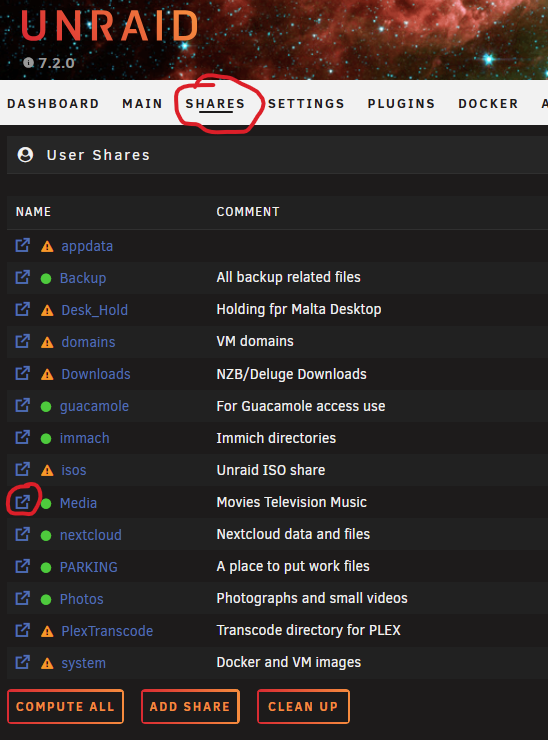
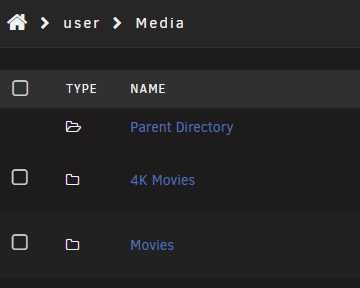
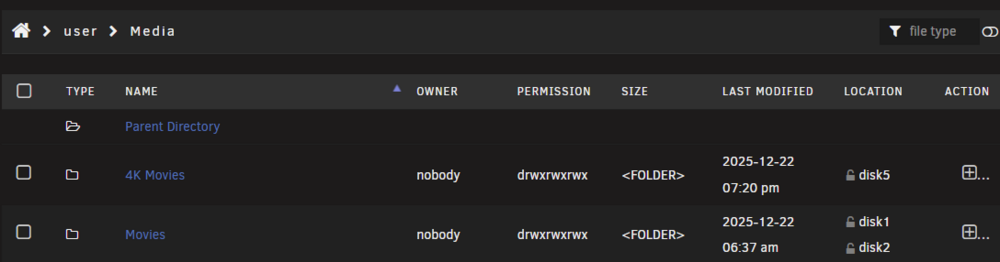
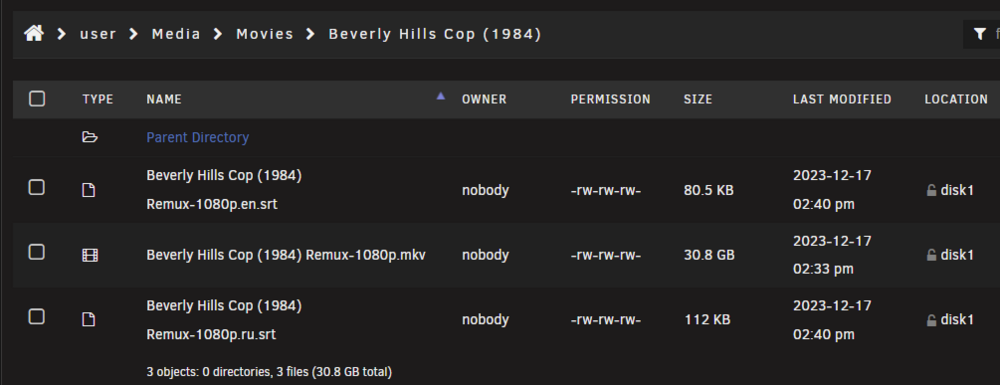
Unraid's File Manager works like most computer directory interfaces (like Windows Explorer, in Details view) Click Shares and you will see a list of your shares. My media is in the Media share (imaginative, ain't I?). A Share in Unraid is basically a top level folder in Windows. If you click on the icon to the left of the Share's name, it opens the share (folder). I'll move down to a movie in my Movies folder: Looking at the screenshots above you will see that for both the sub-folders and the media, the OWNER is nobody. The PERMISSIONS are allowing everything for folders, and allow reading and writing for the media files (you can find many video or text tutorials on Linux permissions, I'm not going there today). We have no idea how you are downloading your media, how that is configured, or if the media is where Plex expects the files to be. So you need check just where the files are (in the correct location for Plex to find?), and are the Permissions and Owner the same as the Media files Plex is able to read (this can block a program/user from seeing/using it).
-
This is in almost everybody's log. It means that Plex did not find any USB TV tuner device. Ignore it, unless you are one of the few people left on the planet using one. Two things to check next: Are the files in the correct place? Confirm they are in the location that is specified by Plex and your Docker template mapping. (If in the same path as other media Plex can see, you are probably good) Check file Owner and Permissions. Use the built in Unraid File Management, and see if the unseen files are the same as the one's you can see in Plex. However you are downloading files may be setting this in a way that prevents Plex from seeing them.
-
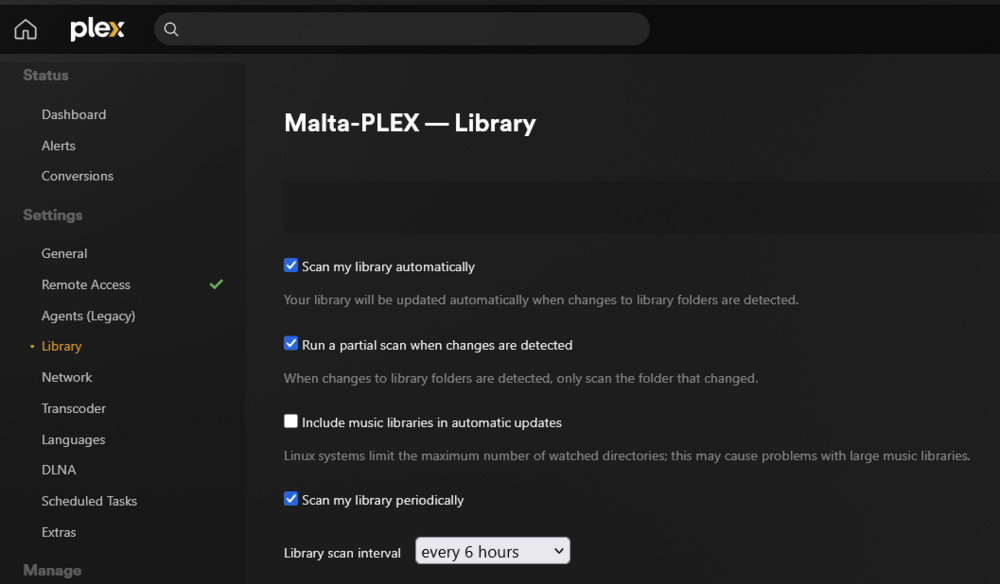
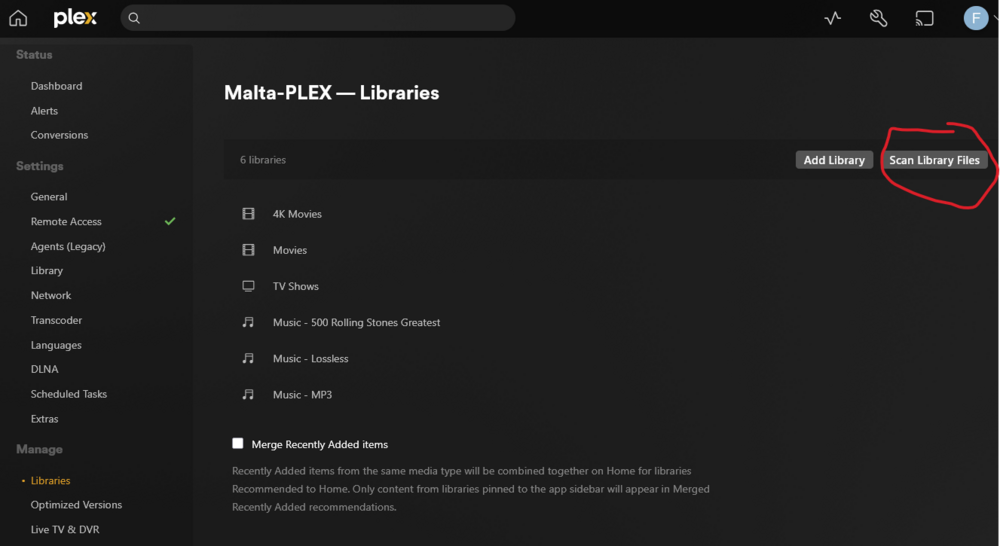
I would first check your Plex settings: If this is set correctly, new media should show up in a minute or so when added to your Library. If not, does it show after manually rescanning your Library?
-
@Aran - It ain't much of a script. I use the Appdata Backup plugin in a pretty basic configuration - Stop the container, back up the appdata, restart the container. That goes in a folder within my Backup share. Nothing interesting there. What I also do is - Weekly I include that Backup share folder in a simple rsync script (along with other computer's backups also residing in the Backup share) and mirror it to an external 8TB USB drive. Then I occasionally swap that drive with one I keep at work. 3-2-1, Belt-Suspenders-Duct Tape, however you wish to look at it.
-
Yes, no way I know of to disable individual plugins. Rebooting in Safe Mode disables all of them, as well as Docker and VM services.
-
Unassigned Devices Preclear and Unassigned Devices Plus are add-ons to Unassigned Devices. You would need to remove these first, then you can remove Unassigned Devices without receiving an error.
-
I believe that the GTX1660 can now do 8 concurrent transcodes. Back when SpaceInvader One posted that video, NVidia drivers had it throttled to only 2 transcodes at a time. You put ich777 in a bad spot. If you read the opening posts in this thread, he clearly states that he cannot assist anyone using this patch. It violates the Terms of Agreement from Nvidia, whom take their ToA very seriously. Which could actually put both him and Limetech at legal and financial risk. Regarding power supplies - Your supply may be more than enough for your system if it is functioning correctly. They do fail over time, and not only catastrophically. Most of the time, they start being flaky (or to be more exact, the system they power has intermittent issues). I have seen several systems do this - many hours of troubleshooting, only to be resolved by replacing the power supply. Failing capacitors, noisy voltages cause strange things to happen, especially as computer semiconductors get physically smaller and power efficient. Other possible issues could be the power you plug your PC into. Noise on the A/C power, improper grounding, floating neutral wire. Or it could be an issue with the NVidia driver code itself. ich777 cannot do anything about that. He generously compiles a package (and the mechanism and GUI to utilize it in Unraid) and offers his knowledge and support for this and literally hundreds of other plugins and Docker containers. Not for money or fame, but because he is genuinely a nice guy (as far as I have observed over the past few years).
-
How a share is configured will only apply to new files written to the share. It won't change existing files (or writes to existing files). If you want all of the files on Disk 2, you can move them manually. You can use the Unraid's built in file manage, or use a program like Unbalanced (plugin), Midnight Commander (CLI) or Krusader (Docker).
-
Without seeing any logs, and that you say only your Plex port is open, my guess is this is coming from your router. Several of the mainstream routers come with a security application which probes devices on your LAN.
-
My desktop and server systems usually like the Ship of Theseus. They never really get replaced, but over time end up has nearly every component being replaced either for an upgrade or repair. The only original parts left in my main server are the case and drive cage, the flash drive and a few cables. Everything else was either added or has been replaced.

-
It could potentially be new (NOS). Could be old, unneeded inventory from a company's IT/service department for repairing employee's laptops. I have worked in a computer service department before. All sorts of brand new, unused parts for computers that were new more than a dozen years earlier. Eventually you need to get rid of them, especially in localities which charge a tax on the company's inventory. You are correct, doesn't seem the risk to you is very big. Run it until it won't, have a plan for replacement when it does. I have a 120GB SSD in my server, was the very first SSD I ever bought. It has been in at least a half dozen systems, it just won't die. I use it as a Plex transcoding temporary file drive now.
-
Looks as the PM981 usually is OEM for several brands of business laptops. Given the capacity, age and being a PCIe 3.0 drive, it isn't really a high price item these days. You don't say if it was sold as new or used, or who the aBay seller was. Many business laptops are leased, when returned are sold off to refurbishers who then put them for sale on eBay. Many of the refurbishers will install a new drive in the computer, so not to worry about drive failures costing them money or negative feedback. They then have a second storefront, which they will sell miscellaneous parts. My gut says it is likely a legit Samsung drive. You can get a feeling by looking at the seller and listing, to see how legit the seller may be.
-
Other than the obvious answer - Know stuff, help people, be nice - How does a forum user get a Community Expert medal?

-
What is the benefit you hope to obtain by doing this? It will not increase either Read nor Write speeds, and if you are spinning down drives when idle, will end up using more power and actually reduce access speeds. Read through the documentation, and scroll down to Allocation Method: Shares | Unraid DocsA key feature of Unraid is the management of shares. Shares are folders or drives on your Unraid server that can be accessed over a network. You can create as many shares as you want on your Unraid se
-
A quirk I see When reordering the dashboard is tiles don't like to be added to the bottom of a column. Try moving a tile between two tiles.
-
Agree with all of the above. That is exactly how my main server is configured (no parity in the second server). I support this if the server is stable and has a history of being issue free. Mine runs with UPS power, has all "can't lose" data backed up regularly, and historically has uptime measured in several months at a time. I did run a manual parity check after updating to Unraid 7.2.0 for peace of mind and not seeing that I had cancelled the last run check. Note I don't use the Parity Check Tuning plugin. My check runs ~26 hours for 18TB. I schedule it for a time where user and maintenance tasks are typically low, and really haven't seen any impact using the server when the check is running. There are 20 Docker containers and 2 small VMs running on it 24/7/365.
-
I've used stock AMD coolers in a a number of Ryzen builds. For "free" stock coolers, they are generally fine. Since the first Wraith Spire cooler that was bundled with the 1500X, AMD has definitely cheapened them some. I have a Thermalright Peerless Assassin 120 SE in the main server (as well as my 5800X desktop). A bit overkill, but allows for lower fan speeds and noise. An excellent inexpensive CPU cooler. The 5600GT in the second server has a low profile Noctura as I had one on hand and unused.





