





jmztaylor
Members
-
Joined
-
Last visited
Everything posted by jmztaylor
-
So it seemed to help a little but still doesn't seem right. Each drive is writing about 60MB/s. This being parity and disk 1. Both of these are on the onboard sata ports.
-
Been using this config for awhile now without issue and all of the sudden barely getting 20MB/s write speeds (10MB/s on parity and 10MB/s on drive being written to). Typically during mover or moving large files this would be around 100MB/s. There have been no hardware changes. Reboots don't fix the issue either. tower-diagnostics-20241126-0946.zip
-
Support thread for Buggregator. I did not create this, only the Unraid template. https://github.com/buggregator/server
-
I tested and one way to do this is run the script with sh script.sh Instead of trying to do ./script.sh I don't know if this is the "right" way to do it.
-
/usr/local/emhttp/plugins/sas-spindown/drive_types #!/bin/bash # Automatically generated, Mon Sep 9 09:41:48 CDT 2024 declare -A DRIVE_TYPE DRIVE_TYPE[sda]=OTHER DRIVE_TYPE[sdb]=SAS DRIVE_TYPE[sdc]=SAS DRIVE_TYPE[sdd]=SAS DRIVE_TYPE[sde]=OTHER DRIVE_TYPE[sdf]=OTHER DRIVE_TYPE[sdg]=OTHER DRIVE_TYPE[sdh]=OTHER DRIVE_TYPE[sdi]=OTHER /usr/local/sbin/sdspin #!/bin/bash # # Deal with spin up/down status of HDDs # # This script is initiated from emhttpd, like so: # # sdspin <device> [up | down | status ] # # "device" is the HDD rdev name, such as "sdd". # # up == Spin the drive up # down == Spin the drive down # status == return the current status via rc # # Default (if no $2) is "status". # Exit code: # 0 - Success (if up/down), device spun up (if status) # 1 - Failure # 2 - Device spun down (if status) # Spin down/up SAS drives plugin # v2024.02.18 # # (c) 2019-2024 @doron - CC BY-SA 4.0 . /usr/local/emhttp/plugins/sas-spindown/functions RDEVNAME=/dev/${1#'/dev/'} # So that we can be called with either "sdk" or "/dev/sdk" Hdparm () { OUTPUT=$($HDPARM $1 $RDEVNAME 2>&1) if [[ $? != 0 || ${OUTPUT,,} =~ "bad/missing sense" ]] ; then RC=1 fi $DEBUG && { Log "debug: $HDPARM $1 $RDEVNAME" Log "debug: $OUTPUT" ; } } RC=0 case ${2,,} in "up") if IsSAS $RDEVNAME ; then $DEBUG && Log "debug: $SG_START -rp1 $RDEVNAME" $SG_START -rp1 $RDEVNAME > /dev/null || RC=1 else Hdparm -S0 fi ;; "down") if IsSAS $RDEVNAME ; then if ! IsExcluded $RDEVNAME ; then if IsRotational $RDEVNAME ; then Log "Spinning down device $RDEVNAME" $DEBUG && Log "debug: $SG_START -rp3 $RDEVNAME" $SG_START -rp3 $RDEVNAME > /dev/null || RC=1 fi else Log "Device $RDEVNAME cannot be spun down - excluded" RC=1 fi else # Not SAS Hdparm -y fi ;; "status" | "") if IsSAS $RDEVNAME ; then OUTPUT=$($SDPARM -C sense $RDEVNAME 2>&1) if [[ $? != 0 ]] ; then RC=1 elif [[ ${OUTPUT,,} =~ "standby condition activated" ]] ; then RC=2 fi $DEBUG && { Log "debug: $SDPARM -C sense $RDEVNAME" Log "debug: $OUTPUT" ; } else Hdparm -C if [[ $RC == 0 && ${OUTPUT,,} =~ "standby" && ! ${OUTPUT,,} =~ "bad/missing sense" ]] ; then RC=2 fi fi ;; *) Log "Invalid op code $2" RC=1 ;; esac $DEBUG && Log "debug: exit $RC" exit $RC /usr/local/emhttp/plugins/sas-spindown/sas-util SAS Spindown Utility (v20240218.01) sdb | HUC101890CSS200 | 1000:0073:1014:040d | n/a | sdc | HUC10189 CLAR900 | 1000:0073:1014:040d | n/a | sdd | HUC10189 CLAR900 | 1000:0073:1014:040d | n/a | Run completed. The output is at /tmp/sas-util-out. /tmp/sas-util-out { "utility-run": { "date": "20240910-09:27 CDT", "version": "20240218.01", "Unraid version": "7.0.0-beta.2", "message": "", "drives": [ { "drive": { "model": "HUC101890CSS200", "sdparm-i": "/dev/sdb: HGST HUC101890CSS200 A3F0|Device identification VPD page:| Addressed logical unit:| designator type: NAA, code set: Binary| 0x5000cca0360472b0| Target port:|designator type: NAA, code set: Binary| transport: Serial Attached SCSI Protocol (SPL-4)| 0x5000cca0360472b1| designator type: Relative target port, code set: Binary| transport: Serial Attached SCSI Protocol (SPL-4)| Relative target port: 0x1| Target device that contains addressed lu:| designator type: NAA, code set: Binary| transport: Serial Attached SCSI Protocol (SPL-4)| 0x5000cca0360472b3| designator type: SCSI name string, code set: UTF-8| SCSI name string:| naa.5000CCA0360472B3|RC=0", "controller-id": "1000:0073:1014:040d", "controller-slot": "02:00.2" } }, { "drive": { "model": "HUC10189 CLAR900", "sdparm-i": "/dev/sdc: HITACHI HUC10189 CLAR900 L7SS|Device identification VPD page:| Addressed logical unit:| designator type: NAA, code set: Binary| 0x5000cca07f0f8578| Target port:| designator type: NAA, code set: Binary| transport: Serial Attached SCSI Protocol (SPL-4)| 0x5000cca07f0f8579| designator type: Relative target port, code set: Binary| transport: Serial Attached SCSI Protocol (SPL-4)| Relative target port: 0x1| Target device that contains addressed lu:| designator type: NAA, code set: Binary| transport: Serial Attached SCSI Protocol (SPL-4)| 0x5000cca07f0f857b| designator type: SCSI name string, code set: UTF-8| SCSI name string:| naa.5000CCA07F0F857B|RC=0", "controller-id": "1000:0073:1014:040d", "controller-slot": "02:00.2" } }, { "drive": { "model": "HUC10189 CLAR900", "sdparm-i": "/dev/sdd: HITACHI HUC10189 CLAR900 L7SS|Device identification VPD page:| Addressed logical unit:| designator type: NAA, code set: Binary| 0x5000cca07f19124c| Target port:| designator type: NAA, code set: Binary| transport: Serial Attached SCSI Protocol (SPL-4)| 0x5000cca07f19124d| designator type: Relative target port, code set: Binary| transport: Serial Attached SCSI Protocol (SPL-4)| Relative target port: 0x1| Target device that contains addressed lu:| designator type: NAA, code set: Binary| transport: Serial Attached SCSI Protocol (SPL-4)| 0x5000cca07f19124f| designator type: SCSI name string, code set: UTF-8| SCSI name string:| naa.5000CCA07F19124F|RC=0", "controller-id": "1000:0073:1014:040d", "controller-slot": "02:00.2" } } ] } } { "controllers": [ { "controller": { "Slot": "02:00.2", "Class": "PCI bridge [0604]", "Vendor": "Advanced Micro Devices, Inc. [AMD] [1022]", "Device": "500 Series Chipset Switch Upstream Port [43e9]", "SVendor": "ASMedia Technology Inc. [1b21]", "SDevice": "Device [0201]", "ProgIf": "00", "IOMMUGroup": "16" } } ] }
-
I added a controller and sas drives to my server. Installed the plugin but the sas drives still refuse to spin down. I don't see anything in syslog unless I missed something. Attached is diagnostics. tower-diagnostics-20240909-1033.zip
-
If this is a docker container then on the docker tab you should see an apply update button like in the screenshot here. If not then you will just need to wait till the container is updated.

-
Dang. I knew that is an issue sometimes and just didn't think about it. Thanks
-
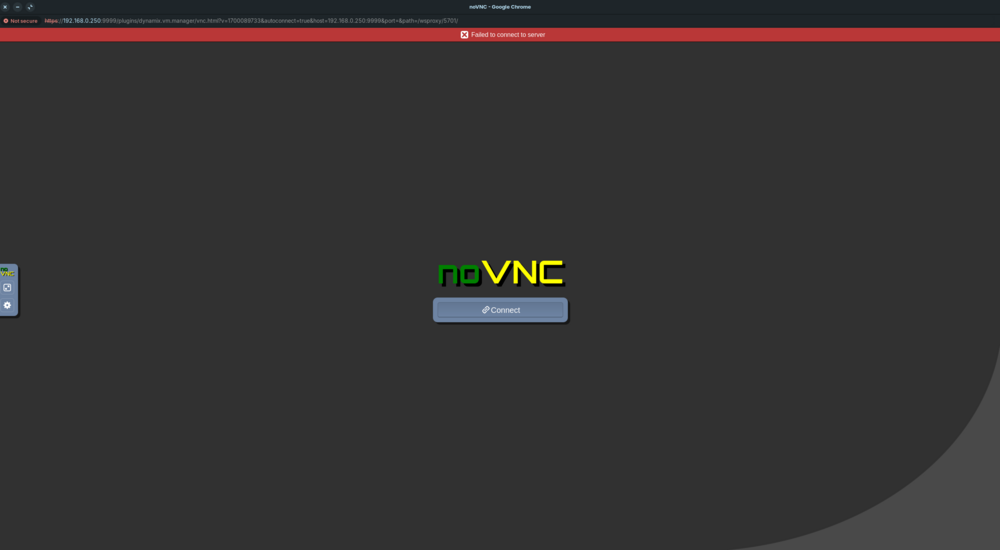
Sorry should have included a screenshot. No matter how many times I hit connect.
-
Console is not working on any VM. Whether its one known to have worked previously or a newly created VM. tower-diagnostics-20240824-1103.zip
-
root@Tower:~# xfs_repair -v /dev/md2p1 Phase 1 - find and verify superblock... - block cache size set to 1489408 entries Phase 2 - using internal log - zero log... zero_log: head block 2213927 tail block 2213927 - scan filesystem freespace and inode maps... - found root inode chunk Phase 3 - for each AG... - scan and clear agi unlinked lists... - process known inodes and perform inode discovery... - agno = 0 - agno = 1 - agno = 2 - agno = 3 - agno = 4 - agno = 5 - process newly discovered inodes... Phase 4 - check for duplicate blocks... - setting up duplicate extent list... - check for inodes claiming duplicate blocks... - agno = 0 - agno = 1 - agno = 3 - agno = 5 - agno = 4 - agno = 2 Phase 5 - rebuild AG headers and trees... - agno = 0 - agno = 1 - agno = 2 - agno = 3 - agno = 4 - agno = 5 - reset superblock... Phase 6 - check inode connectivity... - resetting contents of realtime bitmap and summary inodes - traversing filesystem ... - agno = 0 - agno = 1 - agno = 2 - agno = 3 - agno = 4 - agno = 5 - traversal finished ... - moving disconnected inodes to lost+found ... Phase 7 - verify and correct link counts... XFS_REPAIR Summary Wed Aug 21 07:31:41 2024 Phase Start End Duration Phase 1: 08/21 07:30:59 08/21 07:30:59 Phase 2: 08/21 07:30:59 08/21 07:31:00 1 second Phase 3: 08/21 07:31:00 08/21 07:31:21 21 seconds Phase 4: 08/21 07:31:21 08/21 07:31:21 Phase 5: 08/21 07:31:21 08/21 07:31:21 Phase 6: 08/21 07:31:21 08/21 07:31:40 19 seconds Phase 7: 08/21 07:31:40 08/21 07:31:40 Total run time: 41 seconds done
-
Yeah I swapped to another CPU and it seems to have fixed it. At least for now. Usually it would happen within an hour or so. Is that the same disk from this thread?
-
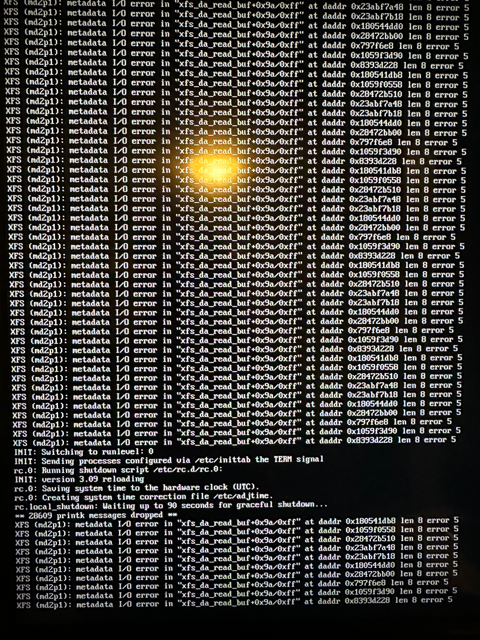
Disabled c-states and still getting same thing. Attached is what I am seeing occasionally on the display output when its locked up.
-
Yesterday I swapped the CPU, removed half the RAM, and removed a video card from the Unraid server. Since then, the server hard freezes. The display output changes to just blinking cursor in top left and all services are down including SSH. Attached is from syslog server and diags after system hard reboot. syslog-previous tower-diagnostics-20240820-0737.zip
-
I checked that but the files I am using only have one audio stream and direct streaming.
-
Hardware: https://www.tcl.com/us/en/products/home-theater/5-series/75-class-5-series-4k-qled-hdr-smart-roku-tv-75s535 https://www.lg.com/us/sound-bars/lg-s75qr-sound-bar https://www.amazon.com/gp/product/B07WNM2NJ5/ref=ppx_yo_dt_b_search_asin_title?ie=UTF8&th=1 Nvidia Shield I have the Shield hooked up to the TV using the monoprice cable linked above. The TV is hooked up via the same cable through earc to the soundbar. Shield is hardwired via ethernet Plex is always playing via direct play so transcoding is not happening. Randomly, the audio cuts out for about 5 secs and the display on the sound bar makes it seem like the audio format was changed by displaying HDMI and then displaying Dolby Atmos. It is random and doesn't happen in the same spot again. So if it happens and I rewind to that spot again it doesn't happen. Its always random. Unfortunately, I have no other dolby compatible devices to try somewhere else. Any help with diag on this issue would be helpful. I am completely out of ideas with Dolby. General Unique ID : Complete name : Format : Matroska Format version : Version 4 File size : 50.0 GiB Duration : 2 h 22 min Overall bit rate mode : Variable Overall bit rate : 50.2 Mb/s Frame rate : 23.976 FPS Movie name : Encoded date : 2020-04-01 11:19:41 UTC Writing application : mkvmerge v43.0.0 ('The Quartermaster') 64-bit Writing library : libebml v1.3.10 + libmatroska v1.5.2 Cover : Yes Attachments : small_cover.jpg / small_cover_land.jpg / cover.jpg / cover_land.jpg Video ID : 1 Format : HEVC Format/Info : High Efficiency Video Coding Format profile : Main [email protected]@High HDR format : SMPTE ST 2086, HDR10 compatible Codec ID : V_MPEGH/ISO/HEVC Duration : 2 h 22 min Bit rate : 41.9 Mb/s Width : 3 840 pixels Height : 2 160 pixels Display aspect ratio : 16:9 Frame rate mode : Constant Frame rate : 23.976 (24000/1001) FPS Color space : YUV Chroma subsampling : 4:2:0 (Type 2) Bit depth : 10 bits Bits/(Pixel*Frame) : 0.211 Stream size : 41.7 GiB (83%) Title : Writing library : ATEME Titan File 3.9.0 (4.9.0.0) Language : English Default : No Forced : No Color range : Limited Color primaries : BT.2020 Transfer characteristics : PQ Matrix coefficients : BT.2020 non-constant Mastering display color primaries : BT.2020 Mastering display luminance : min: 0.0001 cd/m2, max: 1000 cd/m2 Audio #1 ID : 2 Format : MLP FBA 16-ch Format/Info : Meridian Lossless Packing FBA with 16-channel presentation Commercial name : Dolby TrueHD with Dolby Atmos Codec ID : A_TRUEHD Duration : 2 h 22 min Bit rate mode : Variable Bit rate : 4 363 kb/s Maximum bit rate : 6 249 kb/s Channel(s) : 8 channels Channel layout : L R C LFE Ls Rs Lb Rb Sampling rate : 48.0 kHz Frame rate : 1 200.000 FPS (40 SPF) Compression mode : Lossless Stream size : 4.34 GiB (9%) Title : Language : English Default : Yes Forced : No Number of dynamic objects : 13 Bed channel count : 1 channel Bed channel configuration : LFE
-
Everything worked out with the pool after downgrading to 6.12.11. But array will no longer start on boot even though setting is yes. Even after upgrading back to 7.0.0-beta2 as I need Arc support. Would this be because I broke parity and it needs to be redone?
-
Its a btrfs pool
-
In the current state is there any risk to downgrade?
-
I stopped array, unassigned drive and restarted array. Waited for operations to finish then stopped array again, changed slots to 2 and couldn't start the array saying invalid expansion. I had to do a new disk config to get the array started with just the 2 cache drives again. tower-diagnostics-20240727-0938.zip
-
Attached is the log after running extended test. tower-smart-20240709-0946.zip
-
The other day I got errors on the array. Ran parity check and nothing was corrected. Woke up today and there are more errors. Just trying to find out the cause. Nothing has been changed or touched inside the machine. One drive is audibly heard, so it might be failing but wanted to get input before moving forward with anything. Server has not been rebooted since the first error appeared. tower-diagnostics-20240707-1041.zip
-
Ultimately, I think it comes down to just cheap usb hub and reusing device Ids or something. As using 2 of the same hubs, 1 always doesn't work but if i switch it out to another it works.
-
It works perfectly fine in all other scenarios. As unlikely as it is, is it possible since both hubs are identical its just breaking something internally?
-
Any tips on what to check?


