





Hawkins12
Members
-
Joined
-
Last visited
Everything posted by Hawkins12
-
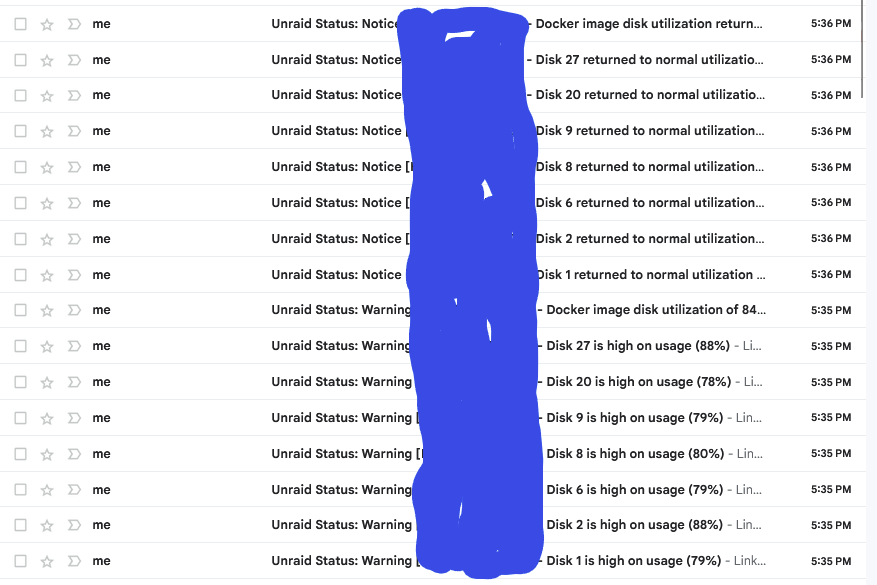
I upgraded to Unraid 6.12.6 a few days ago. Ever since upgrading, everyday my email has been bombarded with disk utilization warnings similar to the below. See below for my emails: Unraid seems to report a bunch of disks at high usage and then 1 minute later, report those same disks as normal. Is this a bug? Is there a fix? Thanks!
-
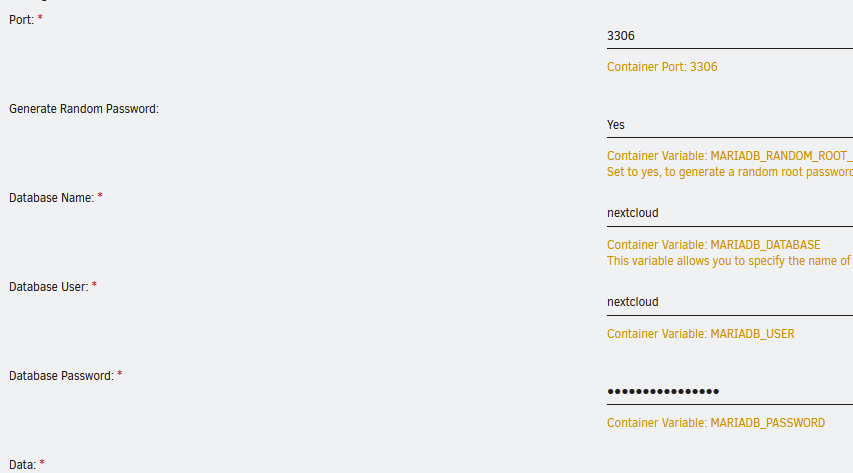
I am in a bit of a pickle here. I originally installed MariaDB-Official to manage my nextcloud database online. Now I'd like to branch out to different dockers which require databases which I'd like to manage through one Maria-DB docker container (I plan to use adminer to help manage this). That being said, I forgot the or dont recall the root password. Here is my MariaDB setup: I have seen a lot of stuff out there on how to reset the root password by going to Safe Mode, and the --chart tables post arguments but that doesn't seem to be working. Is there a way I can reinstall the MariaDB docker (to reset the random root password) without losing my Nextcloud database? Any advice on how to correct? Thanks!
-
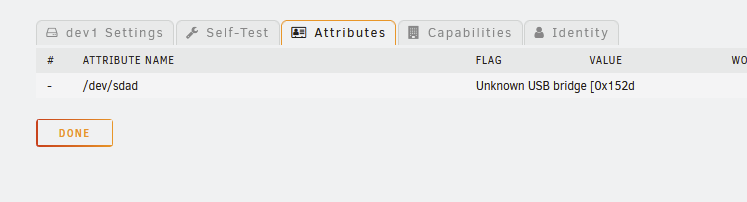
Thanks for the quick reply. I suspected this was the case. Hopefully someone has experience with this. I did notice this when I looked at the drive attributes: Nothing carried over and is displaying via USB. I think that's pointing towards this strategy not working. I just wanted to buy some Manuf. Recert drives and have them tested first while under warranty but I might have to go another route. That being said, are you aware of any USB solutions that may work for my use case? Note that I don't want to run a drive off USB within the array -- simply preclear/test prior to deploying into the server at some future date.
-
My unraid server drive bays are 100% full. Because of my desire to have backup HDD's ready to go, I decided to buy a Sabrent HDD Enclosure that plugs in via USB to the unraid server. The purpose of this is to buy additional drives, preclear those drives, and have them ready to go in case of failure so downtime/time necessary to rewrite a failed hdd would be as limited as possible. That being said, when I tried my first HDD preclear, I see the following in Unraid Note that I am actually preclearing a WD 2TB HDD that was actually deployed in the server previously and replaced. When the drive was deployed it looked something like : (yes I know this is a 6TB but only provided for purposes of illustration. Now this reminds me when I would buy the WD HDD's shuckable drives. I would leave them in the enclosures while I ran the preclear 2-3 times so it would be easier to return (or to prevent any hassle from trying to return a shucked drive). It's been a while since I've done this and the new unraid is here with more Preclear settings than previously. My question is that once this drive is erased/precleared, will it be hot swappable (if I don't use the Sabrent Enclosure)? Will Unraid recognize that the drive is prepped even if it isn't in the Sabrent enclosure? Am I overthinking this altogether? I was planning to buy some 14TB drives so the future disk replacements could take quite a while which is why I was testing on my 2TB spare drive for now. Thanks!


-
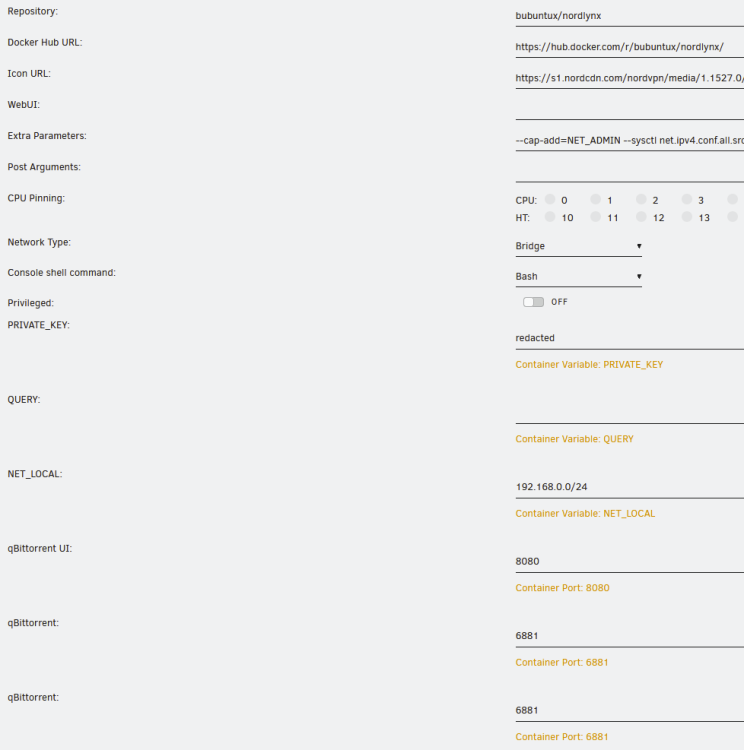
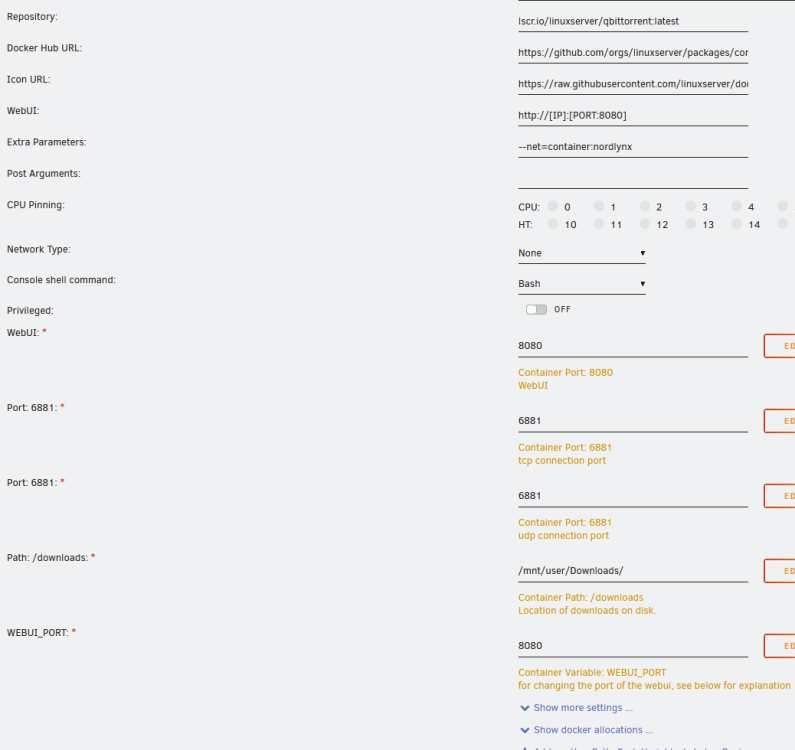
I am presently having an issue with passing a docker GUI through a VPN. Historically, I've used the docker "nordvpn" and then passed "qBittorrent" through that docker with 100% success. I've been able to access the gui from my home PC and things worked just fine. Recent;y the docker "nordvpn" has not been updated and I can't even see it in the "app store". I've since switched to the docker "nordlynx" which is basically the same as before; however, I am having complications accessing the webgui. Note that the docker is starting and actually passing through as my curl ifconfig.io command is providing the same VPN IP for both nordlynx and qBitttorrent. In addition, I know qBittorrent is working in the background -- just the gui is not working. Here are my current settings: As mentioned, these settings are exactly the same as what worked for "nordvpn" docker. Yes the "nordvpn" docker is turned off and not in use. What could I be missing or doing wrong?
-
Shame on me for updating. I updated docker yesterday and it no longer works. Then there was another update today which I presumed fixed the issue -- no avail. Docker doesn't connect to Nord. Any solutions? Note that logs show: A new version of NordVPN is available! Please update the application. New feature - Meshnet! Link remote devices in Meshnet to connect to them directly over encrypted private tunnels, and route your traffic through another device. Use the `nordvpn meshnet --help` command to get started. Learn more: https://nordvpn.com/features/meshnet/ Connecting to United States #9895 (us9895.nordvpn.com) You are connected to United States #9895 (us9895.nordvpn.com)! However, curl ifconfig.io yields no connection to the outside network.
-
Sorry for my delayed response. Because I only had a small bit of files, I downloaded the backups on my PC and transferred them back to Unraid. Not the most ideal but I am not a big tech/code guy to understand all the behind-the-scenes permission issues. And calling support I didn't feel viable as the person would not understand Unraid or how it all works.
-
thanks for this. I was baffled myself! Question -- Does this impact current functionality of the Docker? I suspect it doesn't, but figured I'd ask.
-
@mavrik can you ping your server via command prompt?
-
See my response above. I was getting a similar message. Go to Windows --> Run ---> Services.msc From this find the service called "DNS Client" and ensure it is set to "Automatic" or "Running". If it's greyed out, it'll be a few more steps but that solved my issue.
-
Sorry for my confusion. The steps i was referring to were these: Note that after messing around more, I ended up getting it to work. The issue was a Windows issue (i have another pc and it could access the shares just fine). Apparently, there is a "DNS Client" service that needs to be running in order to access the shared drives. My "DNS Client" in the Services was greyed out and disabled. I had to reg-edit an item, reboot, then was able to enable DNS Client. Once I did this, the shares worked.
-
How would I rollback to the previous version (2022.11.12a) of UD. Just trying to troubleshoot.
-
yes I can access via GUI and the array is started. I did go through the steps outlined. I run into some issues in the #2 File Explorer side. I only have one computer I access the server with (and on the network outside of the Unraid server) and I can't shortcut the server as windows does seem to be able to find the server via file explorer. Also, I tried to Enable Network Discovery and this is not saving my settings. I troubleshooted that and not sure why but my DNSCache setting is greyed out. Not sure if that'll fix that issue or not but I can't seem to start that service. Not sure where I should look? The problem is this issue just started after years of working fine. Over the past couple days, I ran several updates to my windows PC (Windows Update, Armoury Crate, etc) and not sure if one of these broke the shares. Also , on the server, I've been updating plugins as well. Is there anything I am missing here?
-
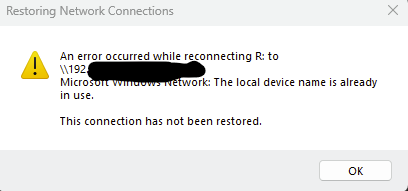
I am at a loss here. Reviving an old thread for some assistance. I have a Windows 10 (now Windows 11) PC that I am using to access my unraid. I've had network shares set up for some time and have never had issues...until now. As little as 4-5 days ago, my network shares worked just fine. Now I am getting an error when I try to access my network shares from my Windows 10 PC. All shares are disconnected and all shares spit out the same error box: I've tried tons of things and have not gotten anything to work. Things I tried include: Remap the Drive Using Command Prompt, Reinitializing Computer Browser, Delete a Key in Registry re: Mountpoints2, Enable File and Printer Sharing in Your Firewall, restoring to a few days ago, I even upgraded to Windows 11, and a few other things. Nothing. I posted in the UD forum and deleted the UD plugins and still saw the issue. Restarted server. Nothing seems to be working. The odd thing is I can still ping the server from my desktop PC, I can access Plex on the server via the webbrowser and my ip (\\192....:port) and all that works. It's just these network shares that aren't working. Can also access the server using PuTTy. It feels like my computer can access the server--simply seems isolated to SMB shares? Does anyone have any help or suggestions you can recommend? I am at a total loss and I use these quite frequently. Thanks!
-
I dont have all or many of my shares set to Public but I'll give that a try. I guess I am back to square one. Any idea what changes Msft has made? This issue literally started within the last week. I am trying to figure out how to roll back any Windows updates as well.
-
I uninstalled all Unassigned Devices (preclear, plus, and UD) and still have the problem. Do I need to restart the server? The odd thing is that I can access plex via the browser and access the server via Putty from my windows PC. Its only my windows shares that dont work.
-
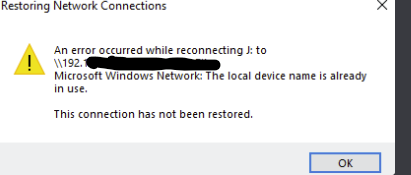
Hello - i am getting an issue where my windows shares cant connect to unraid. My network shares are all showing as "disconnected" and I keep getting the same error message for every network drive I have mapped: I went through Google troubleshooting but figured I'd stop by here and realized that UD controls the windows shares. That being said, the only changes I've made on the servers are updating the UD plugins a couple days ago. I know my shares worked a week ago so I am assuming this is the problem. Anyone else having similar problems? How do i roll back my plugins? Thanks!
-
So i guess to address the points, I didn't adjust any minecraft docker settings with respect to backups. It was set to every 12 hrs. The docker chose 6am/6pm to backup, not me. I didn't even know the backup would run at 6 until i went in today to see what backup files I had in there. My appdata backup has been a scheduled backup every Friday at 6am. It's just mere coincidence. 2) I dont have that much traffic but my concern is I am not sure how to set the backup time and I want to avoid this in the future. By having more daily backups, I am less inclined to run into an instant where we lose 12 hrs worth of data. Space isn't a concern and issues would be noticed within a day so I would have sufficient backups to look back on to remedy the issue (would have several days of backups available). 3) Appdata backup forces dockers to close to backup the data. We were just in the server at 2:00am and logged in and out and everything was there. I have no idea why the server, when stopped, would not have the changes saved from earlier that day and revert to the previous backup. My inventory is still current to what i had when I logged off -- the map changes are not. I'll make it so the appdata backup does not force minecraft to stop any longer but obviously that doesn't solve the issue at hand. 4) Not sure it's user error unless you consider the backup times this. I did nothing to the appdata folder and have no idea why it would revert to the previous backup on it's own just by stopping the docker. That's what brings me to the forum for the plea for help.
-
So question about the game and backup. My minecraft servers been up and running and was set up for backups every 12 hrs. The backup tends to start at 6:00am/pm. In addition, my APPDATA Backup schedules to run every Fri at 6am. So my friends and I were playing in the server yesterday from probably 9:30pm-ish to about 2am-ish. We logged on this morning around 7:30 am (after the backup ran) and all of our map changes (ie. I built a building and we built other things too) were missing. I did notice that there were items in my inventory that remained in there this morning; however, the map changes seem to reverted back. When i looked in my "backups" folder, the latest backup I had was from yesterday at 6pm (nothing for 6am due to the appdata backup). So my question is 1) Is there a way to recover the map? and 2) Why did this happen? How do i prevent? Should I set to 4hr backups. We are just annoyed that we spent a decent amount of time building and the sense of loss is disheartening. Thanks!
-
Well in my defense, I've been playing with a ton of different settings/restore options. I originally tried config, then tried "original location". Ultimately I was able to just download the desktop Crashplan app and restore the files to my Windows PC and transfer over to my server. Not a huge deal this case as it was less than 1GB of info; however, I still want to try to get it figured out. I'll work with the settings and see.
-
I am seeing this in the logs: Failed to create directory at /storage/REDACT: mkdir /storage/REDACT: read-only file system read-only file system. I tried chmod 777 /usr/local/crashplan But it didn't seem to work. Any suggestions? Thanks for taking the time to assist me!
-
at com.code42.backup.handler.RestoreHandler.restoreBackupData(RestoreHandler.java:401) at com.code42.backup.restore.BackupClientRestoreDelegate.restoreBackupDataImpl(BackupClientRestoreDelegate.java:1213) at com.code42.backup.restore.BackupClientRestoreDelegate.lambda$initializeEventStateMachine$21(BackupClientRestoreDelegate.java:519) at com.code42.utils.EventStateMachine.processEvents(EventStateMachine.java:173) at com.code42.backup.restore.BackupClientRestoreDelegate.restoreBackupData(BackupClientRestoreDelegate.java:379) at com.code42.backup.BackupClientV1.restoreBackupData(BackupClientV1.java:1280) at com.code42.backup.message.BackupClientMessageReceiver.receiveMessage(BackupClientMessageReceiver.java:99) at jdk.internal.reflect.GeneratedMethodAccessor24.invoke(Unknown Source) at java.base/jdk.internal.reflect.DelegatingMethodAccessorImpl.invoke(Unknown Source) at java.base/java.lang.reflect.Method.invoke(Unknown Source) at com.code42.messaging.MessageReceiverProxy.invokeLegacyMessage(MessageReceiverProxy.java:186) at com.code42.messaging.MessageReceiverProxy.receiveMessage(MessageReceiverProxy.java:154) at com.code42.messaging.SessionImpl.receiveMessage(SessionImpl.java:527) at com.code42.messaging.mde.MessageWork.lambda$receiveMessage$0(MessageWork.java:89) at com.code42.messaging.telemetry.MessageHandlingTelemeter.monitorMessageProcessingEvent(MessageHandlingTelemeter.java:32) at com.code42.messaging.mde.MessageWork.receiveMessage(MessageWork.java:77) at com.code42.messaging.mde.MessageWork.handleWork(MessageWork.java:67) at com.code42.messaging.mde.UnitOfWork.processWork(UnitOfWork.java:163) at com.code42.messaging.mde.UnitOfWork.run(UnitOfWork.java:147) at java.base/java.util.concurrent.ThreadPoolExecutor.runWorker(Unknown Source) at java.base/java.util.concurrent.ThreadPoolExecutor$Worker.run(Unknown Source) at java.base/java.lang.Thread.run(Unknown Source)
-
Thanks. Took the steps (cleared the service.log.0 log) and tried to restore 1 of the 12 files in this folder. I get this: Seems promising but nothing actually happens. Getting tons of messages in the service.log.0 like this. Any thoughts? [09.27.22 22:38:54.153 INFO er1WeDftWkr0 42.backup.handler.RestoreHandler] Problem restoring! backupData=BackupData[BackupBlock[SourceBlock[BlockRecord[blockNumber = 243812, bdfPosition = -1, state = 5, isRemoved = false], sourceLength = 110151, sourceWeakChecksum = REDACT, sourceStrongChecksum = REDACT, type = 21], backupLength = 102752, backupChecksumAsHex = REDACT], dataBuffer = java.nio.HeapByteBuffer[pos=59 lim=102811 cap=102811]], java.lang.NullPointerException; RestoreHandler@1775562762[ REDACT>41: fileId=REDACT, numBlocksToRestore=231, numBlocksTransferred=0, bytesRestored=0, progressCount=0, 1sec, BC[REDACT>41, sameOwner=f, backupConnected=t, authorized=t, usingForBackup=t, backupNotReadyCode=null, backingUp=f, validating=f, closing=f, keepBlockState=0, con=2022-09-27T22:38:11:008, val=2022-09-27T22:38:14:345, readyCheckTime=2022-09-27T22:38:11:008, MM[BT REDACT>41: openCount=0, initialized = true, dataFiles.open = false, /usr/local/crashplan/cache/41], session=REDACT, hosted=t, hostedCloud=t, replacing=f, selectedForBackup=f, selectedForRestore=t, validationNeeded=f, backupUsageTime=2022-09-27T22:38:52:035, cacheMaintenanceState=null, restoreUtil=BackupClientRestoreDelegate [restoreEnv=AgentRestoreEnv[restoreJob = RestoreJob@-1541681516[ REDACT, REDACT:41, userId=REDACT, acceptingGuid=REDACT, restorePath=null, problemCount=0, failedChecksumCount=0, overwrite=false, validate=true, allVersions=false, lastRestoreFileId=null, osUid=99, osGid=100, useOsUids=true, includeDeleted=false, resumeTime=0, completed=false, canceled=false, localRestore=false, restoreType=CLIENT, restoreSubType=STANDARD, numFilesToRestore=1, numBytesToRestore=30256711, numFilesRestored=0, numBytesRestored=0, sessionTimestamp=0, fileRestoreStrategyId=2, instrumentationStats=InstrumentationStats{totalTime=-41476ms, totalProcessingTime=0ms, readTime=0ms, messageSendTime=0ms, decryptTime=0ms, decompressTime=0ms, writeDataTime=0ms, writeMetaDataTime=0ms, checksumVerificationTime=0ms, startRestoreTime=1009ms, finishRestoreTime=0ms, createTempFileTime=0ms}, userName=app, isUsingRestoreTool=true, groups=[RestoreGroup[pathSet = [V3[cs]+/storage/REDACT/IMG_5874.MOV;w], timestamp = 0]]]], selectedForRestore=true, remoteRestoreStats=RestoreStats[BT sourceId = REDACT, targetId = 41, restoreId = REDACT, selectedForRestore = false, restoring = true, completed = false, completedTimeInMillis = null, stopwatch = 2sec, numFilesToRestore = 1, numBytesToRestore = 30256711, numFilesRestored = 0, numBytesRestored = 0, %complete = 0.00%, receiveRateInBytesPerSec(B/s) = 0.000, sendRateInBytesPerSec(B/s) = 0.000, estimatedTimeRemaining = 0.000, fileNumBytesToRestore = 30256711, fileNumBytesRestored = 0, %completeCurrentFile = 0.00%, numSessionFilesRestored = 0, numSessionBytesRestored = 0, problemCount = 0], pendingRestoresCount=0], BackupQueue[REDACT>41, running=f, #tasks=0, sets=[BackupFileTodoSet[backupSetId=1, guid=41, doneLoadingFiles=t, doneLoadingTasks=f, FileTodoSet@153768949[ path = /usr/local/crashplan/cache/cpft1_41, closed = false, dataSize = 61845, headerSize = 0], numTodos = 221, numBytes = 1662557334]], BackupFileTodoSet[backupSetId=REDACT, guid=41, doneLoadingFiles=t, doneLoadingTasks=f, FileTodoSet@2108449319[ path = /usr/local/crashplan/cache/cpft1020267959441_41, closed = false, dataSize = 12, headerSize = 0], numTodos = 0, numBytes = 0]], BackupFileTodoSet[backupSetId=REDACT, guid=41, doneLoadingFiles=t, doneLoadingTasks=f, FileTodoSet@275596035[ path = /usr/local/crashplan/cache/cpft102026802062_41, closed = false, dataSize = 2943, headerSize = 0], numTodos = 5, numBytes = 192760033]], BackupFileTodoSet[backupSetId=REDACT, guid=41, doneLoadingFiles=t, doneLoadingTasks=f, FileTodoSet@150632961[ path = /usr/local/crashplan/cache/cpft1020267917_41, closed = false, dataSize = 105803, headerSize = 0], numTodos = 723, numBytes = 2149226409]], BackupFileTodoSet[backupSetId=REDACT, guid=41, doneLoadingFiles=t, doneLoadingTasks=f, FileTodoSet@1668751860[ path = /usr/local/crashplan/cache/cpft102026810_41, closed = false, dataSize = 371341, headerSize = 0], numTodos = 2756, numBytes = 1796143574458]]], env=null, TodoWorker@1800907882[ threadName = BQTodoWkr-41, stopped = true, running = false, thread.isDaemon = false, thread.isAlive = false, thread = Thread[W566888887_BQTodoWkr-41,5,]], TaskWorker@752883223[ threadName = BQTaskWrk-41, stopped = true, running = false, thread.isDaemon = false, thread.isAlive = false, thread = Thread[W1145855976_BQTaskWrk-41,5,]]] ]], java.lang.NullPointerException STACKTRACE:: java.lang.NullPointerException [09.27.22 22:38:54.153 INFO er1WeDftWkr0 tore.BackupClientRestoreDelegate] BC::Problem restoring! backupData=BackupData[BackupBlock[SourceBlock[BlockRecord[blockNumber = 243812, bdfPosition = -1, state = 5, isRemoved = false], sourceLength = 110151, sourceWeakChecksum = REDACT, sourceStrongChecksum = REDACT, type = 21], backupLength = 102752, backupChecksumAsHex = REDACT], dataBuffer = java.nio.HeapByteBuffer[pos=59 lim=102811 cap=102811]] e=null [09.27.22 22:38:54.153 WARN er1WeDftWkr0 2.messaging.MessageReceiverProxy] MessageReceiverProxy: InvocationTargetException receiving message=type=com.code42.backup.message.restore.RestoreBackupDataMessage, contents=RestoreBackupDataMessage@1382713588[ BackupData[BackupBlock[SourceBlock[BlockRecord[blockNumber = 243812, bdfPosition = -1, state = 5, isRemoved = false], sourceLength = 110151, sourceWeakChecksum = REDACT, sourceStron..., session=RemotePeer-[guid=41, state=CONNECTED]; Session-[localID=REDACT, remoteID=REDACT, layer=Peer::Sabre, closed=false, expiration=null, remoteIdentity=STORAGE, local=REDACT, remote=162.222.40.206:4287], e=java.lang.reflect.InvocationTargetException, cause=java.lang.NullPointerException, java.lang.NullPointerException STACKTRACE:: java.lang.NullPointerException

-
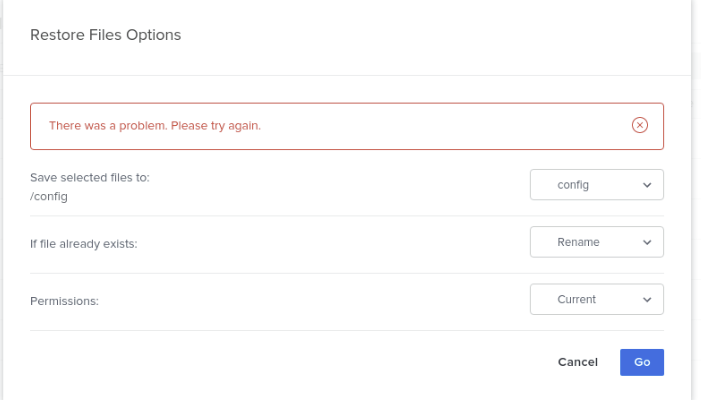
So apparantly I was posting this in the wrong "container" support. I am having an issue restoring folders. See below: I've had CrashplanPro installed for some time and it seems to be working fine from a "backup" perspective. Due to a disk error, I am at a point now where I need to recover some data and I am struggling big time. Upon the first couple tries, I was "hard-stuck" at the "Preparing Data". I let it sit overnight to no avail. Everything seems to be online and appropriate. Now a day later, I keep getting this error when trying to backup: The error doesn't seem to go away regardless of what options I choose from the dropdowns. It no longer allows me to put anything in queue. What could I be doing wrong? I can access my service.log file however, I am not sure what information is sensitive vs. useful. I am seeing this: [09.27.22 01:07:04.206 INFO REDACT-229 backup42.service.ui.UIController] UI:: UserActionRequest: RestoreCheckRequestMessage[REDACT] [09.27.22 01:07:04.206 INFO REDACT-229 backup42.service.ui.UIController] UI:: UserActionResponse: RestoreCheckResponseMessage[restoreId=REDACTfileName=/tmp/REDACT.txt] [09.27.22 01:07:04.216 INFO REDACT-284 tore.BackupClientRestoreDelegate] BC::stopRestore(): idPair=REDACT>41, selectedForRestore=true, event=STOP_REQUESTED canceled=true [09.27.22 01:07:04.216 WARN REDACT-284 .service.backup.BackupController] Unable to start restore. null [09.27.22 01:07:07.390 INFO ackupConnWrk rvice.backup.BackupConnectWorker] BCW:: Connecting REDACT>41 - peer to backup client. [09.27.22 01:07:07.391 INFO ackupConnWrk tore.BackupClientRestoreDelegate] BC::stopRestore(): idPair=REDACT>41, selectedForRestore=true, event=STOP_REQUESTED canceled=false [09.27.22 01:07:07.391 WARN ackupConnWrk .service.backup.BackupController] Problem connection backup!, java.lang.NullPointerException STACKTRACE:: java.lang.NullPointerException at com.code42.backup.restore.BackupClientRestoreDelegate.clearPendingRestores(BackupClientRestoreDelegate.java:1493) at com.code42.backup.restore.BackupClientRestoreDelegate.restoreStoppedImpl(BackupClientRestoreDelegate.java:1074) at com.code42.backup.restore.BackupClientRestoreDelegate.lambda$initializeEventStateMachine$3(BackupClientRestoreDelegate.java:459) at com.code42.utils.EventStateMachine.processEvents(EventStateMachine.java:173) at com.code42.backup.restore.BackupClientRestoreDelegate.stopRestore(BackupClientRestoreDelegate.java:309) at com.code42.backup.BackupClientV1.stopRestore(BackupClientV1.java:1253) at com.code42.backup.BackupClientV1.stop(BackupClientV1.java:481) at com.code42.backup.BackupClientV1.reset(BackupClientV1.java:255) at com.code42.backup.BackupEntityV1.connectToSession(BackupEntityV1.java:260) at com.code42.backup.BackupClientV1.connectToSession(BackupClientV1.java:278) at com.code42.backup.BackupManager.connectClient(BackupManager.java:1508) at com.backup42.service.backup.BackupController.connectClient(BackupController.java:2814) at com.backup42.service.backup.BackupConnectWorker.connect(BackupConnectWorker.java:112) at java.base/java.util.stream.ForEachOps$ForEachOp$OfRef.accept(Unknown Source) at java.base/java.util.stream.ReferencePipeline$2$1.accept(Unknown Source) at java.base/java.util.ArrayList$ArrayListSpliterator.forEachRemaining(Unknown Source) at java.base/java.util.stream.AbstractPipeline.copyInto(Unknown Source) at java.base/java.util.stream.AbstractPipeline.wrapAndCopyInto(Unknown Source) at java.base/java.util.stream.ForEachOps$ForEachOp.evaluateSequential(Unknown Source) at java.base/java.util.stream.ForEachOps$ForEachOp$OfRef.evaluateSequential(Unknown Source) at java.base/java.util.stream.AbstractPipeline.evaluate(Unknown Source) at java.base/java.util.stream.ReferencePipeline.forEach(Unknown Source) at com.backup42.service.backup.BackupConnectWorker.doWork(BackupConnectWorker.java:59) at com.code42.utils.AWorker.run(AWorker.java:153) at java.base/java.lang.Thread.run(Unknown Source) Any thoughts? I am running the most current version of CrashplanPro docker.
-
= Damn I didn't even realize there were two. I am having trouble with the other. I guess I posted in the wrong space but I guess your "fix" may still work. I'll take future issues there. My issue is with CrashPlanPRO


