






Everything posted by MAM59
-
hmm, seems that you do not have "other os" but need to enroll the bootx64.efi manually. Sounds like your BIOS does not use standard keys but only accepts boot files that have been enrolled before. Never seen this before but it may be a good idea to overcome the microsoft s@$t someday. try it out
-
This depends. Not all boards allow windows automatic updates. But its not needed too if you update the BIOS manually. The newest version should already contain the new certificates. But DO NOT DISABLE secure boot! it wont work then. Activate it (and use UNRAID in UEFI mode by renaming "EFI-" on to stick to "EFI" if it is not done yet already) and set the OS type to boot to "other OS" (not "Windows"). This should work and boot fine.
-
Search your BIOS for a setting to disallow downgrades. The new Signatures from Microsoft (yeah! dont blame me! it is UEFI) REQUIRE that this must be set (aka: you cannot downgrade BIOS anymore!). Then install the LATEST BIOS (yeah again, the one that broke everything). Together they hopefully now boot the UNRAID stick. (This all has nothing to do with UNRAID or the stick. It is because old Signatures from Microsoft are running out and if not updated properly, the machine will not boot ANYTHING anymore. If you run Windows (11) the updates were automatically be done already (yeah! Microsoft CAN flash your BIOS without notice or asking for!), with Linux like UNRAID the update is manually. And the time for updates is already running out soon. If you wait too long, the board is just a brick and you can throw it away) And for your "sometimes 1G only" Problem: There is a chance that the DAC cable you are using might be incompatible with the LAN card. Check the manuals or try different cable/modules. (it might also be possible that autonegotiation with your switch does not work properly. Try to set 10G as a fixed rate)
-
I knew it from other OS's like FreeBSD. And so it was just Try&Error... Note that F2-F6 give you DIFFERENT CLIs, in case you need more screens... (they look the same at the beginning, but once you have logged in you see that they are different)
-
Must be something wrong with your keyboard/console. I can use ALT-F1 to ALT-F6 to switch to different sessions... or?, lemme try... mompls... AAHHH, sorry, from within slim you need to push ALT-CTRL-F1 to F6!!! my fault. ALT-CTRL-F7 brings you back to slim, F8-F12 only give you a blank screen. (without slim its only ALT-Fx)
-
You can't kill "slim" as far as I know. but you can switch back to the command prompt by hitting ALT+F(1..?) at the console. One of the ALT Keys will get you back to the GUI (try them out its F6 or F11 or so). So, no need to kill slim.
-
Was bitte ist denn die "Displaysoftware" ??? Ansonsten, wenn irgendwo auf Array geschrieben wird, MUSS immer die Parity Platte nachgeführt werden, sonst wäre sie ja sofort ungültig. Also, wenn diese ominöse "Displaysoftware" unbedingt dauernd was schreiben will, sollte man schauen, ob die Daten so wichtig sind, dass sie ins Array gehören, wenn nicht, dann den Kram in einen eigenen Pool auslagern. Also, bei dem im Video angegebenen Skript als Pfad nicht "/mnt/disk1" angeben, sondern z.B. /mnt/cache (oder einen anderen Pool, Du hast ja 4 NVMe Slots zur Verfügung, also pack was rein)
-
eher umgekehrt, aber wohl wahrscheinlich. (irgendeine Lüftersteuerung wird das Board wohl haben, nur niemand sagt Dir welche. Findet "sensors-detect" (überall YES eingeben!) wirklich keinerlei Chip? very strange...) Es gibt aber noch einen anderen Thread zu Deinem Board https://forums.unraid.net/topic/168387-l%C3%BCfter-steuern-gigabyte-b760/ (wobei mir beim Durchlesen auch keine "Lösung" ins Auge gesprungen wäre...)
-
Ja ok, DAS Teil kennt natürlich niemand (ausser Deinem Bios). Da wirst Du mit UNRAID Plugins nix machen können. Stell die Lüfter eben von Hand ein (bzw lass sie über BIOS regeln). Du kannst natürlich auch versuchen, die Lüfter NICHT an das Dingen anzuschliessen, sondern direkt ans MoBo. Vielleicht meldet sich dann ein (bekannter) Chip und bietet seine Dienste unter UNRAID an. (mir wäre die Regelung "alles über einen Anschluß" etwas suspekt. ) kommt natürlich darauf an, wieviele Anschlüsse am MoBo vorhanden sind.
-
first find out what this additional device is and then we may find a way to (safely) get rid of him...
-
Ja, weis ich, aber da würde ich auch keine Regelung von außen erwarten. Entweder "volle Pulle" oder Regelung vor Ort (gibt so nette Platinchen mit Sensor, Poti und reichlich Anschlüssen für Lüfter). Wie lang sollten denn die Strippen für die Lüfter dann sein???
-
Better check out the culprit and try to fix it completely... @JorgeB 's "Fix" clears it but I think it is really dangerous considering that UNRAID often "renumbers" sdX names after updates and so on. This can lead to serious troubles if you have forgotten the line until then and sadly see one existing disk with data "vanishing" (its not gone or deleted, but "shut off" unless you edit the mentioned line and correct it).
-
Das ist auch gar nicht so erforderlich. Bei den 19" Racks ist es recht verbreitet, dass VORNE die Platten sind, DANN (in der Mitte) die Lüfter und DAHINTER die Elektronik. Also kommt hinten schon die vorgewärmte Luft der Platten an. Da reicht es, die Mobo Temperatur (nicht die CPU!) zu nehmen um eine gute Aussage zu bekommen. Solange man den Deckel drauf lässt, funktioniert das einwandfrei. (zumal man eh so seine Probleme hat, zuzuordnen, welcher Lüfter WAS ist... die Nummerierung im Chip hat oft nicht viel mit den Anschlüssen auf dem MoBo zu tun. Da muss man lange experimentieren.) Zumal es wohl Unterschiede gibt, WAS man mit der Regelung eigentlich erreichen will. Manche wollen "stromsparen um jeden Preis". Allerdings reden wir hier vom Fettgehalt einer Erdbeere zur Brunftzeit. Andere wollen ihre Ohren schonen, das ist schon akzeptabler, allerdings sollte man sich dann fragen, warum man einen 19" Dröhnkäfig unbedingt im Schlafzimmer betreiben will... Aber zurück zu seinem Problem... offensichtlich hat sein MoBo keinen Chip mit PWM Steuerung. Zumindest keinen, der von UNRAID erkannt wird. vielleicht doch mal auf der Shell "sensors-detect" eingeben und den Output hier posten?
-
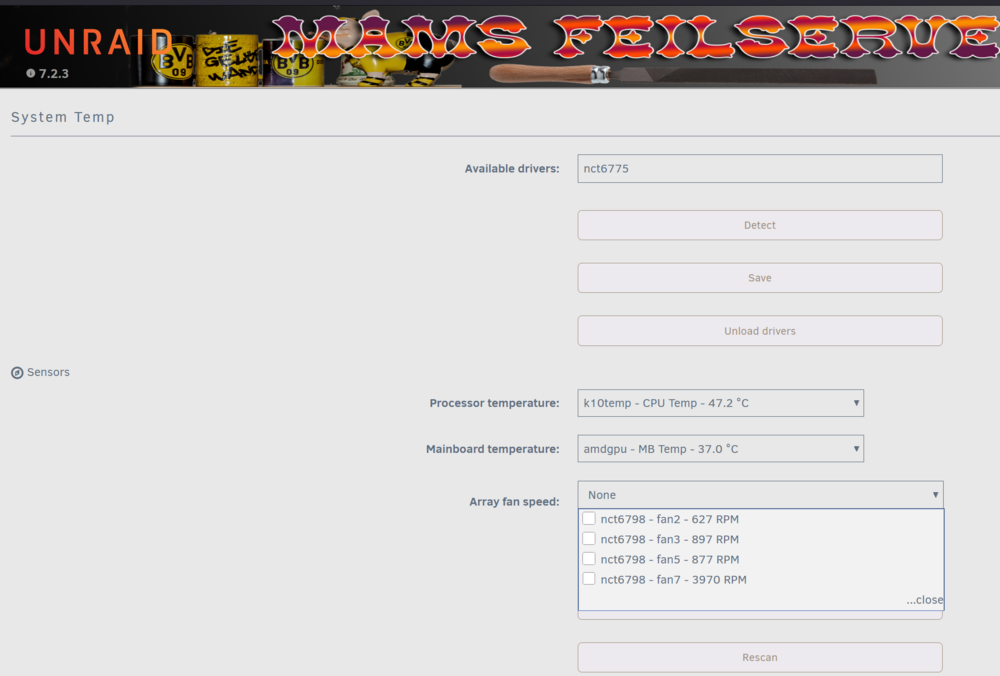
Ja, das Plugin ist "trickreich" und funktioniert alleine gar nicht. Du brauchst erstmal "System Temp", dort den Treiber suchen (und installieren) lassen. Danach tauchen die Lüfter auf und können mit dem fan plugin gesteuert werden (Also erstmal auf "detect" drücken, dann unter "Sensors" die richtigen auswählen, dann will er wissen, welche[r] Lüfter für das Array zuständig ist) (Privater Hinweis: der Aufwand lohnt sich nicht. Die PWM Steuerung im BIOS ist normalerweise deutlich besser und ohrenfreundlicher)
-
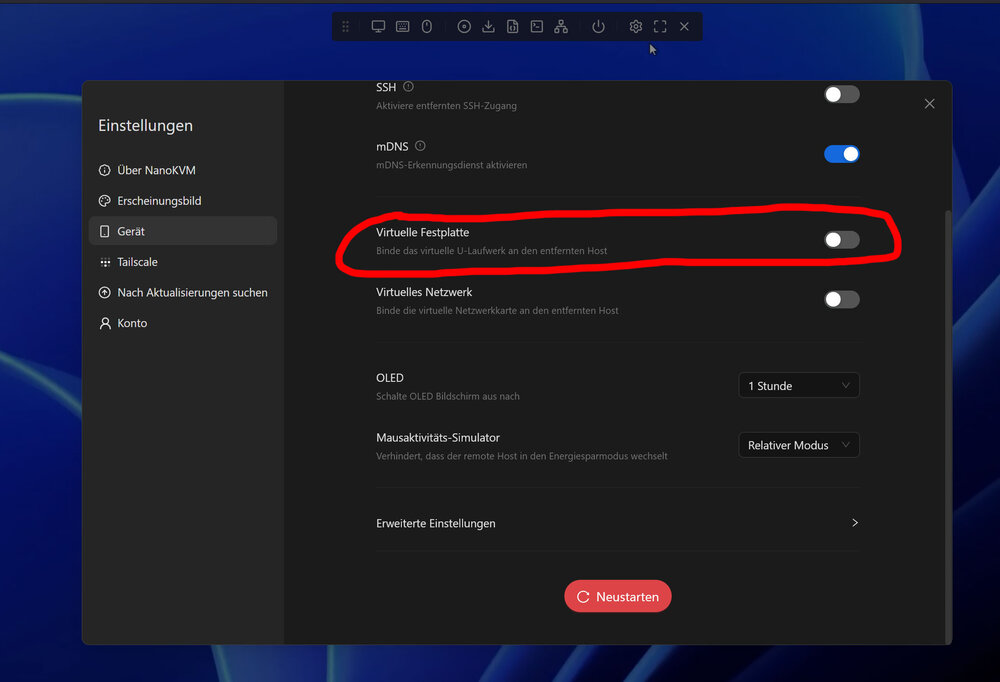
Sometimes devices like (USB) network cards, CD Roms and so on contain a 2nd partition shipping the needed drivers for that card. Usually this is turned off once you have installed it under windows. This will obviously not work with UNRAID/Linux. So there may be an additional drive that you are not aware of. Check the USB devices. (Aaah, also certain KVM devices like NANOkvm come with an storage device which allows you to flash bios or ship drivers. Usually you can find a setting to turn this off) Also there is a chance that the "device" is fixed build into your terramaster. Maybe you should take a look if the "disc" is mountable and contains valid files (the filenames may help to find out where it belongs to)
-
so that was not not a loop. But now you have one, leave it unconnected! these drops are most likely transmissions errors due to bad cabling then. Check the cables, look for dog/rat/cat bites. (mice could also be the culprit)
-
you cannot connect 2 NICs to the same switch (without creating a bond) and expect them to work! You have created a loop which will drive cards and switch crazy. Usually one of them gives up after a few seconds...
-
A 4 port 2,5G card usually needs more than a single PCiE lane. Your "resets on use" are likely a sign of missing lanes. (Note that "fininding" the card at boot time does not mean it is working too later on. Many "good" cards have a buildin PCiE switch which allows them to step down to lower lanes/speed, but the cheap ones have simply connected each lane to each network port. The card itself is found on "lane 1" (always conected), but communication later on is on lane 2-4. You can check this out by trying different ports on the card, ONE of them should work) So check your slots if the one you have put it in is not only physically capable to take the card, but also electrically.
-
you should get higher rates in the opposite direction. try it out.
-
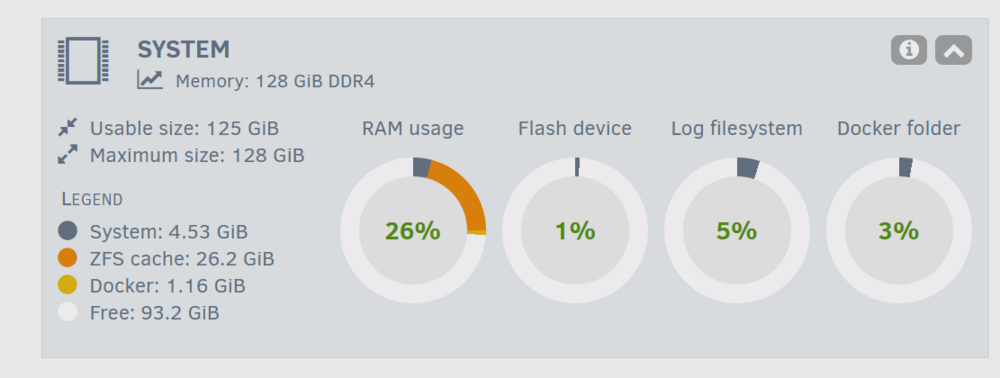
if this was your first zfs disk, you would have needed to reboot after formatting I think. The cache is only allocated at boot time, you can see it in the dashboard then. If there is no entry "ZFS Cache" you need to reboot before you test (Note: after reboot it will not occupy any RAM, but the dashboard will add this new (orange) topic and you will see it grow (and shrink) when you start your tests) Btw: I just had also only ~600Mb/s here, although this morning i had stable 1Gb/s. This is because "others" do something on the server too currently, its perfectly normal
-
Naah, this is just accidentallly (time of day? remember?) btrfs is not lamer than xfs, at least not that much that you can notice it. zfs is also not much faster, it just contains an automatical kicking in RAM cache for reading and writing. This may help network transfers by buffering a lot of data before the underlying disk system blocks the incoming data for a while. Even NVMes have limited write speeds, they usually contain a RAM cache too. But considering your 512Gb RAM in the computer, this may catch up even big files before they need to slow down for beeing written to the drive. So my advice is not really about the zfs filesystem directly, it is just a mule carrying the possible speed up RAM cache...
-
xfs? that gives no speed improvements or more security at all. xfs is good "inside the UNRAID array with parity", but not for standalone pool drives. try zfs
-
nothing I can see here anymore. But 600MB/s is already "good". You cannot expect to get full 10G all the time. It depends also on other clients, background tasks and so on. Do a few more transfers and see if the value is constant or if it is fluctuating now and then. As I said: its normal :-) (I get 10G here only at certain times of the day too) As I have already said, you may get more improvements if you reformat the drive an use ZFS as the file system. (its fairly still empty, so this can be done easily)
-
hmm, next you should turn off "disable NIC offload" in Tips&nTweaks... (again a double negative!) Why do you make your smart NIC dumb as hell and burden all the work onto the main CPU?
-
This makes me worry... it is forbidden somewhere You have got me wrong, it must be set to NO! (you want to enable the feature, so you have to turn off the disable flag. Its puzzling... double negative)





