






MAM59
Members
-
Joined
-
Last visited
Everything posted by MAM59
-
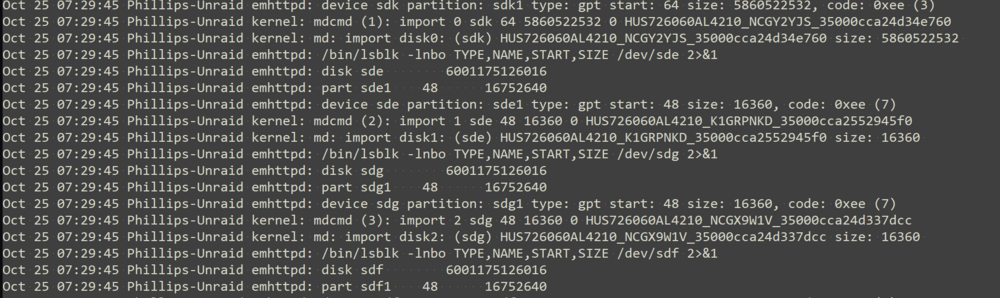
I see... I guess: This looks like to be the problem. The "unmountable" disks are only 16360 sectors in size, too small for xfs (or any other filesystem). Looks like already the partinioning failed. Strange I guess this is something for @jorge I can't help you with SAS drives and controllers, sorry.
-
did you also hit the "yes, I want to do this" Box??? pls retry and then post diagnostics afterwards
-
It is totally normal that an OS has to check "disk health" now and then. Without this "hot pluggin" would not work. The OS itself has no influence if an LED flashes up or not. This is handled by the cage the disk is slept in. Some have activity LEDs, some not. And even not all of those who have them, also flash if certain check commands are send to the drive. The more intelligent ones do not I think. So, its your hardware you have to complain about, nothing to do for UNRAID... If these lights are too bright for you, cover them with some tape, that will dim them or even make them totally invisible. NB: part of the blinking also depends on the drive itself. You will find some that blink, some that are lit all the time and some that do not light up at all. I think, the most HDDs blink, the most SSDs are either "always on" or "not at all". But this optional feature is up to the manufaturer, the OS has no influence on this too.
-
The current implementation of IPV6 in UNRAID is "working" but far from beeing "correct". One badly missing feature is the use of multiple addresses concurrently. (yeah, you can enable privacy extensions, but that is not what I mean) The easiest thing to implement would be to allow SLAAC and/or DHCPV6 even if the setting currently is "static" This would allow additional routers to be accepted even there is a global "main address".
-
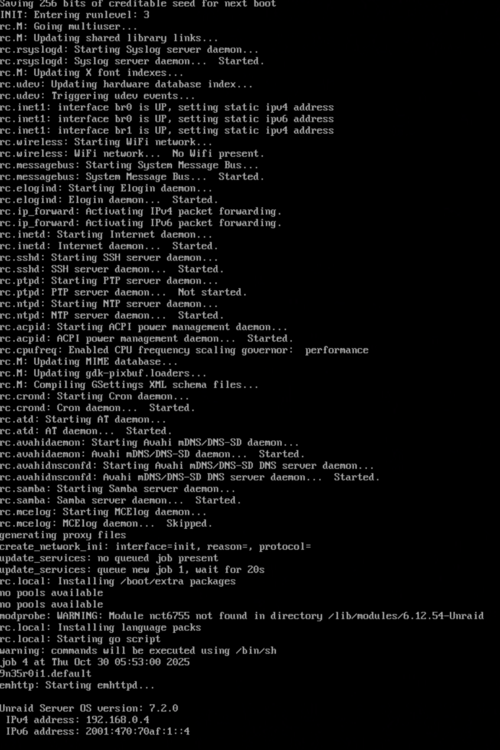
larger screenshot (cannot scroll back, but I think, its enough to see where/when it happens) The 2 msgs "no pools available" are also strange... (there is nothing in /boot/extra, so the install msg is just an info) f-diagnostics-20251030-1928.zip
-
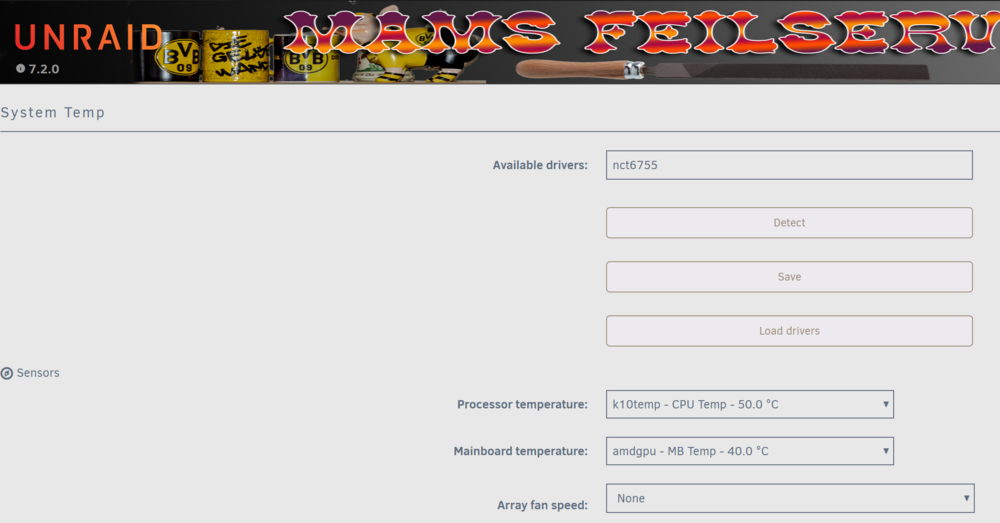
What is this and how can I make it go away: It appears at any boot on the screen, but does not show up in any log file. I use some Dynamix plugins like System Temp and so on, and they show me nct6755 as the used driver. So there must be a loaded module somewhere. But still, why does UNRAID complain it cannot find it at boot time??? Strange...

-
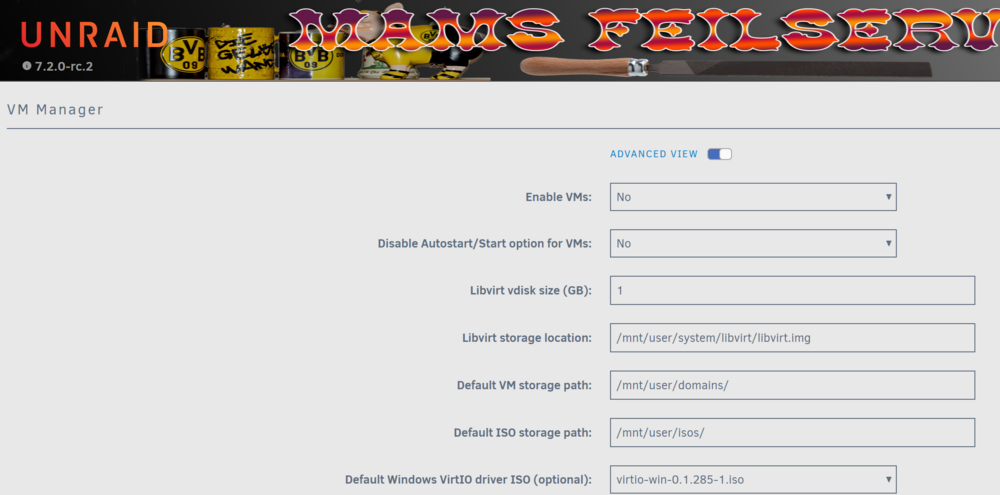
Hmm, so whats in your config??? Should be /mnt/user/domains and the path will be automatically created if you start up the vm manager...
-
es gibt allerdings ein von M$ bestätigtes "Problem" mit geklonten Windows Installationen. Seit dem letzten Update (egal ob 25h2 oder 24h2) hat Windows den "SID Vergleich" heißgeschaltet. Sind im LAN also 2 Maschinen, die denselben SID haben, gehen die Lichter aus. LAN Verbindungen sind dann nicht mehr möglich. Das ist im Prinzip ein verstärkter Kopieschutz, allerdings war es schon zu Zeiten von NT4 nicht ratsam, Kisten zu klonen. Immer schön mit sysprep einen neuen Maschinen SID generieren lassen, das ist der richtige Weg.
-
dunno, you are the first with this kind of problem. so nobody knows But what you mean with "it does not work"? hmm, I just see, your path is "/mnt/cache/domains", it should be "/mnt/user/domains". Take a look at that path, it should be a link to the first and maybe the link is blocking ? (take a look at you global VM config, some years ago people told you to use "/mnt/cache/domains" as the folder to speed up things, but with the advent of exclusive shares in 6.x this is not true anymore. The path should be (and stay) /mnt/user/domains now. Same is true for Dockers)
-
I dont understand why you dare to complain about this at all? RC2 is a marked beta version, nobody forced you to install it and it also plainly states that "there might be still problems with it". So you have volunteered to be a Beta Tester and then complain that there is really an issue that you have found??? Maybe your combination is that rare that nobody has set it up and testet before, but thats normal.
-
but there is a space at the end of "Windows" so you either have to type 'ls -R "Windows\ "' or (more easy) 'v -R' To see the content of the folder
-
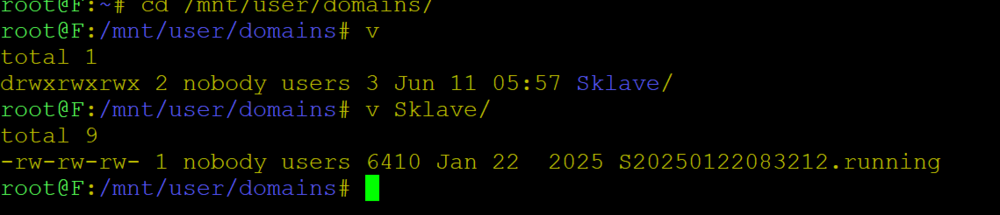
Too bad, but as i said, the plugin is not easy to use... click on "search" in the last column and enter the full path of the file you are looking for like /mnt/cache/domains/Windows Also, you might check if the Windows Folder still contains a file. I also have a "ghost" here: This VM does not exist anymore (actually I have NO VMs here anymore) but the last Stamp for running was not deleted automatically. (but I can delete it because no VM service is currently activated) Anyway, my educated guess would be: you once had a VM named "Windows" some day you have changed the name to "Windows 11 24H2-lts" or something the rename worked mostly but somewhere in the VMs config or image file is still a reference to "Windows" Besides making you upset, I dont think, it will do any harm, maybe you just can live with it? BTW: it would be nice if you could switch your UNRAID to "english" before you take screenshots. My (and I guess a lot of other people here too) chinese is not that fluent, I always have to guess where in the GUI the shot was taken from. Could speed up things and avoid confusion. (you can switch back after the shot)
-
you might consider to install the plugin "open files". With it (and after scanning a looooooooooooooooong list...) you might be able to determine which process is holding "Windows" open (and therefor locking it against deletion). But be prepared that the plugin needs some skills to interpret the data (and setting a filter to just view the correct stuff, there are thousands of files open all the time) Once you found the culprit, the people here might tell you how to avoid it.
-
no idea what happened, wanted to start the array, suddenly all drives were "unmountable, no file system" :-( All files gone... Must have been a very bad day for UNRAID. (I wanted to add a new disk with ZFS to the array, this did not work very well (slow as a dog), so I have stopped the file move and wanted to restart... no go anymore :-( ) Learned lesson: never interrupt a copy/move how many weeks it wants to take... You see, everybody makes mistakes and learns the hard way. But I did not panic (as I always tell to others :-) ), I have a backup server with the exact amount and sizes of drives. Thats usually OFF (an old box sucking a lot of energy) but gets turned on every 12hrs, copys over the changes and then shuts itself off again. But even the fast copy back took 2 days now for 4 drives... You need a lot of patience (and yes: Alcohol is NOT the solution :-) ) Now everything is back, new drives added, parity is rebuilding (1d 1hr, 19mins estimated)... all fine BTW until this here goes more and more off-topic: you should mark the article that helped you most to fix your problem "as the solution" of this thread so others can easily can click it and do not need to read all trys&errors in between...
-
as usual: don't panic :-) the 24 disk slots is only telling the gui how many slots it should slow that could possible be populated with (new) disks. Does not matter at all (unless it forces you to scroll too much), limiting it won't help. (Luckily my Box just has been restored and I am "back in business", took almost 48hrs...) yeah some day. but now it only will cost you more time. complicated things ahead: changing the file systems... This will take you days or weeks and it would be wise now to have a spare disk that you can use to transfer your data... There are manuals for this, click on "help" and read carefully. If you do not have a free disk, you might be forced to kill you parity, use it for swap and after all disks are converted, you can assign the last remaining old one as parity. Or, maybe more future oriented: assuming the oldness of your box, the disks will not be very big (compared to today's ones) too. So it maybe debatable, to buy 3 large ones, use 2 of them for data, and 1 for parity... Finally getting rid of the 10 old ones, that suck up much more electrical power... This is up to you.
-
Wer n Mac hat, hat auch zuviel Geld 😂
-
na ja, manchmal verliert man, manchmal gewinnen die anderen :-) Ich hab früher immer meine alten Platten verschenkt, aber zur Zeit stehen keine an (die kleinste hat jetzt 18Tb, die grössten 24) Ich bin übrigens entzückt über meine Backup Strategie. Wo UNRAID sich intern mit so 30Mb/s beim Umkopieren rumquälte (und ich das Grauen nach 33 Stunden beendet habe, sollte nochmal 78 Stunden dauern...), schafft es Windows mit vier Tasks gleichzeitig vier Platten zu befüllen und hält dabei konstant 240Mb/s ein. Schon seit gestern Abend... (robocopy ist intern begrenzt auf 1Mbit/s, aber man kann ja mehrere starten. Das LAN hätte noch 6Gbit/s frei im Moment, aber ich hab ja nur vier Platten zu beglücken...)
-
I wanted to "move 1 array drive to a newly added array drive" (copying old XFS data to new ZFS drive). So I fired up unbalance, selected the old drive and new drive and pushed "start" it started around 200Mb/s, thats ok, but soon after it dropped down to 60Mb/s. Some hours later it was down to <30Mb/s. Unbalanced told me I should come back in 78hrs!!! For a single disk! After 33hrs I have canceled this joke :-( Instead I fill the new disk over the LAN with robocopy. Guess what? constant 250Mb/s the whole 16Tb were done within half a day!!! So, why is this rsync so utterly slow that is makes such actions really really undesirable??? (and yeah, I know this plugin is just a frontend for rsync, it cannot do much against the slowness. But the question is: why is rsync that slow and isn't there a better alternative for linux out in the wild?)
-
Yeah I know :-) Good night to you and greetings to all the sheep...
-
Yeah, time for breakfast... finally wife rolled herself out of the bed....
-
This means nothing, sorry. The license check is done if you try to "start the array". copying the WHOLE folder will kill the license of the stick. It will contain the key from the old stick then (which is surely not activated then) copy all but the *.key files (but then, I am afraid the mess already has happened)
-
The question is: has this stick been activated with the license, or not (yet) ? Usually it is easier to copy the old config to the new stick. Copy all files BUT THE *.key ones from /config the new stick. Dont worry about any plugins, most of them are outdated or even deprecated now. Boot from the new stick and see if you can start the array. If it refuses, most likely its the not-yet-transfered stick. Look into this forum how to transfer and activate it. In your case I guess you will need to contact Limetech support to do it for you. Once the stick has been activated, the array will start and all old shares should be available again (and passwords and so on). You just need to add the plugins you want. Community Apps are now build in, Tips & Tweaks and Cache Dirs are just 2 clicks away.
-
Good news again for your blood pressure :-) All settings / shares will come back once you either transfer your license to the new stick or alternatively copy the new unraid os back to your old stick (which is still activated). (or buy a new license for the new stick, but I guess this is not really senseful, your old is "lifetime" the new ones you can buy are only "free updates for 1 year" anymore). Which direction would you like to go?
-
ok, der SuperGAU hier hat mir eine neue Erkenntnis gebracht: root@F:/mnt/disk1# v total 0 drwxrwxrwx 3 imagemaster users 66 Aug 5 2022 $RECYCLE.BIN/ drwxrwxrwx 2 imagemaster users 175 Oct 17 16:57 BDundDVD/ drwxrwxrwx 2 imagemaster users 6 Oct 17 16:46 Filme/ drwxrwxrwx 2 imagemaster users 6 Oct 17 16:46 FuerHeiko/ drwxrwxrwx 2 imagemaster users 6 Oct 17 16:46 InstallationsCDs/ drwxrwxrwx 2 imagemaster users 6 Oct 17 16:46 ModelleFuerDrucker/ drwxrwxrwx 2 imagemaster users 6 Oct 17 16:46 Musik/ drwxrwxrwx 2 nobody users 6 Oct 17 16:44 NeueBuecher/ drwxrwxrwx 2 imagemaster users 6 Oct 17 16:46 Serien/ drwxrwxrwx 2 imagemaster users 6 Oct 17 16:46 Spiele/ drwxrwxrwx 2 imagemaster users 6 Oct 17 16:46 VMBackup/ drwxrwxrwx 2 nobody users 6 Oct 17 16:44 Zeitschriften/ drwxrwxrwx 2 imagemaster users 6 Oct 17 16:46 nextcloud/ Siehe da, nun sind die Berechtigungen hier auch nicht "nobody".... Lustig. Also zumindest das scheint "normal" zu sein....
-
keine gute einstellung... ich hab eben eigentlich nix falsch gemacht, keine ahnung warum die kiste auf einmal spinnt. ohne backup schläft man schlecht




