






Everything posted by MAM59
-
yeah, currently I cannot reproduce it too anymore... but it happened 2 times in the las 2 days already. I will keep an eye open and see if I can find the cause before I report a bug... The thing is that it works again after some retries. Seems that the credentials are missing, but I don't know why.
-
Schade eigentlich, aber verständlich.
-
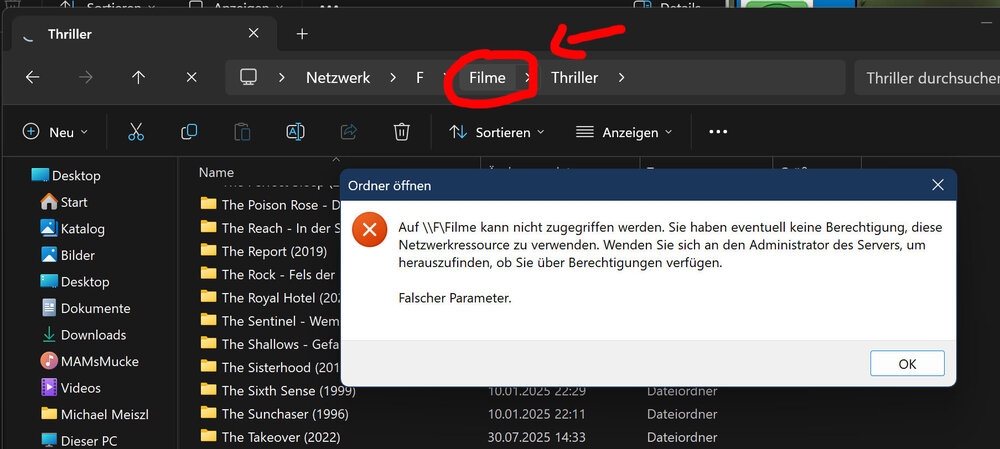
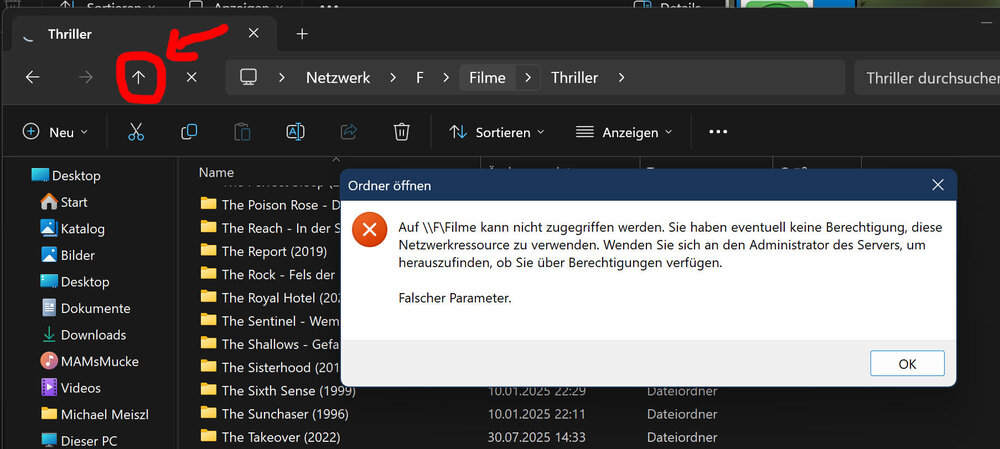
Too fast ok from me :-( I found a not serious, but annoying and irritating problem with 7.2 SMB implementation. Where to report? if here, read on. else move it to the correct forum pls: Using a mounted share with the windows explorer now gives a strange error message if you try to click "one directory level upwards". Clicking it more than once (after quitting the messagebox before of course) gives success after the third or fourth try. Clicking the "up" arrow, always works instantly. (of course there should not be any difference between "going up one level" and "going back one level") A bit annoying and definately new to 7.2 (I know in windows server there is a GPO to allow "bypass directory transversals", maybe something alike is now in SAMBA or the default setting has changed somehow?) This does NOT happen with "real" Windows Server (tested 2019 and 2022).
-
ooh, sorry, i did not see "before". (coffee level too low? gonna fix it fast...) Of course, if already the emulation fails, there is little to no hope that the rebuild will fix it.
-
No issues here so far. Works like 7.1.4. I have skipped the Betas, the included changes are not used here, so I could not test anything.
-
I would say: "Don't Panic!" If it is the old Parity Drive, it is of course unmountable and does not contain any file system. Let the rebuild finish, it should cure that symptom too. Should be mountable and contain your old data afterwards. But may take a long time, be patient.
-
Send the transceiver back and get a real one directly from MikroTik. Or at least from 10GTek, they are known to work. (Beware, the MikroTik one is "10G only!". It does not run with 2,5G or 5G. Or, they have a more modern model available now, dunno. RJ45 is dead for me, only Fiber is used anymore here) (Update: they now ship a /r2 version that supports different speeds: https://mikrotik.com/product/s_rj10 )
-
The module claims to be compatible with your mikrotik switch, but this may be a false info. Even if it is detected, it does not mean that it will work too always. The 1G link you can establish does not prove anything too. There maybe still issues like "wrong cable", "too long line" or something that do not apply to 1G mode. Also, take a look into the Switch's stats for the port. Your module says it will only work between 0 and 70°C. In MikroTiks you will find Modules with 90-96° running when in 10G mode. Maybe your thing overheats and shuts itself off for safety reasons? It can also be a wrong driver in UNRAID, test it with something else like @JorgeB already told you. (the AQC107 based cards are not the brightest one, sound good, work so-so and are not good in servers at all)
-
Bei den Shellys wäre ich auch etwas vorsichtig. Manche von denen haben eine hypersensible Stromüberwachung. Die erkennen beim Einschalten eines PC Netzteils schon mal gerne eine "Überlast" und schalten "zur Sicherheit" die Leitung ab. Aber, wenn Dein NUC danach wieder bootet, kann es das nicht sein, sonst wäre da kein Strom mehr...
-
Oh, Mikrotiks are very complicated, it is likely that you might have missed something in the configs (and no, although I have many mikrotics too here myself, I don't use them as routers. So I cannot help you with this) What settings? I thought I have made a shot of the docker config above already??? or do you mean a particular docker? (although that would be boring, the only thing I ever change for the dockers are bridged or host mode, and maybe a port now and then.)
-
no, I have a real ra server running in my lan that supplies the boxes with full configurations as it normally should be. Obviously your modem/router does not. so stick with the above script by @bmartino1 You may ask your ISP why their box does not supply ra data (note, with V6 DHCP became more or less obsolete, this job is now done by the "router advertising protocol" (RA) which broadcasts the current valid Prefix to the LAN but additionally pack infos like DNS Servers, Routers (himself), local dns names and a lot of flags regulary to the LAN. Also a "new" client can ask for the info directly with a special request packet. If RAs do not arrive timely, the info is deleted at the client and he either picks the next router in line (the infos include a priority field), or stops IPV6 completely) (note2: there are still DCHP6 servers out there. But they only supply addresses and only are asked if a special RA flag tells them to do so. They can be used for fixed prefixe, limited ranges or fixed addresses for a certain client, RA usually only uses dynamic prefixes and dynamic addresses with SLAAC scheme) (note3: what I do not like with the above script is the ...accept_ra_rt_info_max_plen=64. This limits the usage to the "standard" netmask. This is not always true because some ISP already supply smaller Subnets to their customers. I would advise to change it to "0" (accept all sizes). Also, even with a normal mask, you cannot subnet your own lan any further with the 64 setting)
-
ipvlan you could have seen that in the screenshot above. But its hard to find a docker containing ping and even harder to find one that supports v6 too. For me "Oscam" worked. All others in my list did not have "ping" (did not test the rest, once oscam matched)
-
root@c0f0b99bb5d7:/# ping BusyBox v1.36.1 (2025-08-05 16:44:32 UTC) multi-call binary. Usage: ping [OPTIONS] HOST Send ICMP ECHO_REQUESTs to HOST -4,-6 Force IP or IPv6 name resolution -c CNT Send only CNT pings -s SIZE Send SIZE data bytes in packets (default 56) -i SECS Interval -A Ping as soon as reply is received -t TTL Set TTL -I IFACE/IP Source interface or IP address -W SEC Seconds to wait for the first response (default 10) (after all -c CNT packets are sent) -w SEC Seconds until ping exits (default:infinite) (can exit earlier with -c CNT) -q Quiet, only display output at start/finish -p HEXBYTE Payload pattern root@c0f0b99bb5d7:/# ping 2001:470:70af:1::3 PING 2001:470:70af:1::3 (2001:470:70af:1::3): 56 data bytes 64 bytes from 2001:470:70af:1::3: seq=0 ttl=63 time=0.265 ms 64 bytes from 2001:470:70af:1::3: seq=1 ttl=63 time=0.200 ms 64 bytes from 2001:470:70af:1::3: seq=2 ttl=63 time=0.286 ms 64 bytes from 2001:470:70af:1::3: seq=3 ttl=63 time=0.331 ms 64 bytes from 2001:470:70af:1::3: seq=4 ttl=63 time=0.212 ms 64 bytes from 2001:470:70af:1::3: seq=5 ttl=63 time=0.289 ms ^C --- 2001:470:70af:1::3 ping statistics --- 6 packets transmitted, 6 packets received, 0% packet loss round-trip min/avg/max = 0.200/0.263/0.331 ms root@c0f0b99bb5d7:/# works flawlessly (most of the dockers have no ping, but this one does)
-
how else can it work if there is only Ipv6 on the host??? Today you can run the machine without v4.
-
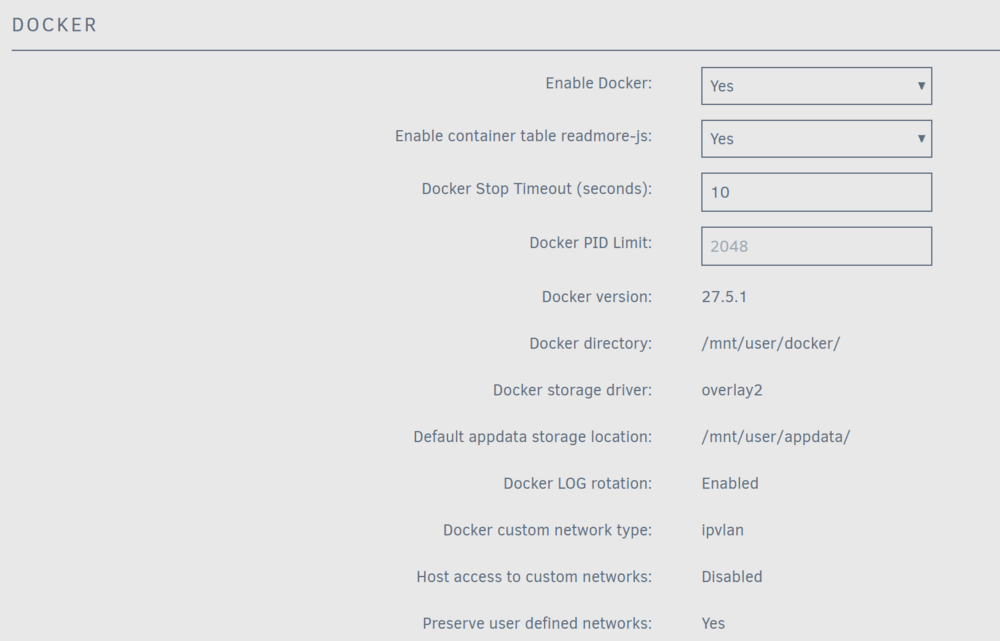
Then, at least, make sure that "host access to custom networks" is allowed in your docker setting
-
Yes, UNRAID is very picky about this. It needs the parity drive to map EVERY sector of the largest data drive. The SAS HBA could use a slightly different partitioning scheme, it may "steal" some sectors (or tracks) for its own management infos to store. These sectors are not visible to the OS below but obviously lower to the total available sector count. Which HBA needs it and which one not, is not visible beforehand, you have to try it out. But it CAN happen that the same type of drive shows different sector count for SATA and SAS Drives. (The same is true for many external USB enclosures. The drives formatted in them show different layout and freespace compared to "direct connected" to the computer. The data can only be used while the drive is in the enclosure) But of course, you can then simply switch around and use a SATA disk as parity and the SAS drive for data. As long, there is no real data on the drives, it does not matter.
-
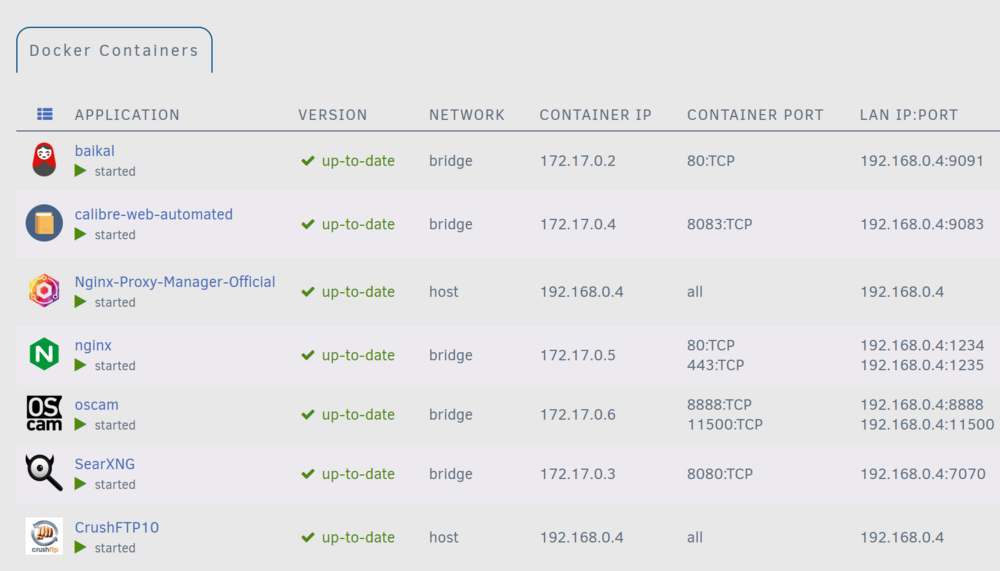
Sorry to hear that you have ignored IPV6 for the last 30yrs. You had a lot of time to learn about it, but obviously you need a crash course now. Docker and V6 are a desaster, like you they have ignored V6 for a long time too and now there is no real implementation, but more or less a half done "fix" or how they call it. Anyway, there is hope, IT CAN BE DONE :-) Take a look at my docker list for example: The gui does not show any V6 addresses at all (but they are there in the background, believe me). As you can see, there are many running in "bridge" mode, others in "host" mode. The general rule is "if you need direct access to the docker from the internet, you need to run it in host mode". This means, it is reachable with the address of the server himself. Here "Nginx-Proxy-Manager-Official" and "CrushFTP10" are directly connected. The others, running in "Bridge" mode, need proxiing, this is handled by "Nginx-Proxy-Manager-Official" (or other alike packages that are also available). This takes the connection from the internet and makes a new internal connection to the local docker (this can become quite complicated, you will find several posts here in the forum how to solve certain problems). The nice thing with it is, it can take connections from V6 and hand it over to internal V4! So you will not have to deal with the complicated Docker-V6 at all. You might ask, why not running ALL dockers in host mode? the answer is simple: in host mode they use all the ports they have been created for. And many many use ports 80,443,8080 and so on. So they cannot be run together. Nginx-Proxy-Manager uses ports 80 and 443 and tunnels them to arbitary ports as you can see on the above list, so baikal can run with nginx although both of them use port 80 internally. But you will need to create a CNAME record in your dns server of your domain for each bridged docker that should be tunneled to the nginx reverse proxy. The biggest problem here is that many dockers do not like to be tunneled easily. They need a special setup in the proxy manager. You will need to search the forum for hints for every of them, there is no general solution. But at the end, everything should work fine again.
-
did you reboot afterwards?
-
One big annoying problem with unraid for me is that there is no way to preconfigure the firefox on the console. Limetech has put in their stuff and refuse to listen to demands from others. It is totally annoying that for each new started sessions you always need to click NO to get rid of the "translation offer" if you run UNRAID gui with a different language than english. This can drive you crazy over the time and it is unnecessary to. So I have made me a small script /boot/config/addtofirefoxsettings which contains just a few lines: #!/bin/sh BASEPATH=/usr/share/mozilla/firefox INFOFILE=profiles.ini UPREFFILE=user.js DIR=`grep "Path=" $BASEPATH/$INFOFILE | sed "s/Path=//"` ZIEL=$BASEPATH/$DIR/$UPREFFILE echo $DIR ( echo echo '#### MAM 2025 ####' echo 'user_pref("browser.translations.enable",false);' ) >> $ZIEL It searches the active firefox profile and adds the lines BEFORE the gui is started. There are three seperate options you can put in here "user_prefs" means this option only applies to the current user "lockPref" means this option is set and cannot be changed by the user (in the settings) "defautPref" means this option is just the default and can be changed by the user later on (but because the profiles are regenerated on each reboot they all work quite the same of course) To get activated you have to put this line into your /boot/config/go file (BEFORE the emhttp line) /usr/bin/bash /boot/config/addtofirefoxsettings For getting rid of the translation popup, you need just the first line "browser.translations.enable". You can add all the settings you can find in the Firefox Documentation under "about:config". A small warning ahead: Don't change stuff that is needed for UNRAID like the startup page with "browser.startup.homepage"!
-
Its your own fault. Read what "strict" means: "Select Strict to enable exclusive use of a myunraid.net SSL certificate for https access (see Provision below). Note that a DNS server must be reachable." This means, all other certs are considered to be invalid. A very paranoid setting. Only connections to unraid.net are allowed anymore. Switch to "yes" then python will love you again.
-
Stell auf jeden Fall unter "Primary Power Mode" auf "Balanced". Bei Deiner jetzigen Einstellung "Power Save" wird auch die Netzwerkkarte nach einer Zeit komplett abgeschaltet. Dann ist natürlich nichts mehr mit Zugriff vom LAN...
-
Ich würde diese Aussage nicht wirklich unterschreiben :-( Es stimmt, im Betrieb reicht ein kleines Netzteil aus (Leistung), aber Festplatten sind hässliche elektrische Maschinen, die sich drehen. Diese haben einen Einschaltmoment. In dem sind sie quasi ein Kurzschluß der Leitung. Und da addieren sich die Ströme ganz ekelig hoch auf. Die meisten Netzteile sterben deshalb beim Einschalten. Bei Platten gab es früher mal üblicherweise einen Jumper, mit dem man das Hochlaufen beim Einschalten verhindern konnte. Der HBA (oder das BIOS) konnte dann jede Platte nacheinander einzeln einschalten und somit den bösen Moment des Einschaltschocks dramatisch abmildern/verhindern. Damit dauerte das Booten dann natürlich ewig lange bei vielen vorhandenen Platten. Deshalb ist das mit der Zeit in Vergessenheit geraten und nun ganz verschwunden. Stattdessen wurden die verschiedenen 5 und 12V Schienen in den Netzteilen eingefügt. Die verteilen die Last und sorgen dafür, dass es nicht in Sekunde 0 zur Kern(Netzteil)schmelze kommt. Wenn man nun durch viele Verteiler dann doch wieder massig viele Platten auf eine Schiene packt, hat man das Problem aber wieder an der Backe. Also: KANN (eine Weile lang) gut gehen, KANN aber auch derbe knallen... Ich würde auf eine solche Erfahrung gerne verzichten wollen...
-
Often a good solution and can be removed later on without leaving any stains :-)
-
I doubt it "failed" but there maybe a short "lose of contact" due to vibrations or something. "Hot Glue" maybe your fix to fight the problems with gravity.
-
Ich hatte die Nachricht wieder gelöscht, weil ich nachträglich den Eindruck bekommen hatte, Du hast nicht den SATA Anschluß "vertauscht" an den Enden, sondern das falsche Kabel von einem anderen Netzteil in dieses Netzteil gesteckt. Da gibts natürlich keinerlei Norm und dann kann es schon mal heftig brutzeln, mit bösem Ausgang :-( Da rettet Dich dann auch kein Pin 3... Da können dann auch schon mal gerne 12V irgendwo hinkommen, wo nur 5 oder 3,3 erlaubt sind...




