






Everything posted by MAM59
-
LOOOL! you are taking this stuff too serious! CALM DOWN ! (and dont type too fast, you are mixing up many letters :-) ) We all know, its just a display problem, so its the lowest of all low level of bug. So maybe its just something to live with it. (and one more reason for me to stay away from Linux as far as I can. Linux Networking is a mess, and a bigger mess because thousands of people fiddle around with in uncoordinated and break things without any reason or progress. Changing from API1 to API2 is always a bad idea.)
-
aaah... use your calculator! 600Mbs is just 75MB/s ! so your 68 MB/s are not far from the absolute maximum (and you have to substract the SMB overhead!). Fooled by Units (again)
-
You are asking me or the original author? in my case ALL shares were affected, some more, some less (mainly depending on how many subfolders and levels are contained in the share). Of course, the more there are, the more often it happened.
-
LOOOL :-) so you have to know it before to be able to see it? :-) very funny (and not really sane). Anyway, I knew already that it will be calculated on fly and that it obviously works (correctly). My "problem" or "question" just is, "why isn't it show by standard tools anymore?"
-
Keine gute Idee... ist so etwa wie "den Teufel mit dem Beezelbub austreiben". Finger weg von USB Kram.
-
Besides that annoyance, I have no issues so far, and, I'm (glad) not (to be) american :-)
-
Hmm, for me it looks that it works (already a day and more without any error message). Does it work LATER ? for me it needed sometimes two or three retries, then the error vanished. If it stays forever, your problem might be of a different kind, but they look very alike...
-
tnx for the explanation, but sadly, it does not work. root@F:~# ip addr show br0 7: br0: <BROADCAST,MULTICAST,UP,LOWER_UP> mtu 1500 qdisc noqueue state UP group default qlen 1000 link/ether 00:02:c9:a5:a9:90 brd ff:ff:ff:ff:ff:ff inet 192.168.0.4/23 metric 1 scope global br0 valid_lft forever preferred_lft forever inet6 2001:470:70af:1::4/64 metric 1 scope global valid_lft forever preferred_lft forever inet6 fe80::202:c9ff:fea5:a990/64 scope link proto kernel_ll valid_lft forever preferred_lft forever There is no broadcast addr shown in this command, unless you count in "brd ff:ff:ff:ff:ff:ff" which is V6 and therefor cannot exist. It says "BROADCAST" but does not list it. Of course, the netmask /23 is shown but nothing else I think it got lost with 7.2 (and yeah, it DOES work, so it must be somewhere in the background, deeply hidden) I am just curious WHY it vanished.
-
More likely it is SMB related :-)
-
Welcome to the club! I have reported this Bug already a few days ago, no "solution" yet... But a "please test"
-
No, I dont care about the docker address, I am puzzled because the "normal" bridges show 0.0.0.0 as a broadcast address. This cannot be true or work. (But the box works, so I think this is just a display error???)
-
Make sure you are getting the HBAs in "IT" mode. UNRAID does not support RAID mode or something.
-
sounds like your box is running amok. Are you sure you did not push the bios over the limit? Overclocking? Too high Memory Speed (run MEMTEST to be sure!) ?
-
The ip should be the same whatever port of the switch you use. It would be VERY unlikely that the dhcp server gives out to the same host just because it is on a different port. Also, it should be easy to test, just put the box on your desk, go to the switch and use a different port there. nothing should change. I would almost guess that your box is not capable of running "headless". If there is no monitor attached, it stays inside the bios and never boots up totally (just a guess).
-
Your current cards should continue to work, but need different cables. Each cable can handle 4 drives, your HBAs should have 2 connectors, so they sum up to 16 drives. You either need another one of those, or (more likely because you run out of slots) need one that can handle 16 drives (+ one of the old cards). In total you will need 6 SAS cables. (not "SAS to..." but simply SAS)
-
After running 7.2rc for some time, I think, everything is running, but the GUI became utterly slow :-( Every Click now has a serious delay until "something happens". You have to wait until you can go on. Its not a second or so, but maybe 500-800ms. Although nothing seems to be wrong, it is a noticable difference to 7.1. Or am I too hectic ?
-
I was puzzled a bit when seeing this: root@F:~# ifconfig br0: flags=4163<UP,BROADCAST,RUNNING,MULTICAST> mtu 1500 inet 192.168.0.4 netmask 255.255.254.0 broadcast 0.0.0.0 inet6 2001:470:70af:1::4 prefixlen 64 scopeid 0x0<global> inet6 fe80::202:c9ff:fea5:a990 prefixlen 64 scopeid 0x20<link> ether 00:02:c9:a5:a9:90 txqueuelen 1000 (Ethernet) RX packets 179807 bytes 231307231 (220.5 MiB) RX errors 0 dropped 3528 overruns 0 frame 0 TX packets 76844 bytes 17873070 (17.0 MiB) TX errors 0 dropped 2 overruns 0 carrier 0 collisions 0 br1: flags=4163<UP,BROADCAST,RUNNING,MULTICAST> mtu 1500 inet 192.168.4.4 netmask 255.255.255.0 broadcast 0.0.0.0 ether 50:eb:f6:55:9e:de txqueuelen 1000 (Ethernet) RX packets 33480 bytes 7981790 (7.6 MiB) RX errors 0 dropped 0 overruns 0 frame 0 TX packets 206 bytes 42479 (41.4 KiB) TX errors 0 dropped 2 overruns 0 carrier 0 collisions 0 docker0: flags=4163<UP,BROADCAST,RUNNING,MULTICAST> mtu 1500 inet 172.17.0.1 netmask 255.255.0.0 broadcast 172.17.255.255 inet6 fe80::42:5fff:fee6:e4f0 prefixlen 64 scopeid 0x20<link> inet6 fd17::1 prefixlen 64 scopeid 0x0<global> ether 02:42:5f:e6:e4:f0 txqueuelen 0 (Ethernet) For br0 and br1 the broadcast address is shown as 0.0.0.0 whereas for the docker part, there is a correct broadcast of 172.17.255.255. Is this wrong, or why is this so???
-
There maybe another problem with the cables. If the line keeps on dropping often, check them (and replace them for better ones). Maybe they were good enough for 2,5G (which uses a lot of pauses to cool down the cable) but do not survive the stress of real 10G (2,5G is just "10G with 3 pauses") So you never noticed that the 2,5G bond was wrong too, it simply never dropped off.
-
As usual. bonding does not really help, as you can see. But here it maybe that you have selected the wrong bonding mode. Seems that you have picked "active backup", but your switch wants something else (Static LAG configurations are not supported, only LACP (802.3ad). So the two do not really talk to each other. You may either try this mode, or leave the single port version (it is VERY unlikely that you will see a speed increase with the LACP. You need a lot of parallel clients to get benefits. Each single connection will still use only one card)
-
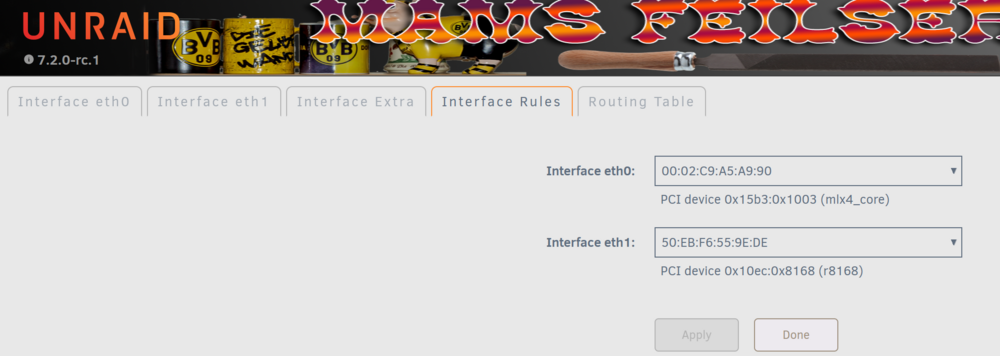
yeah, move it up in interface rules You can simply pick the mac of the 10G one for eth0 and the other one to eth1 in the dropdown boxes. (like shown here, mlx4_core is the 10G card) Btw: consider to disable bonding and only connect one cable! "Active Backup" is almost useless unless you do not have a dog, rabbit or hamster that love to bite into the cables. BTW2: there are no DNS Server settings beside ETH0 just because, DNS Servers are global to all cards. It is debatable if the GUI better should put this settings to a seperate section/tab because many people are getting confused by the current layout. But, its not wrong too. You just have to know and to keep in mind.
-
This is not really a valid measure method. The thing is, that robocopy INSTANTLY slows down if there is "something in the way" (like another connection from the pc to elsewhere), but takes AGES to speed up again later on. Even if you are not aware of other connections, they can happen in the background and maybe invisible to you. So you may take 100 more samples and add them up, very likely the results will be more and more alike each others then. (Networks can really be misleading and are almost not reproducable)
-
Try reloading the page with CTRL-F5 before. I also have problems here writing Articles and clicking on SAVE/Submit Reply. Sometimes it works, sometimes not. Reloading clears my typed words, but the editor of the board has a hidden buffer somewhere. Once you click into the (now empty) "reply" windows again, the buffer is shown again and all my changes are back! And this time, "Save" works. I never know if I need it or not... (lets try now...)
-
Also wenn sie als Parität nicht funktioniert, wird sie auch als Datenplatte früher oder später Ärger bereiten. Such lieber die wahre Ursache. (ansonsten: eine Parität reicht eigentlich IMMER aus)
-
It fairly easy to understand, the clock chip of the computer has no idea of locations or timezones. It just stores the hours, mins and seconds. So if a program sets the time, it has to decide, whether to ignore timezone and so on, or calc it back to UTC and then program this time to the chip. Neither of one is good or correct, both would work, but one had to decide. And Linux decided to use UTC, so the clockchips are running with the same values all over the world. But for automatic power on, it has to compare this time to the stored time, now (in the BIOS) there is no Linux to calc "UTC from local time", its your manual job! As I said, nothing is wrong or bad, you just have to know and obey.
-
This is a bit complicated, so let me show it one by one: a client opens a share on the unraid server and goes a few levels deep: for instance: No problems I am allowed to see this share. Now we want to go back a bit. This usually works, but if you try to get back TWO levels at once (clicking on "Filme" instead of "Kriegsfilm"), something strange happens: A messagebox comes up and tells me that I am not allowed to see "Filme", reason "wrong parameter" !!! You can repeat this several times, quit messagebox, click on "Filme", new messagebox... You can freely click on "F" or "Kriegsfilm", only the two level jump is prohibited! And to make things even stranger, after 3 or more retries, it suddenly works! I've tested the same against some "real Windows Servers" running 2019 and 2022, does not happen there. Beside the evil Messagebox, there is no error message logged somewhere. I can attach diagnostics, but it will not help in any respect. I have never noticed this with previous versions of UNRAID. Here is the messagebox Addon: I just noticed that it also happens if you go DOWN a level or two... After a waiting time, it works again... Samba with Alzheimer??? f-diagnostics-20251004-0733.zip



