





DoeBoye
Members
-
Joined
-
Last visited
Everything posted by DoeBoye
-
This looks great! Does it support multiple temp directories for plotting as well as the multiple final plot directories that were mentioned above?
-
Also, to confirm, it works without issue for me. Just to rule out the obvious, you have identified those paths (/plots and /plotting) inside the docker template, right?
-
Thank you so much!!! This is perfect! Exactly what I was looking for. I followed your steps and I have Swar humming along nicely inside this docker!! Now I can actually see what the docker is doing!! As an aside, this is also a great roadmap for me on how to get other scripts running inside other dockers!!!! Super helpful!!!
-
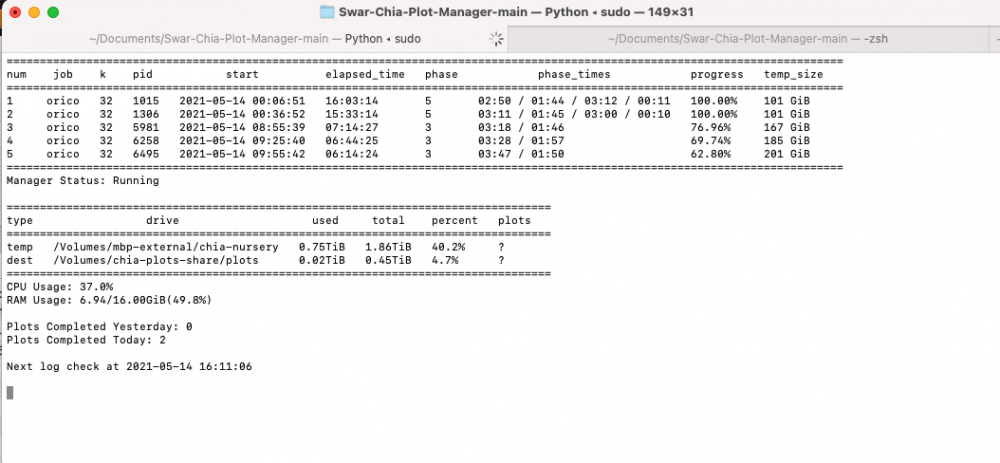
Hey All! Loving this docker! Thanks @Partition Pixel! I've been trying for days to make a Plot Manager work with this docker, but I think/agree that the only solution is to integrate it into the docker. If we're taking votes on Plot Manager integration, I'm a big fan of Swar. I find it a bit more user friendly then Plotman, and can be used in all OSes if you're running more than just the docker (I'm using my MacBook as well as a Windows machine). Here's a screenshot of the interface to try and make the sale .
-
Hey Folks, For anyone running out of ideas, many of these issues sound exactly like what I was experiencing. CPU usage normal, plenty of ram and disk space. Set to Performance and Turbo enabled. My VM was so slow and experienced so much lag that it was pretty much unusable. It came down to Interrupts in my Win10 VM getting messed up in 6.9+. This is what I did to fix it. You can probably skip right to step 5, as I'm pretty sure that's what fixed it, but if you want to be extra careful, it doesn't hurt to clean up all the video drivers as well (I had a bunch of different video cards/drivers in the system, which is why I thought steps 1 to 4 might help as well).
-
I moved to an Adaptec 72405 more than a year ago, and though the initial setup was a bit of a pain, it's been working without issue since. Here's a thread documenting the situation. https://forums.unraid.net/topic/83895-please-explain-what-is-happening-with-my-adaptec-72405/?tab=comments#comment-777570
-
Thanks again! This has been a minor irritant for me for years. Anytime I wanted to preclear an external drive, I would have to shut down my Windows VM, remove the usb 3.0 card from the xml, add a usb 2 controller and reboot. When done preclearing, I would re-add the USB3 controller. This card allows me to dedicate one USB3 controller (port) to my VM, and the remaining three are still available to Unraid! They all show up separate and easy to identify in their own IOMMU groups. Can't ask for better than that!! IOMMU group 24:[1912:0015] 04:00.0 USB controller: Renesas Technology Corp. uPD720202 USB 3.0 Host Controller (rev 02) IOMMU group 25:[1912:0015] 05:00.0 USB controller: Renesas Technology Corp. uPD720202 USB 3.0 Host Controller (rev 02) IOMMU group 26:[1912:0015] 06:00.0 USB controller: Renesas Technology Corp. uPD720202 USB 3.0 Host Controller (rev 02) IOMMU group 27:[1912:0015] 07:00.0 USB controller: Renesas Technology Corp. uPD720202 USB 3.0 Host Controller (rev 02) This is on an ASRock EP2C602-4L/D16 motherboard. Note: In my case, the top port was 06:00.0. You would think it would have gone in order (4, 5, 6, 7), but instead it went 6, 5, 4, 7.
-
Installed and working great in 6.8.3! Funny story. I'm testing out Tdarr to batch convert old .ts files to .mp4 files, and I've been running 'watch nvidia-smi' to keep an eye on my 1660ti when I thought to myself "It would be neat if I could see this in the dashboard". I went to the nvidia plugin support thread, started reading the last few comments, and someone linked to this plugin that does exactly what I was looking for! Thank you!! :)
-
Awesome Docker! Thank you so much!!! One thing I noticed: While using an nvidia card to transcode, if I cancel all workers mid-transcode, the streams do not seem to get released until I stop the docker. If I let them finish, they release as expected. (watching using 'watch nvidia-smi' in Putty)
-
Fantastic Plugin! Thank you so much for all your work! It was mentioned once before, but I didn't see the response (My apologies if it has already been brought up). I was wondering if support for passthrough disk backup is in the cards? I understand Snapshots wouldn't work (The vm will need to be shutdown), but it would be great if the disk could be backed up to an img using something like qemu-img convert... Thank you for your consideration!
-
I noticed this as well. It showed precleared successful, but I had to X to close it. Unfortunately, it seems like the final step of tagging the drive as precleared is not occurring either, so Unraid is now spending 12 hours clearing it...
-
Is Sab writing to the same drive that the VM is living on? I used to share the cache drive as cache/VM storage, and would experience VM lag issues during download and other Sab file activity (unraring etc). Also, are you using a platter drive or an SSD for your VM? SSD definitely helps with VM performance.
-
I hear that! Good luck!!
-
Good advice! I'm not actually looking for a new USB card at this point, as I'm out of pci-e slots, but future-me will definitely upgrade when the onboard USB 2.0 that I've passed through becomes too onerous, and posts like yours help pick the right part . .
-
Thanks for doing this testing!
-
Fantastic! I still haven't found the time to do the upgrade on my end. Hopefully it will work for me as well when I do!
-
Thanks for reporting back! Glad to hear you solved it!
-
Hmmmm... I've never had that problem (Though the Sab forums have some threads about it)... What are you using to find files? Sonarr? Sickbeard? They have built in file organizing as well. If you are using them, how about removing the Sab sorting function, and instead have one of those programs do the sorting/moving? If that doesn't work, another option would be to install the Filebot docker and have it do the sorting and moving for you. It can watch specific folders, and do any renaming and moving and deleting that you want. You get a lot more control over the process with Filebot, and that might solve your problem...
-
That's too bad :(. Have you confirmed you can manually create and delete files in the location you are trying to save to? Also, can you post a screenshot of your settings for Sab docker? Not sure about setting the user for Sab... Someone else might need to weigh in for that. For the record, I have never needed to do that and my Sab has been running without issue.
-
Could you expand a bit on this? When you say "auto delete folders", what's the use case/situation? People might be able to help if we knew the whys. As you're posting in the Sab thread, I assume it has something to do with Sabnzbd...
-
I'm not sure if this will permanently solve your issues (If something is setting permissions incorrectly), but you can try running newperms in terminal on the folder where it is trying to save the output to see if it is a permissions issue. newperms /mnt/user/share/folder Obviously rename "share" and "folder" to the correct names
-
My Windows 10 and Sierra VMs are running without issue on 6.4 with full video passthrough, but I haven't finished my High Sierra install quite yet. I just got the install USB drive sorted out. Hopefully this weekend! I'll report back with my success or failure
-
If this question is for me, I have basic vga from the motherboard, but no on-chip video.
-
I have it working out of the box with no bios dump or extra xml or Clover stuff modifications (from what gridrunner provided) in 10.12.4. I'm using a GT 710. Now that I've upgraded to UnRaid 6.4, I'm going to try the same setup in High Sierra...
-
Will do!

