





Everything posted by unRaiderX
-
Funny
-
It's working better now on the preview version
-
Yes, mine was disable before I updated to 1.76.1
-
Interesting, how to enable? Yes, mine was disable before I updated to 1.76.1
-
yes you can remove torrent without delete the file.
-
Found this on the qbittorrent forum: Close qbitt. and edit qbittorrent.ini file. Under [BitTorrent] section, add a new line: Session\TorrentContentRemoveOption=Delete
-
Welcome!
-
I have the same message. Never seen before.
-
Updated my main unraid server. At the end i got this information in the log. And it still growing. I did reboot again after the update, but is still there. This is no warning, just some information, but like to know what it means Something I should be worried about or is this just some info in the new Kernel? Can i hide this or is it a easy fix for this? EDIT: This has something to do with the SMB share. I just shutdown the containers that i know are using my SMB (I have two NAS) And then start it again, the message came back. I did teste with other containers that not use SMB, like Heimdall, Dozzle. No messages. So maybe this has something todo with the Unassigned Devices plugin?
-
Thanks @SimonF It's fixed now
-
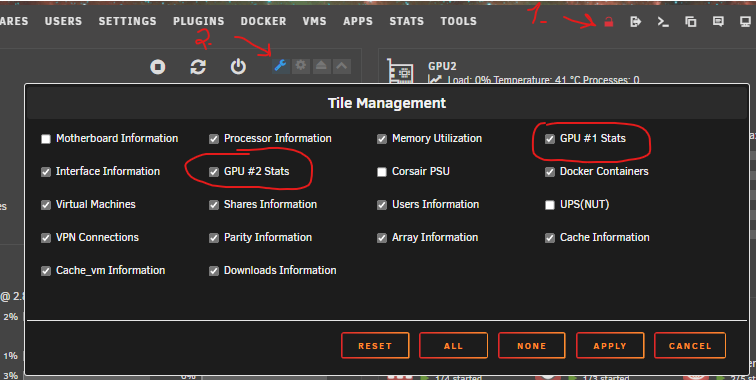
After updating to version 2023.10.29 I start receiving this error: Oct 29 22:38:36 Tower nginx: 2023/10/29 22:38:36 [error] 17053#17053: *10094889 open() "/usr/local/emhttp/plugins/gpustat/images/Threadfin.png" failed (2: No such file or directory) while sending to client, client: 10.15.10.20, server: , request: "GET /plugins/gpustat/images/Threadfin.png HTTP/2.0", host: "10.15.20.100:5001", referrer: "https://10.15.20.100:5001/Dashboard"
-
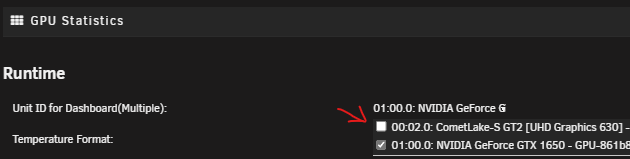
Make sure you have booth GPU selected in the GPU Statistics. In the Dashboard:
-
I'm gonna give 6.12.4 another shoot later. First time I run into some problems, i have posted in the bug reports. So I had to revert back to 6.12.3.
-
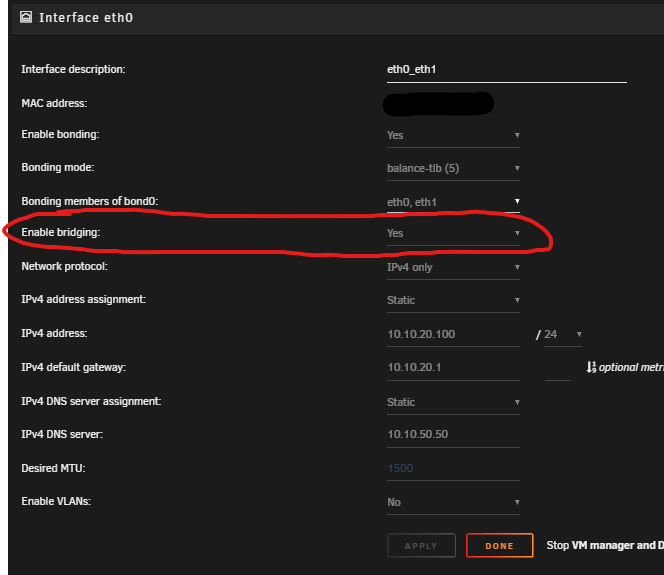
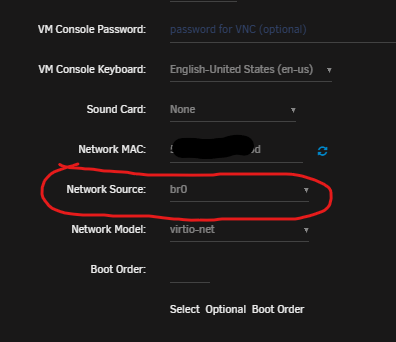
This going to be a problem for me. I'm running VM's on my unraid with Network Source: br0. So I can give every VM a static ip address. So I can RDP to my Windows 10 VM. So how do I gonna resolve this with bridging disable? My win 10 vm:
-
Hi, thanks. I already did:
-
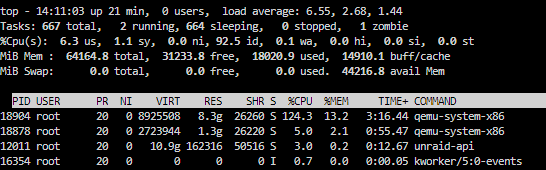
Hi, after upgrading from 6.12.3 to 6.12.4 my Webui has been very slow. Special on docker tab and dashboard. Takes almost 12 sec before the page is visible. I can see my CPU are wokring MUCH more when i try to open DOCKER tab or the Dashboard. Never seen a behaver like this before. I tried to stop Array, but Dashboard is still slow 12 seconds to open it, normally it tooks 2 seconds. Tried to remove some plugins, but still the same EDIT 1: After removing more plugins and multiple reboots. The issue is till there. EDIT 2: I decide to revert back to 6.12.3. And guess what, it working normally again, fast like it always was So can someone please explain me why I had this kind of issue with 6.12.4 ? EDIT 3: Tested v.6.12.5 RC 1 and the latest version released yesterday, v.6.12.5. It's still the same. Adding the diagnostics from my backup server (Galactica)
-
I took the risk and updated now,. Seems to my everything went smoothly. Only one thing i noticed, the DOCKER page took much longer time to open, hmmm That's probably why? It took 12 sec top open the DOCKER tap.
-
Hi, did you upgrade?
-
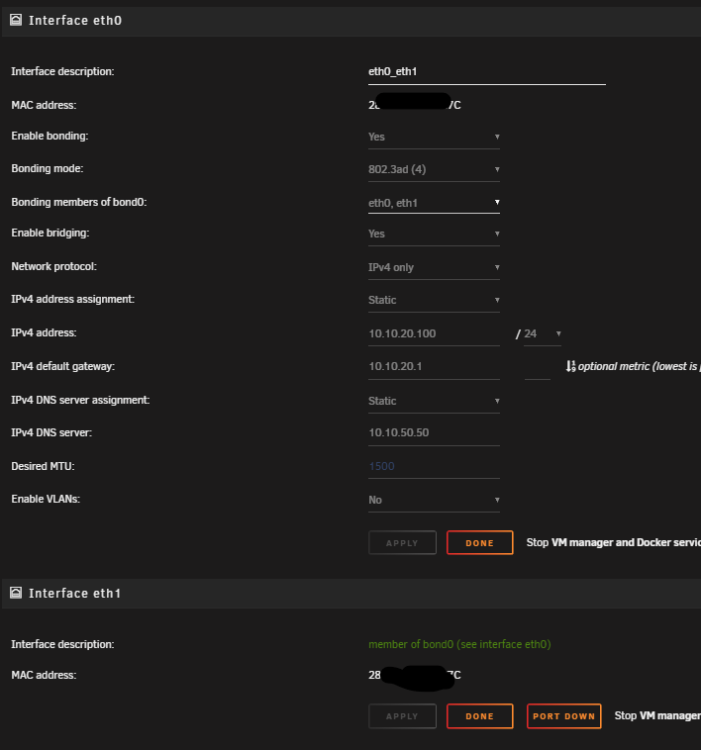
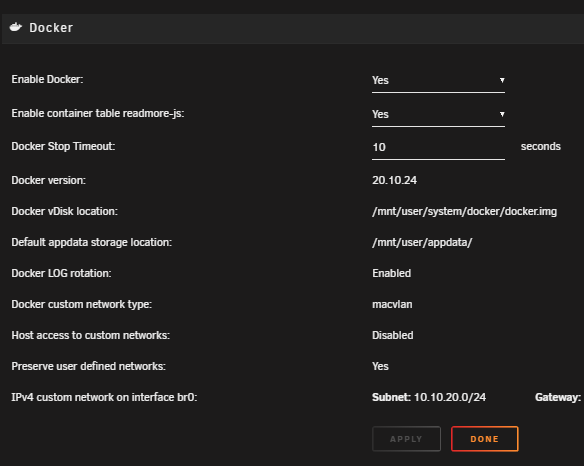
Hi, Is this update gonna make some problems for me when I'm running like this? I do have ab firewall that don't like when I use IPVLAN... when you have over 30 containers and all of the came up with same MAC address with different IP, I had problems to access my containers. That's why I use MACVLAN. Never hade any CALL TRACES error before. Almost all my containers are using br0 network.
-
Thank you very much for this update. Everything seems to work perfectly. I used to get this message after upgrade to v. 6.12.X But it seems to work after an reboot then.

-
I have the same problem, I have an HP Proliant ML 350p G8
-
Hi, Anyone still using ML350p G8 with Unraid? Is it working? I've got my hands on an ML350p G8 with 2 x E2697v2 with 128GB ECC memory with P420i controller with HBA mode enabled.
-
Hi, do you see the temperatures from all of your disk with this controller?
-
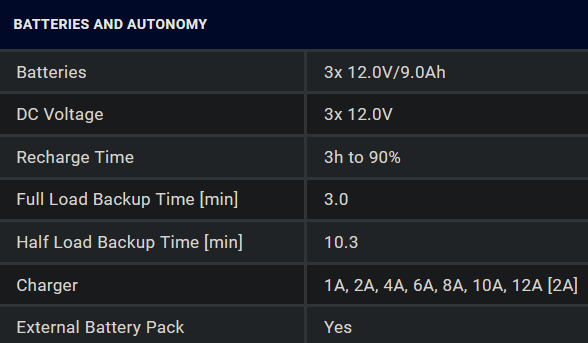
Hi, I'm trying to figure out how to put the right numbers in the driver.parameter.runtimecal: = AAA,100,BBB,50 I have PowerWalker UPS VFI1500 CGPF1 https://powerwalker.com/product/10122109/ What is the right value for me, on AAA and BBB ?
-
Nice, it's working now





