





Gragorg
Members
-
Joined
-
Last visited
Everything posted by Gragorg
-
Yes clicking the orb to spin down. The current filesystem is ZFS. I have been on 6.12.6 since launch. I swear it had remained spun down prior when it was not mounted.
-
Installed the new plugin today now I have an unassigned unmounted drive sdb that will not spin down. If I spin it down it spins back up. How can I roll back to last version? tower-diagnostics-20240112-1522.zip
-
Ok thanks. I was under the impression there was corruption issues at one time with BTRFS in the array.
-
Back when Unraid added BTRFS and XFS file systems it was recommended to use XFS for the array disks. Is this this recommendation no longer valid?
-
I would recommend running cloudflareDDNS (i use the one from selfhosters). Chances are your Internet provider will change you WAN IP and this will keep it up to date. Here another great video from Spaceinvader one that I used to set it up. You can skip past the DuckDNS portion of the video.
-
So something to add to this. In the SMART I posted helium level is showing as 64. I just rechecked it and Attribute 22 it is now showing as 100. Both show that it has never failed. Could this be a bad sensor in the drive? I assume I should be ok to leave it and just monitor it?
-
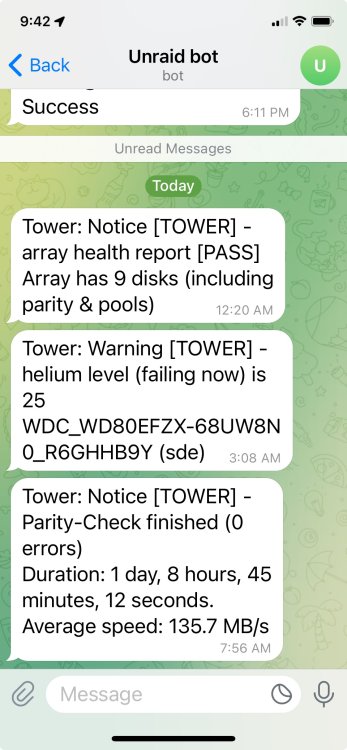
Just finished my parity check this morning and reciecved disk 3 helium level (failing now) is 25. I looked at the smart but I cant see anything that would indicate this. Any ideas of next step? tower-diagnostics-20240102-0940.zip
-
You will need to post your diagnostic for someone to help you
-
Usually unclean shutdowns cause a parity check on startup. You should enable syslog server to capture whats happening during a shutdown. The regular syslog clears with every reboot.
-
Hit the little "?" icon in the top right corner of the gui
-
If your Extended Smart test is good and you want to clear the status you can hit the "Clear Stats" button at the bottom of the main tab. If the counts increases it will show back up.
-
My plex used to do the same thing. For me it I was "Run a partial scan when changes are detected" under Settings, Library (show advanced). After I checked this it was fine. Another thing you could try is enable cache for your media share and move the files in the middle of the night everyday.
-
Not sure whats going on but my log is getting spammed and my server is not very responsive. Any thoughts? tower-diagnostics-20231220-1108.zip
-
Yes this hardware should run great for minecraft server. Just be sure to increase the amount of ram that the docker can use.
-
Take a look at this video
-
You likely have something filling your docker image. 18.8G is alot. How many dockers are you running? I run 20 and my image is 14G.
-
Yes that will work.
-
You need to install Nvidia Driver from Ich777 and then follow Frigates install instructions
-
Post your diagnostics. You can generate under the Tools tab
-
So I installed a docker that had a overlapping directory. I removed the docker that overlapped but still have a listing in Appdata cleanup that I cant remove. Any idea? The directory is /mnt/user/appdata/data Solved: I removed the docker from Previous apps and it did the trick.
-
Installed Readarr to compare to Lazy Librarian. Decide to uninstall but the /mnt/user/appdata/data directory can not be deleted for some reason. Any ideas? I managed to fix the issue was Previous Apps
-
No you don't. If you want to use your Nvidia card in dockers you can install the driver from the app store. If your passing through to a VM you don't need the driver.
-
Raid cards not recommended. i would post diagnostics when you can. Do the drives show up in the bios?
-
Smooth sailing. Thanks again!
-
Update to 6.12.5 went smoothly. Thanks for all the hard work!


