






interwebtech
Members
-
Joined
-
Last visited
Everything posted by interwebtech
-
Updated to 5.13a and ran a new scan. Detects an HPA on all disks (1, 2, 9-11) connected to my Areca ARC-1231ML. Including the 8TB RAID0 volume being used for parity. Pretty sure this is a false positive as I understand it, unRaid is not able to get hardware specifics from disks connected to the Areca.
-
Here's the problem with /user Paths in /user do NOT support the symlinks that many (if not a majority) of docker apps create. There are many documented cases of apps not working at all if they are set to /user, but set it to /cache (or diskX) and they will work perfectly. In this case, I guess its because of the fact that the appdata already existed in /user with invalid symlinks and once the symlinks started working the way that they were supposed to it through plex for a loop. I've got this down as a warning because I anticipated a situation like yours (and I've tried to set up warnings so that you can safely be ok to not receive notifications on them), but going forward, set up any new installs as /cache as this is the proper way to do it and it will minimize any/all issues with containers (and the strange little bugs that sometimes pop up with containers that no one has a clue about what's causing it could possibly be traced back to the symlink issue) After careful consideration of your advise (and finding "watched" status was not sticking on shows, and the Channels section claimed to no longer exists) I zapped the Needo docker and installed Linuxserver.io version using cache/appdata in path. Did not experience any issues with stalled permissions updates as I did in a previous attempt to switch. Might be placebo effect but me thinks it runs smoother
-
FYI. I got the warning about having /user/ in docker mapping instead of /cache/. Changed all 3 of mine (plexEmail, PlexPy & PMS) and they all restarted without issue and displayed all their respective stuffz... EXCEPT Plex Media Server. With that mapping for appdata, I was unable to add new movies. The process of getting the cover & info from content agents would not find any matches. I tried falling back a version but no help. Resetting the appdata path to /user/ fixed it and it matched films up first refresh. I suspect maybe user permissions causing it to fail silently (did not look at pms logs) as I am using Needo's docker. JUst an FYI in case someone else runs across this.
-
AdBlock Plus for Chrome. I have not had any issues with it but others have. https://chrome.google.com/webstore/detail/adblock/gighmmpiobklfepjocnamgkkbiglidom?utm_source=chrome-app-launcher-info-dialog
-
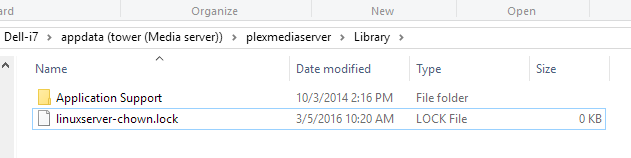
Initial backup takes me ~ 1 hour. My plex has something like 200,000 files in metadata. Mine was an hour almost exactly.I am going to hazard a guess that its the docker service itself that gets cycled so those that have "autostart" turned on will be running after its done. At least that is how mine worked out.Nicely done. Running first one manually. Pushbullet notification, webGUI notifications, like its made for it Thanks again for your great work. ps. can we get some sort of indication that it is running on the two main pages (dashboard & main)? Not necessary to have the real time file list (very slick BTW), just a "appdata backup in progress" thingy? Oh, and maybe disable the "backup now" button while its running?Thanks was able to install it. Now I need to source a z-wave usb dongle. ;Padded new repository: https://github.com/jshridha/homegenie but nothing shows up in templates for manual add. I don't see how to edit repository in the "Add" from Apps. Change the repository from jshridha/docker-homegenie to jshridha/homegenie If Bungy doesn't update the template to reflect this, then I'll make a decision whether to override the repository entry within CA or blacklist the template.Is HomeGenie AWOL?Needo's PMS docker works fine. There have been several Plex versions recently (especially Pass early access versions) that have had problems. When that happens just use the advanced parameters to force a specific known good version until they fix it.FYI if you are having problems with Plex Channels like Comedy Central claiming files don't exist, its a problem with latest version. Fall back to Advanced View | Environmental Variables| and set it to: VERSION | 0.9.15.5.1712-ba5070aNone at all or just reporting that no bytes trimmed? Showed in Plugins as installed, but missing from Scheduler (no tab) and no mention of Trim operations in log. There were log entries saying it was being installed on boot but something was amiss.OK - I don't know what went down with the Cache Pool BUT I do know I have fixed it. I remembered that at the weekend I "tried" to install an ATI Video Card to the Server to demonstrate something to a "Friend" BUT it wouldn't fit with my configuration. I jacked a few of the data cables out of the board to see if it would fit AND I made a mental note that I had not put them into the exact same ports. I decided it didn't matter as I remembered that unRAID didn't care about this like it did in previous versions. So in essence I HAD this: Cache Disk 1 was sdb Cache Disk 2 was sac Now I have: Cache Disk 1 is sdc Cache Disk 2 is sdd Like I mention I didn't feel it was an issue. Clearly I was wrong AS unfortunately this issue coincides (as I keep daily logs) with me making these changes. There is no other Catalyst. I don't know what the connection is here - maybe something to do with the way BTRFS creates the RAID-1 array and keeps track of it. Who knows. Anyway, to fix it, I stopped all applications that would write to the Array. Moved ALL data from the Cache device using the mover. Stopped the Array. Removed both Cache Disks from the Array Cache Slots. Mounted them via Unassigned Devices and removed their partitions. Unmounted them. Added them back into the Array Cache Slots. Started The Array. When Prompted to Format to BTRFS, I did. The RAID-1 Array was successful set up again. Label: none uuid: e699fcb6-1360-4fb9-9ec9-7768cce05986 Total devices 2 FS bytes used 640.00KiB devid 1 size 232.89GiB used 3.03GiB path /dev/sdc1 devid 2 size 232.89GiB used 3.03GiB path /dev/sdd1 btrfs-progs v4.1.2 btrfs filesystem df: Data, RAID1: total=1.00GiB, used=512.00KiB System, RAID1: total=32.00MiB, used=16.00KiB Metadata, RAID1: total=2.00GiB, used=112.00KiB GlobalReserve, single: total=16.00MiB, used=0.00B Then when I ran fstrim from the command line: root@main:~# /sbin/fstrim -v /mnt/cache /mnt/cache: 2233237504 bytes were trimmed All seems to be working again. Weird, but resolved. since you mentioned it, I looked at my log and did not see any recent Trims . Went to scheduler and it was not there at all. Uninstall & reinstall and I am back set for weekly Trim. Oddness.Tried to add a new TV episode tonight and Plex refused to acknowledge the new file in season folder. Looked on Plex site and found others complaining about this latest version too. Mods were asking for logs so I load up the appdata share and while drilling in to the folder I noticed a .lock file. Looks like the permissions failed to finish? Anyway I investigate further and find that ALL my TV shows are shown as "unavailable" in Plex. Its like it can't read that share at all. Movies are fine it seems. I removed Linuxserver.io Plex docker and reinstalled Needo Plex docker. Presto chango, all my TV shows are back and it found the new episode. Same version of Plex. Clearly something failed in the switch to Linuxserver.io and failed silently. Updating Plex version today and noticed that while I thought I had installed Needo's (didn't pay attention to what template was being used), in fact I had reinstalled Linuxserver.io so that was the fix to the permissions thing since it worked fine after that. My bad lolTried to add a new TV episode tonight and Plex refused to acknowledge the new file in season folder. Looked on Plex site and found others complaining about this latest version too. Mods were asking for logs so I load up the appdata share and while drilling in to the folder I noticed a .lock file. Looks like the permissions failed to finish? Anyway I investigate further and find that ALL my TV shows are shown as "unavailable" in Plex. Its like it can't read that share at all. Movies are fine it seems. I removed Linuxserver.io Plex docker and reinstalled Needo Plex docker. Presto chango, all my TV shows are back and it found the new episode. Same version of Plex. Clearly something failed in the switch to Linuxserver.io and failed silently.
 Thanks. All fixed. Had not been keeping up-to-date on changes.I am seeing this on my console... I thought it was due to 6.1.9 update but then remembered Apps had the menu option of removing Users tab (which I had done as I have no users other than root). I have restored original menu structure to see if it gets rid of the message.Successfully switched from needo to Linuxserver.io Plex Media Server. Permissions change took less than 20 seconds. Plex Pass version up and running as if nothing changed.The problem with Plex failing when using /tmp for transcodes came when the authors decided they needed at least 3x the file size in available space as an arbitrary buffer/insurance or it would fail with message about drive being full. While they dialed it back a bit, there is no guarantee they won't do it again. As for SSD write cycles, I am pretty sure I will be long gone before I use up its "finite number" of writes. What is more likely is it will be replaced sometime in the future with a 10TB SSD I picked up on Amazon for $50. http://www.zdnet.com/article/intel-preparing-to-unveil-10tb-ssds-or-you-can-pick-up-a-13tb-drive-today/Me too!Added charts. It's not along side but there's a switch to enable them. It'll graph download and upload based on filters, visible or all data. charts are AWESOME! thanksI used to use RAM for transcoding and thought I was getting the best possible performance that way BUT when the change came to Plex where it was claiming the temp folder didn't have enough room (it was seeing only whatever was reported as free space in RAM) with it showing up at my end as some titles just refused to play, I switched back to using the SSD (same as docker is installed on) and all those errors went away. Now the followup to the "BUT"... when using RAM to transcode, my remote users had frequent issues with buffering and freezing. Even at relatively low settings (3 Mbps over a 30 Mbps connection). Once I switched back to using SSD, it all went away and they now can stream at higher settings with no issues.

