






interwebtech
Members
-
Joined
-
Last visited
Everything posted by interwebtech
-
fixed
-
Thanks. It should be event. I updated the plg file. Everything installed on boot though? oddly enough I am not sure. I *think* I had everything installed before since that was default behavior before the new ala carte system was introduced. Now it shows Python only is installed. I just checked for update and no new found (still at 2016.02.08)
-
During reboot to apply 6.1.8 update, I have an error on console from Nerdpack: chmod: cannot access '/usr/local/emhttp/plugins/NerdPack/events/*' : No such file or directory Nerd Tools v.2016.02.08
-
Your sacrifice is truly appreciated
-
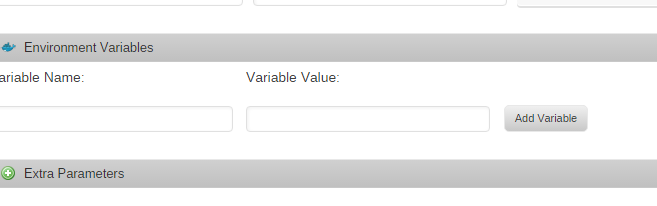
FYI you can set a specific version in the Advanced View of the docker setup. I did this when they borked the "use RAM for transcoding" fiasco recently. No need to run another copy. Just set VERSION = 123456 and restart the docker. Back in bidness in less than 5 minutes.
-
working fine in mine (v2015.12.30). Try deleting cache? That's not the current version of the plugin. There is a new one 2016.01.24. I have the same issue with the icon on the Plugins page. Don't know if it also affects where that icon gets displayed elsewhere in the UI since my router is my Local Master. Now updated to latest and icon is displayed for me. Source: http://tower/webGui/icons/localmaster.png One odd thing, update altered my settings for "Monitor local master election" disabling it.
-
working fine in mine (v2015.12.30). Try deleting cache?
-
For me it broke two other plugins but both were fixed by uninstalling them and then reinstalling. They were the Dynamix SSD Trim plugin, which disappeared from the Settings - Scheduler page, and the Dynamix Local Master plugin, which added the following error message to the syslog every minute: Jan 23 20:08:01 Lapulapu crond[1493]: exit status 127 from user root /usr/local/emhttp/plugins/dynamix/scripts/localmaster &> /dev/null Jan 23 20:09:01 Lapulapu crond[1493]: exit status 127 from user root /usr/local/emhttp/plugins/dynamix/scripts/localmaster &> /dev/null Jan 23 20:10:01 Lapulapu crond[1493]: exit status 127 from user root /usr/local/emhttp/plugins/dynamix/scripts/localmaster &> /dev/null my log is full of these too. reinstalling them now.
-
Can this coexist with gfjardim "Unassigned Devices" or is it one or the other kind of thing? I use gfjardim's version so very seldom but want to have the most up-to-date.
-
settings are under Scheduler. Then look for log entries like this for the day/time you set: Tower logger: /mnt/cache: 42247516160 bytes were trimmed
-
How to install the Tower self-signed PEM into Windows? Certificate import complains file format is incorrect.
-
Is there any way to add a custom profile? In my Windows version, I just drop my XML into the program directory and it shows up as an option the Preferences dialog under the Advanced tab (enable expert mode to see that tab). I have a custom profile that makes near perfect BRD copies based on exhaustive research on the MakeMKV forum. [guessed the answer] Drop the XML file into MakeMKV's /config folder and it shows up as an option. Here is the profile if anyone would like to add it. perfect.mmcp.xml.zip
-
updated several plugins only to end up with this: Warning: require_once(include/DefaultPageLayout.php): failed to open stream: No such file or directory in /usr/local/emhttp/plugins/dynamix/template.php on line 56 Fatal error: require_once(): Failed opening required 'include/DefaultPageLayout.php' (include_path='.:') in /usr/local/emhttp/plugins/dynamix/template.php on line 56 plugs updated: Local Master, installed Fan, then uninstalled it. May have been others don't recall. appears something renames DefaultPageLayout.php to DefaultPageLayout.php- which causes the error.
-
I can't guess who's older but let me just say ... BAH YOU YOUNG WHIPPER SNAPPERS!!! I remember when I had nothing but the green glow of a moving turtle to keep me warm at night!!! You with your fancy shmancy color monitors!!! Get off my lawn you fancy sshmancy CRT-using whipper snappers... oops my job is done, need to collect my punch cards.
-
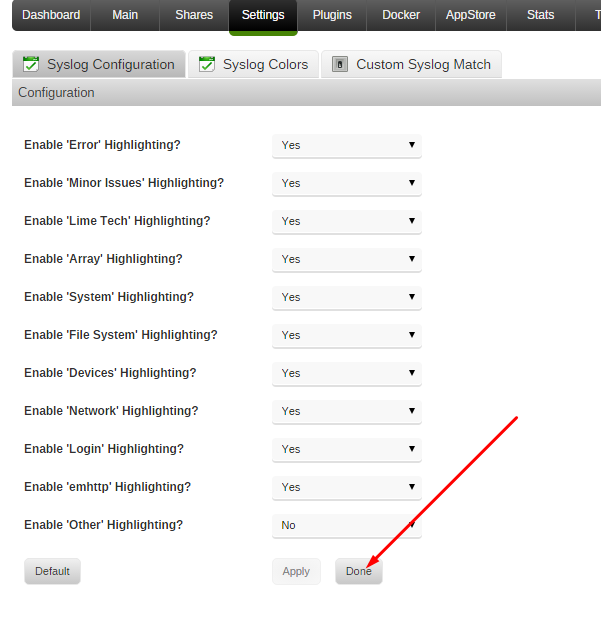
Gentle reminder that the "done" button is still broken. It should send the user to http://tower/Settings. Also there needs to be a scroll bar across the bottom of the log window/frame to be able to read long lines without maximizing the browser The Done button works for me. The slider is there, you just have to scroll down to see it. I'm not sure I can do much about that. My bad. The scroll bar is there. And now the Done works fine. Chrome oddness.
-
Gentle reminder that the "done" button is still broken. It should send the user to http://tower/Settings. Also there needs to be a scroll bar across the bottom of the log window/frame to be able to read long lines without maximizing the browser
-
After applying default colors scheme on this page http://tower/Utilities/SyslogSettings,'>http://tower/Utilities/SyslogSettings, I pressed done and ended up at blank screen with this address. http://tower/Utilities
-
Thise are comment lines. I've made it so those are skipped. Cool. I was going to post the false positive BLUE lines but they too are comment lines and figured you might go this route for filtering.
-
false positive red entries Dec 17 14:30:48 Tower logger: # calls and dumping the information to the standard error. System Dec 17 14:30:50 Tower logger: # is reliable, that is any non-fatal error is ignored and the operation Dec 17 14:31:14 Tower logger: # supported by the Linux kernel. Apple provides mkfs and fsck for
-
This is great. I was able to spot a cache_dirs error I had missed with the plain logs (folder included that no longer exists). I see some false positive RED formatting logging the install of Nerdpack on boot (innocuous word matches me thinks).
-
That's a good idea! I know that my ISP has oversold the fibre in my area, but my downloads are still plenty good enough - I'd be interested to see how upload speeds fluctuate though. There is a docker that does that SmokePing http://lime-technology.com/forum/index.php?topic=43602.msg416088#msg416088
-
Updating all the plug-ins today and then went to reboot so peeked at the console and found this error regarding the ssd-trim plugin install/update. chmod missing operand after '644'
-
I have removed the mapping to /tmp and returned transcoding to default on the Plex server (cache drive is SSD so still speedy). Now running latest release 0.9.14.4 without any problems. I had 1 movie that would always fail to start no matter what version I ran (even known good older ones) ever since the version that initially broke transcoding in RAM. Now it plays fine. They have borked sumthin' in there.
-
That is correct.
-
login as: root root@tower's password: Linux 4.1.7-unRAID. root@Tower:~# php -r "$(curl -skL https://gist.githubusercontent.com/gfjardim/c81fba928425e7a1dfac/raw/)" Disks: + /dev/sdl => /dev/disk/by-id/scsi-SATA_ST6000DM001-1XY_Z4D23K9N + /dev/sdm => /dev/disk/by-id/scsi-SATA_WDC_WD20EZRX-00_WD-WMC4M2038014 + /dev/sdi => /dev/disk/by-id/scsi-SATA_WDC_WD60EFRX-68_WD-WX51D6402971 + /dev/sdj => /dev/disk/by-id/scsi-SATA_WDC_WD20EZRX-00_WD-WMC1T0154634 + /dev/sdh => /dev/disk/by-id/scsi-SATA_ST8000AS0002-1N_Z8406M0L + /dev/sdk => /dev/disk/by-id/scsi-SATA_WDC_WD20EZRX-00_WD-WCC300673196 + /dev/sdn => /dev/disk/by-id/scsi-SATA_Samsung_SSD_840S1DBNEAD812507A + /dev/sdg => /dev/disk/by-id/scsi-MD04ACA500_24R6K00RFS9A + /dev/sdf => /dev/disk/by-id/scsi-ST2000DM001-1CH1_Z1F5DKBF + /dev/sde => /dev/disk/by-id/scsi-ST4000DM000-1F21_Z3024WMZ + /dev/sdc => /dev/disk/by-id/scsi-ST4000DM000-1F21_Z3024WY8 + /dev/sdd => /dev/disk/by-id/scsi-ST6000DX000-1H21_Z4D04L2A + /dev/sdb => /dev/disk/by-id/scsi-ARC-1231-RAID00_0000002273521567 + /dev/sdm => /dev/disk/by-id/ata-WDC_WD20EZRX-00D8PB0_WD-WMC4M2038014 + /dev/sdk => /dev/disk/by-id/ata-WDC_WD20EZRX-00DC0B0_WD-WCC300673196 + /dev/sdj => /dev/disk/by-id/ata-WDC_WD20EZRX-00DC0B0_WD-WMC1T0154634 + /dev/sdi => /dev/disk/by-id/ata-WDC_WD60EFRX-68MYMN1_WD-WX51D6402971 + /dev/sdl => /dev/disk/by-id/ata-ST6000DM001-1XY17Z_Z4D23K9N + /dev/sdh => /dev/disk/by-id/ata-ST8000AS0002-1NA17Z_Z8406M0L + /dev/sdn => /dev/disk/by-id/ata-Samsung_SSD_840_EVO_250GB_S1DBNEAD812507A + /dev/sda => /dev/disk/by-id/usb-SanDisk_U3_Cruzer_Micro_1031811B45D2F146-0:0 unRAID Serials: + ARC-1231-RAID00_0000002273521567 + MD04ACA500_24R6K00RFS9A + ST6000DX000-1H21_Z4D04L2A + WDC_WD60EFRX-68MYMN1_WD-WX51D6402971 + ST6000DM001-1XY17Z_Z4D23K9N + WDC_WD20EZRX-00DC0B0_WD-WMC1T0154634 + WDC_WD20EZRX-00D8PB0_WD-WMC4M2038014 + WDC_WD20EZRX-00DC0B0_WD-WCC300673196 + ST8000AS0002-1NA17Z_Z8406M0L + ST4000DM000-1F21_Z3024WY8 + ST4000DM000-1F21_Z3024WMZ + ST2000DM001-1CH1_Z1F5DKBF + Samsung_SSD_840_EVO_250GB_S1DBNEAD812507A + /dev/disk/by-id/usb-SanDisk_U3_Cruzer_Micro_1031811B45D2F146-0:0-part1 + /dev/disk/by-id/usb-SanDisk_U3_Cruzer_Micro_1031811B45D2F146-0:0 unRAID Disks: + /dev/disk/by-id/scsi-ARC-1231-RAID00_0000002273521567 + /dev/disk/by-id/scsi-MD04ACA500_24R6K00RFS9A + /dev/disk/by-id/scsi-ST6000DX000-1H21_Z4D04L2A + /dev/disk/by-id/ata-WDC_WD60EFRX-68MYMN1_WD-WX51D6402971 + /dev/disk/by-id/ata-ST6000DM001-1XY17Z_Z4D23K9N + /dev/disk/by-id/ata-WDC_WD20EZRX-00DC0B0_WD-WMC1T0154634 + /dev/disk/by-id/ata-WDC_WD20EZRX-00D8PB0_WD-WMC4M2038014 + /dev/disk/by-id/ata-WDC_WD20EZRX-00DC0B0_WD-WCC300673196 + /dev/disk/by-id/ata-ST8000AS0002-1NA17Z_Z8406M0L + /dev/disk/by-id/scsi-ST4000DM000-1F21_Z3024WY8 + /dev/disk/by-id/scsi-ST4000DM000-1F21_Z3024WMZ + /dev/disk/by-id/scsi-ST2000DM001-1CH1_Z1F5DKBF + /dev/disk/by-id/ata-Samsung_SSD_840_EVO_250GB_S1DBNEAD812507A + /dev/disk/by-id/usb-SanDisk_U3_Cruzer_Micro_1031811B45D2F146-0:0 Unassigned Disks: + Array ( ) root@Tower:~#


