interwebtech
Members
-
Joined
-
Last visited
Everything posted by interwebtech
-
Not 6.1 compliant at least the webgui still can read its progress Pre-Read. 0% @ 133 MB/s (0:01:34)
-
Not working at all for me on RC6. Going to reboot and invoke from command line
-
Nice. Have it installed along side plexWatch. One advantage is plexPy has notifications
-
Turn on Help and relevant links are shown and clickable on the Notification Agents page. I had not know of this Help feature. Very cool
-
I'm using the globe variant


-
several variations on a theme of data center Adjustable opacity on the status box top left might be beneficial for darker images.


-
Updated since I doubled RAM and removed slower EARS drives from array. Interesting to note it took me back to values I got from the first time I ran it but added 38 MB/s to speed. Tunables Report from unRAID Tunables Tester v2.2 by Pauven NOTE: Use the smallest set of values that produce good results. Larger values increase server memory use, and may cause stability issues with unRAID, especially if you have any add-ons or plug-ins installed. Test | num_stripes | write_limit | sync_window | Speed --- FULLY AUTOMATIC TEST PASS 1 (Rough - 20 Sample Points @ 3min Duration)--- 1 | 1408 | 768 | 512 | 97.2 MB/s 2 | 1536 | 768 | 640 | 104.4 MB/s 3 | 1664 | 768 | 768 | 104.0 MB/s 4 | 1920 | 896 | 896 | 104.7 MB/s 5 | 2176 | 1024 | 1024 | 103.9 MB/s 6 | 2560 | 1152 | 1152 | 97.5 MB/s 7 | 2816 | 1280 | 1280 | 100.4 MB/s 8 | 3072 | 1408 | 1408 | 102.6 MB/s 9 | 3328 | 1536 | 1536 | 99.6 MB/s 10 | 3584 | 1664 | 1664 | 103.1 MB/s 11 | 3968 | 1792 | 1792 | 102.5 MB/s 12 | 4224 | 1920 | 1920 | 102.9 MB/s 13 | 4480 | 2048 | 2048 | 100.7 MB/s 14 | 4736 | 2176 | 2176 | 102.1 MB/s 15 | 5120 | 2304 | 2304 | 102.0 MB/s 16 | 5376 | 2432 | 2432 | 102.2 MB/s 17 | 5632 | 2560 | 2560 | 101.5 MB/s 18 | 5888 | 2688 | 2688 | 102.1 MB/s 19 | 6144 | 2816 | 2816 | 102.2 MB/s 20 | 6528 | 2944 | 2944 | 101.4 MB/s --- Targeting Fastest Result of md_sync_window 896 bytes for Final Pass --- --- FULLY AUTOMATIC TEST PASS 2 (Final - 16 Sample Points @ 4min Duration)--- 21 | 1720 | 776 | 776 | 91.6 MB/s 22 | 1736 | 784 | 784 | 90.6 MB/s 23 | 1760 | 792 | 792 | 90.6 MB/s 24 | 1776 | 800 | 800 | 90.3 MB/s 25 | 1792 | 808 | 808 | 92.7 MB/s 26 | 1808 | 816 | 816 | 91.1 MB/s 27 | 1824 | 824 | 824 | 93.2 MB/s 28 | 1848 | 832 | 832 | 91.9 MB/s 29 | 1864 | 840 | 840 | 92.2 MB/s 30 | 1880 | 848 | 848 | 91.7 MB/s 31 | 1896 | 856 | 856 | 91.8 MB/s 32 | 1920 | 864 | 864 | 92.6 MB/s 33 | 1936 | 872 | 872 | 92.6 MB/s 34 | 1952 | 880 | 880 | 91.3 MB/s 35 | 1968 | 888 | 888 | 92.3 MB/s 36 | 1984 | 896 | 896 | 94.6 MB/s Completed: 2 Hrs 11 Min 13 Sec. Best Bang for the Buck: Test 2 with a speed of 104.4 MB/s Tunable (md_num_stripes): 1536 Tunable (md_write_limit): 768 Tunable (md_sync_window): 640 These settings will consume 66MB of RAM on your hardware. Unthrottled values for your server came from Test 36 with a speed of 94.6 MB/s Tunable (md_num_stripes): 1984 Tunable (md_write_limit): 896 Tunable (md_sync_window): 896 These settings will consume 85MB of RAM on your hardware. This is 25MB more than your current utilization of 60MB. NOTE: Adding additional drives will increase memory consumption. In unRAID, go to Settings > Disk Settings to set your chosen parameter values.
-
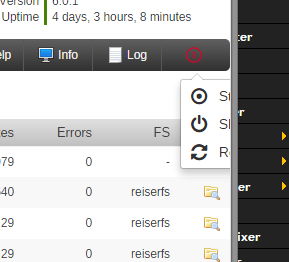
Can you tweak CSS to have the option list drop to the left? Its off screen in Chrome Version 44.0.2403.130. See screenie.
-
I gave up. Thanks for looking.
-
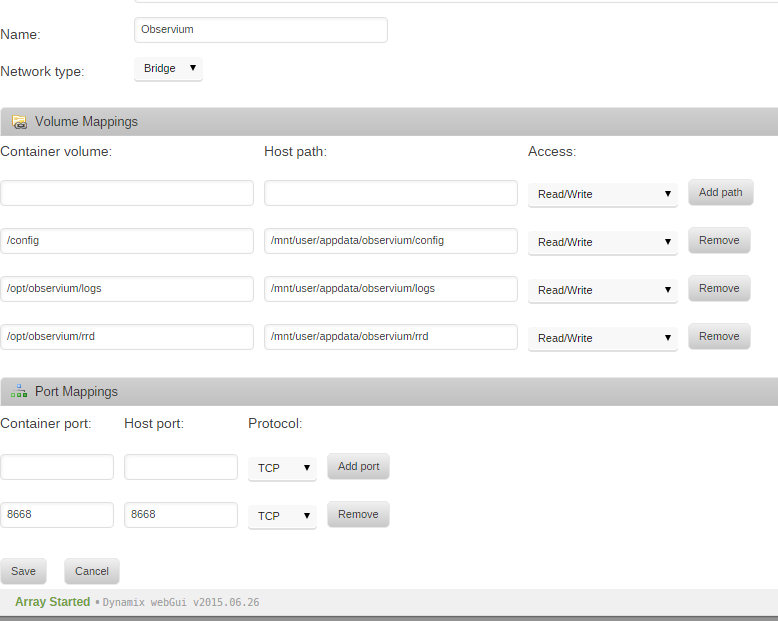
Try using the IP address instead? Adding host 192.168.1.8 community public port 161 Could not resolve 192.168.1.8.
-
I can't seem to add unRaid as a device. Using those settings I get: Adding host Tower community public port 161 Could not resolve Tower.
-
They are enabled but no idea if I am actually using them. Voted Yes but meaning Dunno.
-
perfect thanks
-
PS Icon view is really nice. Me likey.
-
Thought about that, started doing it, then remembered that you can't hover over anything on a mobile device. Hence the pop up. Can you switch to "finger clicky" cursor when over the icon/image if there is a popup available? I found it entirely by accident.
-
missing or corrupt image. http://tower/state/plugins/community.applications/icons/hernandito-hernando-apachephp-docker-latest.png
-
Don't recall if it shows an icon or not but what about array is in "maintenance mode"?
-
-
Thanks for doing this. Now I just need an excuse for a new disk
-
way cool. no disks to test on . Can we get "faster" preclear as an option?
-
New (to me) ARC-1231ML RAID controller (JBOD mode) with nice performance bump over the AOC-SASLP-MV8 it replaced. Tunables Report from unRAID Tunables Tester v2.2 by Pauven NOTE: Use the smallest set of values that produce good results. Larger values increase server memory use, and may cause stability issues with unRAID, especially if you have any add-ons or plug-ins installed. Test | num_stripes | write_limit | sync_window | Speed --- FULLY AUTOMATIC TEST PASS 1 (Rough - 20 Sample Points @ 3min Duration)--- 1 | 1408 | 768 | 512 | 98.8 MB/s 2 | 1536 | 768 | 640 | 93.9 MB/s 3 | 1664 | 768 | 768 | 75.1 MB/s 4 | 1920 | 896 | 896 | 72.6 MB/s 5 | 2176 | 1024 | 1024 | 73.0 MB/s 6 | 2560 | 1152 | 1152 | 72.9 MB/s 7 | 2816 | 1280 | 1280 | 72.9 MB/s 8 | 3072 | 1408 | 1408 | 74.2 MB/s 9 | 3328 | 1536 | 1536 | 73.3 MB/s 10 | 3584 | 1664 | 1664 | 72.6 MB/s 11 | 3968 | 1792 | 1792 | 73.6 MB/s 12 | 4224 | 1920 | 1920 | 72.6 MB/s 13 | 4480 | 2048 | 2048 | 72.8 MB/s 14 | 4736 | 2176 | 2176 | 71.6 MB/s 15 | 5120 | 2304 | 2304 | 73.0 MB/s 16 | 5376 | 2432 | 2432 | 71.7 MB/s 17 | 5632 | 2560 | 2560 | 73.0 MB/s 18 | 5888 | 2688 | 2688 | 74.3 MB/s 19 | 6144 | 2816 | 2816 | 73.1 MB/s 20 | 6528 | 2944 | 2944 | 71.6 MB/s --- Targeting Fastest Result of md_sync_window 512 bytes for Special Pass --- --- FULLY AUTOMATIC TEST PASS 1b (Rough - 4 Sample Points @ 3min Duration)--- 21 | 896 | 768 | 128 | 57.0 MB/s 22 | 1024 | 768 | 256 | 74.0 MB/s 23 | 1280 | 768 | 384 | 85.5 MB/s 24 | 1408 | 768 | 512 | 90.5 MB/s --- Targeting Fastest Result of md_sync_window 512 bytes for Final Pass --- --- FULLY AUTOMATIC TEST PASS 2 (Final - 16 Sample Points @ 4min Duration)--- 25 | 1288 | 768 | 392 | 86.1 MB/s 26 | 1296 | 768 | 400 | 85.6 MB/s 27 | 1304 | 768 | 408 | 86.6 MB/s 28 | 1312 | 768 | 416 | 87.1 MB/s 29 | 1320 | 768 | 424 | 87.5 MB/s 30 | 1328 | 768 | 432 | 88.3 MB/s 31 | 1336 | 768 | 440 | 88.3 MB/s 32 | 1344 | 768 | 448 | 88.6 MB/s 33 | 1360 | 768 | 456 | 88.8 MB/s 34 | 1368 | 768 | 464 | 89.2 MB/s 35 | 1376 | 768 | 472 | 89.4 MB/s 36 | 1384 | 768 | 480 | 89.4 MB/s 37 | 1392 | 768 | 488 | 90.2 MB/s 38 | 1400 | 768 | 496 | 89.9 MB/s 39 | 1408 | 768 | 504 | 90.7 MB/s 40 | 1416 | 768 | 512 | 90.9 MB/s Completed: 2 Hrs 24 Min 48 Sec. Best Bang for the Buck: Test 1 with a speed of 98.8 MB/s Tunable (md_num_stripes): 1408 Tunable (md_write_limit): 768 Tunable (md_sync_window): 512 These settings will consume 71MB of RAM on your hardware. Unthrottled values for your server came from Test 40 with a speed of 90.9 MB/s Tunable (md_num_stripes): 1416 Tunable (md_write_limit): 768 Tunable (md_sync_window): 512 These settings will consume 71MB of RAM on your hardware. This is -7MB less than your current utilization of 78MB. NOTE: Adding additional drives will increase memory consumption. In unRAID, go to Settings > Disk Settings to set your chosen parameter values.
-
I applied the Best Bang for the Buck settings. I am appalled at my disk speeds tho. Tunables Report from unRAID Tunables Tester v2.2 by Pauven NOTE: Use the smallest set of values that produce good results. Larger values increase server memory use, and may cause stability issues with unRAID, especially if you have any add-ons or plug-ins installed. Test | num_stripes | write_limit | sync_window | Speed --- FULLY AUTOMATIC TEST PASS 1 (Rough - 20 Sample Points @ 3min Duration)--- 1 | 1408 | 768 | 512 | 65.8 MB/s 2 | 1536 | 768 | 640 | 66.6 MB/s 3 | 1664 | 768 | 768 | 66.8 MB/s 4 | 1920 | 896 | 896 | 66.9 MB/s 5 | 2176 | 1024 | 1024 | 67.2 MB/s 6 | 2560 | 1152 | 1152 | 67.8 MB/s 7 | 2816 | 1280 | 1280 | 68.8 MB/s 8 | 3072 | 1408 | 1408 | 69.0 MB/s 9 | 3328 | 1536 | 1536 | 68.5 MB/s 10 | 3584 | 1664 | 1664 | 69.1 MB/s 11 | 3968 | 1792 | 1792 | 68.9 MB/s 12 | 4224 | 1920 | 1920 | 69.1 MB/s 13 | 4480 | 2048 | 2048 | 69.0 MB/s 14 | 4736 | 2176 | 2176 | 69.1 MB/s 15 | 5120 | 2304 | 2304 | 69.0 MB/s 16 | 5376 | 2432 | 2432 | 68.6 MB/s 17 | 5632 | 2560 | 2560 | 68.9 MB/s 18 | 5888 | 2688 | 2688 | 69.3 MB/s 19 | 6144 | 2816 | 2816 | 69.4 MB/s 20 | 6528 | 2944 | 2944 | 69.0 MB/s --- Targeting Fastest Result of md_sync_window 2816 bytes for Final Pass --- --- FULLY AUTOMATIC TEST PASS 2 (Final - 16 Sample Points @ 4min Duration)--- 21 | 5984 | 2696 | 2696 | 69.0 MB/s 22 | 6008 | 2704 | 2704 | 69.0 MB/s 23 | 6024 | 2712 | 2712 | 69.3 MB/s 24 | 6040 | 2720 | 2720 | 69.0 MB/s 25 | 6056 | 2728 | 2728 | 69.0 MB/s 26 | 6080 | 2736 | 2736 | 68.9 MB/s 27 | 6096 | 2744 | 2744 | 69.1 MB/s 28 | 6112 | 2752 | 2752 | 69.0 MB/s 29 | 6128 | 2760 | 2760 | 69.2 MB/s 30 | 6144 | 2768 | 2768 | 68.6 MB/s 31 | 6168 | 2776 | 2776 | 69.1 MB/s 32 | 6184 | 2784 | 2784 | 69.1 MB/s 33 | 6200 | 2792 | 2792 | 68.8 MB/s 34 | 6216 | 2800 | 2800 | 68.8 MB/s 35 | 6240 | 2808 | 2808 | 69.3 MB/s 36 | 6256 | 2816 | 2816 | 68.9 MB/s Completed: 2 Hrs 14 Min 4 Sec. Best Bang for the Buck: Test 2 with a speed of 66.6 MB/s Tunable (md_num_stripes): 1536 Tunable (md_write_limit): 768 Tunable (md_sync_window): 640 These settings will consume 78MB of RAM on your hardware. Unthrottled values for your server came from Test 23 with a speed of 69.3 MB/s Tunable (md_num_stripes): 6024 Tunable (md_write_limit): 2712 Tunable (md_sync_window): 2712 These settings will consume 305MB of RAM on your hardware. This is 240MB more than your current utilization of 65MB. NOTE: Adding additional drives will increase memory consumption. In unRAID, go to Settings > Disk Settings to set your chosen parameter values.
-
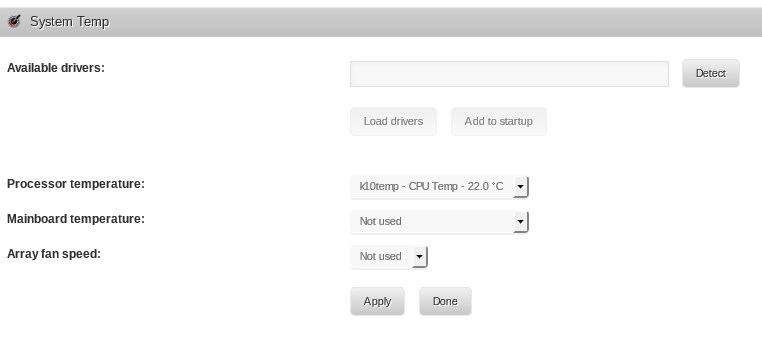
Your drivers are k10temp and fam15h_power. okay now what do I do with that information? I tried putting fam15h_power the "available drivers" box and hit Detect and nothing happened as far as I can tell.
-
Try this and post the output: wget http://www.lm-sensors.org/svn/lm-sensors/trunk/prog/detect/sensors-detect -O /tmp/sensors-detect yes ''|perl /tmp/sensors-detect 2>&1|grep -Po "^Driver.{2}\K[^\']*" from telnet: Tower login: root Password: Linux 3.17.4-unRAID. Last login: Sun Jan 18 20:04:32 -0800 2015 on /dev/pts/0 from Toshiba.home. root@Tower:~# wget http://www.lm-sensors.org/svn/lm-sensors/trunk/prog/detect/se'>http://www.lm-sensors.org/svn/lm-sensors/trunk/prog/detect/se nsors-detect -O /tmp/sensors-detect --2015-02-04 15:14:15-- http://www.lm-sensors.org/svn/lm-sensors/trunk/prog/det ect/sensors-detect Resolving www.lm-sensors.org (www.lm-sensors.org)... 160.45.254.26 Connecting to www.lm-sensors.org (www.lm-sensors.org)|160.45.254.26|:80... conne cted. HTTP request sent, awaiting response... 200 OK Length: 209836 (205K) [text/plain] Saving to: ?Çÿ/tmp/sensors-detect?ÇÖ 100%[======================================>] 209,836 149KB/s in 1.4s 2015-02-04 15:14:17 (149 KB/s) - ?Çÿ/tmp/sensors-detect?ÇÖ saved [209836/209836] root@Tower:~# yes ''|perl /tmp/sensors-detect 2>&1|grep -Po "^Driver.{2}\K[^\']* " k10temp to-be-written fam15h_power root@Tower:~#
-
I click detect and nothing happens. Page flashed briefly and then just sits there. How long should it take?. Meanwhile the only sensor it has set (from previous versions) is the CPU. All fields other than "Available drivers:" text box are disabled.