





kaiguy
Members
-
Joined
-
Last visited
Everything posted by kaiguy
-
Worked like a charm! Thanks for the follow up and solution.
-
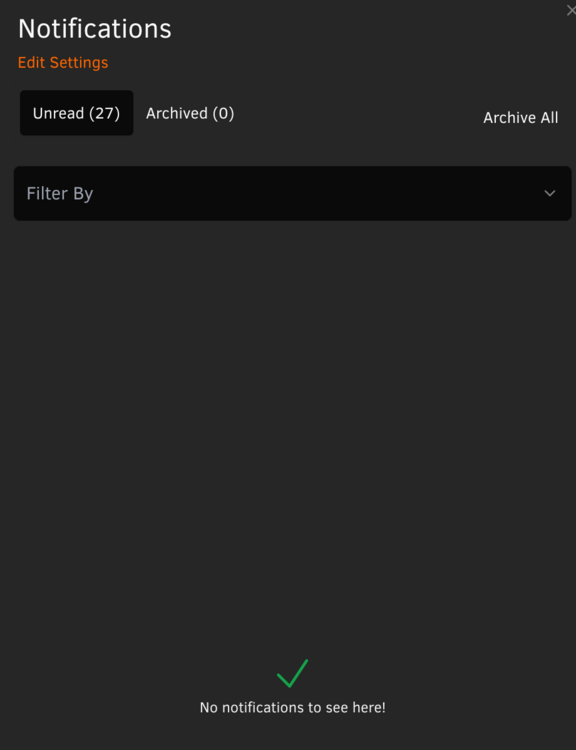
Hello! Just installed 2025.02.06.2108 and I see that the notification bell is showing notifications, there is an unread count of 27, but no notifications are displayed. Any way to clear this out? I tried all filter options, and in every case nothing is displayed. Thanks!
-
Upgraded to 7.0 stable from 6.12.14 without issue. Most tedious part was reinstalling all the docker containers after switching to overlay2. Might help others--when I deleted the existing docker folder, I didn't realize that would nuke my docker network. After a few reinstalls of containers I noticed they had no network assigned. Once I created the same docker network name, all the containers from that point on were assigned to the correct (previously-assigned) docker network. Really impressed how smooth this went overall! Great job, unraid team!
-
Just FYI... per William, BIOS 2.40 does support iGPU Multi-Monitor.
-
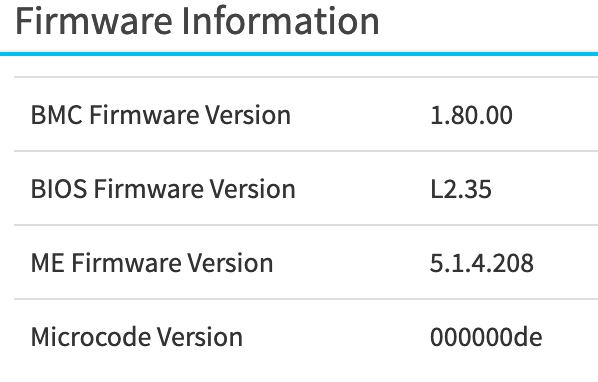
Looks like there's also a new 2.40 BIOS (I've been running the unreleased L2.35). My server seems to be so sensitive that I really don't want to take the jump to test out either of these updates.
-
This thread hasn't had much activity in a while, but I started getting frequent IPMI ECC errors for the past month. Curious if anyone else has run into this and has any suggestions. Sensor: DRAM ECC ErrorB2 Description: Correctable ECC - Asserted Pretty sure B2 indicates the memory slot (2nd from the top). I think I'll try swapping B1 and B2 and see if the IPMI error changes to B1. If not, this would be an indication that the B2 slot is going bad, right?
-
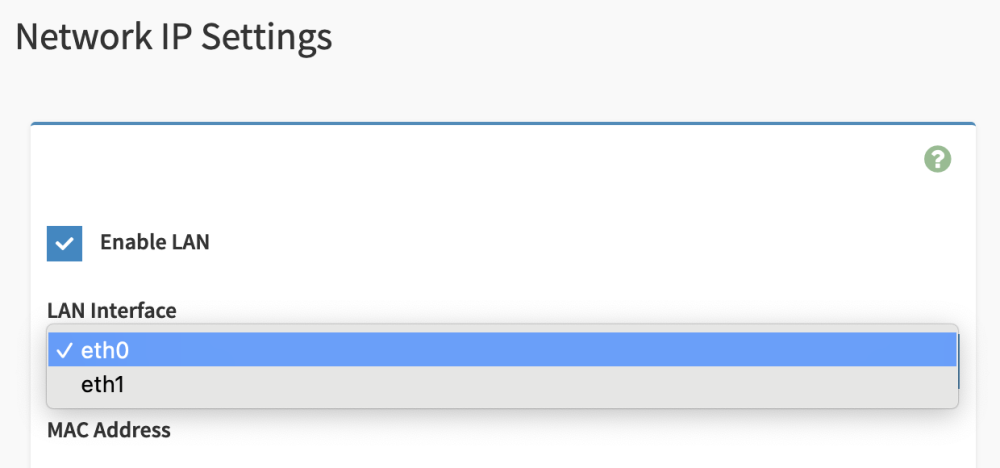
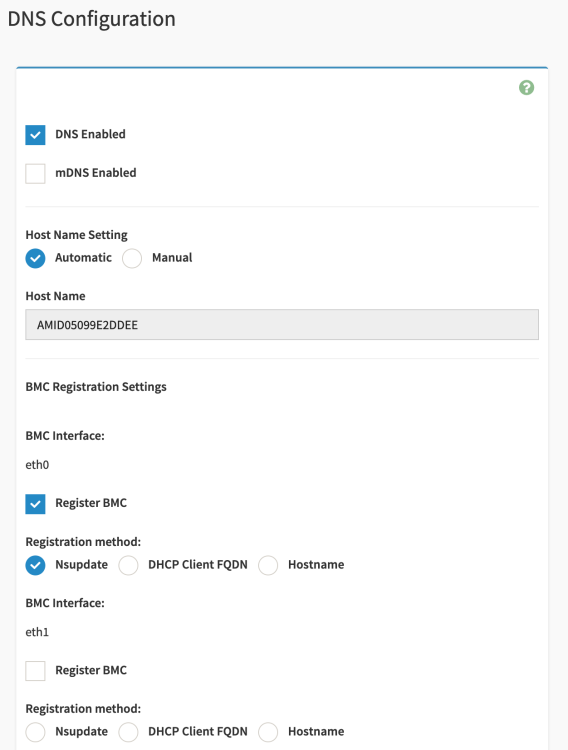
Hmm... this is a little odd. So I ended up successfully able to run the command locally on my unraid server (without specifying an IP address). I no longer see bond0 at all, but I also still don't have the bond configuration option. It's almost like the command just killed the bond without exposing that option. If I force refresh the network settings screen, it does end up showing the bond conf option before logging me out. When I log back in its not visible. What I do have is now the ability to choose enabling the LAN on eth0 or eth1 under Network IP settings, and also the ability to register eth0 and/or eth1 to the BMC. Maybe I'm just misunderstanding that I thought I would see 3 eth options (the 2 LAN and 1 IPMI LAN). Edit: Ok, I got the bonding configuration to show up. Required me to do a BMC cold reset in the settings. Ultimately, though, something is just not working for me. No matter what, I can't seem to get the board to utilize the IPMI port. Even with bonding disabled it's always attaching the IPMI mac address to either eth0 or eth1. I wonder if its related to this bug, but I'm not feeling confident or motivated enough to do anything about it. Oh well.
-
Thank you both, @Hoopster and @JimmyGerms. I tried the command locally on my server but as Hoopster experienced it didn't work for me. I don't have a secondary unraid server, so I am going to spin up a VM on a different machine, install ipmitool, and give it shot. I'll edit this post with my results.
-
Thanks, @JimmyGerms. I am on the same as well. I wonder if I need to plug a cable into LAN2 for the option to show up? Next step will probably be pulling power from the server to soft-reset the BMC. Weird.
-
Rehashing the IPMI bonding question earlier on this page... Although I have a network cable plugged into both the IPMI LAN and LAN1 (LAN2 is unused), I notice that my new Unifi switch is associating both MAC addresses with a single port. So I figured I'd just go and break the bonding, but I don't seem to have the "Network Bond Configuration" option in the GUI. I also didn't see anything in the BIOS. Any thoughts?

-
Been running the last few rc's without issue, and updated to stable tonight just fine. Thanks for all of the work that went into this huge release!
-
Working great so far. Thanks @Taddeusz! Supper happy I can now use ed25519 keys.
-
Thanks for the heads up, @Hoopster. I've never ran into that before, but I have had an intermittent issue where trying to login to the HTML5 IPMI gui would just keep going back to the login screen. The only way to correct it was to shut down and pull the power from the server, but I might try reflashing the BMC next time I encounter it.
-
Closing the loop. Since disabling turbo boost (once again), I have not encountered another CPU_CATERR crash, even with some pretty intensive CPU workloads.
-
Thanks for sharing this. Using your script (with the minor edit that @ICDeadPpl highlighted--it was erroring out for me as well without adding the backslash). What is your recommendation, @mgutt, for identifying what is making /var/docker/overlay2 writes? I'm getting pretty consistent writes still even after incorporating the script.
-
For whatever reason, the QR code doesn't seem to work with my Bitwarden app. Never ran into that problem before (it just won't scan). I just tried setting up TOTP on another site and it worked just fine. Odd.
-
1.5.0 has dropped.
-
I use Adguard Home, but my unraid server specifically bypasses Adguard for DNS. My firewall does utilize blocklists, but only for ingress. So short answer is, no.
-
Might be too early to fully confirm, but disabling Turbo Boost has helped my server survive a few more nights without a CPU_CATERR. I'll stick with you, @Hoopster, and keep Turbo Boost disabled from now on. Thanks for your input.
-
Welp, started getting unraid lockups due to CPU_CATRR again after over a year of stability. No changes to my unraid or server config aside from swapping in some larger disks over the past couple of weeks. It's now happened twice in the last 4 days, the most recent one during a data rebuild. The day before the first recent CPU_CATRR I enabled Plex's new credit detection, which I believe is fairly CPU intensive. Considering the hangs have occured during the time where Plex is doing its maintenance tasks (between midnight and 4am), I'm fairly certain this is the catalyst, and makes me worry my CPU cooling is just insufficient for max load. I'm going to keep the Plex container shut down until my rebuild is complete, then I might try disabling Turbo Boost (as I seem to recall that helped back in late 2021 when I was getting it fairly frequently, but it's been enabled for quite some time now). Bummer.
-
Thanks, @ljm42. As I mentioned before, the unraid-api restart does show as connected for a bit, but the API_KEY under unraid-api status continues to show as invalid (after 5 seconds, 30 seconds, 10 minutes, always). Is that expected behavior? Logging out and back in does not correct the API_KEY: invalid issue.
-
I don’t think that’s the problem on my end, as I don’t even want to utilize unraid’s remote access. I think it’s related to the API key as showing invalid.
-
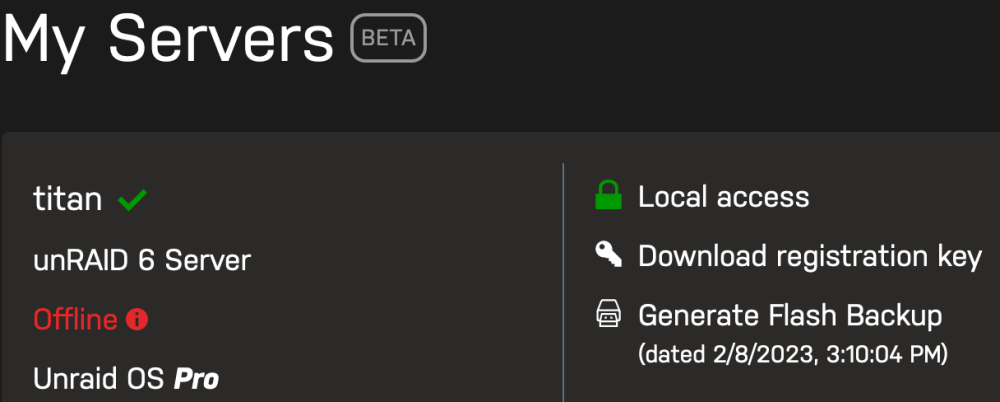
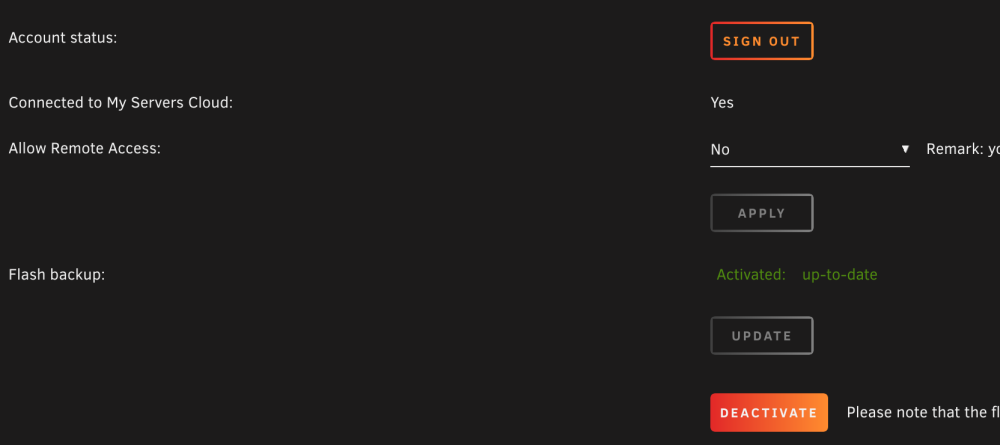
I recently switched firewalls from pfsense to OPNsense, so I absolutely understand that I may have mucked up some configuration. But I can't seem to track this down so I figured I might as well try to eliminate unraid/My Servers as the culprit. I setup my firewall rules pretty much exactly as before, and my topology hasn't changed. Any thoughts? When I access https://forums.unraid.net/my-servers/ , my server shows as offline. I can log out and log back in on the plugin, and it will show as online for a period of time. Not doing it this time though to show the following... This is what the My Servers section of Management Access page looks like on my server: And the API report: <-----UNRAID-API-REPORT-----> SERVER_NAME: titan ENVIRONMENT: production UNRAID_VERSION: 6.11.5 UNRAID_API_VERSION: 2.55.1 UNRAID_API_STATUS: running API_KEY: invalid MY_SERVERS: authenticated MY_SERVERS_USERNAME: kaiguy CLOUD: STATUS: [error] MINI-GRAPH: STATUS: [DISCONNECTED] ERROR: [API Disconnected] SERVERS: ONLINE: OFFLINE: ALLOWED_ORIGINS: </----UNRAID-API-REPORT-----> And output of update DNS: root@titan:~# php /usr/local/emhttp/plugins/dynamix/include/UpdateDNS.php -v (Output is anonymized, use '-vv' to see full details) Unraid OS 6.11.5 with My Servers plugin version 2023.01.23.1223 ✅ Signed in to Unraid.net as kaiguy Use SSL is auto ✅ Rebind protection is disabled for myunraid.net Local Access url: https://192-168-0-10.hash.myunraid.net:8443 ✅ 192-168-0-10.hash.myunraid.net resolves to 192.168.0.10 Request: { "keyfile": "[redacted]", "plgversion": "2023.01.23.1223", "internalhostname": "*.hash.myunraid.net", "internalport": "8443", "internalprotocol": "https", "remoteaccess": "no", "servercomment": "unRAID 6 Server", "servername": "titan", "internalip": "192.168.0.10", "unraidreport": "{\"os\":{\"serverName\":\"titan\",\"version\":\"6.11.5\"},\"api\":{\"version\":\"2.55.1\",\"status\":\"running\",\"environment\":\"production\",\"nodeVersion\":\"v18.5.0\"},\"apiKey\":\"invalid\",\"myServers\":{\"status\":\"authenticated\",\"myServersUsername\":\"kaiguy\"},\"minigraph\":{\"status\":\"DISCONNECTED\",\"error\":\"API Disconnected\"},\"cloud\":{\"status\":\"error\"},\"flashbackup\":{\"activated\":\"yes\",\"error\":\"no\"}}" } Response (HTTP 200): [] success Attaching diagnostics. Would appreciate any feedback. Thanks! Edit: When I run unraid-api restart, the My Servers page will show as online again but the api report will still display the API_KEY as invalid. titan-diagnostics-20230209-1036.zip
-
For the first time the other day I noticed that Community Applications has the ability to mass update plugins/containers directly from the Apps tab. Cool new(?) feature! I'm not sure if this is expected behavior, but when I went ahead and kicked off the update from within the Apps tab, all updated non-running containers with auto-start disabled ended up being started after the update. This is not the same behavior if I would have updated from the Docker tab (non-running containers would remain non-running). Just wanted to report this observation should the desire be for the behavior to be aligned.
-
Appreciate sharing this fix. I was getting this with one container, then a few days later another, and finally I had 5 containers with this issue. I was pulling my hair out thinking I had some issue with my DNS blocklists.






