





NotYetRated
Members
-
Joined
-
Last visited
Everything posted by NotYetRated
-
Ever solve this? Same board, same issues for me. Not wanting to occupy a PCIe space with a NIC if I don't have to....
-
Getting continual hard locks, have to power cycle. Nothing on screen when it does it. Remove my 2.5g marvel card to be safe and still getting them about every 6-24 hours. Any assistance appreciated. bigbang-diagnostics-20250102-2227.zip
-
I should note, I have a Realtek 2.5g 8125 card. Has been in there a long while with no known issues, however I have read another hard-locking post describing the Realteks as a potential issue point. I have installed the plugin/drivers for this card and will see what that does. If I have additional locks, Ill remove it and see if the locks go away.
-
haha doh, sorry. Had it on, thought it auto-populated in the diag downaload. See attached for last 2. syslog-192.168.2.13.log syslog-192.168.2.13.log.1
-
Hello, I am getting some continual hard locking issues where the server becomes unresponsive. I have a headless install so am not able to see if anything pops up in log prior to the hard lock. Computer stays on, but I cant access Unraid via browser, SSH or any apps on unraid. Have to hard power-off and reboot. Happens about every other day. I had a weird error in my USB drive and replaced it, thinking that was the problem, but no dice, 2 crashes since then. Diags are attached. I have not made any configuration or hardware changes that I can think of which would have triggered this, and the system has been running rock-solid for a few years prior to these issues. Side note, I had reinstalled a graphics card and spun up an existing but long-unused VM for some tinkering. I thought that Grpahics card passthrough was the source of my issues, so took the card back out, but still crashes. I had 1 or 2 prior to the card install that were early enough in my issues that I hadn't really thought much of it.... Really appreciate anyones extra set of eyes to maybe help me track down the source of this issue. bigbang-diagnostics-20240701-2101.zip
-
Ill give that shot, thanks!
-
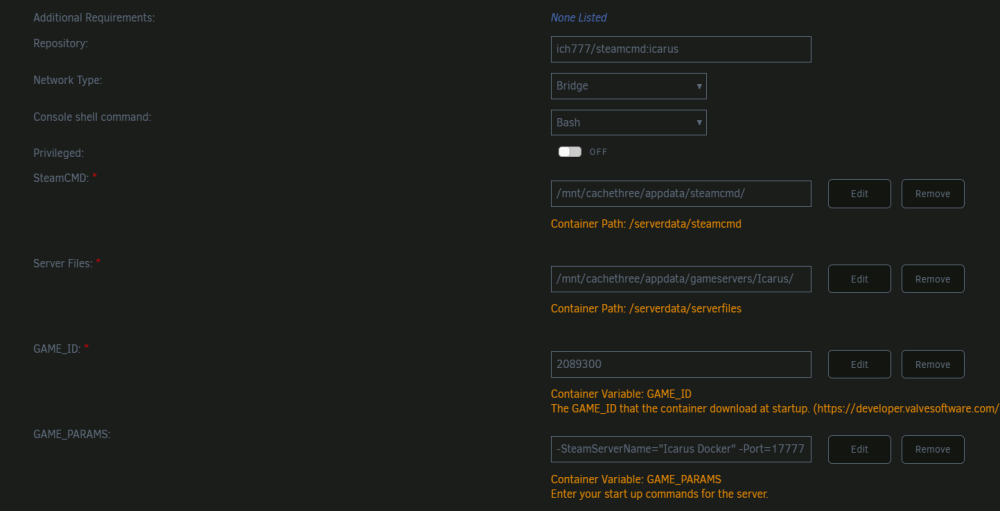
Strange. Creating a prospect on my desktop, then transferring the files to the appropriate folder on the Unraid server, I can get it to the same "Server is now empty" log entry, but cannot see the server in my local game browser. I too am on 6.12.4rc19.
-
Thoughts on where to start looking for issues on my end? I run your Valheim server without issue, but can't get Icarus to allow me to connect. Trying to join locally with server IP:PORT, not working. [2023.08.26-16.18.04:983][ 0]LogInit: Active device profile: [000000001DD14900][000000001E1CEAB0 49] WindowsServer [2023.08.26-16.18.04:983][ 0]LogInit: Profiles: [000000001DD11900][000000000B7D0040 49] Windows, [000000001DD14900][000000001E1CEAB0 49] WindowsServer, [2023.08.26-16.18.04:993][ 0]LogSerialization: Display: AllowBulkDataInIoStore: 'true' [2023.08.26-16.18.05:001][ 0]LogNetVersion: Icarus 1.0.0, NetCL: 0, EngineNetVer: 17, GameNetVer: 0 (Checksum: 1447163286) [2023.08.26-16.18.05:019][ 0]LogAudioCaptureCore: Display: No Audio Capture implementations found. Audio input will be silent. [2023.08.26-16.18.05:019][ 0]LogAudioCaptureCore: Display: No Audio Capture implementations found. Audio input will be silent. [2023.08.26-16.18.05:042][ 0]LogUObjectArray: 32317 objects as part of root set at end of initial load. [2023.08.26-16.18.05:042][ 0]LogUObjectAllocator: 6852008 out of 0 bytes used by permanent object pool. [2023.08.26-16.18.05:042][ 0]LogUObjectArray: CloseDisregardForGC: 32317/0 objects in disregard for GC pool [2023.08.26-16.18.05:051][ 0]LogGauntlet: Display: Gauntlet Initialized [2023.08.26-16.18.05:056][ 0]LogFMOD: Error: 'FMOD::Debug_Initialize(FMOD_DEBUG_LEVEL_WARNING, FMOD_DEBUG_MODE_CALLBACK, FMODLogCallback)' returned 'A command issued was not supported by this object. Possibly a plugin without certain callbacks specified.' [2023.08.26-16.18.05:065][ 0]LogFMOD: Error: 'FMOD::Debug_Initialize(flags, FMOD_DEBUG_MODE_CALLBACK, FMODLogCallback)' returned 'A command issued was not supported by this object. Possibly a plugin without certain callbacks specified.' [2023.08.26-16.18.05:065][ 0]IcarusOSSLog: SubsystemIcarus Startup! [2023.08.26-16.18.05:066][ 0]LogSubstanceCoreModule: Substance [GPU] Engine Loaded, Max Texture Size = 8192 [2023.08.26-16.18.05:068][ 0]LogShaderLibrary: Display: ShaderCodeLibraryPakFileMountedCallback: PakFile 'Z:/serverdata/serverfiles/Icarus/Content/Data/data.pak' (chunk index -1, root '../../../Icarus/Content/Data/') mounted [2023.08.26-16.18.05:068][ 0]LogShaderLibrary: Display: ShaderCodeLibraryPakFileMountedCallback: pending pak file info (ChunkID:-1 Root:../../../Icarus/Content/Data/ File:Z:/serverdata/serverfiles/Icarus/Content/Data/data.pak) [2023.08.26-16.18.05:080][ 0]EOSOSSLog: SubsystemEOS Startup! [2023.08.26-16.18.05:082][ 0]LogAndroidPermission: UAndroidPermissionCallbackProxy::GetInstance [2023.08.26-16.18.05:082][ 0]LogEngine: Initializing Engine... [2023.08.26-16.18.05:086][ 0]LogStats: UGameplayTagsManager::InitializeManager - 0.003 s [2023.08.26-16.18.05:093][ 0]LogInit: Initializing FReadOnlyCVARCache [2023.08.26-16.18.05:093][ 0]LogNetVersion: Set ProjectVersion to 2.0.0.115258-rel-NewFrontiers. Version Checksum will be recalculated on next use. [2023.08.26-16.18.05:093][ 0]LogInit: Texture streaming: Disabled [2023.08.26-16.18.05:160][ 0]LogStreaming: Error: Couldn't find file for package /Script/FunctionalTesting requested by async loading code. NameToLoad: /Script/FunctionalTesting [2023.08.26-16.18.05:161][ 0]LogStreaming: Error: Found 1 dependent packages... [2023.08.26-16.18.05:161][ 0]LogStreaming: Error: /Game/BP/Tools/CheatFunctions/CF_TakeScreenshotUI [2023.08.26-16.18.05:215][ 0]LogProperty: Error: Struct type unknown for property 'StructProperty /Game/BP/Tools/CheatFunctions/CF_TakeScreenshotUI.CF_TakeScreenshotUI_C:ExecuteUbergraph_CF_TakeScreenshotUI:K2Node_MakeStruct_AutomationScreenshotOptions'; perhaps the USTRUCT() was renamed or deleted? [2023.08.26-16.18.05:216][ 0]LogProperty: Error: Struct type unknown for property 'StructProperty /Game/BP/Tools/CheatFunctions/CF_TakeScreenshot.CF_TakeScreenshot_C:ExecuteUbergraph_CF_TakeScreenshot:K2Node_MakeStruct_AutomationScreenshotOptions'; perhaps the USTRUCT() was renamed or deleted? [2023.08.26-16.18.05:329][ 0]IcarusUtilitiesLog: Warning: D_AssetReferences was unexpectedly requested for load, was expected to load during the 'PostEngineInit' phase [2023.08.26-16.18.05:349][ 0]IcarusUtilitiesLog: Warning: D_PlayerTrackers was unexpectedly requested for load, was expected to load during the 'PostContentServer' phase [2023.08.26-16.18.05:401][ 0]LogWindows: EnumDisplayDevices: [2023.08.26-16.18.05:401][ 0]LogWindows: 0. 'Wine Adapter' (P:1 D:1) [2023.08.26-16.18.05:403][ 0]LogWindows: DebugString: GetVideoDriverDetailsInvalid PrimaryIsNotTheChoosenAdapter FoundDriverCount:0 [2023.08.26-16.18.05:405][ 0]LogOnline: OSS: Creating online subsystem instance for: Icarus [2023.08.26-16.18.05:405][ 0]IcarusOSSLog: Error: Login() failed: Empty Id [2023.08.26-16.18.05:406][ 0]LogInit: Display: Game Engine Initialized. [2023.08.26-16.18.08:107][ 0]IcarusUtilitiesLog: Warning: D_TalentTrees was unexpectedly requested for load, was expected to load during the 'PostContentServer' phase [2023.08.26-16.18.12:788][ 0]LogDLSS: FDLSSModule::StartupModule Enter [2023.08.26-16.18.12:788][ 0]LogDLSS: PluginBaseDir ../../../Engine/Plugins/Runtime/Nvidia/DLSS [2023.08.26-16.18.12:788][ 0]LogDLSS: NGXBinariesDir ../../../Engine/Plugins/Runtime/Nvidia/DLSS/Binaries/ThirdParty/Win64/ [2023.08.26-16.18.12:788][ 0]LogDLSS: GDynamicRHIName Unknown Null [2023.08.26-16.18.12:788][ 0]LogDLSS: NVIDIA NGX DLSS requires an NVIDIA RTX series graphics card [2023.08.26-16.18.12:788][ 0]LogDLSS: NVIDIA NGX DLSS supported 0 [2023.08.26-16.18.12:788][ 0]LogDLSS: FDLSSModule::StartupModule Leave [2023.08.26-16.18.12:788][ 0]LogDLSSNGXRHI: FNGXRHIModule::StartupModule Enter [2023.08.26-16.18.12:788][ 0]LogDLSSNGXRHI: FNGXRHIModule::StartupModule Leave [2023.08.26-16.18.12:789][ 0]LogInit: Display: Starting Game. [2023.08.26-16.18.12:789][ 0]LogNet: Browse: /Game/Maps/DedicatedServerEntry?Name=Player [2023.08.26-16.18.12:789][ 0]LogIcarusGameInstance: HandlePreLoadMap - MapName: /Game/Maps/DedicatedServerEntry [2023.08.26-16.18.12:790][ 0]LogLoad: LoadMap: /Game/Maps/DedicatedServerEntry?Name=Player [2023.08.26-16.18.12:790][ 0]LogWorld: BeginTearingDown for /Temp/Untitled_1 [2023.08.26-16.18.12:791][ 0]LogWorld: UWorld::CleanupWorld for Untitled, bSessionEnded=true, bCleanupResources=true [2023.08.26-16.18.12:834][ 0]LogUObjectHash: Compacting FUObjectHashTables data took 7.20ms [2023.08.26-16.18.12:885][ 0]LogAIModule: Creating AISystem for world DedicatedServerEntry [2023.08.26-16.18.12:887][ 0]LogLoad: Game class is 'BP_DedicatedServerEntryGameMode_C' [2023.08.26-16.18.12:893][ 0]LogNetCore: DDoS detection status: detection enabled: 0 analytics enabled: 0 [2023.08.26-16.18.12:894][ 0]LogNet: Display: SteamNetDriver_2147482111 bound to port 17777 [2023.08.26-16.18.12:894][ 0]PacketHandlerLog: Loaded PacketHandler component: Engine.EngineHandlerComponentFactory (StatelessConnectHandlerComponent) [2023.08.26-16.18.12:894][ 0]PacketHandlerLog: Init Handler Complete - StatelessConnectHandlerComponent [2023.08.26-16.18.12:894][ 0]PacketHandlerLog: All Handlers Initialised [2023.08.26-16.18.12:894][ 0]LogNet: GameNetDriver SteamNetDriver_2147482111 IpNetDriver listening on port 17777 [2023.08.26-16.18.12:895][ 0]LogWorld: Bringing World /Game/Maps/DedicatedServerEntry.DedicatedServerEntry up for play (max tick rate 30) at 2023.08.26-12.18.12 [2023.08.26-16.18.12:896][ 0]LogWorld: Bringing up level for play took: 0.000426 [2023.08.26-16.18.12:896][ 0]LogGameMode: Display: Match State Changed from EnteringMap to WaitingToStart [2023.08.26-16.18.12:897][ 0]LogLocalSessionSubsystem: Display: ResetActiveProspect - ProspectID: NULL | ProspectDTKey: NULL [2023.08.26-16.18.12:897][ 0]LogDedicatedServerEntry: ------------------------------------------------ [2023.08.26-16.18.12:897][ 0]LogDedicatedServerEntry: -- Dedicated server begin processing commands -- [2023.08.26-16.18.12:897][ 0]LogDedicatedServerEntry: ------------------------------------------------ [2023.08.26-16.18.12:897][ 0]LogGameState: Match State Changed from EnteringMap to WaitingToStart [2023.08.26-16.18.12:897][ 0]LogIcarusGameInstance: HandlePostLoadMap - WorldMapName: DedicatedServerEntry [2023.08.26-16.18.12:897][ 0]LogLoad: Took 0.107238 seconds to LoadMap(/Game/Maps/DedicatedServerEntry) [2023.08.26-16.18.12:897][ 0]LogInit: Display: Engine is initialized. Leaving FEngineLoop::Init() [2023.08.26-16.18.12:898][ 0]LogLoad: (Engine Initialization) Total time: 8.77 seconds [2023.08.26-16.18.12:898][ 0]LogIcarusGraphicsSettings: Warning: >> r.FidelityFX.FSR.Enabled is now: 0 [2023.08.26-16.18.12:898][ 0]LogIcarusGraphicsSettings: Warning: >> FSR Mode is now: 0 [2023.08.26-16.18.12:899][ 0]LogIcarusGraphicsSettings: >> ResolutionScale is now 0 (0x0) [2023.08.26-16.18.12:899][ 0]LogIcarusGraphicsSettings: Warning: >> r.VolumetricRenderTarget.Mode: 1 => 1 [2023.08.26-16.18.12:899][ 0]LogIcarusGraphicsSettings: Warning: >> r.VolumetricRenderTarget.UpsamplingMode: 4 => 4 [2023.08.26-16.18.12:900][ 0]LogIcarusGraphicsSettings: Warning: >> r.FidelityFX.FSR.Enabled is now: 0 [2023.08.26-16.18.12:900][ 0]LogIcarusGraphicsSettings: Warning: >> FSR Mode is now: 0 [2023.08.26-16.18.12:901][ 0]LogIcarusGraphicsSettings: Warning: >> r.FidelityFX.FSR.RCAS.Sharpness is now: 0.950000 => 0.2 [2023.08.26-16.18.12:901][ 0]LogConsoleManager: Warning: Setting the console variable 'r.RayTracing' with 'SetByGameSetting' was ignored as it is lower priority than the previous 'SetByProjectSetting'. Value remains '1' [2023.08.26-16.18.12:902][ 0]LogConsoleManager: Warning: Setting the console variable 'r.RTXGI.DDGI' with 'SetByGameSetting' was ignored as it is lower priority than the previous 'SetByProjectSetting'. Value remains 'true' [2023.08.26-16.18.12:907][ 0]LogIcarusGraphicsSettings: Warning: >> AA Method is now: 2 [2023.08.26-16.18.12:908][ 0]LogConsoleManager: Warning: Setting the console variable 'r.Shadow.CSM.MaxCascades' with 'SetByScalability' was ignored as it is lower priority than the previous 'SetByGameSetting'. Value remains '2' [2023.08.26-16.18.12:908][ 0]LogConsoleManager: Warning: Setting the console variable 'r.ContactShadows' with 'SetByScalability' was ignored as it is lower priority than the previous 'SetByGameSetting'. Value remains '1' [2023.08.26-16.18.12:909][ 0]LogConsoleManager: Warning: Setting the console variable 'r.Streaming.LimitPoolSizeToVRAM' with 'SetByScalability' was ignored as it is lower priority than the previous 'SetByGameSetting'. Value remains '1' [2023.08.26-16.18.12:909][ 0]LogConsoleManager: Warning: Setting the console variable 'r.Streaming.PoolSize' with 'SetByScalability' was ignored as it is lower priority than the previous 'SetByGameSetting'. Value remains '4500' [2023.08.26-16.18.12:956][ 1]IcarusOSSLog: Error: OnResUserTicket : No player found [2023.08.26-16.18.27:934][462]LogOnline: Warning: OSS: Async task 'FOnlineAsyncTaskSteamCreateServer bWasSuccessful: 0' failed in 15.034913 seconds ^A
-
Nope, just been letting it run toasty.
-
Thanks for all of the work on these, @ich777. Valheim is up and running beautifully. One question, if anyone knows, how can we access the console within the docker? I want to set up a cron for some save/stop/restart automation.
-
Shameless bump because I am pulling my hair out here. I spent a day with the system just on baremetal windows, did some gaming, general computing, and more stress testing and still never jumped higher than 75. Was typically sitting around 45-55 when in use. Again barely over 70 during some prime95 stress testing. Booted back to unraid last night and it still sits at 70+ when under 5% load.
-
Hello, recently upgraded my old dual proc xeon server with a Ryzen 5950x I managed to snag from a local Microcenter. I am having an issue with CPU temperatures from unRaid. When I was originally configuring and testing the system, I installed Windows, did some benchmarking and stress testing. Under full load for 2 hours of prime95, cpu temps never exceeded 71 degrees C and idle at 40. unRaid, under barely any load idles around 65 degrees C as reported by Dynamix System temp, k10temp and spikes to 85 when I put a small amount of load on it. I swapped my Windows disk back in, re-ran the stress test and just did some general computing on it and temps again never spiked above 71, and idled down around 40. I can audibly confirm the CPU reported temps in Unraid, as it sounds as if my chassis is about to lift off. Does unRaid have issues with Ryzen 5x series that would somehow affect temps? Diags attached. Running the following: Case: Fractal Define 7 in HDD storage mode CPU: Ryzen 5950x mobo: AsRock x570 Taichi with 3.80 BIOS Cooler: coolermaster ML360R bigbang-diagnostics-20210107-0124.zip
-
I don't understand what this even is?
-
I have been experiencing server lock-up issues lately. I first attributed it to updating to 6.5RC, but have since downgraded back to 6.4.1 and have been experiencing the same issues. Randomly, my dashboard, main, docker and VM tabs become unresponsive in the WebUI. I can still access my shares, users, settings, plugins, stats and tools tabs. System log shows this: Mar 6 22:43:17 BigBang nginx: 2018/03/06 22:43:17 [error] 8803#8803: *5794 upstream timed out (110: Connection timed out) while reading upstream, client: 192.168.0.61, server: , request: "GET /Main HTTP/1.1", upstream: "fastcgi://unix:/var/run/php5-fpm.sock:", host: "192.168.0.20", referrer: "http://192.168.0.20/Main/Device?name=cache" Mar 6 22:44:34 BigBang nginx: 2018/03/06 22:44:34 [error] 8803#8803: *6324 upstream timed out (110: Connection timed out) while reading upstream, client: 192.168.0.61, server: , request: "GET /Dashboard HTTP/1.1", upstream: "fastcgi://unix:/var/run/php5-fpm.sock:", host: "192.168.0.20", referrer: "http://192.168.0.20/Users" Mar 6 22:46:44 BigBang nginx: 2018/03/06 22:46:44 [error] 8803#8803: *6499 upstream timed out (110: Connection timed out) while reading upstream, client: 192.168.0.61, server: , request: "GET /Main HTTP/1.1", upstream: "fastcgi://unix:/var/run/php5-fpm.sock:", host: "192.168.0.20" Mar 6 22:46:45 BigBang nginx: 2018/03/06 22:46:45 [error] 8803#8803: *7079 upstream timed out (110: Connection timed out) while reading upstream, client: 192.168.0.61, server: , request: "GET /VMs HTTP/1.1", upstream: "fastcgi://unix:/var/run/php5-fpm.sock:", host: "192.168.0.20", referrer: "http://192.168.0.20/Main" Mar 6 22:47:08 BigBang nginx: 2018/03/06 22:47:08 [error] 8803#8803: *7144 upstream timed out (110: Connection timed out) while reading upstream, client: 192.168.0.61, server: , request: "GET /Main HTTP/1.1", upstream: "fastcgi://unix:/var/run/php5-fpm.sock:", host: "bigbang" Mar 6 22:47:10 BigBang nginx: 2018/03/06 22:47:10 [error] 8803#8803: *7145 upstream timed out (110: Connection timed out) while reading upstream, client: 192.168.0.61, server: , request: "GET /Docker HTTP/1.1", upstream: "fastcgi://unix:/var/run/php5-fpm.sock:", host: "bigbang", referrer: "http://bigbang/Main" Mar 6 22:48:14 BigBang nginx: 2018/03/06 22:48:14 [error] 8803#8803: *6869 upstream timed out (110: Connection timed out) while reading upstream, client: 192.168.0.61, server: , request: "GET /Main HTTP/1.1", upstream: "fastcgi://unix:/var/run/php5-fpm.sock:", host: "192.168.0.20", referrer: "http://192.168.0.20/Main/New?name=sdl" Diags will not generate. It just stays at "Please wait, collecting diagnostic information", but i did manage to putty in a generate one. They are attached. I recently replaced an SSD, but was having these same random issues from before that replacement. The SSD was one on unassigned devices, which I keep my VM's on. The new SSD is used the same, just more space. I also swapped my PCIe USB device to a different slot, as there was thinking that was helping drive some lockups. No such luck in fixing my issue. Any help would be appreciated, kind of pulling my hair out here. bigbang-diagnostics-20180306-2250.zip
-
Awesome write up, thanks! Dumb question, is this more secure than my current method of Firewall blocking all but certain IP's? I feel like my method is more secure, but less accessible, that sound accurate?
-
Subscribing here for data. I have been checking in to this as well, in terms of trying various cards with no luck. 3 of the same cards as Prograde mentioned in original post.
-
bah hah, I meant to have quoted someone. Sorry! The error is as follows: /var/run/s6/etc/cont-init.d/50-interface: line 10: /config/scripts/confdba: Permission denied /var/run/s6/etc/cont-init.d/50-interface: line 11: /config/scripts/confdba: Permission denied /var/run/s6/etc/cont-init.d/50-interface: line 12: /config/scripts/confdba: Permission denied
-
I recently also received this error. Don't want to redeploy this at this point... has anyone found a fix? Or cause at least?
-
Data points are recorded and stored by the sysstats application. Usually spikes occur when there was some unforeseen interruption in the recording. These are stored in the database files and can't be removed afaik. The GUI application does do filtering and removes any unrealistic values. The threshold for this is fixed (hard-coded) and higher than the numbers you see. I need to see how to make that smarter. Might be shortest putt to just drop the hard code and make it configurable. That way each person and their individual setup can set their cropping limit based on their individual systems? Just a thought. Thanks for the reply!
-
Is there any way to filter out some odd spikes I see in my Dynamix Stats? Specifically looking at my history of Network and Storage, my network has a couple of sharp spikes upwards of 160gb/s. This would be awesome, however it is definitely not true. It is scaling the graph to lose all of the useful information of trending. Ditto on disk access, with a couple of random insane spikes upwards of 1gb/s.
-
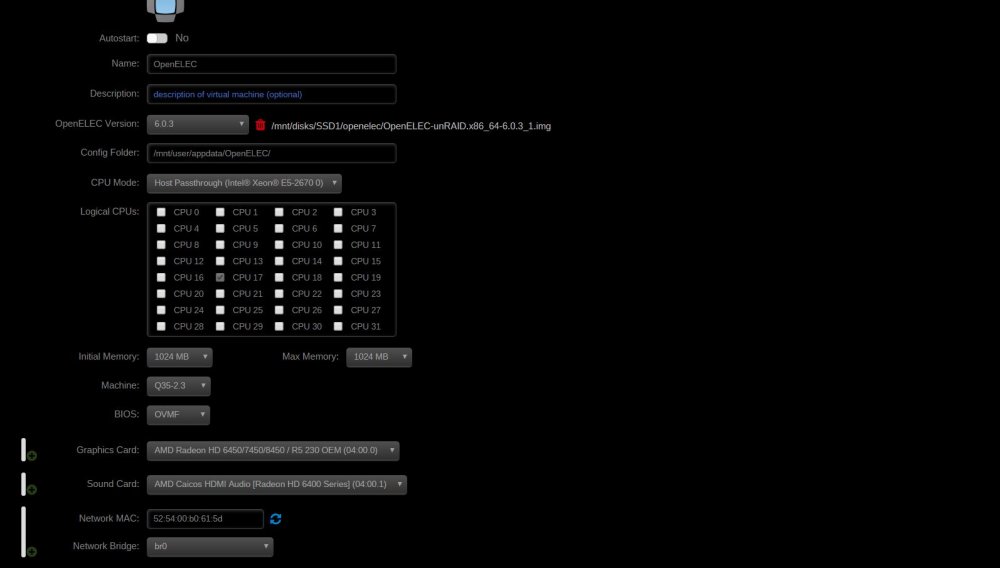
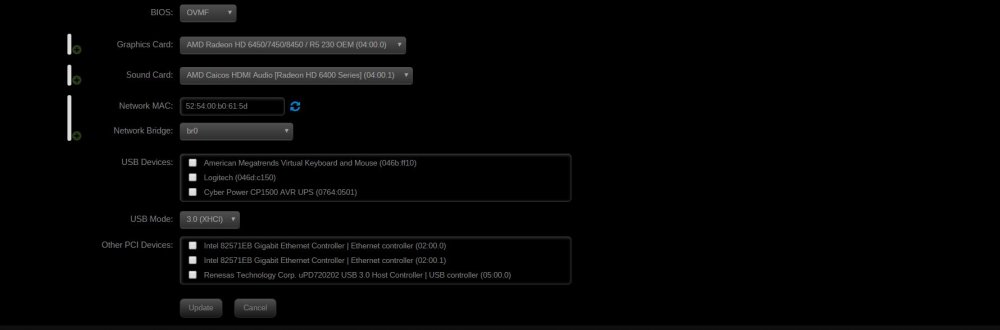
Pictures attached. Also to note, i tried the LibreElec template earlier tonight to no avail. Same issue with the no boot.
-
Updated to 6.2, attempted to install a fresh openelec VM using the unraid default. I get a openelec/kodi boot screen, but it hard crashes. Searching the log in my openelec appdata folder I find this tidbit: 02:11:03 T:140213840799616 ERROR: GLX Error: No Display found 02:11:03 T:140213840799616 FATAL: CApplication::Create: Unable to init windowing system System is with mostly defaults of the template, OVMF, Q35-2.5, 1GB RAM, AMD 6450 graphics card. Diags attached, openelec log attached. I am new to openelec and Kodi, google did not get me far in my search for this issue. Any help appreciated. bigbang-diagnostics-20160915-2220.zip kodi_crashlog_20160916021103.txt
-
Purchased for the sole purpose of getting my VM access nice and easy.
-
Forgive my ignorance, but what is "nice" as it relates to CPU load? Thats a tough one to google....
-
Second this. Current method I use is to stop VM, and copy the image over to a backup share on my unraid array. Its not difficult, though I am not sure that it is the proper method either. Have yet to have to use it.



