





JonathanM
Moderators
-
Joined
-
Last visited
Everything posted by JonathanM
-
I think that is backwards. emhttp was the only web engine in the past, currently nginx is the web server, and emhttp takes care of the background tasks.
-
Sorry, I didn't mean to imply that there are properly working boards that don't run with all slots full. If the manufacturer says their board will run with model XXXX RAM, it should run it fine, but that doesn't mean boards don't fail. I just wanted to let you know that could be a failure symptom, you can have a board where all the slots are fine, all the DIMM's are fine, but all 4 at once isn't. I personally had a board that ran fine with all 4 DIMMS for years, until it didn't. The only failure mode was random errors when all 4 slots were full, it ran perfectly on any 2 of the DIMMS, but put all 4 in and memtest would fail every time.
-
Are you positive nothing else was trying to access the drive during the test?
-
Some motherboards just won't run with all slots filled.
-
Yeah, but they hawk the ability to easily daisy chain them in the same system, even have pinout and diagrams to show how. I can see how stacking these as you add drives could be a good way to go, assuming they work as promised.
-
It's more correct to think of the USB stick as firmware with space for storing changed settings. Unraid loads into and runs from RAM, it only touches the USB stick when you change settings. Container appdata and executables should live on a SSD or multiples for redundancy, separate from the main storage Unraid array. Legacy documentation and videos will refer to that storage space as "cache", now it's more properly referred to as a "pool" of which you can create as many as make sense for the desired speed and redundancy.
-
Hoopster summed it up quite well, but I wanted to stick my .02 into the discussion to hopefully clear this up a little more. Parity doesn't hold any data. Period. It's not a backup. Period. It contains the missing bit in the equation formed by adding up the bits in an address row. Pick any arbitrary data offset, say drive1 has a 0, drive2 has a 1, drive3 has a 1, drive4 has a 1, so parity would need to be a 1 to make the column add up to 0. Remove any SINGLE drive, and do the math to make the equation 0 again, and you know what bit belongs in that column of the missing drive. So, you can protect ANY number of drives, and as long as you only lose 1 drive, the rest of the drives PLUS PARITY can recreate that ONE missing drive. Lose 2 drives, and you lose the content of both, but since Unraid doesn't stripe across drives, you only lose the failed drives. Unraid has the capability to use two parity drives, so you can recover from 2 simultaneous failures. However, the second parity is a much more complex math equation that takes into account which position the drives are in, so it's a little more computationally intensive. The extra math is trivial for most all modern processors.
-
New, unproven, expensive? Advertising looks great, do you have any links to third party real tests?
-
That's not a thing. Unraid will quite happily continue to use a disk slot even if the drive fails a write and is disabled.
-
Strange. I'm out of things to try at this point. Maybe someone else will have some ideas.
-
Probably because you are using a custom network for delugevpn instead of the default bridge. Binhex doesn't support anything but plain bridge. Doesn't mean you can't make it work, but it can be challenging. Maybe the radarr port was added while you were in plain bridge mode?
-
Specific procedure, pretty much just what I said. Delete the image file, start the docker service to create a blank one, add your custom networks, go to previous apps and tick off all the ones you want to put back.
-
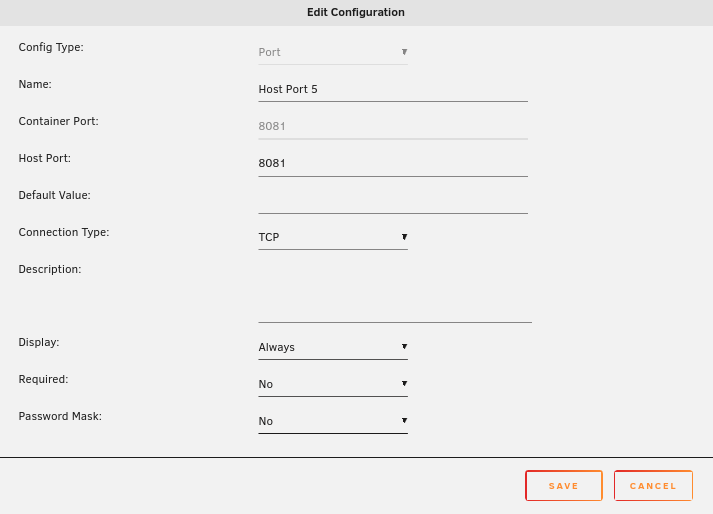
Try deleting that and entering it again. It's missing the container port entry for some reason.
-
click edit on the 8989 entry and post just that part.
-
There may be other ways, but the quickest way I know is delete and recreate the docker.img file. Be sure to create your desired networks BEFORE going to previous apps and selecting everything you want to reinstall. It should only take a few minutes, and everything will be back the way it was.
-
Nope. Forward vs. reverse = no drives detected with wrong cable.
-
Show a screenshot of that in advanced view.
-
If you set the network to bridge without changing anything else, does it work as expected, other than not running through the vpn?
-
Couple factors. Unraid runs in RAM, which effectively means each boot is like a new install. The way linux handles drive identification normally is /dev/sdX or a variant, where each drive that is detected gets the next designation. There are so many things that can change that designation from one boot to the next, and also needing the ability to successfully boot on widely different hardware, the choice was made to identify by something that is supposed to be unique and not modifiable by something written to the drive. Honestly, this is the first time I remember seeing a spinning rust hard drive not give a unique serial number when attached directly to a compatible SATA controller. Many times USB bridges or controllers can manipulate what is passed to the OS, so that's fairly common to need a plain vanilla SATA connection.
-
Does it always stop after 20TB? If so, maybe try a different controller? Maybe the one you are currently attached to has a problem with 20+TB.
-
Stop and start the array, or shutdown and reboot. Can't remember if just stopping and starting clears the error column, but I think it does.
-
Upgrade using the manual method, download the 6.12.10 files, extract and overwrite all but the config folder. Make a full backup of the USB before doing that, so if something goes sideways you have a copy of the config folder.
-
Are you the same person? If not, please start your own thread and attach your diagnostics. If this is still you, attach new diagnostics covering the time period when this happens. Rebuild negates all previous actions you listed, the emulated disk includes the format.
-
Memtest is only definitive if it finds errors, sometimes memory produces errors only under certain loads. Try running with only 1 stick and see if the disk errors change, then switch sticks and repeat. Also, make sure you disable any XMP profiles. XMP is overclocking, regardless of whether the motherboard and memory says it should support it.
-
How many hours of memtest have been run in the current config?


