




.jpg.adf8def3431e0aa8e590900f82752d7a.jpg)

wgstarks
Members
-
Joined
-
Last visited
Everything posted by wgstarks
-
This is likely your problem- 2024-11-22 08:56:58 [UNDEF] Inactivity timeout (--ping-restart), restarting https://github.com/binhex/documentation/blob/master/docker/faq/vpn.md Scroll down to Q17.
-
Attach the supervisord log and docker run command to your next post. Be sure to redact users/passwords.
-
It has a restore function.
-
This can be one of the big ones. Some dockers (plex for example) can have thousands of files and make your backup take hours. Some people don’t want to have their dockers stopped for that long. You may want to do a little initial testing to decide what customizations to use.
-
I would suggest posting on the UD support thread since it sounds like that’s what you are using to attempt the mount. https://forums.unraid.net/topic/92462-unassigned-devices-managing-disk-drives-and-remote-shares-outside-of-the-unraid-array/
-
I would suggest you checkout the appdata backup plugin. It will backup most of the default data usually kept on cache.
-
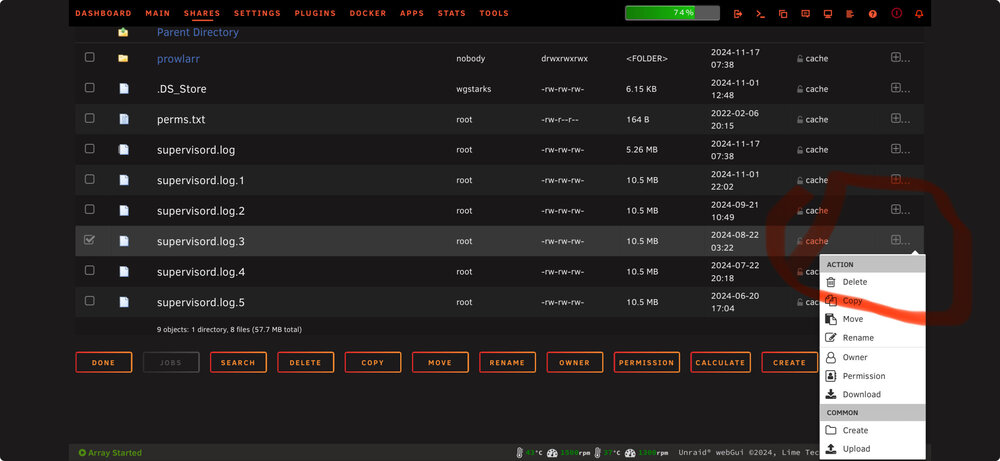
Click the plus sign to the right and select “download”.
-
I would suggest post questions regarding the binhex docker in that support thread. https://forums.unraid.net/topic/44141-support-binhex-plex/
-
Not sure what you’re pointing to in your log but you need to post your entire supervisord log as well as docker run command. Be sure to redact users/passwords.
-
I would suggest posting in the support thread for whatever docker image you are using. Also, IMO there isn’t any need to use cache for your media. Once you get your issues fixed you should consider changing the share to use the array only. Importing videos may be a little slower but it’s all happening automatically in the background so does it really matter?
-
I would test with an Ubuntu download just to be sure it’s really a problem with your app.
-
I found that but not sure it’s completely compatible. I only tried it for a few minutes with Safari but in my case Date Added and Date Completed columns both show what appears to be Ratio and the columns don’t line up with the headers.
-
I don’t think anyone will care and it could benefit other users IMHO.
-
What theme are you using? I’m trying to keep track of themes that are compatible with v5+ but so far have only found one.
-
This looks like your issue- https://github.com/binhex/documentation/blob/master/docker/faq/vpn.md See Q24. Pay close attention to the “Container running VPN” section.
-
Docker run is a link to instructions.
-
I’m not having any issues pausing torrents.
-
Be sure to redact users/passwords.
-
Why don’t you post your docker run command for qbit as well as the qbit supervisord log.
-
Yes. The local IP of the qbit container.
-
Correct. Any port not used by some other container.
-
I use the webUI port number for jDownloader. If you have everything configured correctly this will be in the VPN Input Ports setting in the qbit container.
-
I wouldn’t mess with the permissions of the copy. Every docker sets its own permissions required by the app. Just make another copy to the share and it’ll be there in the unlikely circumstance that you might need it. If you don’t need it you can just delete it later.
-
Hopefully you are using the appdata backup plugin to make regular backups but you could also use dynamix file manager plugin to make a copy of the binhex-qbittorrentvpn folder.
-
Just delete the colon and tag number in the repository field.




