




.jpg.adf8def3431e0aa8e590900f82752d7a.jpg)

wgstarks
Members
-
Joined
-
Last visited
Everything posted by wgstarks
-
Yeah, maybe that would be best. It looks like it’s not currently possible to replace one internal boot device with another one.⁉️ Google is telling me an internal boot device can only be replaced with a flash drive. Hopefully that will change at some point. I know internal boot is new and hopefully still developing. So all the read/writes on the 2nd partition on the internal boot device won’t have an effect on the boot partition?
-
Just bought a new X15 server which comes pre-built with a 1TB internal boot drive. The boot partition uses about 32GB which leaves about 99.5% of the drive unused. I’m trying to decide what to do with the unused space. Currently I’ve added it as a 2nd cache drive. I already had one in my old machine (500GB 2.5” SSD) and didn’t really need a second one though. I’m a little hesitant to use the unused space as a cache because I’m worried that the extra read/writes will wear out the drive faster, so was thinking about getting a smaller m.2 nvme for the internal boot drive and another 1TB m.2 nvme to use in a 2 drive cache pool (replacing my old single disk cache). One problem I’m seeing with this plan is that nobody seems to make a small (32GB) m.2 drive. The smallest I can find is 128GB and those are all from manufacturers I’ve never heard of. Looks like the price of the 128GB is low enough that the wasted space isn’t really a concern though. Anyone have any thoughts? Recommendations for m.2s? Better ways to use the current unused space?
-
This machine does have a speaker in it somewhere though. The beep right before the splash screen is really long and loud.
-
Guess I’ll take the beep code out of the go file then. No point in delaying startup to run it.
-
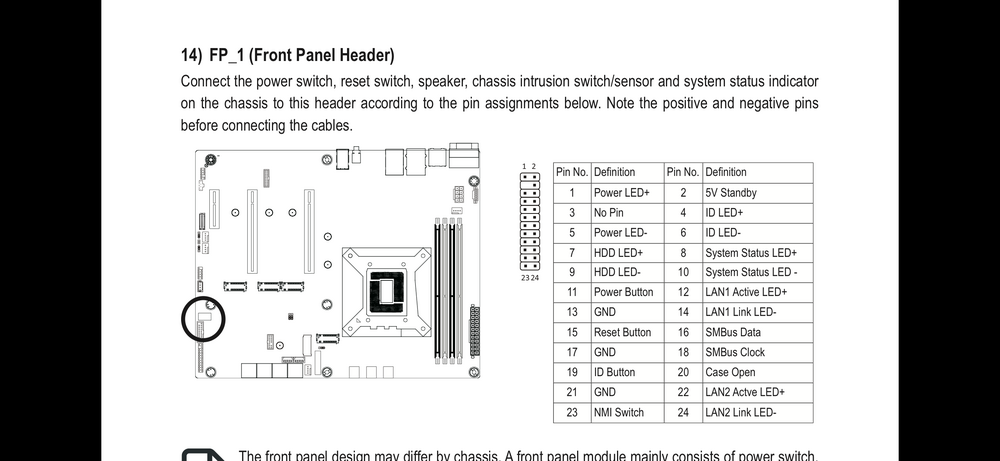
I’ve been looking at the mother board manual for this system and see this- The description for FP-1 shows that the speaker should connect here but the pin out doesn’t show any speaker pins. Not sure what that means? Definitely have a long beep at post though.
-
Since migrating to new X15 server my Beep code is no longer playing on startup. I know the server has a speaker. It beeps once at the start of each boot cycle. brunnhildeii-diagnostics-20260524-0616.zip
-
Thanks. All my movies are going to the same path. It’s just me and my girl friend and she tends to sleep through most movies anyway.😁
-
Not sure what this is or how it sends me an email or maybe a text?
-
If I grab a magnet link and add it to qbit with a radarr category the radarr app will monitor the download and import the files after when the download completes.
-
Unless movarr already adds the completed download to radarr. With my idea I’ll get an email notification of the new movie. Not sure if I will get a notification from radarr currently. The movarr docker hasn’t actually added any download yet so not sure exactly what will happen?
-
If I assign category “radarr” then the Radarr docker will see it in the qbit download queue and import it when completed. I’m imagining a line in the appdata configuration file for this. If compatibility with tv shows is ever implemented then it could also use category “sonarr”.
-
Is there a way to have this use categories in qbitVPN? Want to get Radarr to auto import the files after the download completes.
-
Looks like I must have screwed something up with transferring /config. All users are missing. Still have the old flash. What file controls this?
-
Just migrated to new server and went pretty good. This docker appears to be the only one I'm having problems with. It failed to start on the first attempt. Started on the 2nd try but with no network. I assigned it to bridge but still can't connect for TM backups. Docker run- docker run -d --name='TimeMachine_multi' --net='bridge' --pids-limit 2048 -e TZ="America/Los_Angeles" -e HOST_OS="Unraid" -e HOST_HOSTNAME="Tower" -e HOST_CONTAINERNAME="TimeMachine_multi" -e 'VOLUME_SIZE_LIMIT'='1 T' -e 'TM_USERNAME'='timemachine' -e 'PASSWORD'='timemachine' -e 'ADVERTISED_HOSTNAME'='timemachine' -e 'CUSTOM_SMB_CONF'='false' -e 'CUSTOM_USER'='false' -e 'DEBUG_LEVEL'='1' -e 'MIMIC_MODEL'='TimeCapsule8,119' -e 'EXTERNAL_CONF'='/users' -e 'HIDE_SHARES'='no' -e 'TM_GROUPNAME'='timemachine' -e 'TM_UID'='1000' -e 'SET_PERMISSIONS'='false' -e 'SMB_INHERIT_PERMISSIONS'='no' -e 'SMB_NFS_ACES'='no' -e 'SMB_METADATA'='stream' -e 'SMB_PORT'='445' -e 'SMB_VFS_OBJECTS'='fruit streams_xattr' -e 'WORKGROUP'='WORKGROUP' -e 'TM_GID'='1000' -e 'SHARE_NAME'='timemachine' -l net.unraid.docker.managed=dockerman -l net.unraid.docker.icon='https://upload.wikimedia.org/wikipedia/de/f/f4/Time_Machine_%28Apple%29_Logo.png' -v '/mnt/user/appdata/timemachine/':'/users':'rw' -v '/mnt/user/m1_miniSMB/':'/opt/m1_mini':'rw' --hostname timemachine 'mbentley/timemachine' 07309720e80e613b1d8aad5ca0da0ea5ca03f3b81f1932a4b4f3c0baed957844 The command finished successfully!
-
Thanks
-
But if I use the same name that was used when the shares were setup I won’t have to go back to each share and modify them, correct?
-
https://github.com/binhex/documentation/blob/master/docker/faq/vpn.md Scroll down to Q24.
-
So I can just change the name to Cache? Is there another step to actually assign it as Cache? My old machine has been setup for years and I really don’t remember the process.
-
What do I need to do to modify my settings for this new machine? It’s been a few years since I set this up and I really don’t remember much.
-
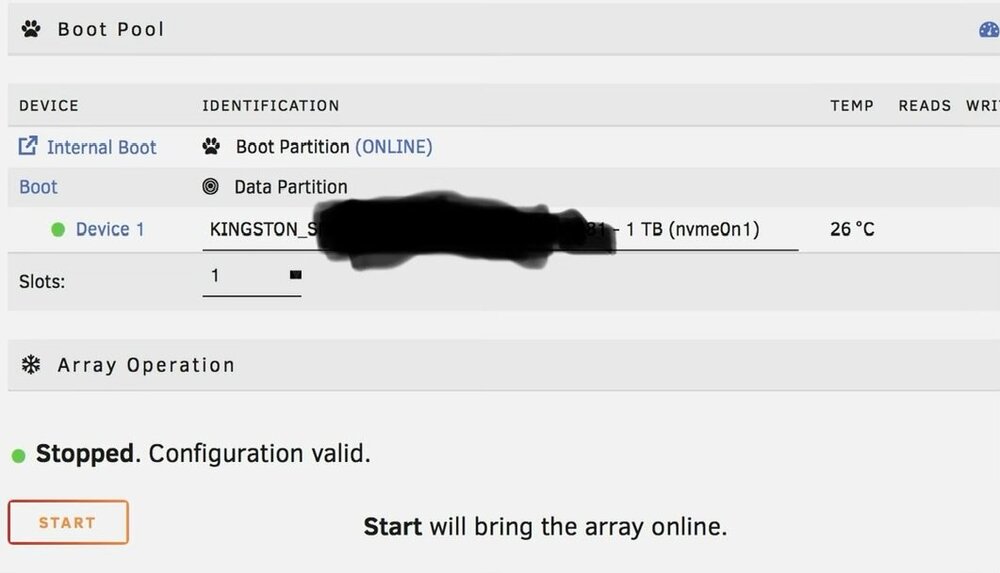
I just received a new X15 server which comes with a 1TB m.2 nvme drive. 32GB has been used for an internal boot partition and the rest is just unused space that I would like to use for cache. Google says it can be done but not how. Is there some way to just assign it or do I need to do a new config? Or maybe I could just create a cache.cfg file?
-
Thanks. Was hoping to do some of the initial setup before shutting down the old server. Gonna be a lot of lives destroyed because Plex is down for an unbearable period of time (more than 30 minutes 😁).
-
Looks like transferring the old /config via SMB would be a nightmare. The built in file browser will only allow uploading individual files so I’d need to create all the directories manually. Got to be an easier way right???
-
I can rename the X15’s existing files to something like name.old.cfg just to avoid overwriting right? As a just in case situation.
-
Just occurred to me that I need to transfer /config without changing the ethernet port configuration already set in the new X15. Which files should I not transfer?
-
Nevermind. Took a call to the 45Homelabs tech support team but they quickly figure out the issue. You have to push the button. DUH. 😳😳😳 Black button and it just blends right in with the case if the unit isn’t started.



