





Vr2Io
Members
-
Joined
Everything posted by Vr2Io
-
Double check that, some new drive didn't work if have 3.3v, check does power cable have 4 or 5 wire.
-
No expander have detect, check the power , SAS cable, LED status, and touch heatsink warm or not. EDIT: You got no SAS cable between controller.
-
Replace "iperf" to "./iperf3"
-
Power down means server complete power down, as mention I seldom access those cold data, only power on when I need. Array and pool can spindown correctly, but it still use 200w rather than 400w+. If someone need access recent / some media, I will copy out to small build for access, no way to pay high electricity bill. Even 12 disks RAID0 can't beat NVMe performance, so don't think that. Does Plex perform media scan too frequency or too much file count ( small size media ), could you split them and import to different Plex for speed up things. I am not sure and I haven't use Plex. Like my CCTV recording, if you hold 1 week recording, it will very slow, so keep 3 days is solution. ( 1 day have 43K file count ) Really depends on how much data access and media access, does both always in race condition. Array just partially backup of pool, another build ( Morefine mini PC ) is 7x24 docker / application host. I may try put 1 pool to ZFS, but no timeline as ZFS new to me.
-
Really weird, several post report similar problem. Any wrong docker network setting ? You say have 4 NIC, assume 3 interface for 3 subnet. There must have routing in the table, but your screen miss both. Unless you route those thr gateway 192.168.0.33. ( you bridge eth0 eth1, no eth2 and eth3 ) # Generated settings: IFNAME[0]="br0" BRNAME[0]="br0" BRSTP[0]="yes" BRFD[0]="0" DESCRIPTION[0]="Onboard" BRNICS[0]="eth0 eth1" PROTOCOL[0]="ipv4" USE_DHCP[0]="no" IPADDR[0]="192.168.0.33" NETMASK[0]="255.255.255.0" GATEWAY[0]="192.168.0.2" DNS_SERVER1="208.67.222.222" DNS_SERVER2="208.67.220.220" USE_DHCP6[0]="yes" DHCP6_KEEPRESOLV="no" SYSNICS="1"
-
You add VLAN in Unraid ? Pls provide docker page screen capture to check.
-
Try mark down disk assignment, then perform new config and redeemed again.
-
Pls also run memtest, your system show some odd reading, configured in 1280MT/s or 257MT/s. My system show FYR. Memory Device Array Handle: 0x000C Error Information Handle: Not Provided Total Width: 64 bits Data Width: 64 bits Size: 4 GB Form Factor: DIMM Set: None Locator: A1_DIMM0 Bank Locator: A1_BANK0 Type: DDR3 Type Detail: Synchronous Unbuffered (Unregistered) Speed: 667 MT/s Manufacturer: Kingston Serial Number: BA19045C Asset Tag: A1_AssetTagNum0 Part Number: KHX1600C9D3/4GX Rank: 2 Configured Memory Speed: 1280 MT/s Memory Device Array Handle: 0x000C Error Information Handle: Not Provided Total Width: 64 bits Data Width: 64 bits Size: 8 GB Form Factor: DIMM Set: None Locator: A1_DIMM1 Bank Locator: A1_BANK1 Type: DDR3 Type Detail: Synchronous Unbuffered (Unregistered) Speed: 800 MT/s Manufacturer: Undefined Serial Number: 00001761 Asset Tag: A1_AssetTagNum1 Part Number: TIMETEC-UD3-1600 Rank: 2 Configured Memory Speed: 257 MT/s
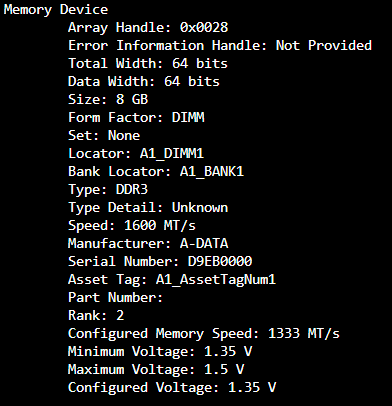
-
What actual current docker img file size ? BTW, container size show usage ~30.1 GB. Not sure img file size reduce if actual usage reduce.
-
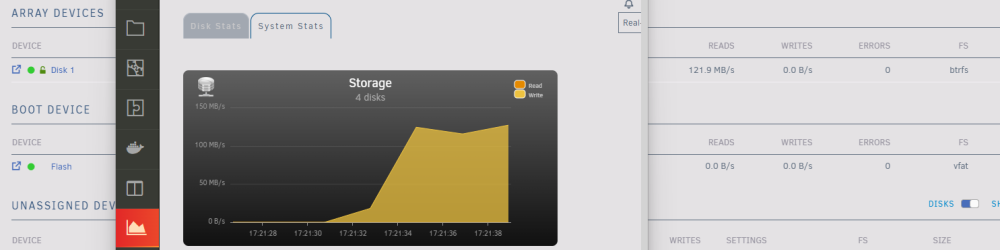
System stats plugin have swap read / write reading in 6.12rc6 & 7, have try server reboot. But no problem on 6.11.5 Below are reading on array disk, but STATS show it is writing, same on UD disk.
-
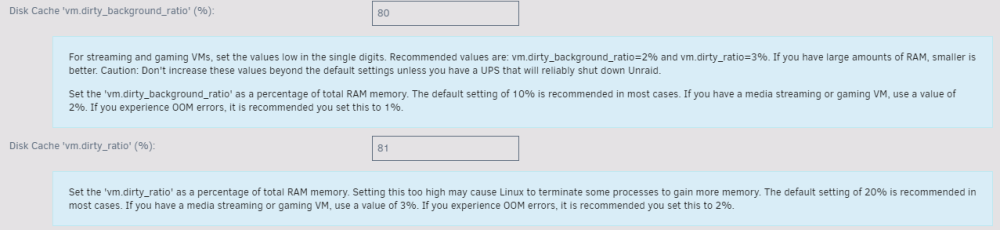
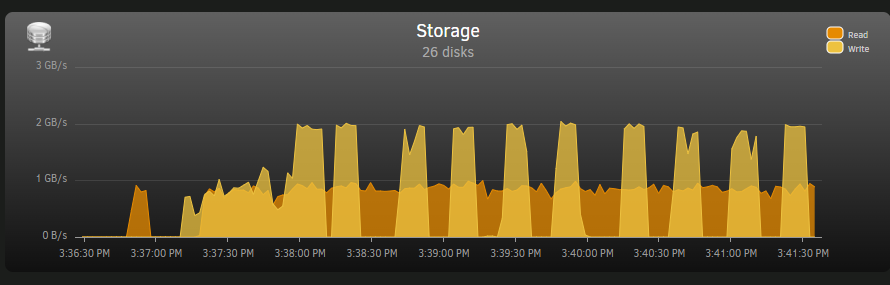
10 and 20 are default setting, it should be a good default value to minimize data lost against suddenly power lost, i.e. a situation when data in memory and waiting to write to disk, as you have UPS protect, so you can set to a higher value and safe. Pls read help text and do some test for better understanding. Yes, Windows copy. When you have 32G and set to 80, this not means fixed allocate 24G for cache (figure just simple talk, not actual value) it means max use 24G for cache before flush to disk, actual cache size depends on how much memory were free. I mean slow parity rebuild case, concurrent parity rebuild and cache directory in race for read/write to array, as result slow down all. This almost no negative effect for adding memory, many memory also have different use case, as you have UPS to protect, so the remain question is does this useful in your use case, does those small amount size enough to not use SSD cache, pls evaluate and test yourself. Disk cache are manage by disk itself, a disk have 512M not means better then 256M, those cache are use for disk internally for different purpose, you just need care about their performance or user review report. Spinners in another big build, pure disk/file build and always power down, it have array and two RAID0 pool, all independent. The performance of RAID0 pool depends on how many disks involve in the operation (because disks are different in size, not always use 8 or 12 disks ), but usually provide several hundred MB to 2GB throughput. Array : 7x 8TB Pool_1 : 4x 10TB + 4x 18TB = 112TB Pool_2: 6x 12TB + 6x 14TB = 156TB For example, 8 disks pool writing to 12 disks pool, got ~900MB read and ~2GB write.
-
Sometime will be that, when something in race condition or different situation. Depends on caae, RAM cache like a temp storage, let say you have 32G, if you transfer data in 24G (~80%), then all can cache in RAM and transfer as fast as source even destination was slow, it flush to destination in background. But if you transfer data more then 24G, then it will queue as usual and transfer in "throttled". For docker run in RAM disk, it is because high performance and no need care about write endurance issue, of course you need to understand data lost when power off. SFF means small form factor. I use a mini PC ( ~ 1 lite size ) with two 32G sodim and a 256G Nvme to host all docker, no spinners disk. (Morefine S500+) Array and Raid0 pool are independent, Raid0 pool are a large high performance pool, it can form by different size disks, but any disk fault will lost all, so you need backup. I form two pool in 8 and 12 disks.
-
Agree. But may be some situation keeping in R-M-W long enough.... anyway haven't test or try to reproduce. Does OP use parity, reconstruct write only have meaning with parity. Just to be confirm, or provide screenshots / diagnostic.
-
Can't remember since which OS version, even you set reconstruct write, if multiple session write to array or file cross allocation to different disk, it will change to R/M/W and back. So you should review file allocation setting.
-
Usually I will maximize memory in mobo, only use 32G module, so a SFF mobo will have 64G. Then utilize the ratio in Tips And Tweaks. This would help use RAM cache as much as possible, it help during file transfer. Docker won't need too much storage, in my case less then 6GB, so I set all run to /tmp ( RAM disk ), only appdata backup to SSD or restore to /tmp when system restart. A CCTV recording need ~12G for 3 days also store in /tmp recycle, just daily backup to harddisk. VM and other application are use SSD. Spinner disk just as main storage, mix with array and RAID0 pool ( this got high performance so eliminate cache pool ) , this tier usually seldom access because those are cold data.

-
If more function/feature ( IC chips ) provide by mobo, then it draw more power, i.e. 10G onboard, Thunderbolt, PCIe multiplier .... . If it capable maximize the CPU, it also consume more power in VRM (voltage regulator modue) and proportional to power usage of CPU. In general, mobo power usage won't a key factor.
-
189MB/s really good now. I haven't use cache directory and cache pool. I like RAM cache or running most stuff in RAM. ( 1st tier was SSD / NVMe, spinner disk usually 2nd tier main-storage )
-
Cache directory plugin. Rebuild in pause ?? To got best rebuild speed, minimize other parallel disk read/write operation. Or provide a new diagnostic to check.
-
Pls try uninstall those plugin, confirm no more counter build-up, then resume rebuild. You can click the icon to toggle between bandwidth / counter mode.
-
** Edit **, so you got ~1/3 throughput. If sit at 50% position, a ref. throughput should ~140MB/s instead 45.4MB/s for parity. If sit at 50% position, a ref. throughput should ~140MB/s instead 79.7MB/s.
-
Change between throughput / counter mode, and clear the counter then monitoring.


-
Doesn't matter, it still provide far more bandwidth then you need.
-
Try to pause rebuild and check any disk read/write counter buildup. If sit at 50% position, a ref. throughput should ~140MB/s instead 79.7MB/s. Cache_Dirs plugin seems use too much CPU/disk resources. PID USER PR NI VIRT RES SHR S %CPU %MEM TIME+ COMMAND 12512 root 20 0 33476 31388 2048 R 76.5 0.1 0:01.77 find 12505 root 20 0 5128 3392 2032 R 35.3 0.0 0:00.75 find root 12244 0.0 0.0 5588 3664 ? S Jun06 0:28 /bin/bash /usr/local/emhttp/plugins/dynamix.cache.dirs/scripts/cache_dirs -u -c 1 -U 100000 -l off root 12454 0.0 0.0 4564 2936 ? S 10:12 0:00 \_ /bin/bash /usr/local/emhttp/plugins/dynamix.cache.dirs/scripts/cache_dirs -u -c 1 -U 100000 -l off root 12620 0.0 0.0 2584 872 ? S 10:12 0:00 | \_ /bin/timeout 30 find /mnt/disk1/Projects -noleaf root 12621 2.0 0.0 3920 2364 ? D 10:12 0:00 | \_ find /mnt/disk1/Projects -noleaf root 12455 0.0 0.0 4564 2936 ? S 10:12 0:00 \_ /bin/bash /usr/local/emhttp/plugins/dynamix.cache.dirs/scripts/cache_dirs -u -c 1 -U 100000 -l off root 12824 0.0 0.0 2584 940 ? S 10:12 0:00 | \_ /bin/timeout 29 find /mnt/disk2/Music -noleaf root 12825 0.0 0.0 3932 2476 ? D 10:12 0:00 | \_ find /mnt/disk2/Music -noleaf root 12475 0.0 0.0 4564 2936 ? S 10:12 0:00 \_ /bin/bash /usr/local/emhttp/plugins/dynamix.cache.dirs/scripts/cache_dirs -u -c 1 -U 100000 -l off root 12498 0.0 0.0 2584 828 ? S 10:12 0:00 | \_ /bin/timeout 30 find /mnt/lan_cache_pool/lancache -noleaf root 12501 22.5 0.0 3856 1096 ? D 10:12 0:00 | \_ find /mnt/lan_cache_pool/lancache -noleaf root 12485 0.0 0.0 4564 2936 ? S 10:12 0:00 \_ /bin/bash /usr/local/emhttp/plugins/dynamix.cache.dirs/scripts/cache_dirs -u -c 1 -U 100000 -l off root 12500 0.0 0.0 2584 936 ? S 10:12 0:00 | \_ /bin/timeout 30 find /mnt/unraid_files/appdata -noleaf root 12505 39.0 0.0 5128 3392 ? R 10:12 0:00 | \_ find /mnt/unraid_files/appdata -noleaf root 12490 0.0 0.0 4564 2936 ? S 10:12 0:00 \_ /bin/bash /usr/local/emhttp/plugins/dynamix.cache.dirs/scripts/cache_dirs -u -c 1 -U 100000 -l off root 12510 0.0 0.0 2584 924 ? S 10:12 0:00 \_ /bin/timeout 30 find /mnt/vms_pool/vms -noleaf root 12512 91.5 0.0 33476 31388 ? R 10:12 0:01 \_ find /mnt/vms_pool/vms -noleaf
-
But file transfer bar show that transfer in 180MiB/s, just Unraid show have 1Gb/s network traffic.
-
Understand those are cache only. I haven't use cache pool, I am not sure cache only will affect array disk spinup or not, in general, I haven't unexpected spinup.





