





Vr2Io
Members
-
Joined
Everything posted by Vr2Io
-
For access Internet, you need fill the gateway and your router also need support multi-subnet.
-
You can restore the backup to new USB and it should allow you self-service to replace the key. ( Self-service allow once per year )
-
It likely PES12N3A 12-lane 3-Port PCI Express Switch (rev 0e) cause this problem. Anyway pls try disable iommu in bios does this help.
-
When you change network settings, interface will up and down, and you need waiting Windows side link up too. If you " lsof | grep 169.254 " haven't found service listening on that, you must set static IP.
-
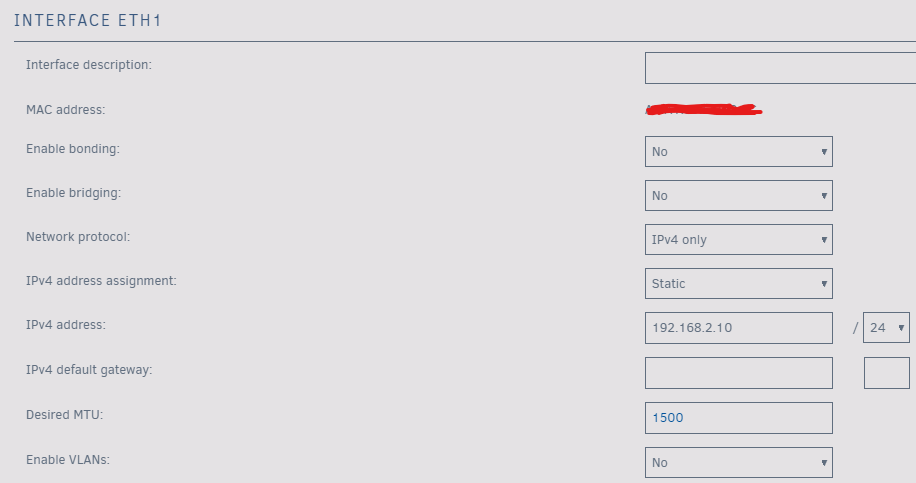
169.254.117.248 is eth1 IP, you need ping Windows IP. BTW, just simple test, as mention before, pls assign a static IP & subnet at Unraud eth1 and Windows At least it should work with 6.12.1 lsof | grep 192.168.2 sshd 520 root 4u IPv4 1550800 0t0 TCP 192.168.2.10:ssh (LISTEN) smbd 577 root 32u IPv4 1545181 0t0 TCP 192.168.2.10:microsoft-ds (LISTEN) smbd 577 root 33u IPv4 1545182 0t0 TCP 192.168.2.10:netbios-ssn (LISTEN) rpcbind 631 rpc 8u IPv4 1549725 0t0 UDP 192.168.2.10:sunrpc ntpd 808 ntp 17u IPv4 1556567 0t0 UDP 192.168.2.10:ntp ntpd 808 811 ntpd ntp 17u IPv4 1556567 0t0 UDP 192.168.2.10:ntp nginx 929 root 19u IPv4 1550959 0t0 TCP 192.168.2.10:http (LISTEN) nginx 929 root 20u IPv4 1550960 0t0 TCP 192.168.2.10:https (LISTEN) nginx 4866 root 19u IPv4 1550959 0t0 TCP 192.168.2.10:http (LISTEN) nginx 4866 root 20u IPv4 1550960 0t0 TCP 192.168.2.10:https (LISTEN)
-
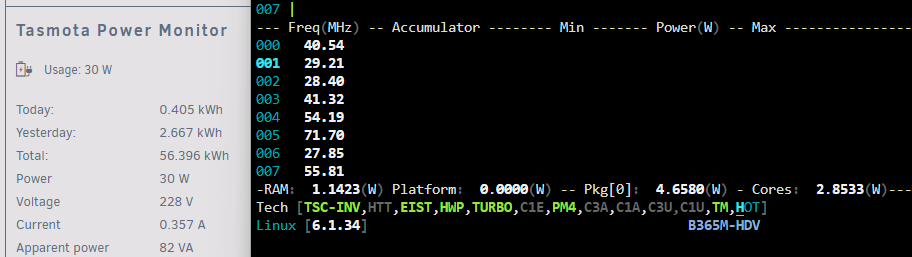
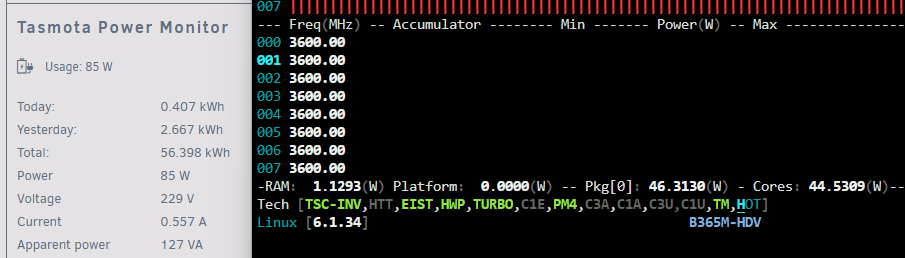
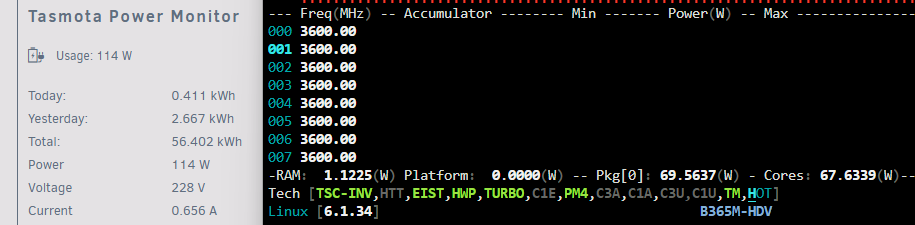
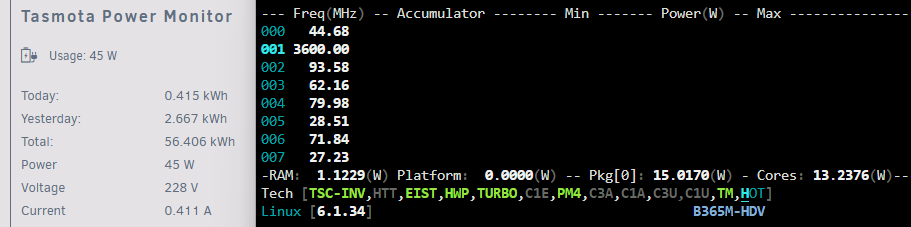
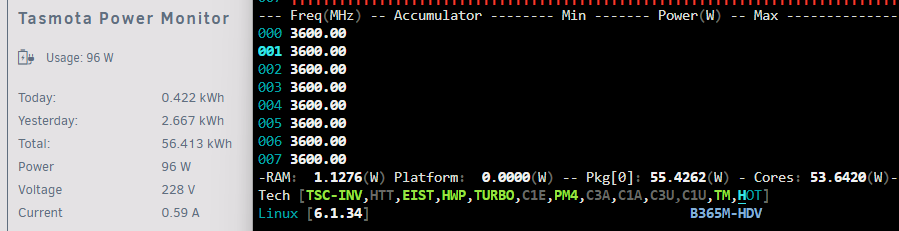
Since then ( 2 years ago ) I haven't try / use this plugin. Today, I use it to troubleshoot a server which apply PL2, but system actually just ignore the setting and use lot of power. After many booting and BIOS setting, I finally identify "Disable SVID" cause this problem, set it to auto then solve. The problem haven't aware in long time after BIOS have update several times. https://linustechtips.com/topic/888024-what-is-asus-svid-support-and-when-should-i-use-it/?do=findComment&comment=10957949 I also install in two other machine and all work great, with this wonderful tool, now I got much better knowing the power usage in Unraid environment. I also make some test to compare the reading from power meter, in my view the reading should be consistence. @ich777 @CyrIng Thanks !! 1. Idling, meter 30w, Pkg 4.6w, different ~25w 2. Atomic Burn, different ~ 39w 3. Conic Compute, different ~ 44w 4. Turbo Random CPU, different ~ 30w 5. Estimate PI / Monte Carlo, different ~ 41w
-
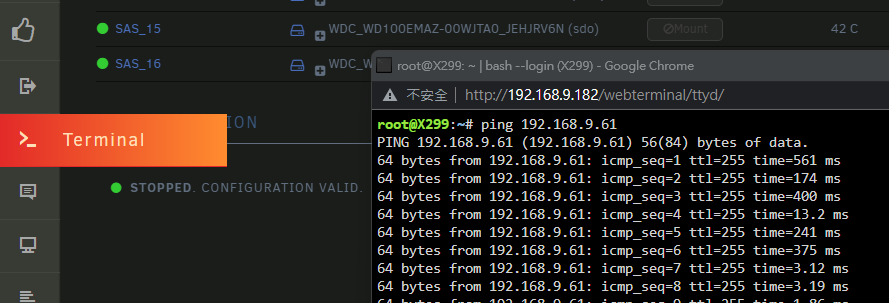
OK. For Unraid, open web terminal then ping Windows IP
-
If rear 12 bay was connect to front 24 bay expander BP, then try to connect rear BP directly to LSI and test problem stop or not. ( Bypass front BP ).
-
Does Unraid and Windows can ping each other in eth1 network ? Pls post Unraid diagnostic zip file as usual.
-
According your description, you set eth1 allocate IP by DHCP, but as no DHCP in that network, so finally it will assign 169.254.*.* I haven't test does 6.12.x will do same thing, but in general won't setting in that way. Pls simple assign static IP and Subnet to eth1 ( gateway in blank ), for example if router network in 192.168.1.1 with 255.255.255.0 then set eth1 in 192.168.2.X with 255.255.255.0 and windows machine in 192.168.2.Y 255.255.255.0 ( also gateway in blank ) should solve your problem.
-
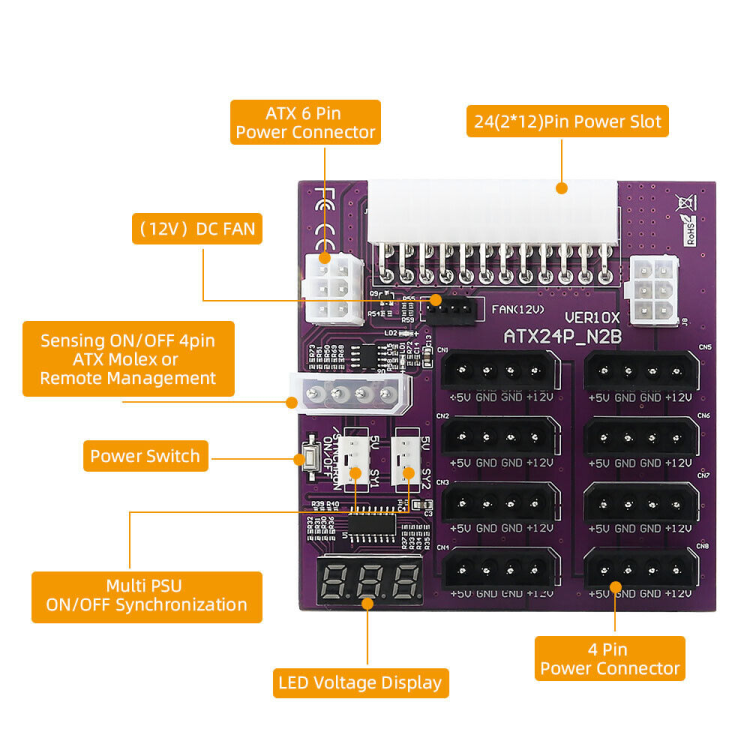
Those adapter should be for PSU fan-out to 8 molex ( from 24 pin + 6 pin gpu ) and the switch is control PSU on / off. It is not for connect to motherboard. https://www.amazon.com/dp/B09PRFYX9P If you need sync server side on/off, you need below version.
-
Try disable fast boot in BIOS.
-
Parity ( single or dual ) must be the biggest disk.
-
If you use USB bridge NVMe, pls try different bridge ( use different bridge controller solution ). Best was not use bridge, no empty PCIe ? even those x1 slot ?
-
If IPv6 and docker host access not need, pls try disable both and check problem solve or not. Pls also use IPVLAN too.
-
Check Plex and SABnzbd. PID USER PR NI VIRT RES SHR S %CPU %MEM TIME+ COMMAND 22212 nobody 27 7 443504 413888 13680 S 331.2 0.6 2:49.40 Plex Tran+ 10184 nobody 20 0 6899020 710276 16160 S 12.5 1.1 0:11.84 python3
-
Same, because player machine just like that. So it should be Plex issue, does media playback need transcode, pls try does hardware decode would help. Something as below. There also many post about that. Yes, because Unraid array is some kind file pooling won't bonding different disk in group, but not suitable for multiple access. Those 256GB ram useful when I still only using array because it help speedup things, but as buying more and more disk to form some pools, then you basically not need that. Yes.
-
It should that. Try iperf test at local machine to verify.
-
Have try USB NIC, sometimes you will found it assign to ethX if you plugin before boot up. But if you reboot again, then status always undetermined, so USB NIC almost can't use as system NIC. But different chips / solution USB NIC may have different result.
-
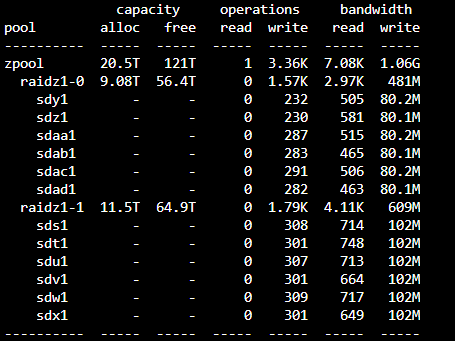
I try move a btrfs RAID0 pool to zfs raidz x2 pool in this way. 6x 12TB and 6x 14TB One big difference observed vs btrfs pool, let say when filling over 144TB data (12x12TB), then data will sit on six 14TB. But zpool will stripe in weight to all 12 disks, (because both vdev in different capacity), as result seems will always use 12 disks. But this only valid when pool was created before filling data, not for expansion vdev later on.
-
You may ref. some user feedback about Asustor Lockerstor 6 Gen2. Pls check with them does system stable or any know trouble. ( Pls note N5xxx or N6xxx is some kind weak CPU ) No matter DIY or NAS, bad disk must replace.
-
Could you try disable ipv6 ( dhcp), if still have problem then set ipv4 only and disable NIC bonding.
-
Pls try read a file from Unraid in several times, does close to 510Mbps ? If yes and only writing to Unraid got slow, you should try enable "reconstruct write".

-
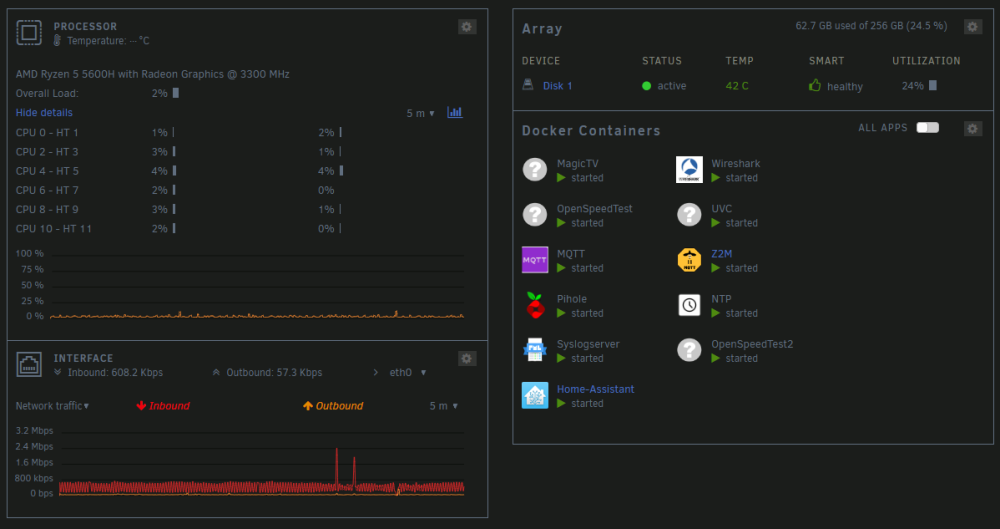
Even mpeg2 / h264 / h265 HD media, its streaming bandwidth won't exceed single spinner disk or 1Gb network throughput. So if you found always buffering / slow response it should be other issue, like SW / HW encode/ decode issue. I store / playback HD media no problem with array disk ( SMB file sharing ), but you must keep array serve this at the time without other heavy workload. The reason use pool ( stripe data ) just because I need performance for multiple access and as quick as possible to complete different disk task . I use Unraid in 7th years, come from consumer Synology / Qnap NAS, many different change / config / build in those year. In general not need, I use Unifi Video ( UVC ), it first host by a baremetal J1900 Windows PC, then change to Unraid Windows VM, then change to docker version. The resources usage really low now as no need Windows. But UVC rather basic and have't any elegant feature, so the requirement also low end. System usage always in few percent for host all docker. Using Asus X299-A II platform, have 8x 32G and 48 lane CPU provide 16+16+8 PCIe slot, all in hotplug disk rack case. Yesterday change the 12 disks to ZFS pool in RAIDz1 x2 ( RAID5 x2 ), read / write performance drop half but have some kind redundancy. Have fun now ......
-
Those are WiFi relate, even link rate was 866M, it doesn't mean the bandwidth was 866Mb/s, and if got 542Mb/s is almost some kind best figure ( 2xxMb/s also a normal value ). You may try increase the WiFi channel width to 80Mhz or 160Mhz if AP and laptop support that.




