





Vr2Io
Members
-
Joined
Everything posted by Vr2Io
-
Pls try enable ACS in BIOS. If that true, I think you can't separate most device in standalone group, seldom found that for onboard NIC.

-
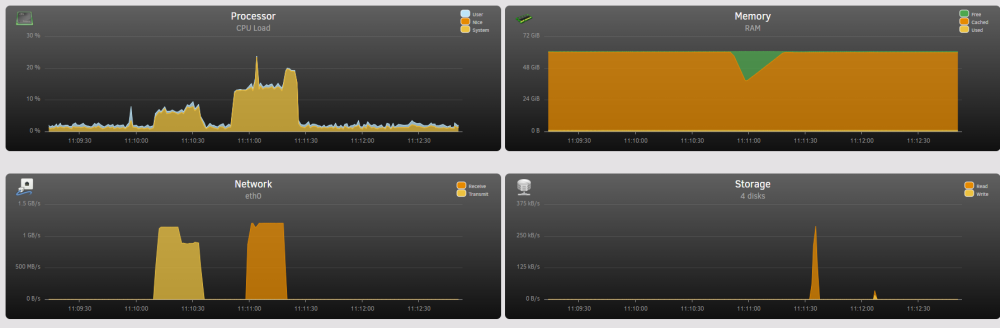
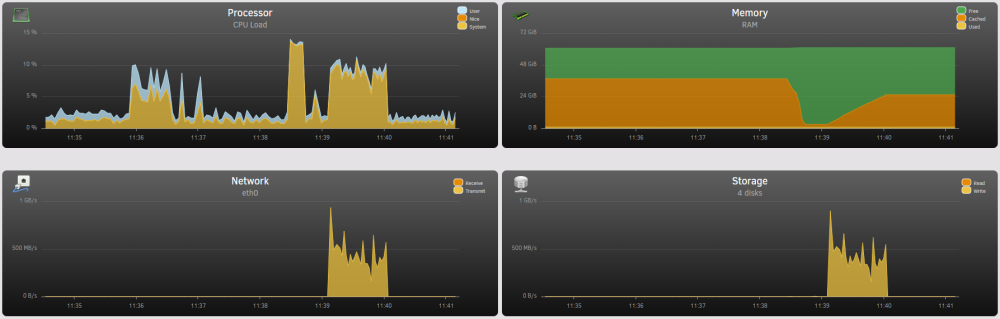
CPU usage usually not much importance, sometimes those figure also various with multi-thread enable or not. Below are some capture FYR, SMB read and write. on 6.12.rc6 ( NIC 82599 and NVMe SSD, MTU1500 ), if I test on a slow SATA SSD, then throughput less then half. 2nd PIC are flush the RAM cache, real through physical SATA SSD. You should make some test, JorgeB may have idea.
-
VM and Docker service still enable and use /mnt/user/xxxxxxx path If you want spindown as much as possible, move those to SSD and mount by UD in /mnt/disks/xxxxxxx DOCKER_ENABLED="yes" DOCKER_IMAGE_FILE="/mnt/user/system/docker/docker.img" DOCKER_IMAGE_SIZE="80" DOCKER_APP_CONFIG_PATH="/mnt/user/appdata/" SERVICE="enable" IMAGE_FILE="/mnt/user/system/libvirt/libvirt.img" IMAGE_SIZE="1" DEBUG="no" DOMAINDIR="/mnt/user/domains/" MEDIADIR="/mnt/user/VMData/" VIRTIOISO="/mnt/user/VMData/VM Image/virtio-win-0.1.229-1.iso"
-
How about if ping gateway ( router 192.168.1.1 )
-
-
That's great, I have MellanoxX3, also work fine.
-
Not likely, I use 82599 in various Unraid v6 haven't issue. You have many retr, this abnormal. You have 4 16GB stick run at 3200MT, pls try set it to 2666MT even 2400MT for test any different and don't overclock BCLK / PCIe. If according your previous post, if the problem was writing to SSD limited to ~300MB/s then it is other issue. ( not network issue )
-
In simple answer, 450w. But you also need look VA, UPS have both figure and usually VA importance then W, for example, if we say power factor was 0.8, a 80w draw means 100VA.
-
Very unlikely. The monitor only take reading and provide switch on off function. All usually relate overload, but PSU have different kind protection, so also unlikely overload kill the PSU. Any external fan controller use ? Any fan speed reduce adaptor use ?
-
-
How couldn't boot ? PSU stay on ? BIOS POST success ? Success boot from USB ? A short video may provide more info.
-
I haven't PT GPU, but first time hear just bound to vfio then work. May be because you have iGPU.
-
Iperf indicate not network problem, what OS use in "main", ? Could also try NFS ?
-
Few weeks ago, just buy some USB 2.0 stick, haven't try with Unraid. Quite cheap and doesn't matter even not work. I won't insist must USB 2.0, but metal case and small in size must. https://www.amazon.com/dp/B0B81ZCVBS?ref=ppx_pop_mob_ap_share
-
In main page -> boot device -> click flash -> safe mode -> apply then reboot.

-
No hear/found others have limitation with LSI.
-
How about if boot to safe mode.
-
Secure boot is different topic, when happen BIOS will prompt a warning message. For fast boot issue, as other people solutions, you can enter/ exit BIOS or change to other USB port for boot one time.
-
From my experience ( SATA disk ), only * means it spin down. Just few second. Yes in most case, but exclude in some case, .i.e. SMART extend test, it will spin own too and cause extend test abort. Timer just for spin down.
-
Your Wifi network have several AP or mesh ?
-
Ensure disable "fast boot" in BIOS, or plug the stick to other port and try again.
-
Really enjoy every network upgrade, of course spending $$ 10M ( coaxial ) -> 100M ( TP ) -> 1G -> 10G ( Fiber )
-
I miss you got a new controller ASM1064 and seems great now. My main build all disks under HBA, but some small build use AMD / Intel onboard SATA controller haven't problem at all, at least no problem with B450, X370. PS : A newly 5600H ( Morefine S500 ) put in service.
-
Some suggestions Always set auto negotiation, if problem happen when plug in switch and router, then it is seever side issue. 1. Change NIC Or 2. Change PSU power cable and confirm earth wire really connect to earth.
-
No much reason use 4th Intel as you have 9th for that.


