





Vr2Io
Members
-
Joined
Everything posted by Vr2Io
-
Yes in some case / setup. I also got similar speed with NVMe, never reach 10G when I test in longtime ago, but if test use memory cache, I will got full 10G SMB speed ( MTU also 1500 and no need SMB multi-channel ) ...... so since then I basically not use NVMe / SSD for cache purpose.
-
If Windows was VM, then you just test on virtual to virtual and nothing relate to 40G physical NIC. BTW, test on Windows VM ( virtio driver ), I also got 10g, there should be driver limitation, if test on docker to docker, I got 55G. Connecting to host 192.168.9.6, port 5201 Reverse mode, remote host 192.168.9.6 is sending [ 4] local 192.168.12.19 port 49736 connected to 192.168.9.6 port 5201 [ ID] Interval Transfer Bandwidth [ 4] 0.00-1.00 sec 1.22 GBytes 10.5 Gbits/sec [ 4] 1.00-2.00 sec 1.21 GBytes 10.4 Gbits/sec [ 4] 2.00-3.00 sec 1.22 GBytes 10.5 Gbits/sec [ 4] 3.00-4.00 sec 1.23 GBytes 10.6 Gbits/sec [ 4] 4.00-5.00 sec 1.27 GBytes 10.9 Gbits/sec [ 4] 5.00-6.00 sec 1.27 GBytes 10.9 Gbits/sec [ 4] 6.00-7.00 sec 1.26 GBytes 10.8 Gbits/sec [ 4] 7.00-8.00 sec 1.15 GBytes 9.85 Gbits/sec [ 4] 8.00-9.00 sec 1.26 GBytes 10.8 Gbits/sec [ 4] 9.00-10.00 sec 1.27 GBytes 10.9 Gbits/sec - - - - - - - - - - - - - - - - - - - - - - - - - [ ID] Interval Transfer Bandwidth Retr [ 4] 0.00-10.00 sec 12.4 GBytes 10.6 Gbits/sec 0 sender [ 4] 0.00-10.00 sec 12.4 GBytes 10.6 Gbits/sec receiver http://networkstatic.net/measuring-network-bandwidth-using-iperf-and-docker/ docker run -it --rm --name=iperf3-server --net='host' -p 5201:5201 networkstatic/iperf3 -s docker run -it --rm --net='host' networkstatic/iperf3 -c 192.168.9.6 [ 5] local 192.168.9.6 port 58752 connected to 192.168.9.6 port 5201 [ ID] Interval Transfer Bitrate Retr Cwnd [ 5] 0.00-1.00 sec 6.50 GBytes 55.8 Gbits/sec 0 895 KBytes [ 5] 1.00-2.00 sec 6.44 GBytes 55.3 Gbits/sec 0 1023 KBytes [ 5] 2.00-3.00 sec 6.47 GBytes 55.6 Gbits/sec 0 895 KBytes [ 5] 3.00-4.00 sec 6.43 GBytes 55.2 Gbits/sec 0 895 KBytes [ 5] 4.00-5.00 sec 6.42 GBytes 55.2 Gbits/sec 0 895 KBytes [ 5] 5.00-6.00 sec 6.35 GBytes 54.5 Gbits/sec 0 895 KBytes [ 5] 6.00-7.00 sec 6.49 GBytes 55.8 Gbits/sec 0 895 KBytes [ 5] 7.00-8.00 sec 6.52 GBytes 56.0 Gbits/sec 0 1023 KBytes [ 5] 8.00-9.00 sec 6.58 GBytes 56.5 Gbits/sec 0 895 KBytes [ 5] 9.00-10.00 sec 6.58 GBytes 56.5 Gbits/sec 0 895 KBytes - - - - - - - - - - - - - - - - - - - - - - - - - [ ID] Interval Transfer Bitrate Retr [ 5] 0.00-10.00 sec 64.8 GBytes 55.6 Gbits/sec 0 sender [ 5] 0.00-10.04 sec 64.8 GBytes 55.4 Gbits/sec receiver
-
When in virtio NIC, the link speed just a number, it can perform more then it. ( In some physical Switch / NIC also that, i.e. RJ45-SFP+ media converter, throughput could larger/smaller then link-speed ) Someone bridge NIC in Unraid network and you may test any performance different by Windows VM. I haven't bridge NIC.
-
If without calc. power factor ( efficiency ) then power reading will be larger than real power. Anyway I seldom found efficiency swing that much. To identify does CPU consume huge power, you can set PL to 65w, if reading have ddro, that means it consume more then 65w, next try 40, 30 ..... if reading not drop significant, that means power draw not on CPU.
-
Great with so much PCIe slot. Good too, but SATA socket too close each other, some SATA cable won't fit due to SATA plug little bit bigger / wider.
-
Pls provide Tasmota whole screen dump, from your last pic. it indicate "efficiency" near 100% .... this almost impossible.
-
Check BIOS setting and the CPU freq does clock down during light-load idle.
-
They look like same ? My one was Adaptec but no problem with Intel firmware. ( HBA won't relate if using "sg" utility. ) You must have lenovo's firmware on hand, otherwise you can't fallback if got problem.
-
https://www.intel.com/content/www/us/en/download/18199/intel-storage-expander-res3fv288-res3tv360-firmware.html
-
I use 'H' or 'I' connect to controller and three of A-G to disk currently ( should be EFG ). So break above diagram. Btw "H" "I" never connect disk because I haven't 8644-SATA, A-G should all accept controller or disk, at least I never got test failed, so I haven't aware have those limitation or not. And I really can't confirm Intel / Microsemi, B057 / B059 currently, it seems display info. won't reflect that.
-
Try 'OS type' setting in BIOS, set to 'other OS' instead 'Windows'
-
My 970evo+ seems show in day instead hr, 36 may means 36 day.
-
May ref. below post or others to found which mobo suit your need.
-
Because in normal usage, it always low then that and I want to guard the power if one day it suddenly draw abnormal power which I don't aware. Yes, I will choice K if someone have point out a sold reason why not for my use case. Why, they use DP ? I have two GT710 which have 4 HDMI per card, this really good for attach monitor. If 3D power really not need, pls try found out similar GPU. https://amzn.eu/d/5I1w5Il Noctua was my favourite, excellent quality and reliable, it also cover all my different CPU in one. In some build, my Noctua not sufficient cover the TDP, but this fine because I apply PL1, so no trouble. My current little Unraid and desktop was FSP SFX 350w and 450w, due to all light load, so PSU efficiency not a key factor. And borh really cheap. https://www.amazon.com/dp/B07T2G4XWQ?ref_=cm_sw_r_apan_dp_HTGFBJJ4Z6HGVE4H4PWJ More always better. Last, I would recommend you use 2 unraid insead all in one. For me, my large Unraid use 150w up to 500w+. The little one 7x24 minimum config with a very cheap mobo can do that, it is a small version matx with 3 slot (two are open end x1 ). https://www.amazon.com/B360M-HDV/dp/B07BMVGW1Q/ref=mp_s_a_1_45?content-id=amzn1.sym.4d2857d0-578a-447e-ad82-f39435a4c278%3Aamzn1.sym.4d2857d0-578a-447e-ad82-f39435a4c278&keywords=asrock+b365m&pd_rd_r=303a4ff6-1a22-48b0-9e80-c44b059690f2&pd_rd_w=JXola&pd_rd_wg=po6rn&pf_rd_p=4d2857d0-578a-447e-ad82-f39435a4c278&pf_rd_r=9MTT8FJWGD4C137ZEKRK&qid=1675155254&sr=8-45
-
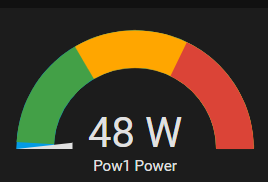
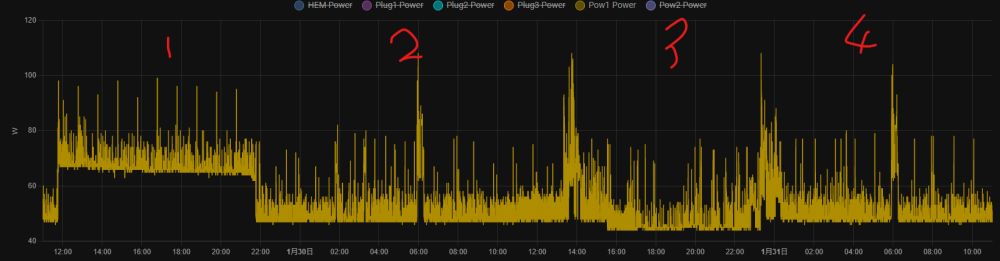
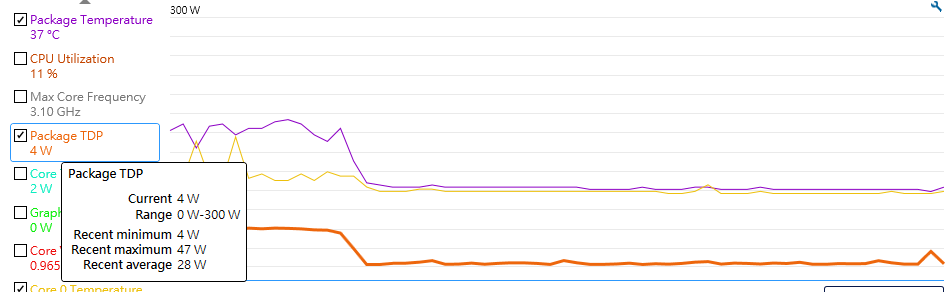
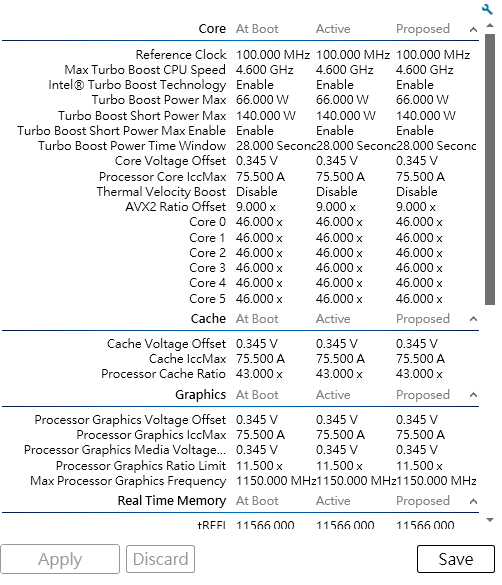
Yes, thats why I said K also draw low power in idle/light load, even always in high load, you can lower PL setting to limit overall power draw, then power draw between K and T won't have much different. That also why I choice K type CPU, it allow me have great configuration possibility and cheaper then T type CPU. Let say it turbo ( draw huge power ) in 28s then it will limit PL to something you config, this 28s won't affect too much on the electricity cost too much. No, I never add / under voltage, I hate too complicate tuning. I never have T type or green type CPU, so I can't show you the different, but my 7x24 Unraid with similar config. draw almost same power with AMD 2400G, 1700, Intel 9600k, 9700k ... so I don't think under same work load will half the CPU power usage with T type CPU. A graph may more informative, this is my little 7x24 unraid with 10G switch and some device power usage in these two day. - 9700k - two 3.5 SATA ( always spindown ) - One NVMe and one SATA SSD - 10G NIC Highlight - Sometime it will draw high then 100w - No kwh/h reading can provide 1. I perform parity check ( two disk ), floor at 66w 2. & 4. It is usual power usage 3. This ( yesterday ) was I try turn-down a Windowns VM for CCTV recording to docker version, as result it only save less then 3w although CPU usage greatly reduce, this really means CPU power draw in some situations not a big dealas , also as @JonathanM mention, many factor will affect the electricity cost, pls don't only focus on CPU. For my desktop, it is 9600K+10GNIC+NVMe+SATASSD and provide Windows XTU ( support K type CPU only ) FYR ( I never hard tuning, only PL1 set 66w )
-
K type CPU also draw low power when idle/light load. You also can limit its TDP if BIOS support that. For me, must K type. My desktop ~30w and Unraid ~40w average, all is K type CPU. Pls search PL1 ... PL2 ..... TDP:35 W PL1:35 W PL2:106W https://www.techpowerup.com/cpu-specs/core-i9-13900t.c3001
-
You have Dev 1-11, you may try avoid use disk slot 1-11, i.e. use disk slot 21-25 for array disk. I found this may help but no guarantee, this will void parity and need rebuild.
-
In my experience, directory allocate cross different disk may cause spinup even the file ( same directory) allocate in disk 4, and there are some factor also affect spinup. If you can't minimize the access, I advice you forget spindown for making life simple, Unraid spinup quit "sensitive". FYR, I only access array for daily backup, so in this case it spindown well.
-
To troubleshoot HBA relate or not, try start array in maintenance mode, don't mount ZFS and UD. Then click spin down ( global, not individual disk ), then all disk should spin down and monitoring any disk will spin up.
-
If only that, you can use "tools", "new config" and Preserve current assignments. Then mark parity is valid and start array. If either data disk show unmountable ( because USB-SATA bridge not transparent ), you may need rebuild them individual. If both also mountable, you should check any file abnormal or missing then perform parity check to ensure parity integrity.
-
Agree both
-
Those meter really good and cheap, the major part is could you flash the firmware. I have about 5-6, use 3 now. Agree. I also monitoring UPS and other non-RMS meter, but reading different really quit large and not much make sense. 🥳
-
The difference of add IP was it make a routing for the corresponding subnet, otherwise it route through management lan, checkt does this the issue.
-
Overlook your mobo support 2 onboard M2 nvme, so I assume the slot in use. Yes As NIC driver crash, so, it won't work again even you plug / unplug cable until reboot. And generate PCIe AER error also not surprise. Found a similar report, but haven't confirm solve, pls also try disable docker / VM. ** OP change from Realtek to Intel still got problem. **
-
Look like igc driver issue ( I225 NIC ), using different kind NIC should be a quick way to verify problem, but your ITX board seems haven't PCIe slot available.





