





Vr2Io
Members
-
Joined
Everything posted by Vr2Io
-
因為區塊 trim 後, 重讀這些區塊可以係不確定, 這樣會造成 parity 驗證不正確, 但有啲ssd會係 trim 後讀出全零, 這樣便沒有問題. 因此 Unraid 直接不允許在 array disk trim. 其實 trim 不 trim, 好多時都係冇大問題, 不用糾結.
-
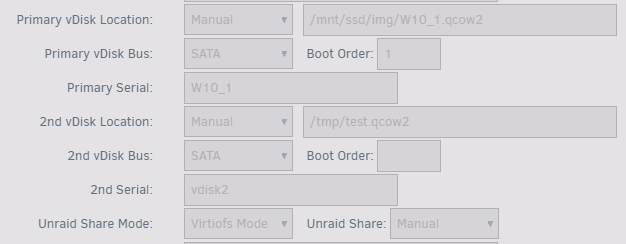
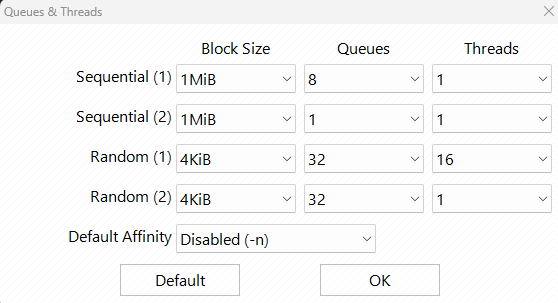
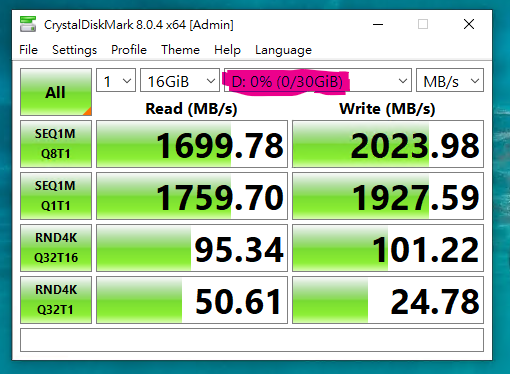
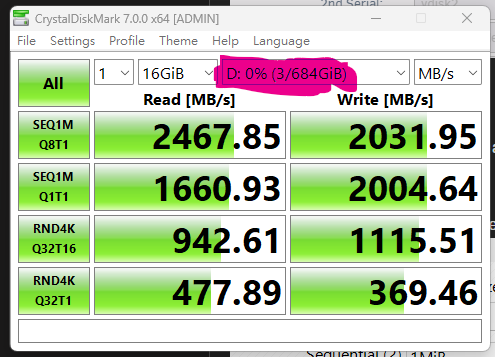
No, it already a RAM disk. Below are the simple test for create qcow2 30GB image in /tmp ( RAM disk ) for testing, VM only assign 4 cores and 6GB memory. If compare a baremetal Windows on a NVMe ( not top class ), not too bad just worst in 4K test in VM. Pls align the test setting, so that they are same or similar.
-
I face similar problem one time on a new system, all work fine but file copy just corrupt. After some hardware setting change / reset, it gone. But I haven't found out what cause that. Pls try reset BIOS setting to default.
-
對, 會重新拉取. 我沒有為意 docker 這問題, 但基本沒有影響, 你亦自行解決了. 👍
-
其實你只得 35GB data, 抄去其它地方先, 砍掉這個 pool, 再抄回就可以. du -sh /mnt/cache 是否只有 35GB 左右 ? 砍掉這個 pool stop array wipefs -a /dev/sdb wipefs -a /dev/sdf
-
For ZFS single / array disk, try below solution https://forums.unraid.net/topic/141781-utterly-low-file-copy-speed-what-is-wrong/?do=findComment&comment=1282301
-
If you don't need reallocate file cross different disk, just create the directory then move it from source directory to target directory on each disk will be on the fly. For example Disk 1 cd /mnt/disk1 mv /tv /data/media/ mv /movies /data/media/ Disk 2 Same ....
-
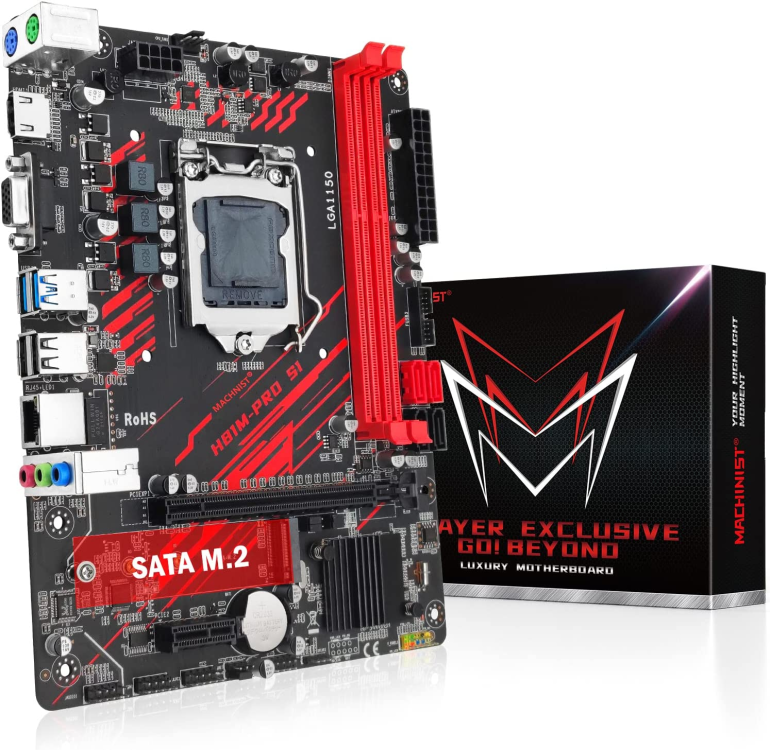
Unraid OS usually work well with different hardware, just set not auto start array, backup USB stick by build-in backup function, then booting in new hardware and check does all storage device correctly detect and go on. I further check i7-4790S, it have iGPU and quicksync, would you really need Nvidia GPU ? The other solution is buy a new 8 series mobo and give 2nd life for i7-4790S ( China have those 8 series new mobo very cheap ( less then 50usd ), dual LAN and support NVMe booting ( although you don't need that for Unraid ), build to ITX and SFX PSU and make it as small footprint as possible. I have buy one for a friend too, so far so good. ( But wrong BIOS setting will need CMOS reset ) You don't need 600w PSU, my 9700K build just use a 300w SFX PSU. Or This one in Amazon ( but not support PCIe NVMe and single LAN ), size are DTX ( between ITX and mATX ), Cooler master NR200P support this mobo and max with two 3.5HDD. https://www.amazon.com/MACHINIST-Motherboard-H81-Processor-H81M-PRO/dp/B09DVCV3LT

-
Opps 🤪
-
I have two ZFS pool RAID_0 and RAIDz1+RAIDz1, if compare to BTRFS RAID, performance have drop half, but it still far fast then single spinner disk, so copy / rsync to array won't got problem.
-
I have 64G, but mainly because just several docker and not use more then 6GB. Remain memory use for CCTV recording.
-
I always use rsync -ah ( same as -avh ) to sync appdata between disk and /tmp ( because I run docker in ram disk), it never have problem, but I will stop all docker & docker service before backup.
-
md_write_method="auto" Try enable reconstruction write first. Even that, it seems a bit slow, less then 30MB/s, but this also depends on large / small file size.
-
Pls also review does file allocation setting have change, I notice 6.12.x may revert those setting. BTW, 6.12 have some change to 6.11.x
-
Yes
-
Seagete NVMe ? if the pool are single storage pool, you can safe add it back. But I also aware Seagate NVMe at UD haven't show the mount button, this may indicate it have file system problem.
-
I doubt temperature were cause, my system even run at 40c+ case temp and 56c harddisk with workload. Option 3, recommend.
-
You can add them in your ignore list, but can't add Moderators.
-
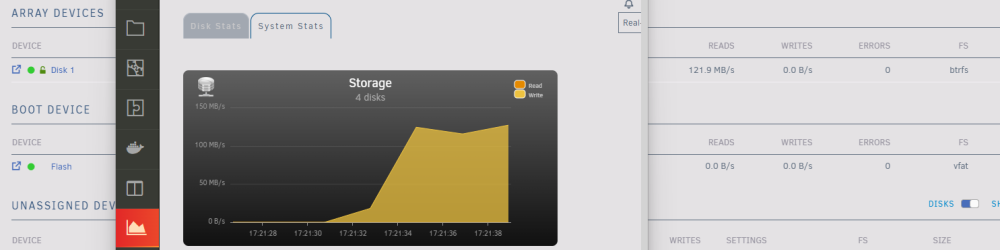
Bump, when will fix storage read/write figure problem. Thanks
-
Why stay 6.10.3 not 6.12, due to some plugin not available on 6.12 ? 7th years with Unraid 4 License, 2 7x24, 1 main storage power on demand , 1 test/spare Also rock solid if you avoid any stuff may cause unstable Try make thing as simple as possible Not noticeable, but 6.12 seems have more trouble report. Currently less active in forum, mainly boz lazy and boring.
-
Yes, so DNS must both subnet ( br0 , br1 ) accessible, common setting were use Internet DNS, if you want to use local DNS, then you need some advance network design / config.
-
Even disk in emulate, user / disk share also will see that ( include / exclude won't affect ). Suggest after fully recovered then reboot and check again.
-
To got best performance on array writing, pls use disk share instead user share if possible, and always ensure only one read/write session in array. Pls also ensure no any abnormal / slow disk in array too.
-
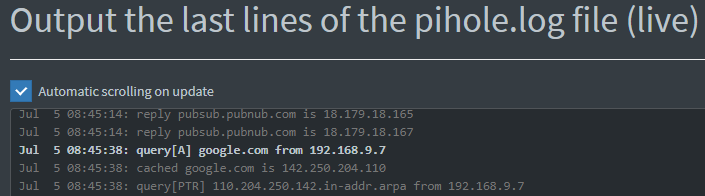
That's great. It should use Unraid setting DNS, so docker at br1 won't reach your DNS 192.168.10.214. For example, one of my Unraid config use local DNS ( Pihole ), check the docker ( 192.168.9.7 ) will use that too.
-
One of the reason is some user connect their 10G NIC in peer to peer directly. So no Internet ( actually is other subnet traffic ) in that network, if setting gateway then it will mess routing path. There also different reason will setting that, for example, I blank the gateway in Unraid 2nd NIC but docker have manual set the gateway for Internet access, so Unraid can access different docker network by routing the traffic to router then route back to docker network without "host access enable". Do you means docker in br1, if yes, pls troubleshoot by ping router & internet inside docker ( console ).




