





tjb_altf4
Members
-
Joined
-
Last visited
Everything posted by tjb_altf4
-
New image seems to be working as intended and can see appdata folder being populated as expected, thanks!
-
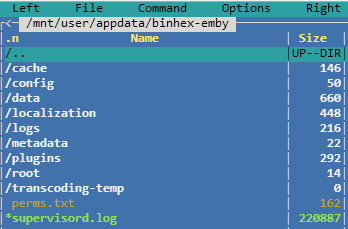
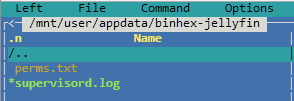
@binhex I'm seeing the same issue mentioned above: Jellyfin appdata template Jellyfin appdata For comparisons sake, here is Emby appdata Run command (formatted) root@localhost:# /usr/local/emhttp/plugins/dynamix.docker.manager/scripts/docker run -d --name='binhex-jellyfin' --net='br0' --ip='192.168.1.212' -e TZ="Australia/Perth" -e HOST_OS="Unraid" -e 'TCP_PORT_8096'='8096' -e 'UMASK'='000' -e 'PUID'='99' -e 'PGID'='100' -v '/mnt/disks/downloads/_temp/emby-test/media/':'/media':'rw' -v '/mnt/disks/downloads/_temp/emby-test/tv/':'/media-tv':'rw,slave' -v '/mnt/disks/downloads/_temp/emby-test/movies/':'/media-movies':'rw,slave' -v '/mnt/disks/downloads/_temp/emby-test/music/':'/media-music':'rw,slave' -v '/mnt/user/appdata/binhex-jellyfin':'/config':'rw' 'binhex/arch-jellyfin' c727eb966e562c0f8c20a88bbdc36eada63cd79edbdf53b9d29303c9c9602138

-
As this is external storage and nextcloud is accessing via SMB over network, the share must be accessible on the network (as set in Share settings). Internal paths won't work, and I would personally create a non-root user to access those shares. Assuming the share is exported to network, it should look like /media/ not /mnt/media/
-
RE: using delugevpn privoxy with jackett On the LSIO docker I did this way, @binhex might be able to comment whether something similar can be done or added to this container. I remember having issues with the in-app proxy settings, can't remember what though
-
docker stats jackett Jackett has been up for about 12hrs at this stage, seems excessive for what it needs to do. 15 min after a docker restart and with a few queries through the webUI.


-
Seems to be back to normal in recent update, thanks!
-
Recent update (or possibly earlier) to active streams plugin seems to be exposing file access relating to appdata on the shares? Host/User comes up as unknown, playtime unavailable, and Share is the immediate parent folder it happens to reside in (or file itself). Stream disappears when I stop the docker/VM related to that appdata. At first I thought something more sinister was happening (brown pants moment), but now I'm incline to think it's active streams over reporting?
-
6.6.5 to 6.6.6 update went well, colour scheme for usage at a glance is a welcome addition
-
Thanks, was broken on last update, new image has me up and running again
-
There are many perfectly good reasons to run multiple of the same dockers, and that is part of the great flexibility Docker affords us. I have had to duplicate a docker recently for a mariadb docker because one application I'm installing only works with a older maridb versions. This is how I set it up only recently, the instance you create below is your new instance. Notable things I had to change on my "duplicate" docker: Docker name Docker config folder Docker external port number There may be other things you need to change for specific apps, but this should be the bare minimum.
-
I understand the rationale, but that means deleted files never get logged as being deleted as they aren't being logged as deleted when they go to the recycle bin folder. Only deleted files that bypass recycle bin are logged as deleted. Or am I misunderstanding the intent of the deleted files log?
-
6.6.5 I think I may have spotted the issue: /etc/samba/smb-shares.conf has .Recycle.Bin as an excluded directory on all shares. recycle:exclude_dir = .Recycle.Bin I don't think this is needed as it is named as the recycle repository recycle:repository = %P/.Recycle.Bin/ With the .Recycle.Bin directory excluded it won't pickup when a file is deleted from that directory (when it empties).
-
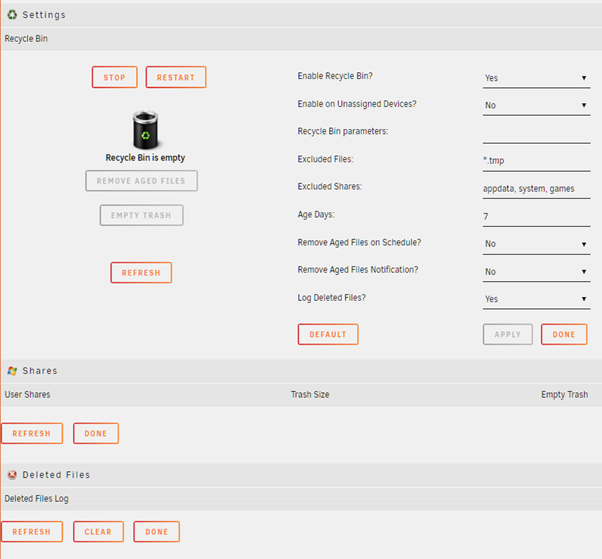
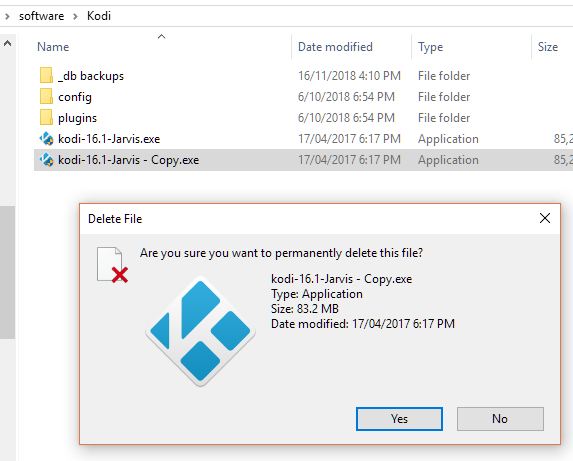
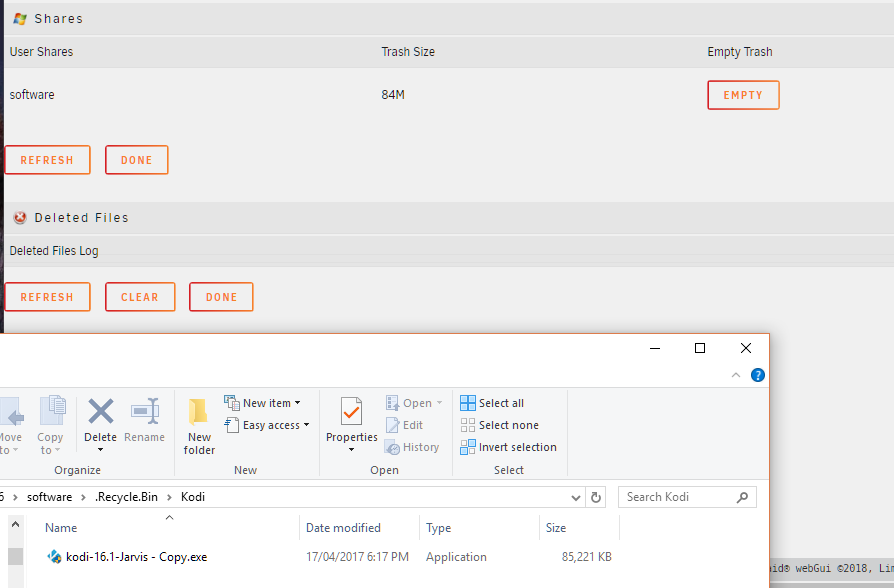
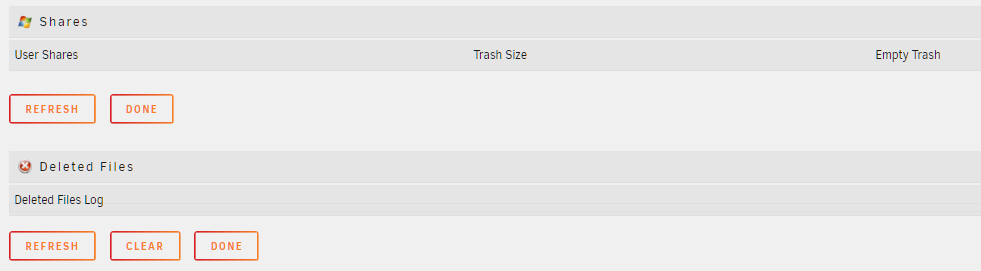
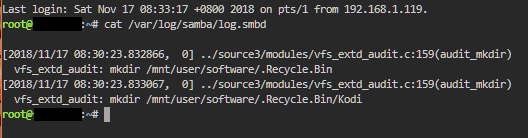
Understand. Lets start from the top, I've cleared the log and excluded the games share that was pumping the steam cache entries. Here a run through of deleting a file: Initial state Created file to delete, then deleted Share appears, no delete file log, .Recycle.Bin directory and deleted file appears Emptied recycle bin, still no deleted file logged .Recycle.Bin directory + contents and GUI reference to share disappear as expected Output of cat /var/log/samba/log.smbd [2018/11/17 08:30:23.832866, 0] ../source3/modules/vfs_extd_audit.c:159(audit_mkdir) vfs_extd_audit: mkdir /mnt/user/software/.Recycle.Bin [2018/11/17 08:30:23.833067, 0] ../source3/modules/vfs_extd_audit.c:159(audit_mkdir) vfs_extd_audit: mkdir /mnt/user/software/.Recycle.Bin/Kodi
-
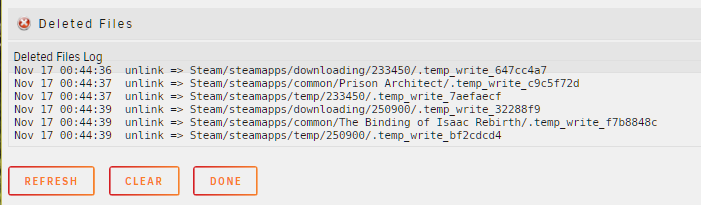
OK looking at the log (below) I found entries related to folders (of deleted files) are visible (Kodi, IrfanView) but files themselves are not. In between now and then some other recycle bin activities have occurred and some files went to recycle bin, other temp type files were deleted outright and these did show up in GUI log. It seems the samba log is including records we're less interested in logging, and excluding what we are interested in? cat /var/log/samba/log.smbd output: [2018/11/16 16:10:26.798241, 0] ../source3/modules/vfs_extd_audit.c:159(audit_mkdir) vfs_extd_audit: mkdir /mnt/user/software/.Recycle.Bin [2018/11/16 16:10:26.798478, 0] ../source3/modules/vfs_extd_audit.c:159(audit_mkdir) vfs_extd_audit: mkdir /mnt/user/software/.Recycle.Bin/Kodi [2018/11/16 16:10:30.227792, 0] ../source3/modules/vfs_extd_audit.c:159(audit_mkdir) vfs_extd_audit: mkdir Kodi/_db backups/.tmp [2018/11/16 16:10:30.230186, 0] ../source3/modules/vfs_extd_audit.c:180(audit_rmdir) vfs_extd_audit: rmdir Kodi/_db backups/.tmp [2018/11/16 16:15:22.667634, 0] ../lib/util/become_daemon.c:138(daemon_ready) daemon_ready: STATUS=daemon 'smbd' finished starting up and ready to serve connections [2018/11/16 16:15:52.150000, 0] ../source3/modules/vfs_extd_audit.c:159(audit_mkdir) vfs_extd_audit: mkdir /mnt/user/software/.Recycle.Bin/IrfanView [2018/11/16 16:20:38.684070, 0] ../lib/util/become_daemon.c:138(daemon_ready) daemon_ready: STATUS=daemon 'smbd' finished starting up and ready to serve connections [2018/11/17 00:44:27.116724, 0] ../source3/modules/vfs_extd_audit.c:159(audit_mkdir) vfs_extd_audit: mkdir /mnt/user/tjb/.Recycle.Bin [2018/11/17 00:44:27.116957, 0] ../source3/modules/vfs_extd_audit.c:159(audit_mkdir) vfs_extd_audit: mkdir /mnt/user/tjb/.Recycle.Bin/documents [2018/11/17 00:44:27.117170, 0] ../source3/modules/vfs_extd_audit.c:159(audit_mkdir) vfs_extd_audit: mkdir /mnt/user/tjb/.Recycle.Bin/documents/home [2018/11/17 00:44:27.117358, 0] ../source3/modules/vfs_extd_audit.c:159(audit_mkdir) vfs_extd_audit: mkdir /mnt/user/tjb/.Recycle.Bin/documents/home/iTunes [2018/11/17 00:44:36.969299, 0] ../source3/modules/vfs_extd_audit.c:159(audit_mkdir) vfs_extd_audit: mkdir Steam/steamapps/downloading/233450 [2018/11/17 00:44:36.988766, 0] ../source3/modules/vfs_extd_audit.c:268(audit_unlink) vfs_extd_audit: unlink Steam/steamapps/downloading/233450/.temp_write_647cc4a7 [2018/11/17 00:44:37.543853, 0] ../source3/modules/vfs_extd_audit.c:268(audit_unlink) vfs_extd_audit: unlink Steam/steamapps/common/Prison Architect/.temp_write_c9c5f72d [2018/11/17 00:44:37.549194, 0] ../source3/modules/vfs_extd_audit.c:159(audit_mkdir) vfs_extd_audit: mkdir Steam/steamapps/temp/233450 [2018/11/17 00:44:37.566873, 0] ../source3/modules/vfs_extd_audit.c:268(audit_unlink) vfs_extd_audit: unlink Steam/steamapps/temp/233450/.temp_write_7aefaecf [2018/11/17 00:44:39.626607, 0] ../source3/modules/vfs_extd_audit.c:159(audit_mkdir) vfs_extd_audit: mkdir Steam/steamapps/downloading/233450/steam_shader_cache [2018/11/17 00:44:39.755794, 0] ../source3/modules/vfs_extd_audit.c:159(audit_mkdir) vfs_extd_audit: mkdir Steam/steamapps/temp/233450/steam_shader_cache [2018/11/17 00:44:39.821349, 0] ../source3/modules/vfs_extd_audit.c:159(audit_mkdir) vfs_extd_audit: mkdir /mnt/user/games/.Recycle.Bin [2018/11/17 00:44:39.821560, 0] ../source3/modules/vfs_extd_audit.c:159(audit_mkdir) vfs_extd_audit: mkdir /mnt/user/games/.Recycle.Bin/Steam [2018/11/17 00:44:39.821740, 0] ../source3/modules/vfs_extd_audit.c:159(audit_mkdir) vfs_extd_audit: mkdir /mnt/user/games/.Recycle.Bin/Steam/steamapps [2018/11/17 00:44:39.821929, 0] ../source3/modules/vfs_extd_audit.c:159(audit_mkdir) vfs_extd_audit: mkdir /mnt/user/games/.Recycle.Bin/Steam/steamapps/temp [2018/11/17 00:44:39.822136, 0] ../source3/modules/vfs_extd_audit.c:159(audit_mkdir) vfs_extd_audit: mkdir /mnt/user/games/.Recycle.Bin/Steam/steamapps/temp/233450 [2018/11/17 00:44:39.822328, 0] ../source3/modules/vfs_extd_audit.c:159(audit_mkdir) vfs_extd_audit: mkdir /mnt/user/games/.Recycle.Bin/Steam/steamapps/temp/233450/steam_shader_cache [2018/11/17 00:44:39.825014, 0] ../source3/modules/vfs_extd_audit.c:180(audit_rmdir) vfs_extd_audit: rmdir Steam/steamapps/temp/233450/steam_shader_cache [2018/11/17 00:44:39.827131, 0] ../source3/modules/vfs_extd_audit.c:180(audit_rmdir) vfs_extd_audit: rmdir Steam/steamapps/temp/233450 [2018/11/17 00:44:39.833493, 0] ../source3/modules/vfs_extd_audit.c:180(audit_rmdir) vfs_extd_audit: rmdir Steam/steamapps/downloading/233450/steam_shader_cache [2018/11/17 00:44:39.839589, 0] ../source3/modules/vfs_extd_audit.c:180(audit_rmdir) vfs_extd_audit: rmdir Steam/steamapps/downloading/233450 [2018/11/17 00:44:39.848790, 0] ../source3/modules/vfs_extd_audit.c:159(audit_mkdir) vfs_extd_audit: mkdir /mnt/user/games/.Recycle.Bin/Steam/steamapps/downloading [2018/11/17 00:44:39.914053, 0] ../source3/modules/vfs_extd_audit.c:159(audit_mkdir) vfs_extd_audit: mkdir Steam/steamapps/downloading/250900 [2018/11/17 00:44:39.925227, 0] ../source3/modules/vfs_extd_audit.c:268(audit_unlink) vfs_extd_audit: unlink Steam/steamapps/downloading/250900/.temp_write_32288f9 [2018/11/17 00:44:39.938174, 0] ../source3/modules/vfs_extd_audit.c:268(audit_unlink) vfs_extd_audit: unlink Steam/steamapps/common/The Binding of Isaac Rebirth/.temp_write_f7b8848c [2018/11/17 00:44:39.940705, 0] ../source3/modules/vfs_extd_audit.c:159(audit_mkdir) vfs_extd_audit: mkdir Steam/steamapps/temp/250900 [2018/11/17 00:44:39.954151, 0] ../source3/modules/vfs_extd_audit.c:268(audit_unlink) vfs_extd_audit: unlink Steam/steamapps/temp/250900/.temp_write_bf2cdcd4 [2018/11/17 00:44:41.248923, 0] ../source3/modules/vfs_extd_audit.c:159(audit_mkdir) vfs_extd_audit: mkdir Steam/steamapps/downloading/250900/steam_shader_cache [2018/11/17 00:44:41.375309, 0] ../source3/modules/vfs_extd_audit.c:159(audit_mkdir) vfs_extd_audit: mkdir Steam/steamapps/temp/250900/steam_shader_cache [2018/11/17 00:44:41.433327, 0] ../source3/modules/vfs_extd_audit.c:159(audit_mkdir) vfs_extd_audit: mkdir /mnt/user/games/.Recycle.Bin/Steam/steamapps/temp/250900 [2018/11/17 00:44:41.433567, 0] ../source3/modules/vfs_extd_audit.c:159(audit_mkdir) vfs_extd_audit: mkdir /mnt/user/games/.Recycle.Bin/Steam/steamapps/temp/250900/steam_shader_cache [2018/11/17 00:44:41.436687, 0] ../source3/modules/vfs_extd_audit.c:180(audit_rmdir) vfs_extd_audit: rmdir Steam/steamapps/temp/250900/steam_shader_cache [2018/11/17 00:44:41.439915, 0] ../source3/modules/vfs_extd_audit.c:180(audit_rmdir) vfs_extd_audit: rmdir Steam/steamapps/temp/250900 [2018/11/17 00:44:41.445601, 0] ../source3/modules/vfs_extd_audit.c:180(audit_rmdir) vfs_extd_audit: rmdir Steam/steamapps/downloading/250900/steam_shader_cache [2018/11/17 00:44:41.448777, 0] ../source3/modules/vfs_extd_audit.c:180(audit_rmdir) vfs_extd_audit: rmdir Steam/steamapps/downloading/250900
-
include = /etc/samba/unassigned-shares/downloads.conf include = /etc/samba/unassigned-shares/storage.conf #vfs_recycle_start #Recycle bin configuration [global] syslog only = No log level = 0 vfs:0 #vfs_recycle_end In it's entirety
-
include = /etc/samba/unassigned-shares/downloads.conf #vfs_recycle_start #Recycle bin configuration [global] syslog only = No log level = 0 vfs:0 #vfs_recycle_end Thanks for the help, only other entries are unassigned devices.
-
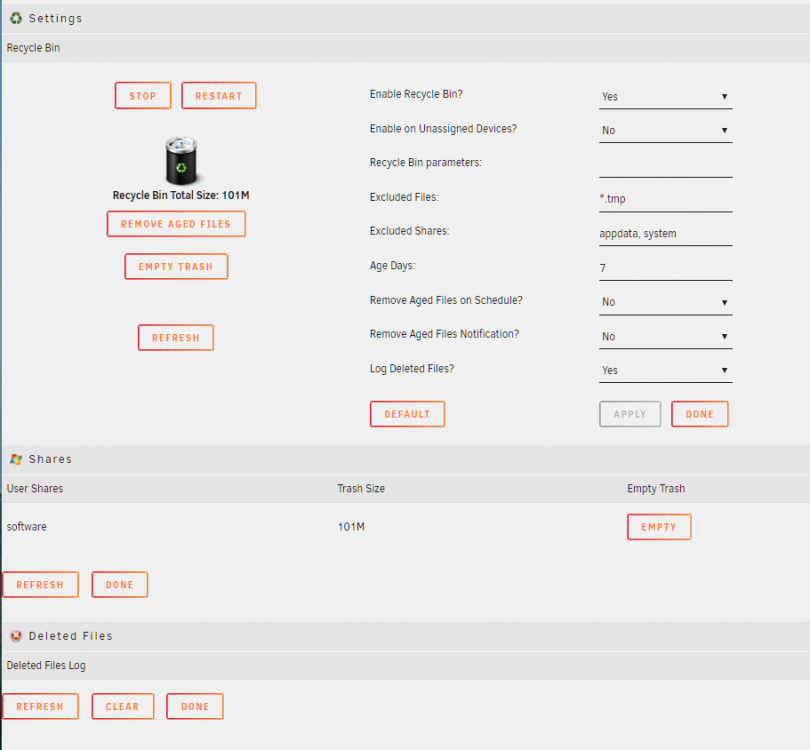
Virgin install on 6.6.5, recycle bin functionality works perfect as far as I can tell after running a few delete + empty tests, but the deleted file logging isn't coming up (yes it's enabled). Screenshot of settings below, let me know if it's anything I've missed? Thanks
-
Have you tried running in x4/x4/x4/x4 mode to see if that fixes the issue? If your on a slot that doesn't have that option, you may have the m.2s connected to the "second half" of the x8 instead of the "first half", changing the slots the m.2s are connected to may fix the issue.
-
2 things to try: Create the folder in midnight commander (unraid main console, then mc), navigate to the appdata folder and create folder via mkdir (F7) File should be .env not env.ini, what you've done is probably ok, but mine is named simply .env
-
Assuming MariaDB is already up and running, bash into the docker container (or select console on the mariadb docker context window). In the console enter the following command, if there's no password set on mariadb, press enter on password prompt. mysql -u root -p Once logged in run the following commands, modifying password and username fields as you require. CREATE USER 'monicaUser' IDENTIFIED by 'monicaPassword'; CREATE DATABASE IF NOT EXISTS monicahq CHARACTER SET = utf8mb4 COLLATE = utf8mb4_general_ci; GRANT ALL PRIVILEGES ON monicahq.* TO 'monicaUser' IDENTIFIED BY 'monicaPassword'; Note the created values, these will need to be added to the database connection details in the .env file I've also set up the collation (in the statement above) to allow for emoji data to be stored, we turn this setting on in Monica in the docker .env file by setting emoji usage to true # Use utf8mb4 database charset format to support emoji characters # ⚠ be sure your DBMS supports utf8mb4 format DB_USE_UTF8MB4=true
-
@Ruthalas After looking further into this package I got interested and wanted it working too haha. One method I knew would work was to add all variables to the docker template... no thanks 😛 Though some google-fu and trial and error, I eventually worked out how to pass the .env file and got monica running. If you manually create the monicahq folder in appdata directory and add the .env file there, you can point to it in the Extra Parameters section of the docker template (advanced setting enabled) with this: --env-file=/mnt/user/appdata/monicahq/.env Other than adding port and the appdata path (probably needed later on) this is all that is needed to get the service going, but be warned it may need some further tweaking. I've also setup monica's db in mariadb, if anyone is interested in how to set that up I'm happy to share.
-
Search via CA in unRAID and extend search to docker hub. The GitHub repository linked is for those wanting to build the image from scratch. It looks like "monicahq" is the official docker hub repository for Monica CRM. https://hub.docker.com/u/monicahq/
-
I think it's on the GUI end or something in the middle, I have not touched my scheduler in over a year and it's still working as expected. Will be worth upgrading to 6.6.3 in case the bug has already been caught and fixed. Best to repost to the bug forum so it gets traction: https://forums.unraid.net/bug-reports/stable-releases/
-
So decided to get down to a bit of maintenance over the weekend, as is typical I had a couple of small headaches. Upgraded the bios from v2.00 > v2.30 (bridging) > v3.30 For some reason v3.3.0 disabled my backpanel usb3 ports from being detected at boot time, so unraid flash was moved to front panel usb2... grrrr I'll fix that up later. Got into unRAID and updated from v6.5.3 to v6.6.3 Other than some unrelated DNS adventures, upgrade went off without a hitch and I've noticed some issues I was having with VNC have gone away, happy days. VM performance seems to be better in 6.6.x, so that's a win
-
That feature wasn't added until a later version of unRAID (you're on 6.1.6 accoring to your sig), I don't think the web console was even available in your version. However, you can still bash into docker by using SSH into unRAID (via putty etc), then type: docker exec -it mariadb sh This is the same command you can see in the popup window title in spaceinvaderone's video when the web console is launched, from there you should be able to follow the rest of the video.




