





tjb_altf4
Members
-
Joined
-
Last visited
Everything posted by tjb_altf4
-
If you just want 2 separate btrfs/zfs pools, this has been available in Unraid for years. This feature request is to add multiple Unraid type arrays (mixed disk size, individual file systems, parity protection)
-
You are getting hit with 2x parity penalty, once when adding data to zfs pool, and again when removing old data from array. This would also be writing to old disks when data is being removed so you are thrashing between read and write on the old array disks. Probably some other hardware limits you are hitting depending on how you are setup. A pure copy, then format of array disks would have been quicker.
-
I would always take a backup before starting, and make sure your encryption keys are safe also... but there is a plugin to do just this.
-
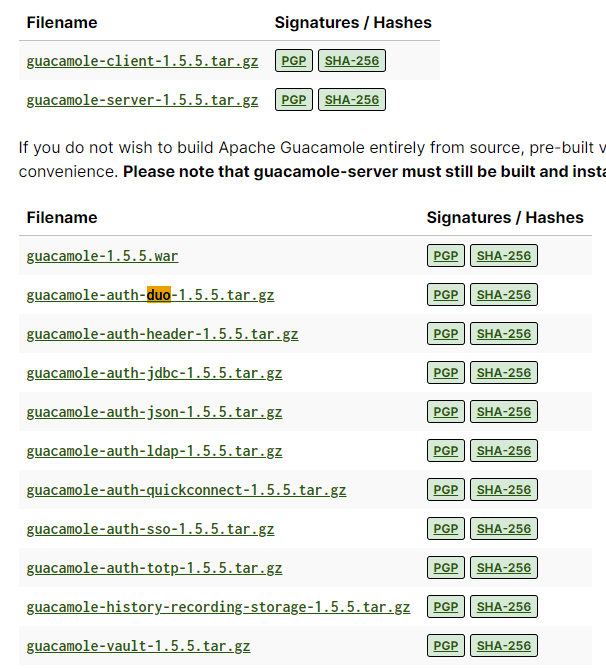
Had a look for that repo and there is a PR from a few months ago to add support for 1.5.5, not sure if the author is still around. You could either build the image yourself from that PR, or you could look at moving to official image, which looks like it requires a separate container for postgresql and would probably need you to migrate your settings.
-
works fine for binhex releases, but might help to clean up old cache and cookies and see if problem reoccurs after logging in again.
-
it appears to be tied to the release, so pulling latest (or specifically tag 1.5.5) should give you guac with duo 1.5.5
-
Any chance we could get a feature added to manually add webui links as a custom action for the folder level object? Or maybe surface the existing webui links to the folder object? Thanks
-
Its a bug that has been around for years, I've got a bug report for it in the attached link, and there is supposed to be fixed in an upcoming Unraid 7 beta release.
-
-
Sounds like you've built the image locally (only). The image can be built anywhere, but must be pushed to a container registry, then you pull from the registry, and not use the local referenced image. If you do this it should work as expected.
-
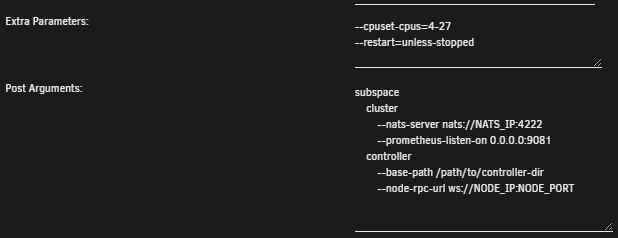
For some containers, often AI or compute type containers, I often need to specify quite a bit in both post arguments and extra parameters fields. Request is for the html field type be changed to a multi line (textarea), and for the following reasons: easier to see the full command allows use of line continuation for nicer formatting of command in the same way that would be compatible in command line Examples: Current Proposed change to multi line: Proposed change to multi line, where user can format for better readability (note I've missed the line continuation in this example) The code change on webpage to do this is something like Current: <dd><input type="text" name="contPostArgs"></dd> Proposed: <dd><textarea name="contPostArgs" spellcheck="false" style="resize: both; overflow: auto"></textarea></dd>


-
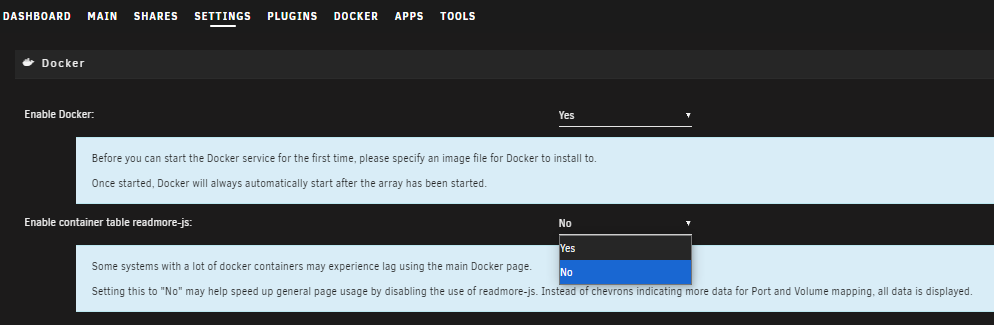
What you've done with the cpu pinning is good, I've done this on my compute intensive servers so they are still usuable. Docker page has always been the slowest, especially in advanced mode. One setting in Docker settings was added in recent versions that disables a visual display script, this can make a noticeable difference to performance on Docker page.
-
Not OP, but qemu agent is installed in Unraid by default enable it like so: Reasons for enabling qemu guest agent is to see IP address of Unraid within proxmox interface, and for proper power control of the VM (shutdown, restart etc) from the Proxmox interface. I'm pretty sure the SCSI controller is only applicable for any added vm disk, if everything is running off the LSI controller it won't be relevant.
-
you need to specify a network (that you have already created) with --net=mycoolnetwork (usually easiest to use existing bridge networks) and add --ip=192.168.1.111 You don't need to specify ports if containers get their own IP, everything is available on native ports. That said, just build your own template and add everything there, then you can manage it like other Unraid containers. There is also a docker compose plugin for more complex deployments.
-
Hey @SimonF this has worked for ARC gpu for the apps I added. Would you like me to wait until you release the updated plugin with intel support before submitting my PR? We also did notice Emby uses ffmpeg for transcoding on ARC, not sure if you have any ideas on how to make it identifiable, we don't seem to be able to see the full command in intel gpu top.
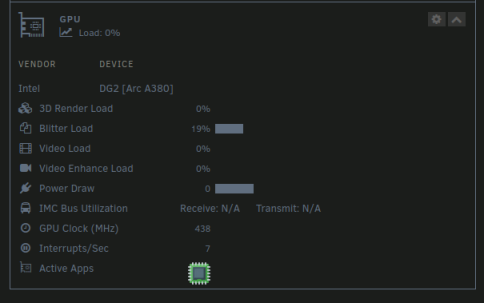
 Thanks, I've done a baseline test to make sure the updated package still detects the apps in my system, and have passed on to my friend to test in his ARC gpu system.Does this build also address the web ui linking problem encountered in this situation, where web ui link returns about:blank#blocked? (see thread)Thanks. Anything in the works to add this feature to AMD or Intel GPUs? I imagine he last upgraded his system prior to beta being available, and simply hasn't upgraded it since.Doing some testing on these specific apps, they are working on Nvidia cards but not on a friends Intel Arc gpu (6.12.x thor build kernel for arc support). I can see the same app name show up in his intel gpu top output, I'm assuming name detection use the same definitions created in Nvidia.php? (couldn't see anywhere else to define) Any thoughts on how to troubleshoot the issue?I'd put MQTT on a custom network (e.g. one of the vlan bridge networks) and retest, seems like Docker's networking defaults are causing this.If you want to do this in CLI with fstab, here is Ubuntu's documentation on doing so for a SMB share. https://ubuntu.com/server/docs/how-to-mount-cifs-shares-permanentlyAssuming you have setup your share in Unraid to be exported, this is an SMB example on a fresh install of Ubuntu 24.04.1 LTS for my "scratch" share. Click Connect and use the username and password you created in your unraid share settings. It should now be mounted and available in the sidebar.
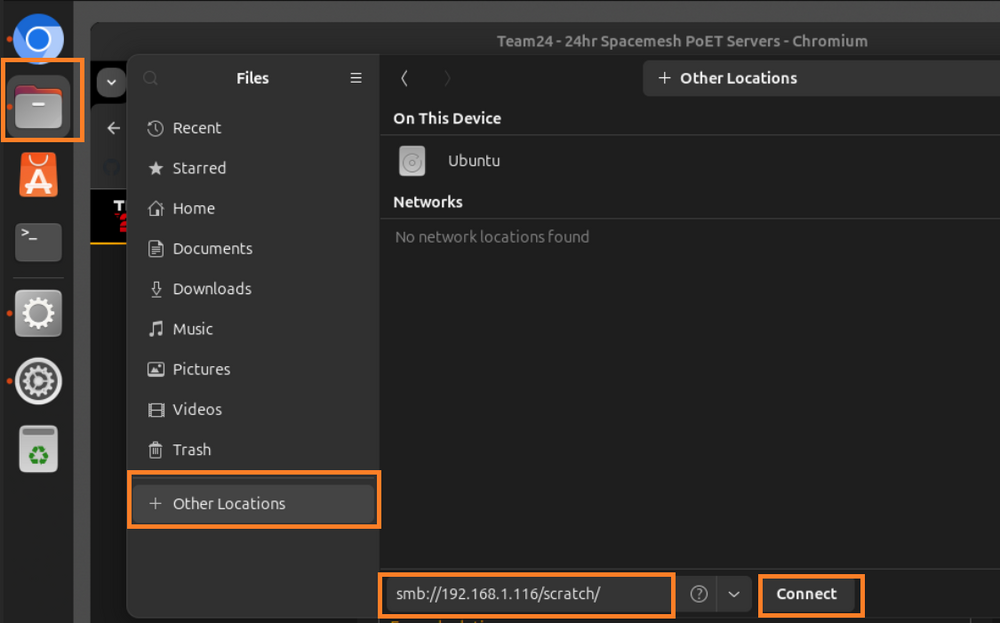 Hi Simon, I want to create a PR for some additional apps, but I'd like to test locally first... how best to approach this? I've already cloned the repo and made the changes I need locally. Figured it out, will send a PR once ready, cheers!Old bug, but its never been addressed. If a container doesn't have a port exposed in its dockerfile, the Unraid Docker page isn't able to determine its IP address. This is especially problematic for containers using custom networks that don't need ports exposed to function. Adding a mapped port in the unraid template does not make the ip address appear either. Docker itself has no problem returning the addresses missing when querying docker docker inspect -f '{{range.NetworkSettings.Networks}}{{.IPAddress}}{{end}}' container_name_or_id This seems to be an Unraid implementation limitation due to the requirement to get and display exposed port(s). My suggested fix is that when using custom networks, containers should only attempt to show the IP, as published ports are largely irrelevant in this case.






