





tjb_altf4
Members
-
Joined
-
Last visited
Everything posted by tjb_altf4
-
its says your plots directory is empty also, I'd double check your paths are still correct, and maybe check permissions also. I'm still on 1.6.2 so I've not personally tested the new build yet.
-
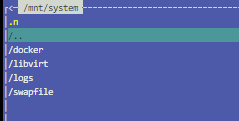
For reference, I went through this and did delete the system share, this is how I organised it.
-
You'll need to remove the share of the same name first, but yes works fine.
-
For what its worth, I've provisioned another 2 Unraid licences on Sandisk Ultra Flair (USB3.0) with zero problems for last couple of weeks.

-
A few I know of, the flag for third-party cooling response is an important one on the Dells, as this flag is only set through ipmitool and cannot be set in the ipmi ui (iDRAC) or bios. Disabling this flag stops the system raising minimum fan speed by +60% when you add third party cards like non-server GPUs. To set value to Low FAN speed offset run command: ipmitool -I lanplus -H <IPADDRESS> -U <USERNAME> -P <PASSWORD> raw 0x30 0xCE 0x00 0x09 0x07 0x00 0x00 0x00 0x07 0x00 0x02 0x02 0x02 0x00 0x00 To set value to high FAN speed offset run command: ipmitool -I lanplus -H <IPADDRESS> -U <USERNAME> -P <PASSWORD> raw 0x30 0xCE 0x00 0x09 0x07 0x00 0x00 0x00 0x07 0x00 0x02 0x02 0x02 0x01 0x00 Set Third-Party PCIe Card Default Cooling Response Logic To Disabled ipmitool -I lanplus -H <IPADDRESS> -U <USERNAME> -P <PASSWORD> raw 0x30 0xce 0x00 0x16 0x05 0x00 0x00 0x00 0x05 0x00 0x01 0x00 0x00 Set Third-Party PCIe Card Default Cooling Response Logic To Enabled ipmitool -I lanplus -H <IPADDRESS> -U <USERNAME> -P <PASSWORD> raw 0x30 0xce 0x00 0x16 0x05 0x00 0x00 0x00 0x05 0x00 0x00 0x00 0x00 Get Third-Party PCIe Card Default Cooling Response Logic Status ipmitool -I lanplus -H <IPADDRESS> -U <USERNAME> -P <PASSWORD> raw 0x30 0xce 0x01 0x16 0x05 0x00 0x00 0x00 The response data is: 16 05 00 00 00 05 00 01 00 00 (Disabled) 16 05 00 00 00 05 00 00 00 00 (Enabled) Referenced for 13th gen Dell servers, but I believe it is applicable to other models. https://www.dell.com/support/kbdoc/en-au/000135682/how-to-disable-the-third-party-pcie-card-default-cooling-response-on-poweredge-13g-servers Also note IPMI is disabled by default, and you have to got into iDRAC settings to enable it.
-
Painless upgrade for me, but I saw this post yesterday so I knew what to expect. MFA using Google Authenticator on Android working just fine with the QR link.
-
I read about the auth changes coming and pre-emptively made sure all the *arrs were using it, everything worked like it did before. I'd double check if the API key was reset/changed if you are having connectivity issues.
-
Have been running the new auth on all *arrs for a few weeks now, no issues.
-
As long as you: don't use them for parity, don't use them a lot, don't mind much slower writes when the disk is getting full, and don't use them to rebuild failed disks, ...then you should be fine. Oh and they need TRIM to maintain performance to prevent write amplification, which the Unraid array doesn't support.
-
Minor issue I just found. I noticed if you are on release that is not supported by the newest iteration of the plugin (e.g., 6.10.3), it will cause the update all plugin button to never exit... just seems like download or install process has hung. Of course closing the popup and refreshing showed all was well, although I possibly got lucky alphabetically that GUI Search was the last update. Not sure if an Unraid OS problem, or a problem with the way the plugin exits, but thought I'd raise it here anyway.
-
Don't need to replace fans, should be able to get quiet yourself. You can adjust fan offset in idrac down to 0% offset, if its still loud its probably kicking on the third-party PCIe card fan profile (does this when you add consumer GPUs etc). You can disable that with these steps: https://www.dell.com/support/kbdoc/en-au/000135682/how-to-disable-the-third-party-pcie-card-default-cooling-response-on-poweredge-13g-servers ipmitool was previously available using nerdpack, newer unraid releases you use nerdtools which should have it also.
-
I don't know what that silly dot is doing there, but I agree 25GbE is better than 10GbE
-
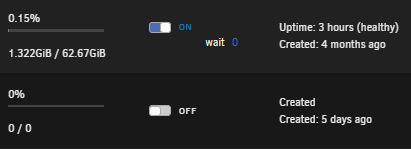
Can you screen shot the column to the right also, like this?
-
Kernel 6.2 isn't even stable yet, so we probably won't see it in the coming Unraid stable release. Unraid typically releases on LTS kernels, which is currently 6.1 (and found in Unraid 6.12 beta).
-
There is no GUI interface for creating or deleting docker networks (I'm assuming this is what you are referring to). Instead you need to go into the CLI and type: docker network rm <my-network> Where <my-network> is the name of your network to be removed, this can also be stacked if you like e.g. docker network rm <my-network1> <my-network2> <my-network3> If you don't know what networks you have, type docker network ls The Unraid default docker networks are br0 (and br1, brx etc for each interface), bridge, host, none and wg0 Note that any containers still configured to use that network will fail to start, but you can adjust this in the docker settings. If a containers is still running and using one of these networks the command will likely fail to remove it. Example: root@fortytwo:~# docker network ls NETWORK ID NAME DRIVER SCOPE f65acde003bd br0 ipvlan local 8ba0d062c51e br1 ipvlan local b410faa93e33 bridge bridge local f14e96c2b3e7 go-spacemesh_spacemesh bridge local 5974bf6e7616 host host local 6ef32c3f7c35 none null local d51a9a1ed7b1 pihole bridge local 6c61ba876986 proxynet bridge local 1fd749e6cfc9 wg0 bridge local root@fortytwo:~# docker network rm go-spacemesh_spacemesh go-spacemesh_spacemesh root@fortytwo:~# docker network ls NETWORK ID NAME DRIVER SCOPE f65acde003bd br0 ipvlan local 8ba0d062c51e br1 ipvlan local b410faa93e33 bridge bridge local 5974bf6e7616 host host local 6ef32c3f7c35 none null local d51a9a1ed7b1 pihole bridge local 6c61ba876986 proxynet bridge local 1fd749e6cfc9 wg0 bridge local root@fortytwo:~#
-
Macvlan docker network type is the likely cause of your kernel panics, this is a known issue and such a common problem in recent releases that it is no longer a default setting. The fix in this case is to change docker network type from macvlan to ipvlan, which involves stopping the docker service: go to SETTINGS > DOCKER with advanced view toggled (top right), set Enable Docker: No, then set Docker custom network type: ipvlan Once complete: set Enable Docker: Yes to restart docker service. Report back with fresh diagnostics if kernel panics continue.
-
macvlan docker network type is the likely culprit, known issue and such a common problem in recent releases that it is no longer a default setting. To change, go to SETTINGS > DOCKER, then with advanced view toggled, set Enable Docker: No, then set Docker custom network type: ipvlan Once complete, set Enable Docker: Yes to restart docker service.
-
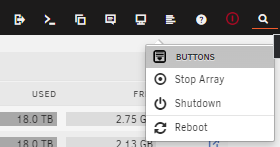
Might turn off this addon power button to prevent future misclick accidents 😂
-
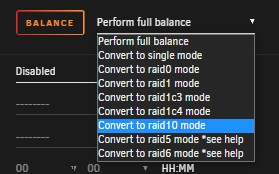
Once you have created a pool with at least 4 disks (btrfs), you can convert to raid10 using balance option under that pool's disk settings (click on first disk in pool from Unraid GUI > MAIN).
-
I know one guy ready to test the limits
-
Probably switching to the Nvidia card as a primary display, my R730 started doing the same after added Nvidia drivers.
-
A common use case is adding a 10GbE NIC to your server and direct connecting to a desktop/workstation for fast access to your data, where the rest of your network would normally run 1GbE.
-
I notice all the unaffected users would have been part of a mod/admin security group, and likely had different permissions to normal users
-
Working @SpencerJ Not sure, they were just screenshots, so nothing over the top
-
Since the recent downtime, I have been seeing the following when attempting to add attachments: Sorry, an unknown server error occurred when uploading this file. (Error code: -200)





