





tjb_altf4
Members
-
Joined
-
Last visited
Everything posted by tjb_altf4
-
transcode logs added ffmpeg-transcode-18222f33-a0d3-4d3b-bc6e-1d810ebb868d_1.txt
-
I tried it with your Jellyfin container, and Emby official (I have premiere) Both recognized and provided quicksync and vaapi options under transcoding options root@UNRAIDVM:~# ls -la /dev/dri total 0 drwxrwxrwx 3 root root 100 May 23 01:32 ./ drwxr-xr-x 15 root root 3280 May 23 01:33 ../ drwxrwxrwx 2 root root 80 May 23 01:32 by-path/ crwxrwxrwx 1 root video 226, 0 May 23 01:32 card0 crwxrwxrwx 1 root video 226, 128 May 23 01:32 renderD128 note: while the name is UNRAIDVM, it is running on baremetal video blips ~2% at start, then it reverts to cpu transcode unraidvm-diagnostics-20220523-1650.zip

-
Perfect, thanks @InvicTech
-
Having a bit of trouble, might have missed something, have gone through the following steps: install intel_gpu_top plugin echo "blacklist i915" > /boot/config/modprobe.d/i915.conf reboot connected hdmi reboot i915.enable_guc=3 reboot I can see transcoding kick in for a second in intel_gpu_top (identifies cpu/gpu correctly), but them it falls back to cpu transcoding. Running on Unraid 6.10.1
-
Arrived today, testing tonight
-
Possibly related to this issue linked. If so, you should just need to grab the nvme ID again and update your VM XML and any passthru settings (UD or vfio-pci driver binding)
-
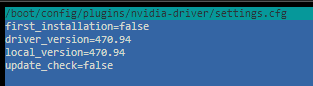
Already rebooted again with the setting changed, this is what it looks like now, and this is what I had set in plugin prior to OS update
-
Upgraded to 6.10.1 and had a problem with gpu again, went into plugin settings and it has reverted to latest driver again. Seems it is not honoring driver preference settings between upgrades?
-
Moved both servers from 6.10.0 to 6.10.1 this morning, no issues previously, and no issues with latest upgrade.
-
I just noticed moving files within a disk share is reverting to a copy/delete instead of an instant type move.
-
Thanks! I'm currently using as a host card, and for some light OpenCL stuff in docker.
-
Had some troubles with nvidia-smi not communicating with my gpu since moving to 6.10. Turns out driver v470.94 is the last supported driver in the list for my little old GT 710, its no longer on supported products on the newer drivers.
-
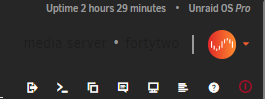
Any updates for 6.10 ? I like my custom dark-on-dark theme, but the text for the upc/myservers plugin is a new element that needs to be added/configured to the plugin.
-
Main server upgraded, she's all shiny and new now!
-
That sounds like you set your PIA endpoint to one that doesn't support port forwarding. Port forwarding is important for seeding, without which will kill your download speed and overall standing on private trackers. If you're only using public trackers, then I don't think it will impact much.
-
Easy upgrade for my 2nd server that has been running RC series, Main server will be upgraded later today, hopefully just as smooth!
-
Binhex's release from 2 weeks ago has that fix (Prowlarr release 0.3.0.1730)
-
About 52 hours for me, but I wasn't quite getting full speed out of it, note it also took about 82 hours when done through an external enclosure Once you finish step 1, the overall preclear time is approx. 3 times that (steps 1,2,5 all take about the same time).
-
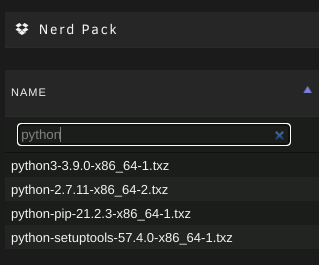
A3. Install nerdpack plugin, which allows you to install packages through the GUI, with User Scripts plugin being a nice frontend for running scripts on a schedule. Alternatively you could look at running the scripts through a python based docker. VM is also possible, normally you would just create a vdisk for it to run on, but passing a whole disk is also possible.
-
I did this as a 1 device pool that was set not to participate in user shares. I also use the same nvme for swapfile, logs and libvirt image.
-
new latest image is working for me, thanks!
-
Docker generated MACs start with 02:42:ac (or similar), with the rest derived from the IPv4 IP address.
-
Did you set the network + IP in the container(s) itself? Those two MACs pictured, one is your server's NIC, the other looks like something custom set (from Portainer?), as that is not a valid/typical MAC.
-
I'm still on a crusty old release (2.0.4.dev38_g23a48dd01-3-01), but my web.conf only has 6 sessions and its the same install I've been using since 2017.
-
It depends on the network you assign your docker to, you can have a mix within a server. To set an IP, the network needs to be a custom one, this might be one you created (docker network create), br0, or if you added vlans something like br0.10 Portainer in your screenshot looks like it is custom network named macvlan.network (of the type macvlan presumably). The Fixed IP option only shows once a custom network is selected, if you don't add an IP, it will simply use DHCP for the next free IP. Also note that the docker name can be used for name resolution within that network (when its on a custom network), which is quite handy if you don't want/need to have fixed IP.




