





tjb_altf4
Members
-
Joined
-
Last visited
Everything posted by tjb_altf4
-
Its an unraid bug. IP won't show, web UI link won't work from menu, but an IP is assigned and the UI will work if you specify the right IP
-
I don't think that's right for what I want to achieve. If I have 10 local disks in UD, they currently all mount like: /mnt/disks/disk-001 /mnt/disks/disk-002 /mnt/disks/disk-003 ... /mnt/disks/disk-010 I would like to be able to mount a subset into a different folder, where I can specify the name, e.g. SOME_GROUPING: /mnt/disks/SOME_GROUPING/disk-001 /mnt/disks/SOME_GROUPING/disk-002 /mnt/disks/SOME_GROUPING/disk-003 /mnt/disks/SOME_GROUPING/disk-004 This would be to allow me to simply pass /mnt/disks/SOME_GROUPING/ into a container
-
Is there a sample script to modify the UD mounting behaviour? I'm looking at a way to nominate a sub folder, e.g. /mnt/disks/SOME_GROUPING/disk-001 & /mnt/disks/SOME_GROUPING/disk-002 This would allow me to easily pass a group of UD disks into a container, as well as be more dynamic as I add and remove disks over time... as I wouldn't need to change the container volumes each time
-
The get container size screen doesn't account for layer reuse. Binhex containers all use the same base layers, so the majority of their reported size doesn't actually result in more disk usage.
-
Are you using the preclear plugin, and are preclearing disks? That is what those icons are for
-
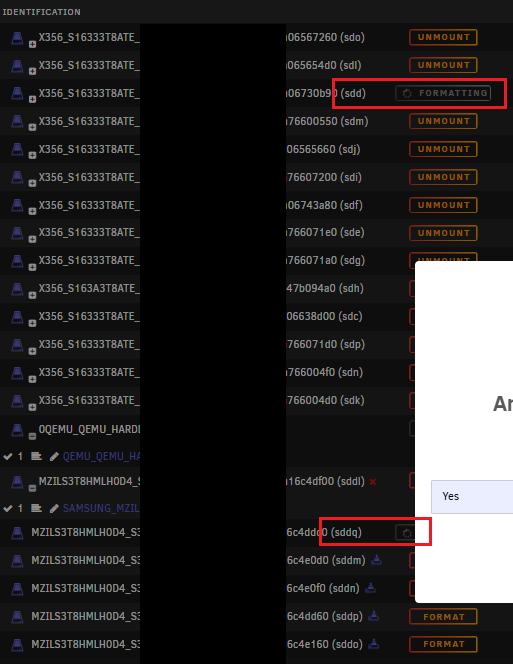
Came across a visual bug when you have a ton of disks online, if I format (for example) disk sddq, sdd will also show as formatting also (thankfully not a duplicate format). Haven't tested if this quirk extends to other actions.
-
If you're having issues with the latest release not starting, take a look at this issue for the fix, which requires updating the setting.json file for jellyseer in your appdata folder. Apparently this behaviour was added as a "feature" 🤷♂️ https://github.com/Fallenbagel/jellyseerr/issues/1095#issuecomment-2473284507
-
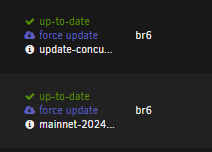
As per title, when I run custom tags I very often end up with truncated tag names, which usually omits useful information about the release. For example: ...where the second tag would be: mainnet-2024-nov-13, omitting the part of the tag most likely to indicate release. It currently makes showing the tag in advanced view useless unless you simply want to confirm if you are running latest or not. This display behaviour is currently the case for both 6.12.13 and 7.0.0-beta.4 releases. Ideally the VERSION column should be widened to allow more tag text to be visible. If messing with column width is not possible, at least make the full tag visible as a tool tip... or even some combination of the two. Thanks
-
I'm on 6.12.13 and see expected speeds with PM1633 via a LSI 9305-16e
-
it should work fine at higher speeds... I've seen it use 5Gbps on my own system (25GbE), not done any formal testing... I just needed a quick fix after migrating 😅 Note that cpu utilisation will be higher compared to virtio (when its not broken), which is why when its fixed virtio will be the better option.
-
for cpu upgrade you probably don't even need to worry about clearing cpu pinning, unless you decide to give containers/vms more cores post upgrade. it should be an easy upgrade on the unraid side, just make sure your bios is updated with a version that allows you to make the upgrade you are planning.
-
Its a kernel bug, pretty sure its fixed in unraid 7 beta4, though not tested myself. I'm still on 6.12.13, so using vmxnet3 drivers is my workaround.
-
Interposers are only there to allow multi-pathing for sata drives, which you aren't using. In some scenarios they can also be useful to avoid compatibility issues with mixed sas/sata deployments. Unless you know you need them, you don't need them.
-
Given you were originally trying to do this manually in the CLI, I think the mount folder had incorrect permissions. The GUI does this automatically.
-
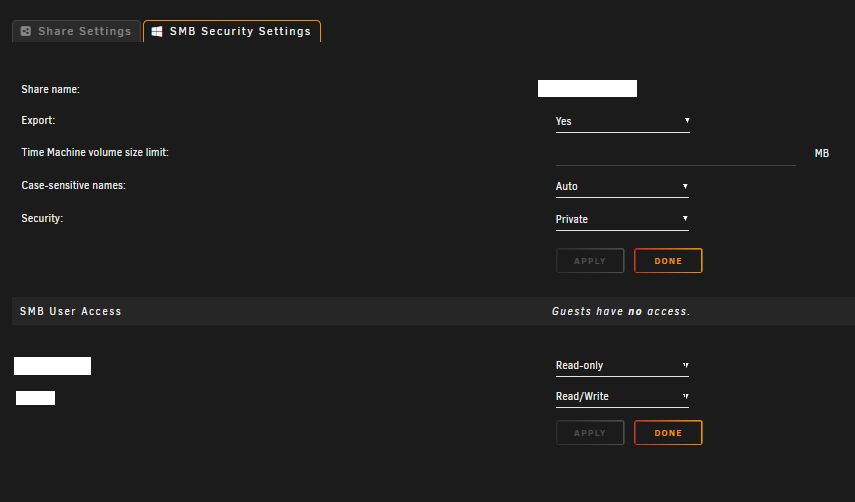
Private
-
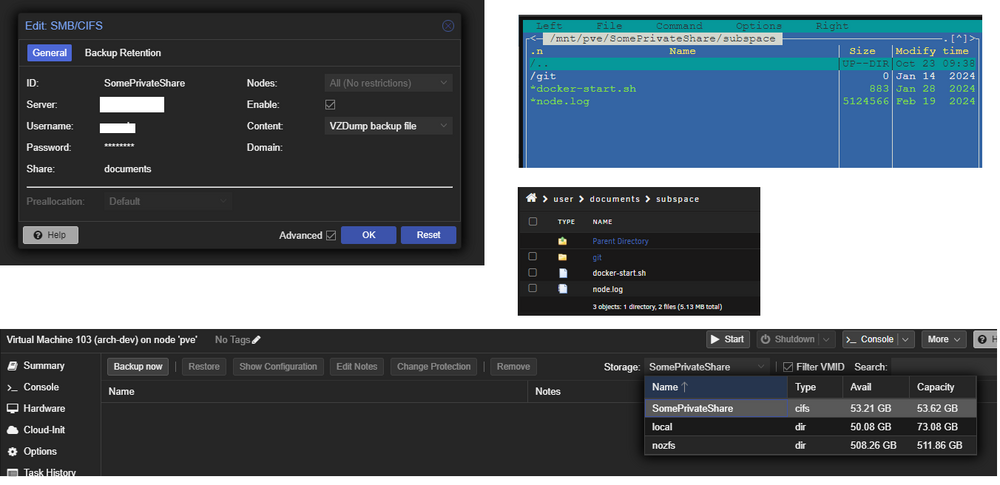
Working fine with this test SMB share I setup
-
it should work fine, here's an older thread for doing just that
-
It would be due to having an IP on the interface, although its curious that it was picking up the wrong gateway. No IP on interface. and it becomes editable.
-
you mean like this?

-
Not run gpu mining specifically, but have personally run long term gpu intensive tasks like foldingathome, library transcodes, hdd mining plotting etc. There's a few good nvidia related plugins and settings you might want to setup, but the main thing is that your system is stable. Also note there won't be any fancy UI for overclocking... OS like Hive is the place to go for those features as its dedicated for this task.
-
Docker network config only has references to vlans under br2, and br2 is not configured. DOCKER_CUSTOM_NETWORKS="br2.10 br2.80 br2.90 " Docker networking settings probably needs a refresh.
-
You need to stop the docker service (or array) and configure network settings for docker under Settings > Docker. This is an additional step for docker networking. Once configured there it will show up in template network type section.
-
Would still like this, but would like to add that it would be neat to also be able use vlans assigned in network settings as the context for each network graph
-
works for me: https://registry.hub.docker.com/r/binhex/arch-sonarr/ ..but its possible you are on an old version of the template, you can update the field in advanced mode if that's the case

-
Most of your "lost" capacity is actually from comparing different measurement units (TB vs TiB) To start with your unformatted space from 7 disks gets you about 51TiB (56TB) If you go to the SHARES tab, you can press the "Compute..." button to see where storage is being used and what is free.




