





nextgenpotato
Members
-
Joined
-
Last visited
Everything posted by nextgenpotato
-
Thanks! Before I saw this, I did the steps below and it worked. The official docs in there are not unraid specific so you will have to figure out some details yourself. 1- I copied the sqldb file from paperless to paperless-ng location 2- I copied the pdfs from paperless to paperless-ng location 3- I ran the commmand "python3.7 manage.py document_index reindex" on the docker console (for example it's not clear you can run this command this way on the official docs) However multiple user scenarios don't work at the moment, I think I need to switch to postgresql as well
-
Is there a guide for migrating from paperless to paperless-ng?
-
@LoneTraveler I've got nextcloud working on my first try within 5 min. However I cannot get droppy or bitwarden to work with NPM. Any suggestions? Droppy shows login page but I get a blank page after login. I'm not even trying https.
-
I'm trying to setup reverse proxy for droppy using nginx proxy manager. It doesn't work. Blank page after login. Anybody have ideas?
-
I installed the shaarli docker. This is probably the best bookmark app out there, however I couldn't get the "bookmarklet" working. It seems like it's hardcoded to go to admin.com for some reason. I tried the firefox addon as a workaround, that works.
-
If I change the time zone to something else from UTC, web UI stops working. This suggestion below worked for me, thanks! But I think this may be the reason that if I change any other settings UI stops working
-
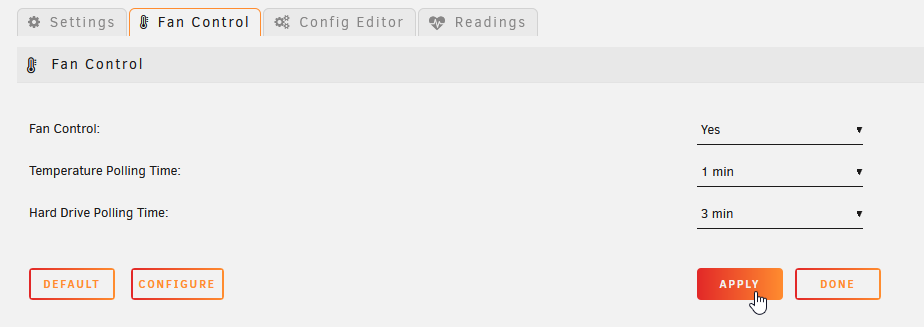
Guys I'm still stuck here, I really need some ideas to troubleshoot this because my BMC doesn't control fans either for whatever reason. All Fans stuck at the same speed, CPU fan included. It was working at first but None of the buttons work, so I cannot change any settings. I'd appreciate any feedback
-
Hi all, Today I've added a new fan in the case and started unraid back up and tried to add the readings of the new fan onto dashboard. Now in IPMI tools, I cannot change any of the settings anymore. The apply button is not responsive. It's still polling the readings, no problem there. I think maybe it cannot write into the config file for some reason. It is possible that I may have installed the ipmi tools plugin before I had a root password setup. Uninstalling and reinstalling didn't help. Any ideas?
-
Thanks for looking into it! I just read the whole thread. Thanks to @sjerisman as well. Compression looks promising
-
OMG, I just discovered this and wow. Thanks Djoss! I had the let's encrypt, nextcloud setup working for almost 2 years now, but I could never figure out how to add a second site/webapp to reverse proxy using let's encrypt docker. With this I figured it out in about 10 min. And the first 5min I spent on finding the defaults credentials to log into the web UI I want to read the whole discussion here but it's 26 pages. I am also wanting the sub folder functionality, it is there yet? One question, Let's encrypt docker couldn't renew license, if 80 and 443 aren't used by the let's encrypt docker. Is this also going to be an issue here?
-
Can I suggest using zstd for compression? This will cut down the time to compress the image by like 10 times. Or lbzip2 if have many cores this will also make it much faster. Or can we have options for these? Both of these are already on unraid 6.8 by default.
-
Thanks a lot! For whatever reason lbzip2 disappeared from my plugins list though. Any idea what happened there?
-
lbzip2 was added last year, thanks again! For the same reason above, I've found out that there is a better compression tool called zstd https://github.com/facebook/zstd Can this be added as well please?
-
After upgrading to 6.6.2 and also switching to new hardware, I am getting this error below when I click on apps tab. Any ideas? RESOLVED AFTER UPDATING THE CA PLUGIN Fatal error: Uncaught Error: Call to undefined function dockerRunSecurity() in /usr/local/emhttp/plugins/community.applications/include/helpers.php:151 Stack trace: #0 /usr/local/emhttp/plugins/community.applications/include/exec.php(1347): checkValidDockerRunCommand(Array) #1 /usr/local/emhttp/plugins/community.applications/include/exec.php(117): DownloadApplicationFeed() #2 {main} thrown in /usr/local/emhttp/plugins/community.applications/include/helpers.php on line 151
-
+1 for paperless
-
+1 That would be nice to have. At the moment I just put the IP under description, which works as well.
-
That was crazy fast! Thanks a lot!
-
Hi all, Can I make a request for an addition to nerdpack? What I need is lbzip2. I use unraid through ssh, as much as use it through the web interface. Mainly for file operations. lbzip2 is bzip2 multi-threaded. It's packaged by all major distros. It makes a significant change in the amount of time compression takes, when you have a multi-core CPU. Basically it reduces time by the amount of threads. And the particular use case I find myself needing it is to compress the VM disks for backup/snapshot purposes. The VM manager in unraid doesn't have a snapshot option. When I install a new OS, I usually like to keep a fresh backup of it, just in case I need it in the future so that I don't have to re-install.

