






SimonF
Community Developer
-
Joined
-
Last visited
Everything posted by SimonF
-
If vgpu unlock is required for this to use then it wont be implemented. Also doesn't vgpu need a licence server and an official license?
-
Create more virtual(VFs) GPUs upto a max of 7. Will use more memory also for vRAM
-
Can you send full XML for windows also.
-
Can you provide this for Debian also virsh dumpxml VMName | xmllint --xpath '//devices/disk'
-
Was the VM running at the time? The output only shows that the VM is using just be original image file. Can you provide cat /etc/libvirt/qemu/snapshotdb/AArch/snapshots.db replacing AArch with your VM name. <disk type="file" device="disk"> <driver name="qemu" type="raw" cache="writeback" discard="unmap"/> <source file="/mnt/user/domains/Windows 11/vdisk1.img" index="3"/> <backingStore/> <target dev="hdc" bus="sata" rotation_rate="1"/> <serial>vdisk1</serial> <boot order="1"/> <alias name="sata0-0-2"/> <address type="drive" controller="0" bus="0" target="0" unit="2"/> </disk>
-
Try unchecking saving and then rechecking in the settings. If this does not work can you post nvidia-smi -q -x Do you have two NV gpus? Also try ctrl + F5 in dashboard.
-
Release 2025.11.23 Update puts the dynanic app detection into the mainstream plugin. Users on the dev branch will see the update and it will put you back onto the main branch. Thanks to @Peuuuur Noel for the initial PR that provided the base for the dynamic detection.
-
Click on the green padlock on the page selection line on the right. This will then show a spanner in the machine name panel click on it and it should show panels with check boxes to select or deselect.
-
It was a pleasure working with you and your insight into the inner workings of GUI and backgroud services. You brought so many enhancements like movable dashboard. You will be missed. RIP.
-
GPU stat just uses values from Nvidia smi value does change most of the time it shows p8 when not in use. Not sure why p5 is shown.
-
The latest API has support for power and temps for CPUs. It will be in the next release or you can download the connect plugin. query ExampleQuery { info { cpu { packages { power temp totalPower } } } } Result { "data": { "info": { "cpu": { "packages": { "power": [ 11.82 ], "temp": [ 44 ], "totalPower": 11.82 } } } } }
-
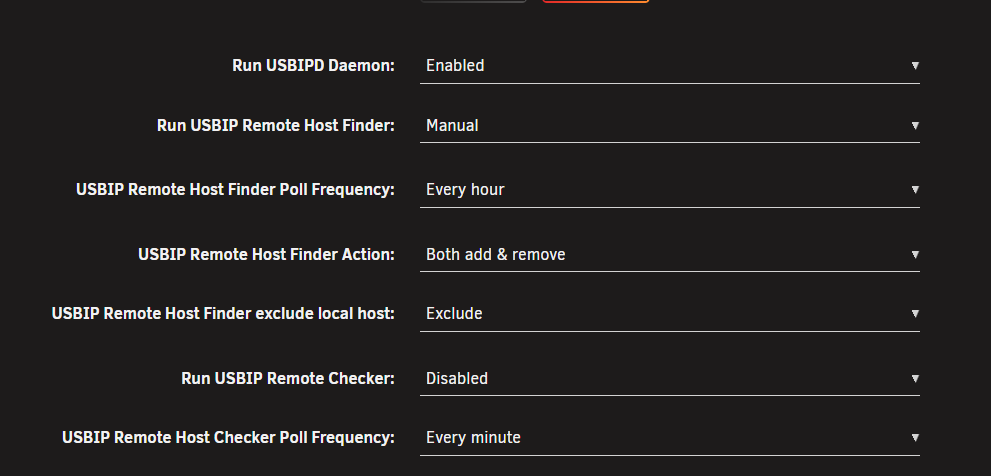
Do you have it enabled in the settings? You can check the log to see if usbipd is running. root@QNAPR420:~# cat /var/log/syslog | grep usbipd Nov 17 07:42:35 QNAPR420 usb_manager: Start usbipd Nov 17 07:42:35 QNAPR420 usbipd: usbipd: info: starting usbipd (usbip-utils 2.0) Nov 17 07:42:35 QNAPR420 usbipd: usbipd: info: listening on 0.0.0.0:3240 Nov 17 07:42:35 QNAPR420 usbipd: usbipd: info: listening on :::3240 Nov 17 07:43:43 QNAPR420 usbipd: usbipd: info: connection from 127.0.0.1:58920 Nov 17 07:43:43 QNAPR420 usbipd: usbipd: info: received request: 0x8005(11) Nov 17 07:43:43 QNAPR420 usbipd: usbipd: info: exportable devices: 0 Nov 17 07:43:43 QNAPR420 usbipd: usbipd: info: request 0x8005(11): complete root@QNAPR420:~#
-
The VM disk file is a sparse file. I will grow as the VM consumes storage. The real file size on the disk will not be the full 60Gb of the VM disk until it is used. So if the physical under-lying storage has no space then the disk cannot expand and will cause the VM to pause. If you open the VM storage view it will show allocated space.
-
Try loading this dev version it should pickup icons from the dockers. Install this dev release, https://raw.githubusercontent.com/SimonFair/gpustat-unraid/refs/heads/Dynamic-App-Support/gpustat.plg I am looking to update the plugin to this new version within the next few weeks.
-
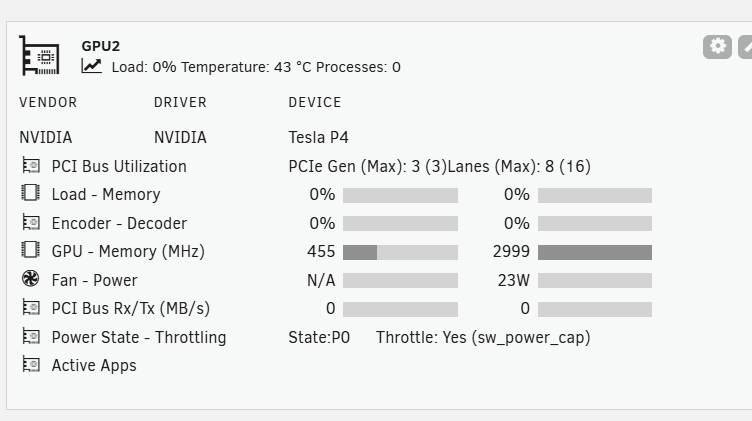
Data shows currently with you XML on my system. Try ctrl-F5 when on the dash board or in settings deselect all gpus, save and try to add again.
-
Can you provide output from nvidia-smi -q -x
-
It looks like moonlight supports wake on lan. I have a plugin called WOL for services which supports starting VMs via wol magic packets.
-
The update for 7.2 is mainly GUI fixes. But should work as on 7.1.4. Do you have any logs?
-
I have updated the plugin with issues I can see on my 7.2 system while making them backware compatible with 6.12. My IPMI systems is 6.12 so cannot test all features on 7.2 please post any screen shots of issues after installing 2025.11.07
-
Yes on my to-do list now 7.2 is out. But am also working on next.
-
Install the r8125 plugin from app store.
-
I can open that page in the UK
-
No the API can be updated via the connect plugin. The PR has a plugin for testing also, it is documented in the conversation.
-
This is for the GUI side: https://github.com/unraid/webgui/pull/2407 And this is the API: https://github.com/unraid/api/pull/1745
-
I have a PR to add along with CPU power usage.



