






SimonF
Community Developer
-
Joined
-
Last visited
Everything posted by SimonF
-
I have been testing on our X15. Everything seems to work as expected on 7.3.1 2026-06-02 08:15:25 Starting Fan Control 2026-06-02 08:15:25 Board: Giga Board Model: MW34-SP0-00 2026-06-02 08:15:25 Fan:Temp, CPU0_FAN(40%):CPU0_TEMP(34C), SYS_FAN1(25%):HDD Spundown using M2_AMB_TEMP_2(30C), SYS_FAN2(Disabled), SYS_FAN3(Disabled), SYS_FAN4(Disabled), SYS_FAN5(Disabled), SYS_FAN6(25%):HDD Spundown using M2_AMB_TEMP_2(30C) 2026-06-02 09:06:27 Fan:Temp, CPU0_FAN(60%):CPU0_TEMP(50C), SYS_FAN1(25%):HDD Temp(30C), SYS_FAN2(Disabled), SYS_FAN3(Disabled), SYS_FAN4(Disabled), SYS_FAN5(Disabled), SYS_FAN6(25%):HDD Temp(30C) 2026-06-02 09:07:27 Fan:Temp, CPU0_FAN(76%):CPU0_TEMP(62C), SYS_FAN1(25%):HDD Temp(30C), SYS_FAN2(Disabled), SYS_FAN3(Disabled), SYS_FAN4(Disabled), SYS_FAN5(Disabled), SYS_FAN6(25%):HDD Temp(30C) 2026-06-02 09:08:27 Fan:Temp, CPU0_FAN(40%):CPU0_TEMP(34C), SYS_FAN1(25%):HDD Temp(30C), SYS_FAN2(Disabled), SYS_FAN3(Disabled), SYS_FAN4(Disabled), SYS_FAN5(Disabled), SYS_FAN6(25%):HDD Temp(30C) 2026-06-02 09:10:27 Fan:Temp, CPU0_FAN(44%):CPU0_TEMP(38C), SYS_FAN1(25%):HDD Temp(30C), SYS_FAN2(Disabled), SYS_FAN3(Disabled), SYS_FAN4(Disabled), SYS_FAN5(Disabled), SYS_FAN6(25%):HDD Temp(30C) 2026-06-02 09:11:27 Fan:Temp, CPU0_FAN(59%):CPU0_TEMP(49C), SYS_FAN1(25%):HDD Temp(30C), SYS_FAN2(Disabled), SYS_FAN3(Disabled), SYS_FAN4(Disabled), SYS_FAN5(Disabled), SYS_FAN6(25%):HDD Temp(30C) 2026-06-02 09:12:27 Fan:Temp, CPU0_FAN(40%):CPU0_TEMP(35C), SYS_FAN1(25%):HDD Temp(29C), SYS_FAN2(Disabled), SYS_FAN3(Disabled), SYS_FAN4(Disabled), SYS_FAN5(Disabled), SYS_FAN6(25%):HDD Temp(29C) 2026-06-02 09:13:27 Fan:Temp, CPU0_FAN(41%):CPU0_TEMP(36C), SYS_FAN1(25%):HDD Temp(29C), SYS_FAN2(Disabled), SYS_FAN3(Disabled), SYS_FAN4(Disabled), SYS_FAN5(Disabled), SYS_FAN6(25%):HDD Temp(29C) 2026-06-02 09:14:27 Fan:Temp, CPU0_FAN(40%):CPU0_TEMP(33C), SYS_FAN1(25%):HDD Temp(29C), SYS_FAN2(Disabled), SYS_FAN3(Disabled), SYS_FAN4(Disabled), SYS_FAN5(Disabled), SYS_FAN6(25%):HDD Temp(29C) 2026-06-02 09:22:27 Fan:Temp, CPU0_FAN(61%):CPU0_TEMP(51C), SYS_FAN1(25%):HDD Spundown using M2_AMB_TEMP_2(31C), SYS_FAN2(Disabled), SYS_FAN3(Disabled), SYS_FAN4(Disabled), SYS_FAN5(Disabled), SYS_FAN6(25%):HDD Spundown using M2_AMB_TEMP_2(31C) 2026-06-02 09:24:27 Fan:Temp, CPU0_FAN(41%):CPU0_TEMP(36C), SYS_FAN1(25%):HDD Spundown using M2_AMB_TEMP_2(31C), SYS_FAN2(Disabled), SYS_FAN3(Disabled), SYS_FAN4(Disabled), SYS_FAN5(Disabled), SYS_FAN6(25%):HDD Spundown using M2_AMB_TEMP_2(31C) 2026-06-02 09:25:27 Fan:Temp, CPU0_FAN(64%):CPU0_TEMP(53C), SYS_FAN1(25%):HDD Spundown using M2_AMB_TEMP_2(30C), SYS_FAN2(Disabled), SYS_FAN3(Disabled), SYS_FAN4(Disabled), SYS_FAN5(Disabled), SYS_FAN6(25%):HDD Spundown using M2_AMB_TEMP_2(30C) 2026-06-02 09:26:27 Fan:Temp, CPU0_FAN(40%):CPU0_TEMP(35C), SYS_FAN1(25%):HDD Spundown using M2_AMB_TEMP_2(30C), SYS_FAN2(Disabled), SYS_FAN3(Disabled), SYS_FAN4(Disabled), SYS_FAN5(Disabled), SYS_FAN6(25%):HDD Spundown using M2_AMB_TEMP_2(30C)
-
I have a B50 just created a new Fedora 44 system and works as expected. Will try with my A770 and report back.
-
Yeah 9300-16i
-
I have -16i shows as two 8port controllers IOMMU group 26: [1000:0097] 09:00.0 Serial Attached SCSI controller: Broadcom / LSI SAS3008 PCI-Express Fusion-MPT SAS-3 (rev 02) 8/8 GT/s x8/x8(Gen:3) IOMMU group 27: [1000:0097] 0b:00.0 Serial Attached SCSI controller: Broadcom / LSI SAS3008 PCI-Express Fusion-MPT SAS-3 (rev 02) 8/8 GT/s x8/x8(Gen:3)
-
What does corsairmi show, name: 'CORSAIR HX1000i PSU' vendor: 'CORSAIR HX1000i PSU' product: 'CORSAIR HX1000i PSU' powered: 20174857 (233d. 12h) uptime: 878857 (10d. 4h) temp1: 46.2 temp2: 50.2 fan rpm: 0.0 supply volts: 230.0 total watts: 116.0 output0 volts: 12.1 output0 amps: 6.5 output0 watts: 74.0 output1 volts: 5.0 output1 amps: 5.3 output1 watts: 26.5 output2 volts: 3.3 output2 amps: 3.8 output2 watts: 12.0 root@QNAPR420:~#
-
We added a change to make sure the support version is not decreated. Currently we are running 10.2.2 and these are deprecated. We did have users with 4.x and that support dropped. Qemu 11 is out now and if we update to that 5.x are likely to go. Hence why 8.0 was selected. root@computenode:~# qemu-system-x86_64 -machine help | grep pc-q35 pc-q35-9.2 Standard PC (Q35 + ICH9, 2009) pc-q35-9.1 Standard PC (Q35 + ICH9, 2009) pc-q35-9.0 Standard PC (Q35 + ICH9, 2009) pc-q35-8.2 Standard PC (Q35 + ICH9, 2009) pc-q35-8.1 Standard PC (Q35 + ICH9, 2009) pc-q35-8.0 Standard PC (Q35 + ICH9, 2009) pc-q35-7.2 Standard PC (Q35 + ICH9, 2009) (deprecated) pc-q35-7.1 Standard PC (Q35 + ICH9, 2009) (deprecated) pc-q35-7.0 Standard PC (Q35 + ICH9, 2009) (deprecated) pc-q35-6.2 Standard PC (Q35 + ICH9, 2009) (deprecated) pc-q35-6.1 Standard PC (Q35 + ICH9, 2009) (deprecated) pc-q35-6.0 Standard PC (Q35 + ICH9, 2009) (deprecated) pc-q35-5.2 Standard PC (Q35 + ICH9, 2009) (deprecated) pc-q35-5.1 Standard PC (Q35 + ICH9, 2009) (deprecated) pc-q35-5.0 Standard PC (Q35 + ICH9, 2009) (deprecated) q35 Standard PC (Q35 + ICH9, 2009) (alias of pc-q35-10.2) pc-q35-10.2 Standard PC (Q35 + ICH9, 2009) pc-q35-10.1 Standard PC (Q35 + ICH9, 2009) pc-q35-10.0 Standard PC (Q35 + ICH9, 2009) The values are changed when libvirt start. https://github.com/unraid/webgui/pull/2625/changes
-
Currently there is not a way to do it, We plan in a future release to change the model on how the xml is created, currently it rebuilds it each time. You can out qemu commands in that will remain but not sure if that is possible with the options you need.
-
OK thanks will look into it
-
Sorry for the late reply they only use two headers for the chassis fans and one for the cpu
-
Does it not show on the zfs info?
-
The drive is for both parts. Each is a partition, data part and boot part.
-
Reading the doc its states speaker in error I believe there is not header or info I can find to connect a speaker to the motherboard. AI says as it is a workstation board they remove that ability.
-
The are two stable releases. A 7.3 update will becoming also. docs.unraid.net/unraid-os/download_list/
-
The docker version will be bumped when the next 7.3 release happens.
-
Warning may be a bug, but will review logs. Do you have any SR-IOV devices showing below?
-
No need to worry about that but not sure why that is showing. You need to set the vfio file aswell, did you have an devices you pass thru to a VM? If not just check one of the vfio check boxes then uncheck the bind button is now enabled and will save a clean vfio file.
-
Suggest going to system devices in tools and checking vfio is correct. PCI IDs will have change just toggle one of the check boxes and same to reset the file.
-
Ed, has setup this up on my B50 which he has access to. I believe he will be making a follow up video at some point.
-
I have updated the plugin with a few code updates, please can you update and confirm it is still working correctly for you systems.
-
Could you provide a screen print please.
-
@Woodpusherghd @emexso I have made some updates to the API which the dashboard uses. This a plugin that will install the changes, once you have tested you can remove or keep it in place until a release ships with the API changes. https://preview.dl.unraid.net/unraid-api/tag/PR2011/dynamix.unraid.net.plg
-
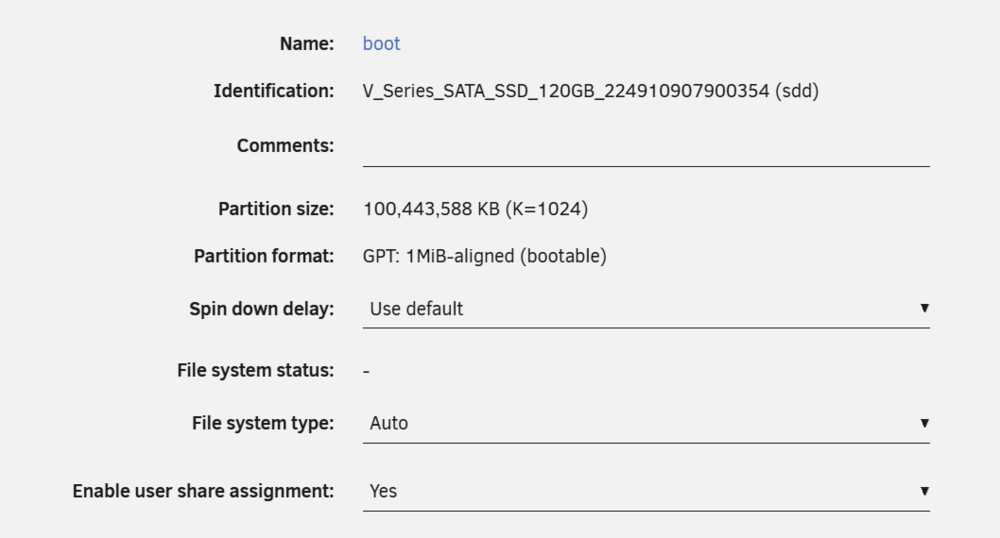
Boot is the name of the pool, When you start the array you will have the option to format(File system type). By default it will format to xfs but if you want some thing different like btrfs or zfs click on the name and set there. If you want to change the name from boot you can rename it by clicking the name in the disk info page where you set the format. If you plan to install a 2nd device to make it mirror, then I would select btrfs or zfs as the format.

-
Hi @emexso @Woodpusherghd Could you open a terminal nano temppower Copy this code block into the file, run using bash temppower and unload the directory and files created. OUT="/tmp/cpu-test-$(date +%Y%m%d-%H%M%S)"; mkdir -p "$OUT"; \ { echo "=== sensors ==="; sensors 2>&1; } > "$OUT/sensors.txt"; \ { echo "=== sensors -j ==="; sensors -j 2>&1; } > "$OUT/sensors.json.txt"; \ { echo "=== hwmon names + temp labels/inputs ==="; \ for d in /sys/class/hwmon/hwmon*; do [ -d "$d" ] || continue; \ echo; echo "[$d]"; [ -r "$d/name" ] && echo "name=$(cat "$d/name")"; \ for f in "$d"/temp*_label "$d"/temp*_input; do [ -r "$f" ] && echo "$(basename "$f")=$(cat "$f")"; done; \ done; } > "$OUT/hwmon.txt" 2>&1; \ { echo "=== powercap ==="; ls -la /sys/class/powercap 2>&1; \ find /sys/class/powercap -maxdepth 3 -type f \( -name name -o -name energy_uj -o -name max_energy_range_uj \) -print 2>/dev/null | \ while IFS= read -r f; do echo; echo "-- $f"; cat "$f" 2>/dev/null || true; done; } > "$OUT/powercap.txt" 2>&1; \ { echo "=== modules ==="; lsmod | grep -Ei 'k10temp|fam15h_power|zenpower|rapl|coretemp' || true; } > "$OUT/modules.txt"; \ echo "Saved to: $OUT"; ls -1 "$OUT"
-
Happy to help
-
If you can install the latest plugin version. Then replace this file in /usr/local/emhttp/plugins/gpustat/include Enable debug in the settings. Run a transcode and then logs are here. /var/log/gpustats.debug Main.php





