






SimonF
Community Developer
-
Joined
-
Last visited
Everything posted by SimonF
-
Intel do not support SR-IOV on igpus. The plugin creates a modified driver which is not part of the main kernel hence why it is not included. SR-IOV support was added to the gui to support device that support it natively like ARC B pro GPUs and network adapters. If you need SR-IOV suppurt for igpus you still need the plugin for the modified driver.
-
Not sure if this is still the case but I think you need to run the beta version of Plex to get arc battlemage support.
-
GPU Stats is limited on XE I am working on integrating qmassa
-
XE shows limited info in GPU Stats at present, at most Fans/Temps and processes. I am working on integrating qmassa which should provide some better status as Intel don't provide any useful tools and most others don't provide a JSON output that can be used.
-
Not currently. But I guess should be the higher fan value should be used rather than the temp as you could set different values for each. i.e HDD Temp wants fan at 25% and CPU wants fan at 30% should use 30? So may be and add an option of cascade to use current setup or max fan to use the highest fan.
-
@God_TM @nusyo Release 2026.05.05 fixes the Dell issue, sorry took me a bit longer as need to work on my test R420 to get it working correctly. The last update I remove the manual mode in errror. 2026-05-05 09:15:35 Fan:Temp, FAN123456(17%):Temp(39C) 2026-05-05 09:25:15 Stopping Fan Control 2026-05-05 09:25:15 Setting fans to auto 2026-05-05 09:25:17 Starting Fan Control 2026-05-05 09:25:17 Board: Dell Board Model: PowerEdge R420 2026-05-05 09:25:17 Setting fans to manual 2026-05-05 09:25:27 Fan:Temp, FAN123456(19%):Temp(41C)
-
@God_TM @nusyo You can install and use this https://raw.githubusercontent.com/SimonFair/IPMI-unRAID/3f5c9bc0ea60fd09963e45f45644a35044c330a9/plugin/ipmi.plg to install the previous version. Nothing should have changed I will try an look at the Dell issue over the weekend. Do you have any fan logs you can send me?
-
7.3 rc is already on a fixed kernel was fixed in 6.18.22 and the RC is Linux kernel: version 6.18.23-Unraid
-
Please update to version 2026.05.01 of the nvidia plugin for the CDI update. For more info see this thread. https://forums.unraid.net/topic/98978-plugin-nvidia-driver/page/232/#findComment-1620557
-
Gigabyte support for MW34-SP0 add in release 2026.04.28
-
I have provided info on the IPMI page.
-
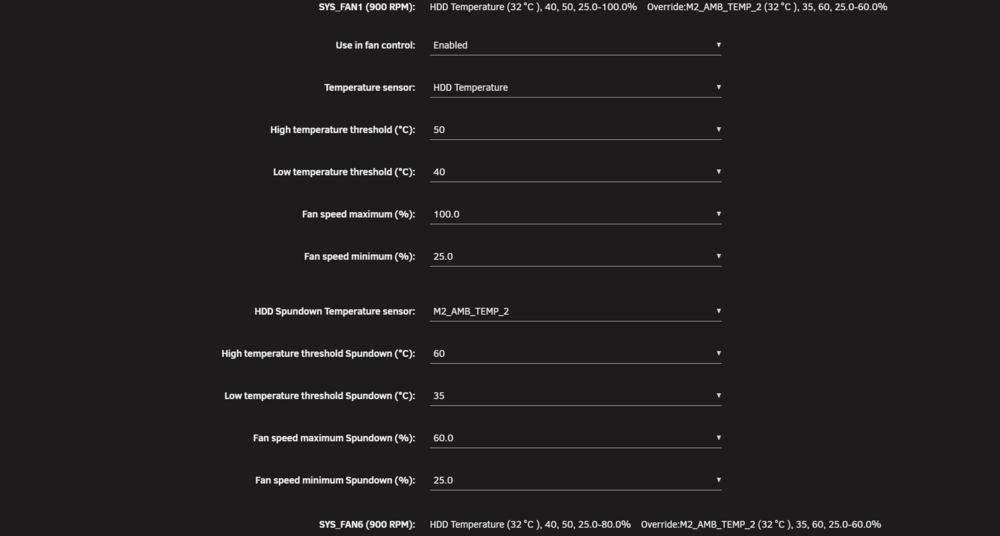
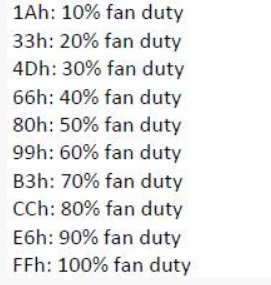
I have been working on getting a Giga MW34-SP0 working as this is the motherboad in a X-15 and will be releasing in a few days. These are the raw commands, so if any other GB users what test and let me know if they work with there board. Note the fan IDs may be different. Set fan duty to 40% ipmi-raw 00 2e 10 0a 3c 00 40 01 66 A6 Set back to auto for all fans ipmi-raw 00 2e 10 0a 3c 00 40 00 00 00 ############################################# # Gigabyte Model for SW34-SP0 # raw => '00 2e 10 0a 3c 00 40 01 CC BB', # + value 0-255 for speed and ID A0-A6 # auto => '00 2e 10 0a 3c 00 40 00 00 00', # full => '00 2e 10 0a 3c 00 40 01 FF FF', # # BB # A0 - CPU_FAN # A1 - SYS_FAN1 # A2 - SYS_FAN2 # A3 - SYS_FAN3 # A4 - SYS_FAN4 # A5 - SYS_FAN5 # A6 - SYS_FAN6 # FF - all fans # # CC # 00 to FF - Set Speed (0-255) # # Fan duty is a value from 1-255, where 1 is 0% and 255 is 100%. The command sets manual mode inline. # No way to set individual fans to auto, but setting all fans to auto will override manual mode and set all fans to auto. ############################################# This board works differently to other manufactures where there is more control over individual fans so I have added the option to disabled so they can be managed by the BMC if required. Supermicro normally have zones. As a future enhancement I will look to add groups so you can set as a single options for a group of fans. Example log. 2026-04-27 10:22:59 Stopping Fan Control 2026-04-27 10:22:59 Setting fans to auto 2026-04-27 10:23:03 Starting Fan Control 2026-04-27 10:23:03 Board: Giga Board Model: MW34-SP0-00 2026-04-27 10:23:03 Fan:Temp, CPU0_FAN(Disabled), SYS_FAN1(58%):HDD Temp(32C), SYS_FAN2(Disabled), SYS_FAN3(Disabled), SYS_FAN4(Disabled), SYS_FAN5(Disabled), SYS_FAN6(58%):HDD Temp(32C) 2026-04-27 10:24:03 fan control config file updated, reloading settings 2026-04-27 10:24:03 Fan:Temp, CPU0_FAN(Disabled), SYS_FAN1(30%):HDD Temp(32C), SYS_FAN2(Disabled), SYS_FAN3(Disabled), SYS_FAN4(Disabled), SYS_FAN5(Disabled), SYS_FAN6(30%):HDD Temp(32C) 2026-04-27 10:24:53 fan control config file updated, reloading settings 2026-04-27 10:24:53 Fan:Temp, CPU0_FAN(Disabled), SYS_FAN1(25%):HDD Temp(32C), SYS_FAN2(Disabled), SYS_FAN3(Disabled), SYS_FAN4(Disabled), SYS_FAN5(Disabled), SYS_FAN6(20%):HDD Temp(32C) 2026-04-27 10:26:33 fan control config file updated, reloading settings 2026-04-27 10:27:33 fan control config file updated, reloading settings 2026-04-27 10:27:33 Fan:Temp, CPU0_FAN(30%):CPU0_TEMP(35C), SYS_FAN1(25%):HDD Temp(31C), SYS_FAN2(Disabled), SYS_FAN3(Disabled), SYS_FAN4(Disabled), SYS_FAN5(Disabled), SYS_FAN6(20%):HDD Temp(31C)
-
You can still use the flash for the license guid or change to TPM.
-
Does the machine have a BMC and support IPMI?
-
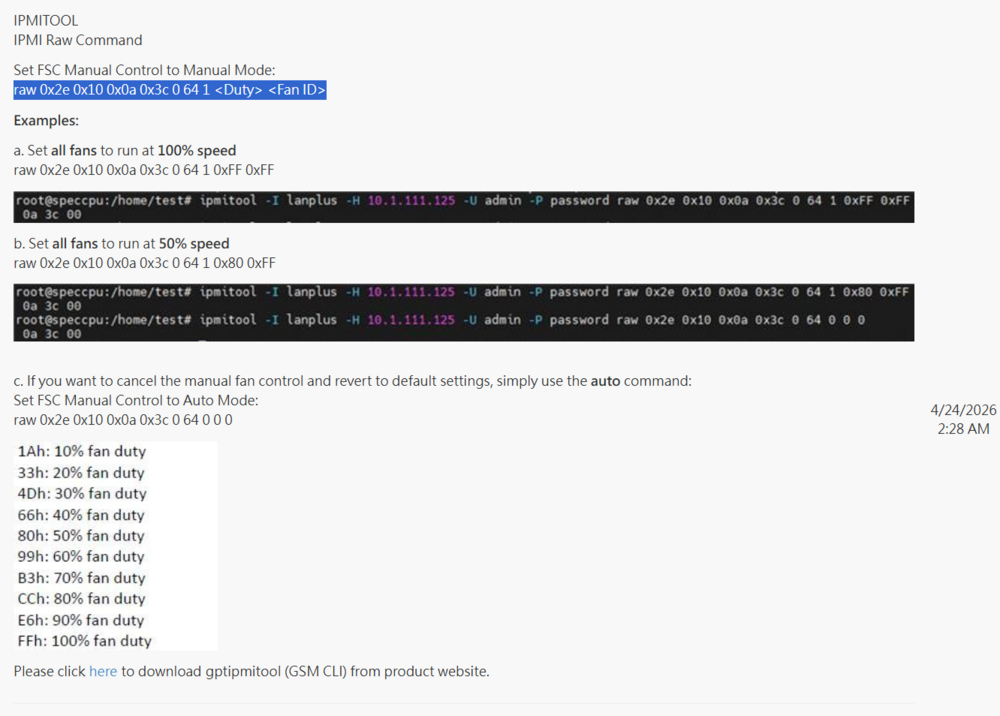
I am looking to add support for the MW34-SP0 as this will be in the X15. now that I have been able to get info from GB. Command to test if we have the plugin installed. Set to auto ipmi-raw 00 2e 10 0a 3c 00 40 00 00 00 Set to 40% ipmi-raw 00 2e 10 0a 3c 00 40 01 66 xx xx on this motherboard is A0 for the CPU and upto A6 for the system fans.
-
Can you post diagnostics? Have you tried without these options? <qemu:commandline> <qemu:arg value='-fw_cfg'/> <qemu:arg value='opt/ovmf/X-PciMmio64Mb,string=65536'/> </qemu:commandline>
-
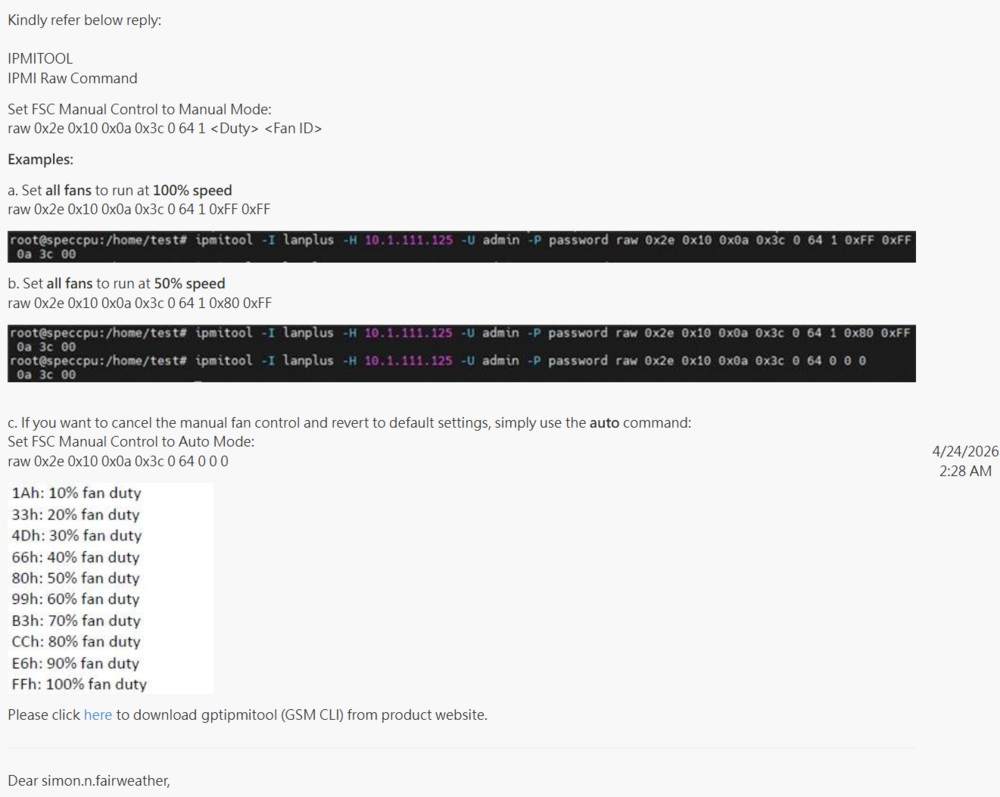
This morning I have been provided some infomation from GB as to the options. So will be looking to test and update IPMI next week.
-
What make of motherboard do you have just for reference?
-
I have MSI z890 with 245K I needed this driver for my board. Nuvoton NCT6687 Driver its in ca
-
It would change the highest value. We will need to raise the minimum values as looks like the depreciated minimum versions has increased. We update ones no longer support. Please can you raise a bug report at product.unraid.net
-
If xe is not in use, then you can do modprobe -r xe follow by modprobe xe which should unload and reload the driver. If that does not work can you post diagnostics
-
The GPU does not seem to gave any drivers. I would expect. 04:00.0 VGA compatible controller: Intel Corporation Battlemage G21 [Arc Pro B50] Subsystem: Intel Corporation Device 1114 Kernel driver in use: xe Kernel modules: xe What does dmesg | grep xe show.
-
Go into gpu stats settings, remove the GPUs, apply then add the back in and apply to see if that fixes. Also run lspci -k to check the gpu is using xe.
-
Yes all devices can fail. If it is a mirrored pool it is a standard disk replacemnet. Single woud have more steps that a flash.
-
The reason for internal boot is many user have requested an option to boot from a non usb flash drive due to the potential of them failing. Myself I ran the same usb since I purchased in 2017 only changed because it was too small. The internal boot pool does support redundant drives so will still run if one of them fails an you can just swap in a new one.






