






PSYCHOPATHiO
Members
-
Joined
-
Last visited
Everything posted by PSYCHOPATHiO
-
Thanks for the continuous effort UNRAID team & devs, both servers upgraded & running smooth.
-
@FoxxMD I Got my second SDR today & its already connected to ShinySDR, I'm not so sure I configured it right! I got it all up & running but all I have is the simulated RF. I think I need to dig a little deeper & look around till I find my solution.
-
i have multiple Vlans setup through pfSense & L2 Switch: LAN 10.0.0.0/24 Network SLAN 10.0.1.0/24 Servers & Dockers Network (Services Network) VPLAN1 10.0.3.0/24 VPN Network 1 (pfsense has already got an openvpn connection setup for remote network access, this is for email relay & other network requirements) Unraid can be accessed on 10.0.0.4, 10.0.1.4, 10.0.3,4 port 443 NPM docker wont start on ports 443 & 80 as it conflicts with unraid when bridged, unless I missing something. When I moved unraid to a different port & set NPM to 443 & 80 it started them came the forwarding & bad gateways, I could probably make it work but I'd rather not have to mess up my DNS & network to make it work. The issue is pfsense forwarding internal dns request to NPM is I think on port 443 & 80 only so whenever I have e.g plex.xxx.com ip 10.0.0.10:32400 pointed to NPM it just displays a blank page. EDIT: I need NPM to listen to 443, 80 on its designated IP on its VLAN
-
That worked in a way, but I ended up getting Bad Gateway errors on more than half the hosts with limited internal & external access only to some of the hosts on port 443 for some reason.I tried changing the NAT type (pure or proxy & messed with NAT reflection) but that didnt help (I'm using a physical pfsense.) To bridge the docker I had to remove my unraid from port 443 & change lots of things on the network, its not worth the change, I will keep NPM pointing at 8080 & 4443 as I have already configured everything to work correctly.
-
I have been trying to do this for over 3 days but nothing seems to work, even tried manually editing files in the config but it wont work on ports 80 & 443, changing the docker variables does nothing.
-
I started fiddling with your Shiny SDR looooooool, but I was only testing. I will get back to it once I get the second SDR. I'm also fabricating some antennas & keeping my self busy. I would love to have @ShoGinn VRS Docker on unraid, it would be a nice addition to the long list of dockers available.
-
This is getting out of control looooooool I just got a second SDR & FlightAware 1090 MHz ADS-B Antenna with the SMA filter, I love it. Going to keep one for tracking flights and the other for messing around with frequencies. I will probably use the new dongle on a windows VM and test VRS & others software. @FoxxMD This is all your fault
-
looooooooool im on amazon getting antennas & stuff & on my second screen I got the monitor up. Any recommendations for antenna or other equipment to get I even attached its own with lets encrypt link to monitor outside the house. not much activity though https://fr.sykorp.net/gmap.html
-
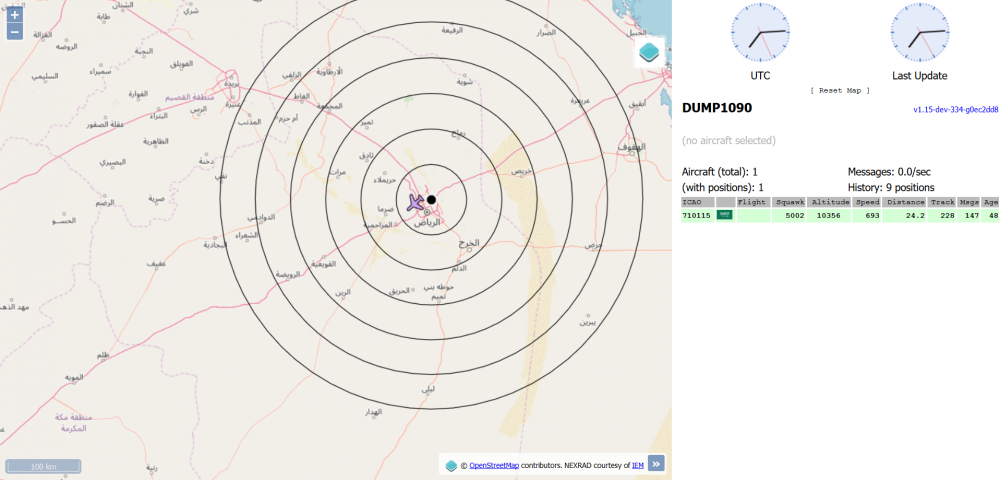
got my Realtek RTL2838, got it configured and all running but I need to get some decent antennas of fabricate one my self and get a long cable to extend to my reach to the skies lol Thanks for the work mate with the 2 antennas provided with the USB I managed to pick up a couple of flights, this is awesome
-
I just went on amazon and bought an RTL-SDR just for your docker, very interesting. Back in the 90's I had a hand held illegal scanner lol thanks for the work.
-
I upgraded, then started questioning my sanity...
-
-

From the album: Community Created Banners
-
-
I get the flash in the banner, but only noticed it when you mentioned it
-
i love these as im actually using one now, thanks for the share
-
I like having abstract designs, these are for both my servers One is server plus hence the larger backdrop for the Limetech logo and name.



-
I started with 8GB as a minimal in any of my builds, then moved the components to different builds left and right and ended up with 2 servers each with 16 GB. Intel i7-6700K - 16GB 2x8 Corsair LPX @3200Mhz This is the file & media server with a single Windows 10 VM with a gtx 1060 6GB streaming games. Ryzen 1700X - 16GB 2x8 Corsair LPX @3000Mhz This is the VM Server with 4 VMs and planning 2x16GB in the future. I think 8GB is reasonable for any simple build for a file & media server witha couple of usefull dockers.
-
I think the notification method doesn't inform other members till they're quoted, so most will not reply till they check every post they make manually. I'm sure there are a bunch of decent designers out there but this post should be pinned up the forum.
-
I made another attempt to make a printable label as there is no labels on the internet for unRAID.

-
modprobe it87 force_id=0x8620 this works for me but with constant updates and restart I'm not sure why hasn't it been implemented in the build yet!
-
anyone with any luck finding the driver for Ryzen motherboards? Its a bit frustrating not being able to monitor the senros, at least PCH temps.
-
I'm having an issue with the download folder, whenever I download a torrent to move or delete I have to apply permissions to the download folder. This is ofcorse after I stop seeding and remove it from qBittorrent interface. it's a bit frustrating
-
I thought I'd give it a try, though my skills are rusty. The dimensions are not even close to what was specified & I have gone with a minimalist design.

-
This solved my problem, Thanks





