






PSYCHOPATHiO
Members
-
Joined
-
Last visited
Everything posted by PSYCHOPATHiO
-
Click on the docker you want to remove once loaded clock on the X next to it. that simple
-
I got the UMASK variable working nicely for me without an issue in any updates., I no longer use the extra parameters field.
-
@Liquido2@mkono87 A bit late to the party, but the admin user is created via the console with this command: register_new_matrix_user -c /data/homeserver.yaml http://0.0.0.0:8008
-
This is a bit late, but you do not need to generate a certificate if you will be running the matrix behind a reverse proxy. In addition, once you setup the DNS properly you will be using port 443.
-
I'm not an expert I actually got no clue of the permission system but this woks for me for now
-
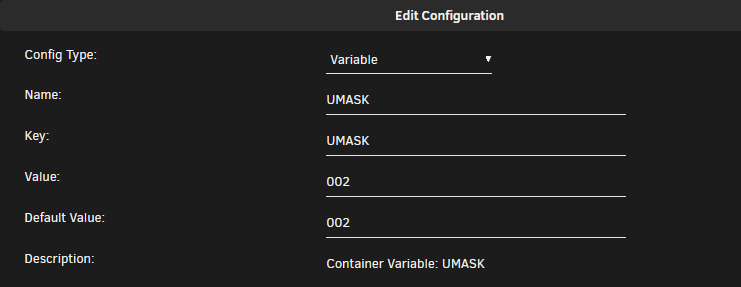
There seems to be a problem with the latest update, it broke the permission system. I cant delete or move or rename any files downloaded & have to manually change the permission for every download. I have 2 qBittorrent clients, but one of them keeps changing its own permissions. Both dockers are identical in settings & setup, only thing different is port numbers. One of the dockers is behaving normally & I can move or delete files yet the other keeps locking them. @HHUBS @Linguafoeda EDIT: After the update I had to remove the old "extra parameters: -e UMASK_SET=000" & add a new variable UMASK 002. That fixed the permission problem & should have been implemented from the beginning.
-
Thought the majority of people used chrome, seems most geeks like me like Firefox. I use Firefox for regular browsing & I also use Edge & IE when I need to test something on the local network.
-
Got 1 running & 1 walking
-
I've been hosting my own email server for years & actually have 4 domains on it, but I use one only the other domains are set up as cach-all. I started with an unmanaged VPS for playing around and testing but through time & more experience I host mine now on a VM on my unraid setup connected with ADDC LDAP & have another VM with proxmox mail gateway installed acting as buffer filtering my email from spam and viruses <-- note I have no port forwarding so I have another remove VPS server with pfsense connected via VPN forwarding what I need back to my local pfsense to keep everything running on 5G internet. So basically, I use a Windows server VM with a business class email server.
-
Perhaps you would care to share the wealth with the people's democratic Unraid republic, or the post above you 😁
-
I have wiped my nextcloud & started from scratch & I found out that there are some LDAP issues with this build... I tried the official nextcloud build & LDAP works flawlessly but in Linuxserver build I'm not sure what is wrong but all the fields after I fill them up seem to have no effect. also onlyoffice isnt working on Linuxserver build but works on the official build. i get this message in my logs: Could not detect any host in http:///data/htaccesstest.txt RuntimeException: Could not get appdata folder for preview I dont know if what I said makes any sense
-
you need to change the folder permission to 777 or in unraid under "tools - New Permissions"
-
@paaland I run the older 1700x on asus 370x board I found out this works for me "modprobe it87 force_id=0x8620" just run in in CLI without quotations.
-
I've been using Nextcloud for the past couple of years, the Nextcloud app on my phone uploads any chosen folder with pictures automatically to my Unraid.
-
@Linguafoeda I have no clue but without it, I can't delete or modify the files I download.
-
I had this question on my mind for years but never thought to look it up, nice share.
-
@Linguafoeda in your qbittorrent under advanced, add this line in extra parameters -e UMASK_SET=000
-
Yes, I'm connected to 2 servers. you can try connecting to mine sykorp.com my user is @psychopathio:sykorp.com
-
Sorry for the late reply. The initial setup is a bit confusing and sort of headache, even if I wanted to start a new server I will make a mess in the beginning. Anyway, I set up my matrix server on the root domain itself, so my name will appear as "@psychopathio:domain.com" this is after I mastered rebuilding the server 30-40 times at least, here is my Nginx config https://img.sykorp.com/kUYo4/LoSuRoSi86.png you do not need to use port 8448 as this is mainly for communicating with the federation I use port 8008 on http also you need to set up the SRV DNS correctly so here is a link to my DNS https://img.sykorp.com/kUYo4/NaPuJomo19.png it has to point to port 443 for your matrix server to work without adding a port to the end. Here are a couple of links that helped me through the process. https://github.com/spantaleev/matrix-docker-ansible-deploy/blob/master/docs/configuring-dns.md https://github.com/spantaleev/matrix-docker-ansible-deploy/blob/master/docs/prerequisites.md I hope this helps.
-
@darrenyorston Just tried the line in consol & it works fine "cat /dev/urandom | tr -dc 'a-zA-Z0-9' | fold -w 32 | head -n 1" maybe the image you downloaded is corrupted or something wrong with it. Try this Repository "matrixdotorg/synapse:latest" The one defined in the app hasn't worked for me. just make sure you delete all files in the appdata folder before reinstalling. With every update, there are changes in the homeserver.yaml file but once configured, nothing will change. @A75G Maybe u should change the repository to "matrixdotorg/synapse:latest"
-
Amazing build, & a great choice of hardware overall, This is what I would call a perfect build. Just make sure you protect your investment with a decent UPS, it saved my server at least 2 times in the last 6 months from outages. Welcome to the club.
-
Did you change this line bind_addresses: ['::1', '127.0.0.1'] to 0.0.0.0 as for the DNS records you can follow this guide, its really helpful when working with the matrix https://github.com/spantaleev/matrix-docker-ansible-deploy/blob/master/docs/configuring-dns.md
-
I'll manage as I have some other twisted setups. just needed a confirmation to go ahead and work my ways. @CorneliousJD ok might be a thing not sure of as I'm not sure it would work but is it possible to set a port range, I remeber it was doable but cant some some reason do it now.
-
Do we need to add the ports to the docker it self as in range of ports?
-
I once passed 30+ days mark, i love reboots



