






PSYCHOPATHiO
Members
-
Joined
-
Last visited
Everything posted by PSYCHOPATHiO
-
this was quick https://github.com/linuxserver/docker-qbittorrent/issues/181 "It's an issue we're aware of, it's been fixed in the upstream base image so the next build of the qbittorrent image will have the fix. In the meantime just roll back to the previous image release if you need the umask functionality."
-
@Linguafoeda I had an issue with my unraid a couple of days ago & I thought it was the USB & after 12 hours of work and ivestigation a member noted that there might be an issue with the USB port I was useing... it was I had wiped all my system & restored it and finally the system was back online.... @ the same time qbittorrent updated & I messed up my system thinking it was something in my config eventually I realized it was the docker it self that changed 🙄 The PAIN. Thank you for the quick help.
-
@Linguafoeda unfrotunatly I'm here for this issue, it's very annoying to set permissions for everydownload i need to change. How to do a rollback?
-
Latest update broke permission on the torrent directory, I have to chmod the directory if i need to remove or do changes to downloaded files. "-e UMASK=000" or "UMASK 002" both no longer work I have tried everything to fix the permissions but nothing worked.
-
Hmmm seems that did it, I'm confused now lol THANK you so much for your time & knowledge 🤔
-
if it helps here are the diagnostics .............................. tried a clean install again, copied config dockers & VMs running but cant get network shares. vidas-diagnostics-20220616-2023.zip
-
This server hasnt got one, but i will finda solution soon
-
@trurl First I tried a wipe with copying the config & then I wiped all and reinstalled without anything styill same issue presists.
-
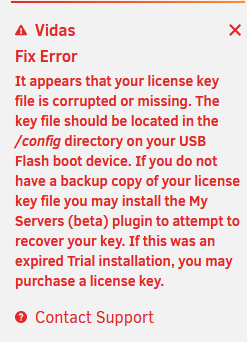
im kinda doing kung fu, things kind of work temporarly but here is how the GUI looks like. very strange, dockers & VMs work but shres are no existant or inaccicable. EDIT: I'n going to wipe the USB & reinstall from scratch as it might be a currput USB only (already hace a backup copy. EDIT: yup after a full wipe and reinstall of UNRAID on the same flash still got errors yes I installed the licence key as its not my first USB change, also server is on and running but cant access shares or use vms or dockers, its just online.
-
sandisj 8GB usb 2.0
-
As per the title I just replaced my old dying USB with another old temporary one, but now the temp one is dying I cant use anything on my server for the time being and its stuck on a parity check that i cant stop as its also starting services at the same time & ... yeah i need to replace the USB ASAP. Already got new usb drives but cant change the USB due to the 1 year change limitation. please advice.
-
Based on the logs it seems the Turn server is not configured correctly, you can use the default port "listening-port=3478" without certs. But if you want to encrypt the voip communications you can use "tls-listening-port=5349" you need to have the certs. if you have "lets encrypt" or "nginx proxy manager" you can redirect your docker to look for the certs over there. The easy way is just delete the file turnserver.conf and use a free turn server on the internet, or download the coturn docker and configure it seperatly. If you need further help in matrix join my server & lets talk there https://matrix.to/#/#support:sykorp.com you can create an account if as registration is simple.
-
I never got LDAPs correctly cause of the certs, but its internal communication with the local LDAP server & im not opening external ports for it to work. I got no clue how to get LDAPs to work
-
I like using their dockers but sometimes I have to revert to the official dockers to get better updates & functions, in our case LDAP was broken in all nextcloud dockers listed in the app store. what else do you have connected to your LDAP <--- off topic. I got airsonic advanced, matrix server, email server, nextcloud, & strangely pfsense for guest wifi via captive portal, so users can authenticate with their LDAP
-
oooh yeah, but I used the official nextcloud docker, all others are broken. The official docker is much faster when paired with redis & everything works nicely. if you need help you could add me on matrix https://matrix.to/#/@psychopathio:sykorp.com
-
read it a couple of days ago, it pissed me off a bit as I know what the devs are up to lol. I'm always checking for updates but only because I know there would be security, stability, & driver updates & more nice features. Its always worth the wait for a stable release.
-
havnt tried the game yet but if a game has a hostable server I am willing to get or at least give a try.
-
this line threw me off, I was putting down the user in caps so I was getting an error, nothing needs to be im caps. I'm confused lol anyway, the docker is running fine. I wasn't sure I wanted something like this but to be honest it is very nice, including sharex uploads & I also can put up temporary uploads of files & pics... this is a keeper This will replace my "xbackbone" docker as it's more useful. nice work
-
Modified it to some extent, didn't realize I needed to do more I will give it a try later & give u feedback, thanks for the work.
-
Thought would give this a run, got an error with 3 tries installing it. This is after step 3, also if I used caps I will get wrong username or password output. An error occured while running the seed command: Error: Command failed with exit code 1: ts-node --compiler-options {"module":"commonjs"} prisma/seed.ts error Command failed with exit code 1. info Visit https://yarnpkg.com/en/docs/cli/run for documentation about this command. /void #
-
Might have been a crash or a kernel panic, used to happen to me a lot due to some incompatibilities & Ryzen first gen issues with ram.
-
I don't think SVG format is supported, try converting it int o PNG if you want a transparent background or use a normal JPEG
-
My advice is go bigger on RAM as slots are limited for future upgrades, go for 2x16 to give you have headroom in case u needed more. Also check compatibility with the motherboard to make sure the system will be stable.Same issue on 6.9.2, I dont think its related to the RC2

