






PSYCHOPATHiO
Members
-
Joined
-
Last visited
Everything posted by PSYCHOPATHiO
-
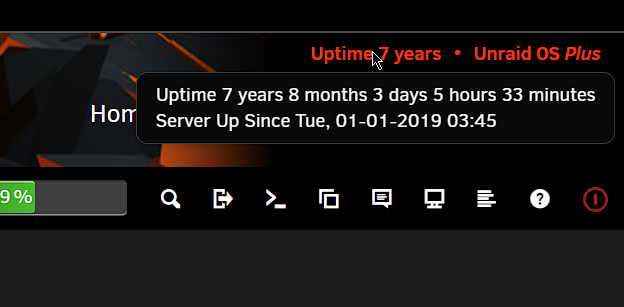
had to lookup this thread for something strange.... i was working on a new network card resetting and configuring networks when i noticed this its probably the date I purchased the license for my second server Uptime of 7 years, 8 months & 3 days... no one can beat that lol
-
This is a bit late but: Port 25/TCP is only used for incoming mail as standard (Simple Mail Transfer Protocol (SMTP),used for email routing between mail servers) Port 465/TCP preferred port for Message Submission over TLS protocol. Port 587/TCP Email Message Submission STARTTLS (No longer preferred; use port 465) I get most of my port related info from here (https://en.wikipedia.org/wiki/List_of_TCP_and_UDP_port_numbers) just a note; never use TCP/UDP for all incoming ports for security reasons, try finding the proper protocol and assign it.
-
I've got a strange problem with any update after 7.2.4. The system will be stuck at (Starting Array: Mounting Disks) for a long time and when the system is finally up it will be sluggish (barely responsive) and one of my drives will always fail and be offline. When I downgrade back to 7.2.4 all is working fine again. I tried it with 7.2.5, 7.2.6, 7.3.0 all the same, my second server upgraded without an issue. Attached is the diagnostics if anyone can figure it out... vidas-diagnostics-20260514-1603.zip
-
For absolute no reason, I decided to look manually for an update and got one. My internal nonsensical brain working as usual Thanks for the constant updates & the endless features added.
-
I was having a similar problem with Windows server 2025, everything was laggy and slow on remote desktop. With this "sysctl -w kernel.split_lock_mitigate=0" rebooted unraid & to be honest made the remote desktop much smoother to operate, a noticeable difference.
-
Since the beta 7.2 beta 1 and I can't change "Header custom background color", whatever color I choose it defaults to white. I tested it on 7.1.2 seems to be working fine.
-
Never thought I needed one, but actually this nice to have
-
The community is always here to help ☺️
-
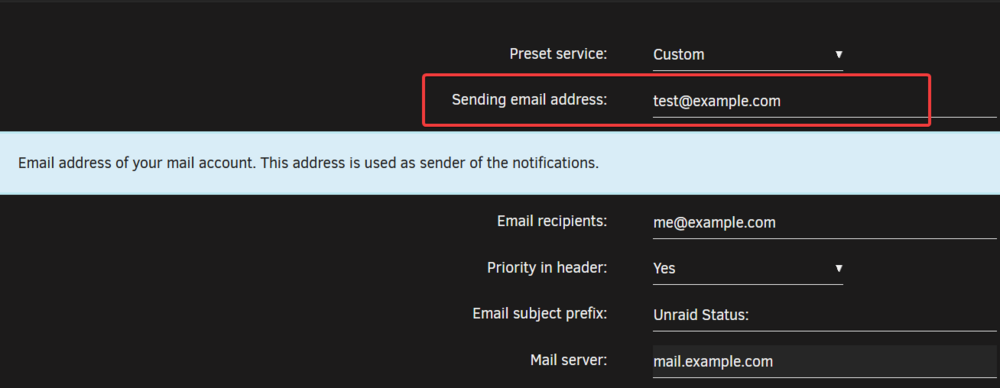
@cyberteer@b3rrytech@gustsant Its already available
-
i have 2 server both Ryzen 5800x and 1700x both servers had Windows 11 VMs with passthorugh GPU the CPU which minimal activity is pinned to 90+ %, switched to Windows 10 and all works fine.
-
I had Windows 11 VMs & the CPU is pegged at max with minimal activity and disk I/O is just unusable, switched to Windows 10 and all works fine. Tried tuning the Windows 11 VM but nothing seems to work.
-
@JorgeB unfortunately didn't work
-
@JorgeB will give it a try and see, I have not had the issue since I posted this. Anyway, it was something random but annoying
-
Try disabling docker under docker settings and enable it again, if that doesn't work try deleting the docker image and create a new one.
-
Something strange has been happening to my UNRAID system, I'm using it like usual then suddenly I can no longer access the NAS (shares or drive array) neither can the dockers or VMs I was installing some dockers & then got this message -bash: cd: /mnt/user/appdata: Transport endpoint is not connected EDIT: all will go to working fine after a reboot This happened for over a year now many times & I just ignored it, but it's making my UNRAID unrelaiable. Attached is the Diagnostics file vidas-diagnostics-20250105-2109.zip
-
i got LDAP but never got to use Authentik, so i will give it a try & comeback. No promises
-
nop all works great as inteded https://upload.sykorp.com/SOwI1/pOKesubi30.png
-
Took my a couple of hours to restore some of the dockers but all restored, updated plugin & it works as intended or I think. 👍
-
Updated with no permission changes 👍 thanks for the great plugin
-
After I saw half my dockers were down & checked their logs trying to redownload them & failing, then I had to check my firewall(s) 3 of them for port or rule changes I made in the last two hours while configuring the exchange server, then rebooted my server a couple of times & then researched some of the errors & suddenly something FLASHED in my head "a memory of a plugin with permissions" lol Problem solved
-
I have a separate SSD drive for my Nextcloud where permission is annoying to deal with that's why I kept the data folder on its on drive, but that can be fixed. But I think users should be warned about the permission that going to be applied, every user has their own way of organizing and storing files. I normally do permission on all my drives except the cache & the Nextcloud data storage SSD, perhaps the permission should be kept to the main array to avoid data loss or corruption.
-
the permission caused chaos in my server and had to wipe all my docker system and rebuild all over, took me some time to figure it out. Once I reinstalled my PostgreSQL docker & reinstalled the plugin, all went down again due to the cache permission.
-
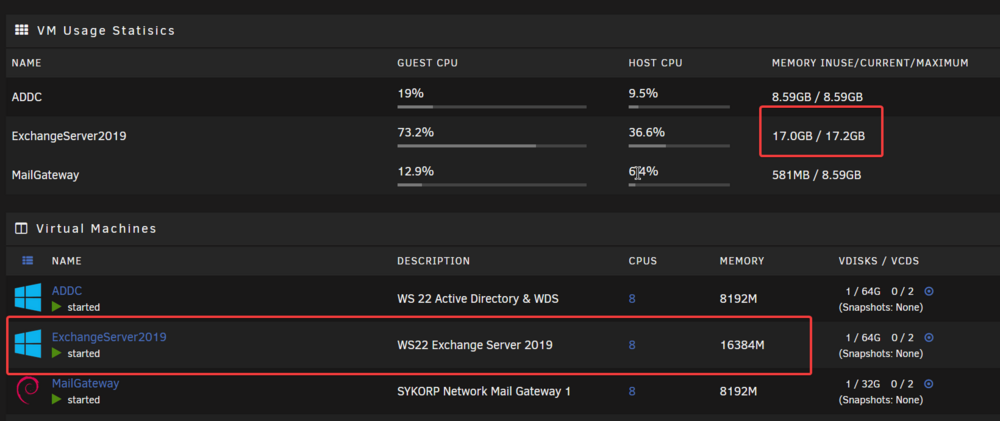
I don't know how to express this other than a photo The chosen amount of ram for each VM is not represented correctly under "VM Usage Statistics" when enabled, this scratches my OCD Also a minor mistake, "VM Usage Statistics" is written as "VM Usage Statisics"
-
I think all you need is a single docker for a torrent client & that's all, the torrent is already downloaded to your chosen destination is on your HDD. if you pair it with Sonarr & Radarr as @Helmonder mentioned, they can transfer your media into their designated folder but will leave a copy for seeding. or you can just have a windows or linux VM and do whatever you want, its as simple as that
-
YES to all, you can have dockers run everything you need and automate that to your liking.






