





miicar
Members
-
Joined
-
Last visited
Everything posted by miicar
-
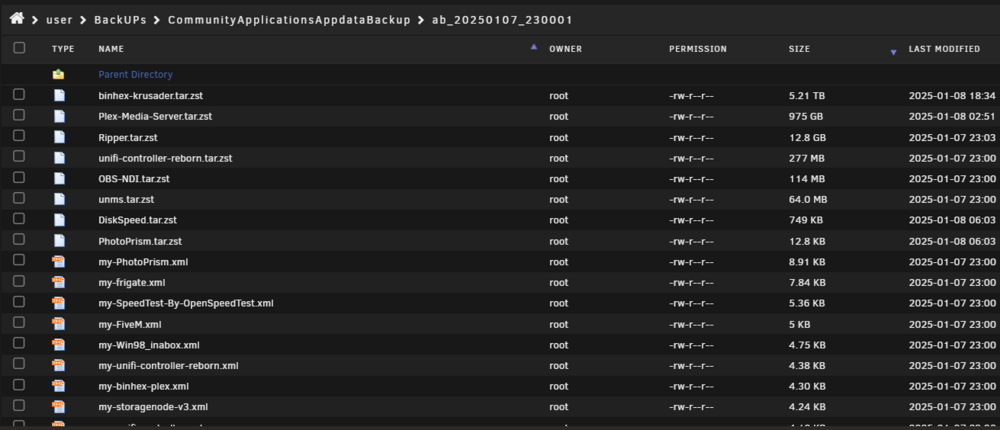
I did enable that (in hopes for smaller files)...is there no way (PC software) to open those file types? is the compression even worth it? only "/mnt/user/appdata" (and as i stated, the folder in that location are a fraction of the size of the backups). I DO NOT have anything in the "Include extra files/folders" section neither. I am assuming there would be only a log after a backup (and gets deleted after reboot)? I cant find the log as listed otherwise. (i will do a manual backup and report back) UPDATE: FYI: b43ce314-661f-4de5-874d-9e24bba9a28b (debug log ID) (i cant seem to find it in /tmp...) So the manual backup didn't seem to create the huge krusader backup file (and the plex backup seems logical given the number of meta data files it would have...although i think i need to figure out how to clean that, cuz the appdata folder still seems larger then it should be, but that's not the backup plugins fault). So i donno why the auto backup created the big bloat, but manualy seems normal (6GB for manual, and the auto was over 6TB)! ONLY thing i can think of, is the backup ran while i was moving files around with krusader? just a guess (not sure how krusader handles temp files while moving things). I did notice that some of the older backups (i keep 6 versions) were floating around 1tb, which also seems larger then they should be...
-
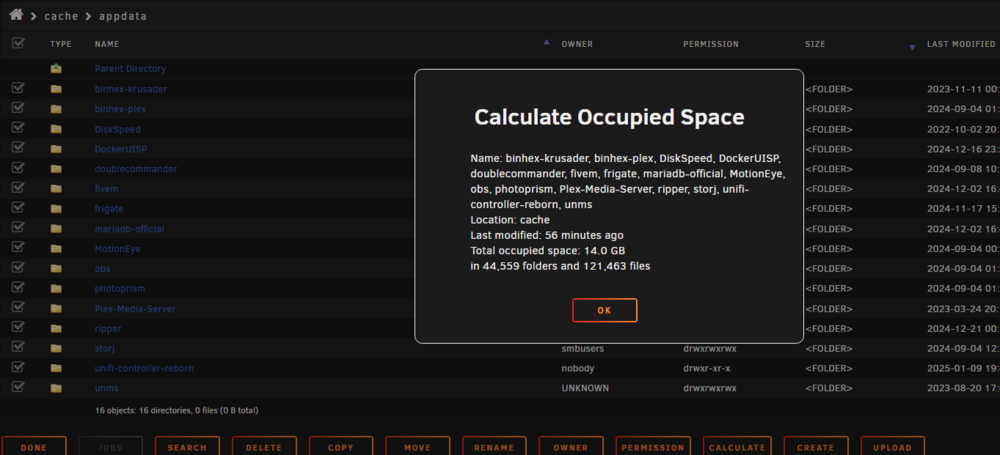
I have triple checked that the only thing that is being backed up is the flash USB, libvert, and appdata folder...and that folder is only a couple GB! Is there a way i can open up that .zst file and see whats inside? 7zip, winrar etc do not recognise it (i kinda miss the old version that seemed much easier to look at the backups...or i'm doing it wrong).
-
Hi so i was cleaning up things today and i noticed my appdata-backup backup file was massive! around 6TB! My actual appdata folder is less the 15GB! Where are these extra files coming from? The *.zst files for Krusader and Plex are surprisingly huge (5.2TB and almost 1TB respectively)...i don't even have that much in my media folder that plex looks too! The backup files seem to have ballooned the last couple of backups, whilst nothing has really changed on the server! It doesn't make sense that CA Appadata-backup is backing up my media (i don't understand how since its only pointing to the appdata folder...nothing else). And how is the krusder backup pushing 6TB!?!?!? that seems insane! Again, the actual app data folders for these are tiny (as expected). Trying to figure this out cuz its gobbled up my backup pool space! THX!
-
so the 2 vdev's act as JBOD to each other not raid0. good to know! Thanks for confirming this for me!
-
Since this was never resolved...i'm taking over! Lets say i wanted the 8 x 14TB with two Vdevs setup (one raidz2 already exists that i would be adding to)? My guess is that i would stop the array, expand the pool from x4 to x8, assign the x4 new (unformatted) drives, and start the array again? Beyond that, i am a bit lost...and scared! UPDATE: It seemed to work properly (using above steps), but i expected the re-silvering process to take some time, and show some drive activity (at least on the new drives) as things were balanced out to the new vdev. It shows the additional available space (double form before), and drive activity seems to be writing to the whole pool equally! I will assume its good; but i feel like i am missing a step, and only the original pool drives have the (old) data on them. Can someone confirm any more steps i must take? Additionally, if i was to want to remove one of the vdevs (assuming there is enough space on the remaining vdev), is that possible? Or does this have to be done one disk at a time?
-
After removing the missing devices (with CLI) you can import it properly...otherwise, it lists as a bad pool, and asks to format (shudder). also...i hope this bug is fixed in 7.x.x Swapping a drive sometimes triggers a not properly configured error in BTRFS pools...super scary if you don't understand how to fix it (reset pool, do everything in CLI...even tho the gui claims to be able to).
-
Ok, but i can still do everything "manually" through the CLI? (Looking forward to v7.x.x! seems like a major upgrade for unRAID! kinda wanna build a test server and start running the betta's)
-
Macrium Reflect free is a great tool for imaging your OS/hard drives...can even run it on a schedule, to automatically make sure new stuff isn't missed! I have been using the free version at home for years and its saved my tinkering behind more times then i can count! The paid version has a few more bells and whistles too! (not paid sponsorship, but i would)
-
Latest (stable) UNraid version with everything updated.
-
Already blew up the pool and started over. This was just a general question in hopes to find a better way of doing things.
-
Not to hijack, but i have had some issues with BTRFS drive removal, and "too many missing/wrong devices", as well. I have a pool called "TEST POOL", and as its name states, it gets used/unknown disks put in the pool. The pool records some mostly pointless security camera and other test data. Once I trust the disk, it goes in my "good" pile for later use in family/friends PC's or other unraid pools). I have this pool set up as RAID1 RC3, cuz i expect drives to fail (and they have). BUT I can never pull/fail more then 1 drive from the pool at a time with out the "too many missing/wrong devices" error (whether from failure or just want to pull or replace 2 good drives and let it rebuild)! This pool has anywhere from 5 to 20 drives sitting on it at a time, so its a tedious task to remove the pool, start/stop the array, then put it back together! Is this (RC3/4 pools) something that the unraid gui just cannot deal with? Should i just bypass the interface and do the removal/swaps manually in terminal? I would like to be able to just simply remove a couple drives in the gui and get on with my day (as long as it falls under the max failure tolerance)! Any hints?
-
I am getting the same reboot loop on a Dell Precision Tower 7910. Were you ever able to sort that out? Do you happen to have a dell as well? I think mine is related to a ME firmware issue that cropped up after i tried to install an x8 HBA in a x4 (x16 size) slot, and the system wouldn't post. That mistake seemed to take out both the HBA card, and motherboard...not sure how. Anyway, now i cannot get unraid to boot past loading the BZroot stuff, even with a new demo USB key. Just curious what system you are running, as we might have similar issues. For me, I am using another server i had as a spare for now, and it looks like i am going to have to get a chip flasher and re-flash the intel ME chip to fix the firmware error on this 7910...
-
That was my findings too. I am going to conclude that the 256 "errors" (and the "kernel: critical medium error, dev sdx, sector 15097745480 op 0x0:(READ) flags 0x0 phys_seg 256 prio class 2" error), were due to that really old HBA overheating crashing itself and causing issues. I think i should run a full (correcting?) parity check. UPDATE: as i wrote this, i realized my server was kind of locked up (SMB still worked, but no access to GUI and a ton of ngix errors in the log). Did a reboot, and it failed to find the boot USB again. there goes my night! UPDATE 2: Array passed parity check with no errors. Still concerned about why, after the "lots of tabs still open" crash and a reboot, my USB won't boot till i power down the server for a min. But for now things are running fine. When i get to site and swap out that old HBA, i will stress test the drive cabs again and see if i still get that other crash. Thanks for all the help community!
-
I'll add my hat to the ring of people who just had "nchan: Out of shared memory....." errors flood my log as well (V: 6.12.10). As well: Cant open logs or terminal through the main gui (opens and closes right away). It says im out of memory, but this system has 384GB of ECC ram! Seem to have access to SMB but the gui is slow to load locally. And yes, i have a bunch of tabs open on my PC at home (remote access through wiregaurd), as i've been troubleshooting possible drive issue (and i have been getting MCE errors too, but i thought that was tied to that). I'm going to assume if i close the open tabs, and clear the nginx service (or reboot), those errors will stop? I hope this is fixed in the next release!
-
Yes. I ran the long SMART test (took around 18 hours). So the only place (i can find) that says passed, is the SMART status. Would that not be updated there if it failed? Otherwise, at the bottom of the "Self Test" page, it says completed...nothing there says passed or not. New Diags posted as requested. elmstorage-diagnostics-20240813-1821.zip
-
the "growing defect list" hasn't grown at all. So they all show "passed" in the identity tab; and none of the drives have "uncorrected errors" in the SMART log, so am i getting bent out of shape for nothing? I am trying to understand the "Non-medium error count". I have a sneaking suspicion that allot of this has been caused by that old (and horrible) HBA card that i have running the external drive cabinet. I was doing a move of some local machine backups from a cache pool (that lives on the external cabinet), to the main array. I think that caused the HBA card to overheat, and i am told by the manufacture, those cards did NOT throttle under heat, they just crashed! I tried putting a fan blowing on it a while back and that seemed to make it happy, but maybe i pushed it too hard with a network-wide backup. Time to look for a new HBA i, but all this has me worried about my main array as well.
-
So i ran the long test on all 4 of the (identical) array disks (2 parity, 2 data; there are an additional 2 data drives that are a different manufacture/size). What exactly am I looking for, and where?? I am guessing "non-medium error count" is a tell-tale indication of a drive going bad? Is there an acceptable number? Or soon as that hits more then zero, its time to replace? The 2 disks that i was having these "BRCM Debug mfi stat 0x2d, data len requested/completed 0x100000/0x0" messages in the logs, do have greater then zero (3 & 2) "non-medium error count"; and the other 2 SAS disks are still at zero. (just a side note/question: I've had drives show "elements in grown defect list" greater then 0, and last years without growing that number or having issues, so I don't think that's a factor here.) I am considering running a parity check (with corrections) next, but if these disks need to be replaced anyway, would it be better to replace the 2nd parity disk first, then the data disk, instead? Then run a parity check again after replacing both disks? Or will the replace/rebuild process be enough of a parity check (and save some wear on the disks)? Also, I am assuming there is some sort of algorithm, with dual parity, that would ignore errors if one disk (either data or the other parity) returns corrupted data on a rebuild, and gets that data from a trusted source? Thanks for the help ya'll!
-
Just an update: The server locked up, couldn't access the gui, and I was forced to reboot through the IPMI interface. At that point it seemed to loose access to the USB boot key. But after shutting down and restarting a couple times, the UBS drive appeared in bios again and it seems to have boot fine now! This is a new (spring) Samsung Pro USB key; i did not expect any issues with it already! I do have an older HBA controller, for the external drive racks, that likes to overheat and crash the system...so I am going to swap that out for something else the next chance I get, and hopefully that will fix the stability issues (not the drive that got the errors; that is managed from the motherboard onboard SAS controller). I have a "BRCM Debug mfi stat 0x2d..." notice in the log of a second HGST drive, in the pool, as well...I hope I don't have 2 failing at once (and thank myself for having dual parity i guess). Since the USB/reboot mess, I am not getting any errors showing, on those drives, on the main page; and the server seems to be running properly (other then the persistent "mfi stat..." notices on the drives). I am running extended tests on the x4 HGST drives in the Array. I will update this when it is finished.
-
elmstorage-diagnostics-20240810-2115.zip Did this get resolved? If so, how? While doing a mover action, I got 256 errors show up randomly on my 2nd parity drive of the array. This showed up in the disk log for that drive. It happens to be a HGST 10TB SAS drive; same as the OP. Also getting this (or a similar version of this log) repeating a bunch of times throughout the disk log: This is a production server, so i want to make sure all is good. I'm working remotely so i cant check the connections, backplane etc, till I'm onsite next week. I will run a full smart test, but i was hoping for a bit more insight if anyone has any! Thanks.
-
I'm just venting, cuz i woke up to my CPU around 100C this morning...the "Autofan" (only plugin that will even recognize 3 of the fan headers) was set to go full speed at 35C...but since all my drives were sleeping, it could care less what the PCI-e NVME drive temp is, and for some unknown and stupid reason, cant monitor the CPU/mobo temp and control the fan from that (like EVERY other mobo manufacture does). and yes...the fans are set to max in the bios, but this Autofan program overrides that (which is fine to cut down the intense noise pollution...when it works). Yes...i hate my dell server. I hate that i got it for a deal and cant afford a non-proprietary, wanna be apple trash, mobo! I have a Supermicro at work that i have FULL control over and i love it! But these Dell try to melt all the time, or i have to run the fans at full speed...all the time. ***I would say a bunch of bad words here, but i don't wanna get banned***. You know what you can do Dell... I remember having a Dell Laptop that always wanted to melt and i couldn't get any fan program to work with it neither (windows); I did finally find some obscure university forum with some computer science major who made a script to control the laptop fans...it was clunky but worked enough to keep things from melting all the time. Anyone know of a class action against Dell for this kinda nonsense? 🤢🤮🥵🤯🤬
-
So i am having the opposite problem here. My XML time is "<clock offset='UTC'>", and when my server reboots, the VM time is set to UTC, even tho the windows time is set to sync to the proper CST zone! FYI...My mobo (supermicro x10) is set to UTC, the unraid time is set to CST, as well as the VM time (and NPT is enabled in both VM and UNRAID). This is quite frustrating as the Blue Iris software tags recordings with the UTC time and its confusing to those who are checking them (and myself)...although the recording files are tagged to the local (CST) time! I have just enabled the windows time properties as @BoKKeR suggested, so we will see if that resolves the issue (when i am able to reboot the server off-hours). Just wondering if my issue might be related to having the UNRAID time set to CST instead of UTC, and that confuses the windows10 VM?
-
Can someone can chime in from UNRAID and explain why these messages occur, and how we might prevent them?? They seem to happen to people for many different reasons (at least the "solutions" are varied...if they actually solve things), and there has to be an underlying issue. That solution/explanation should be put into the FAQ's since it seems to happen to many people under many different circumstances! This PROPFIND error has been consistent for the last few years over many updates!
-
Having the same ongoing issue. No idea what causes it, but it momentarily locks access to files/folders while its log-storming! It would be nice, since this is such a well reported issue, if UNraid would address this! It would be nice to know what is causing it to come back! I have fresh installed on new USB's and it seems to go away for a while, then returns (or maybe that's just a placebo)..
-
Having the same ongoing issue. No idea what causes it, but it momentarily locks access to files/folders while its log-storming! It would be nice, since this is such a well reported issue, if UNraid would address this!
-
but 3 months slow? seems like lawsuits would be a-plenty if they were that slow!

