





Andiroo2
Members
-
Joined
-
Last visited
Everything posted by Andiroo2
-
OK, so...I'm posting this in the Dynamix plugins thread. Can anyone tell me where the Cache Dirs plugin logs ae stored?
-
More on this one...it looks like Mover ignored the Tuning settings for file ages. It moved everything available, and not just the files older than 30 days. I'm not over the "move all cache-yes" files threshold either. If you are interested, the logs I DM'd show the mover using a 30-day cut-off, but many more files were moved.
-
Update: Mover was running this morning when I woke up. Looks like my issue was a rounding error. Mover tuning was reporting 95% usage but Unraid was reporting 96%. I must have been right on 95% usage and not enough to trigger the mover.
-
Same issue for me this morning. Mover not working: May 23 13:52:02 Tower kernel: May 23 13:52:02 Tower root: ionice -c 2 -n 0 nice -n 0 /usr/local/emhttp/plugins/ca.mover.tuning/age_mover start 30 1 0 /mnt/user/system/Mover_Exclude.txt ini '' '' no 95 '' '' May 23 13:52:02 Tower root: Log Level: 1 May 23 13:52:02 Tower root: mover: started May 23 13:52:02 Tower root: Hard Link Status: false May 23 13:52:02 Tower root: mover: finished May 23 13:52:02 Tower root: Restoring original turbo write mode May 23 13:52:02 Tower kernel: mdcmd (55): set md_write_method auto May 23 13:52:02 Tower kernel: My settings are set to move at 95% usage of cache and I am at 96%. I installed a new plugin version right before running this latest attempt. Let me know if I can provide anything to help here.
-
I tried searching but can't find it here...what's the path for the logs for plugins? Specifically looking for my Cache Dirs logs to troubleshoot disks spinning up. Thanks!
-
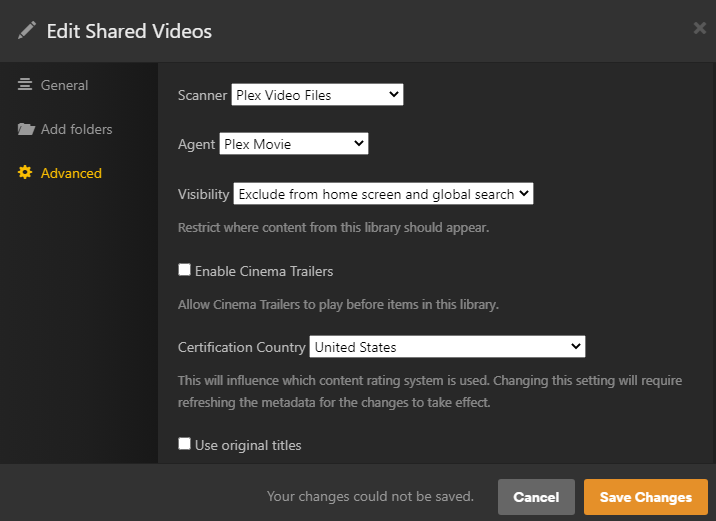
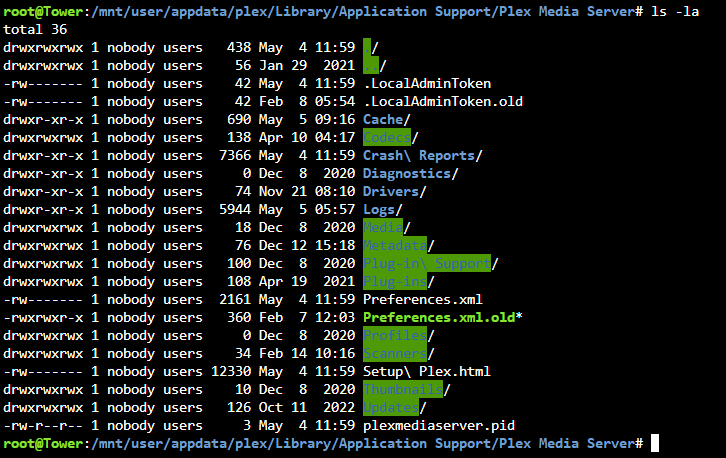
Hi all, I'm getting an error when trying to save library settings for the last few weeks. I'm simply trying to change the Visibility settings, but when I save it I get the error "Your changes could not be saved". Other than this, Plex runs perfectly. Thoughts? Posting the permissions of my plex appdata folder for reference. Thanks!
-
Any timeline on fixing iotop dependencies?
-
I pulled my hair out for a few hours trying to figure out why the MOUNT button was greyed out for one of my disks. Clicking this refresh button fixed it for me.
-
On the Unraid dashboard, my Docker gauge is showing 90%. When I used a docker image, this meant that I had filled the image to 90% of the specified size. What does this number mean for the directory-formatted Docker data?
-
Oh I keep those on cache…I’m referring specifically to my backups that I want to move off the server quickly after creation and then archive them on the array for safe keeping. Edit: I’ve manually implemented this by calling the per-share mover script via scheduled task: find "/mnt/cache/CommunityApplicationsAppdataBackup" -depth | /usr/local/sbin/move -d 1
-
I just received my QNAP QM2-4P-384 and installed in Unraid. It worked right out of the box. 4x NVMe and no bifurcation required on my motherboard. I even took an existing cache pool off the motherboard and put it right into this card and Unraid booted up and recognized the pool without issue. I paid $170 USD + shipping to Canada.
-
Pinning CPUs makes sense in your case where the performance of other things isn’t acceptable when the issue occurs. My experience is different though…I get the high IOWait but the rest of the system doesn’t hang.
-
I'd love to see per-share mover settings as well. I have a similar use case...I want my Appdata backups (~300GB file) to write to the cache, and then stay on the cache while it's transferred to my external storage. I want to benefit from the fast read and write for the backup processes. Once that's done, the mover can move that huge file onto the array so it's not soaking up valuable NVMe cache space.
-
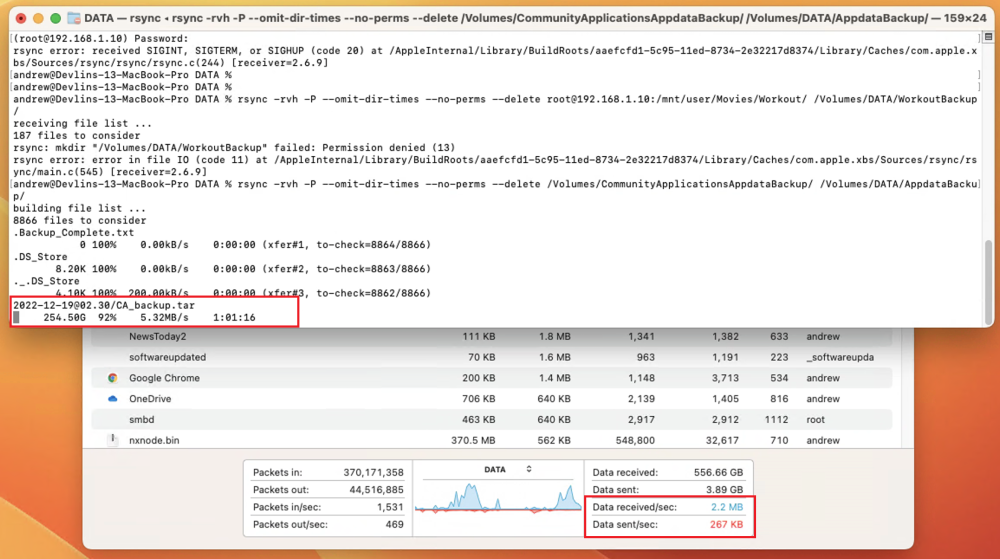
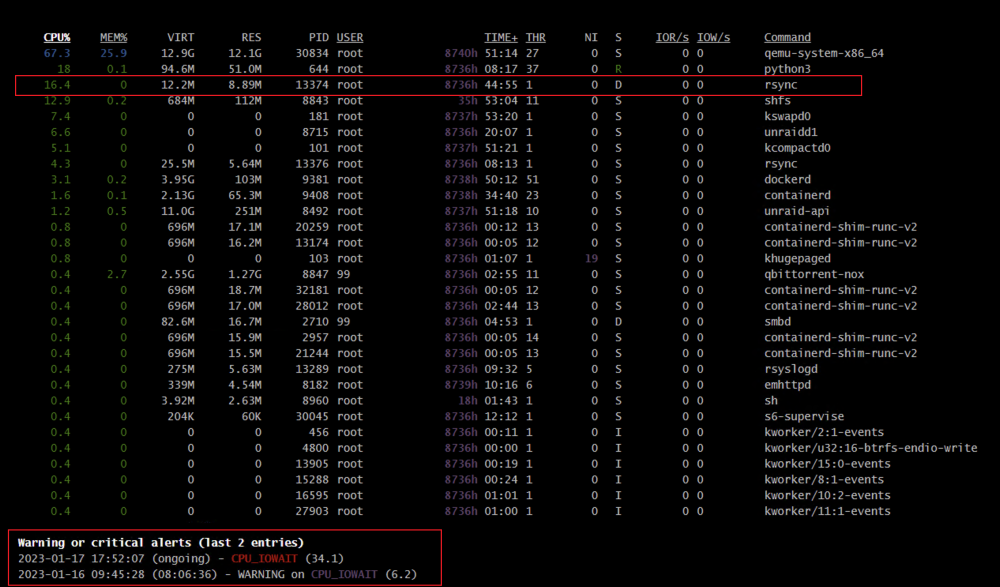
I'm having this issue when trying to export data from the array to another server for backup. Speeds start around 30MB/s and drop to around 5-7MB/s. IOWAIT sitting around 33.3 according to glances. No other activity on the server at the same time. What's interesting is that the array shows ~100MB/s of reads, but there is only a trickle going over the wire. It's like the system is spinning it's wheels trying to get the data ready to send, but can only send really slowly. For reference, I am "pulling" data from Unraid to macOS. I am running the rsync commands on MacOS, connected to Unraid via the network. I have been trying with rsync over SSH and just via SMB but no real difference.

-
Further to this, it did not persist after a reboot, so I saved a copy of the root.pubkeys file on the flash and added a command to the go file to copy it into the /etc/ssh/ folder on boot.
-
Fix it. I had to edit this file and manually add my public key: /etc/ssh/root.pubkeys
-
Trying to set up SSH keys between Mac OS and Unraid. The intent is to log into Unraid from MacOS. I followed a few different guides here but always get to the same result...the login fails and falls back to password. I get this in the Unraid log: Dec 21 09:26:41 Tower sshd[29312]: Connection from 192.168.1.14 port 53913 on 192.168.1.10 port 22 rdomain "" Dec 21 09:26:41 Tower sshd[29312]: Failed publickey for root from 192.168.1.14 port 53913 ssh2: ED25519 SHA256:<blah blah blah> Dec 21 09:26:41 Tower sshd[29312]: Postponed keyboard-interactive for root from 192.168.1.14 port 53913 ssh2 [preauth] Dec 21 09:26:44 Tower sshd[29312]: Connection closed by authenticating user root 192.168.1.14 port 53913 [preauth] I have created ED25519 keys and used ssh-copy-id to copy them to the server, but I get this in the output there which seems different from others: Number of key(s) added: 1 Some people get 2 there, not sure if that's relevant. I have persisted the changes to the flash following another guide as well. I have verified that the public key is showing correctly in my Root user settings in the GUI. What else can I try here?
-
I used to get a nice secure handshake and a long URL into the address bar, but lately I just have my server IP and a certificate warning. My Servers plugin is installed and updated, and the api report looks ok: <-----UNRAID-API-REPORT-----> SERVER_NAME: Tower ENVIRONMENT: production UNRAID_VERSION: 6.10.3 UNRAID_API_VERSION: 2.49.2 (running) NODE_VERSION: v14.15.3 API_KEY: valid MY_SERVERS: authenticated MY_SERVERS_USERNAME: Andiroo2 CLOUD: ok RELAY: connected MINI-GRAPH: connected ONLINE_SERVERS: Tower OFFLINE_SERVERS: HAS_CRASH_LOGS: no </----UNRAID-API-REPORT-----> Anything I should be checking, or is this the new default behaviour? I am using a Ubiquiti router if that makes a difference (I recall some issues with those posted in the past). Thanks!
-
I just fixed my grafana with brute force: chmod -R 775 /mnt/user/appdata/grafana Add --user 99:100 to Extra Parameters in the container settings
-
Anyone else having issues using the Grafana container since the 6.10 upgrade? In another thread on Docker permissions after the upgrade, some users are having permissions issues with existing containers post-upgrade: My Grafana error is: logger=ngalert.multiorg.alertmanager t=2022-05-25T09:34:45.41-0400 lvl=eror msg="unable to create Alertmanager for org" org=1 err="error writing file notifications: unable to create the working directory \"/var/lib/grafana/alerting/1\": mkdir /var/lib/grafana/alerting/1: permission denied" I've made various wholesale changes to the permissions on the appdata folder with no luck, but I think this error is happening with file access within the container.
-
Same issue here. Some of the containers can't write to their own files in Appdata. Grafana initially for me, but maybe others.
-
Follow up on this one. My Unifi setup had created an internal honeypot on 192.168.1.99, but this wasn't listed in the clients section of the router. This is why I thought it was available when I deployed Pihole to the same address. Just in case anyone else has this issue in the future with their Unifi setup.
-
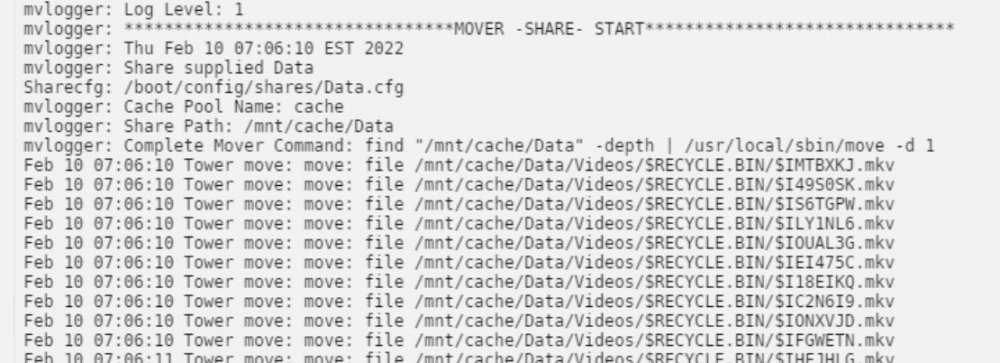
I don’t see that message in the logs. See attached.
-
Quick note on the “Move all files from cache pool selected above” option. When running this, my turbo write doesn’t engage. Can the Mover Tuning plugin check for this setting and enable turbo write when moving one share? I have “force turbo write on during mover” set in Mover Tuning settings for regular moves. Thanks!
-
I just updated from 2.00.10 (working) to 2.00.13 and I'm getting this error: [ERROR] Tdarr_Node - [39mBinary test 3: mkvpropeditPath not working It was working on my previous version. My json is blank for all 3 of these binaries: "handbrakePath": "", "ffmpegPath": "", "mkvpropeditPath": "", Do I need to point it to a specific path?




