





Michael_P
Members
-
Joined
-
Last visited
Everything posted by Michael_P
-
Have you done what the release notes suggest? https://docs.unraid.net/unraid-os/release-notes/6.12.3 If Docker containers have issues starting after a while, and you are running Plex, go to your Plex Docker container settings, switch to advanced view, and add this to the Extra Params: --no-healthcheck
-
You can limit them to a specific amount, for me Plex goes wonky during scheduled maintenance and gobbles up all the RAMs so I limit it to 4GB

-
Nextcloud is what I use
-
Heimdall is what I use, but there's also homer, homarr, dashy, and moreShot in the dark, but are you running a torrent docker container using the buggy libtorrent version 2.xParity/RAID is strictly for high availability, so you can continue using the system while the failed disk(s) rebuild. There is absolutely zero data security, as it can be deleted/corrupted/changed at any time. Figure out what's really important and 3-2-1 back up that.I use Nextcloud, sync from and to any device with very little setup wizardry To backup, I use this script and you can set it up to automatically run when a USB drive is plugged in to the serverDoesn't work like that, Parity has no idea what a 'file' is and wouldn't 'know' there's a difference in bits until a scan is done and if the parity calculation differs, it'll tell you something doesn't add up, but it won't know which is correct so it'll just fail the disk. Same with RAID, it'll just mirror the corrupted data. Parity/RAID is for rebuilding a faild disk. If you need data integrity, you need checksums and backupsYou should post diagnostics else any help is just reaching around in the darkCRCs are almost always cable related, replace themI've just finished dusting it out, re-seating RAM, changed out a power and SAS cable - going to re-build parity and cross my fingers.Since moving to 6.11 it's happened each of the times one has dropped offline, this is the 3rd time. The other two times were during parity re-builds after upgrading a drive and one of the others dropped (I rarely get a clean parity check/re-build on the first try without losing a drive likely due to power which I'm working on again..)After 2 drives dropped offline, a segfault occured in emhttpd which resulted in inaccurate health and status displays on the dashboard, and aslo the nightly health report email to erroneously report that the array was healthy. No indication from the server that anything was wrong, save for the entries in the syslog which I happened to read by chance. When this happened back on 6.11.1 during a parity re-build, the correct FAIL email was sent so I'm not sure if this is specific to 6.12.3 urserver-diagnostics-20230802-0520.zipIt does it every time a drive drops, here's one from the last time I was re-building a new drive and another in the array decided to take a short nap (same disk btw, I suspect a cable or power delivery issue). The gui no longer reports any progress on the parity re-build, I just have to wait for it to finish and re-boot to get the dashboard back. This one at least sent the correct [FAIL] email, which leads me to question whether it's a 6.12 issue?
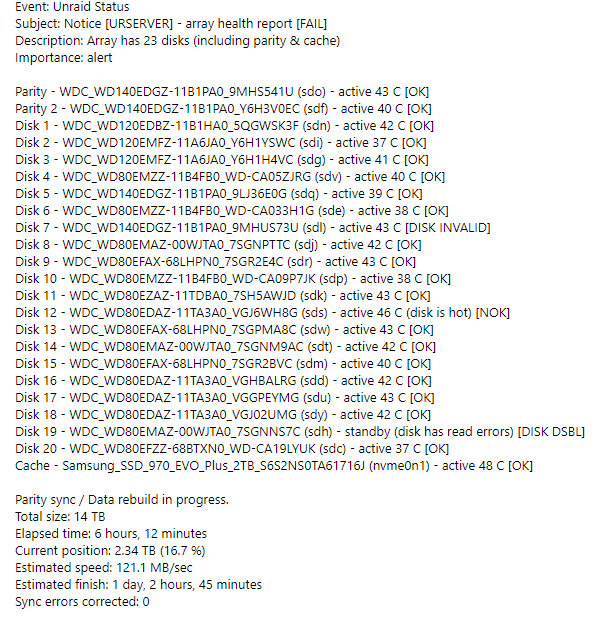 They both dropped offline, and after a restart they're both disabled - diags before and after attached urserver-diagnostics-20230802-0520.zip urserver-diagnostics-20230802-0730.zipLooking at my nightly email from unraid about the array's health report, it shows as 'Passed' but I notice that all the drives were spun up (except for 1 anyway). So I log into the server to see if they still are, and they were all still spun up, so I click the button to spin them all down to see if they'll stay down but all the icons do is spin. I try each drive individually, with no effect on any of them, so I open up the log to see if there's any spindown commands noted. Turns out two of the drives were disabled, and the emhttpd process had segfaulted shortly after the drives show disconnected and re-connected. The dashboard continued to show no issues and send an ALL OK Bro! email..... If I hadn't noticed the drives spun up and investigated, it might have been a while before I would have any reason to look at it... What's the point of the health email if it doesn't report the actual health of the array?
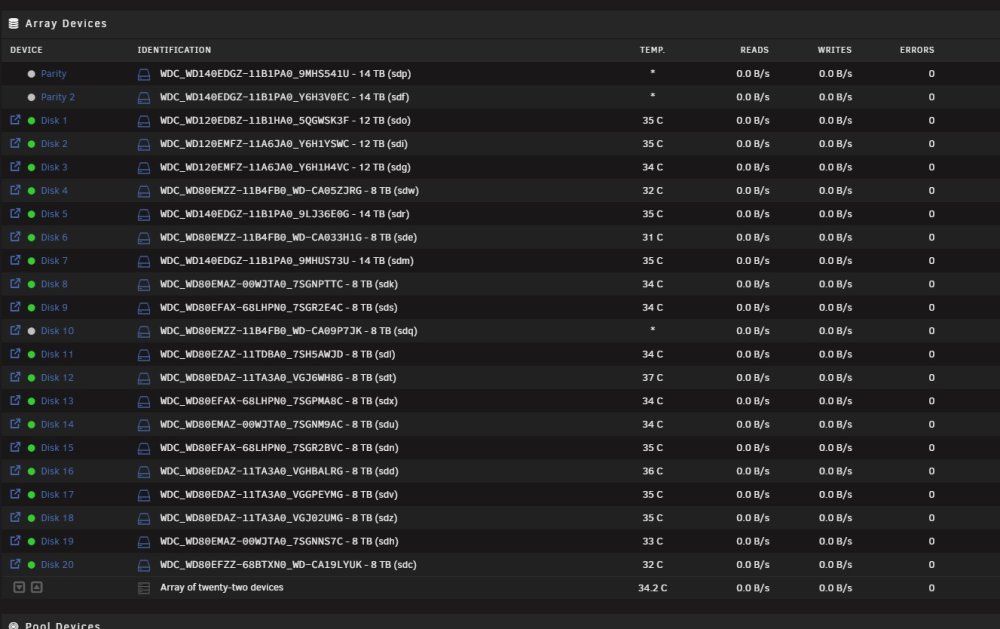
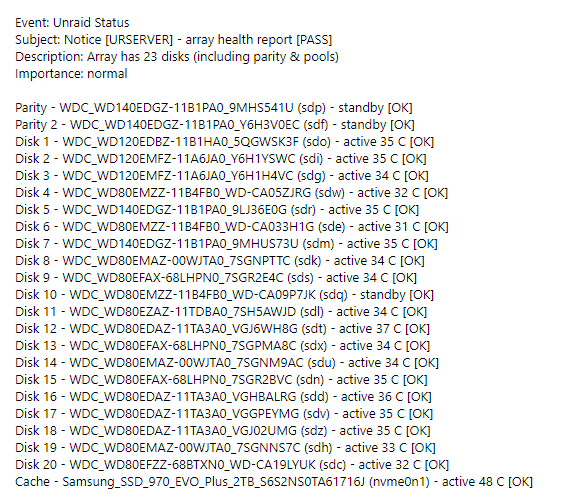 User name checks out Are all 3 drives on the same controller (Marvell perhaps?). It's unlikely all 3 failed at the same time so you'll need to look for commonalities - controller, connection, power (including distribution to the drives, ie splitters) You didn't include the diagnostics, so there's no SMART reports to look at.It was still online in some fashion as I could still read the files on the drive, just not writeMy cache drive decided to go read only this morning, not sure exactly why. A reboot brought it back online but I'm unsure as to what to diagnose to avoid it happening again. At the moment, I've decided to move everything off of it and re-format it just to be safe. Coincidentally, perhaps, but I've recently updated to 6.12.3 and the system was rock solid on 6.11.1 Diagnostics before and after reboot attached urserver-diagnostics-20230724-0605.zip urserver-diagnostics-20230724-0704.zipI wouldn't say it was a mistake, but I would absolutely rather have Arc support over ZFS.I use Nextcloud to sync my mobile devices to the server, UrBackup for the desktops, and rsync for server to server along with a cold grab n go HDD for the can't lose data.You can* mount it in Windows, just Google it and follow one of the many guides to 'Mount a Linux disk in Windows'It's the bashing it'll take if you have to rebuild any other drive in the array that would be the killer. My experience with Seagate drives hasn't been good, they typically keel over rather quickly once they start failing. If you don't have your "can't lose" data backed up, now's a good timeDepends on your tolerance for risk - if another drive happens to fail you'll need it and the rest to stay healthy enough to rebuild







