





Michael_P
Members
-
Joined
-
Last visited
Everything posted by Michael_P
-
No, that's not how unraid works
-
Sounds Sounds like a job for Nextcloud
-
They're looking for an outbound VPN to mask downloading Linux ISOs I've had pretty good luck with PIA and binhex's deluge-vpn docker container
-
If it's a single parity system, personally I'd do a new config if rebuilding on top of the same drive is your only option. Losing another disk during the rebuild would suck twice as much
-
It's not funny
-
SMART fail is a drive fail - no point in ignoring SMART, that's its only job
-
Aside from the SMART failure lol
-
rsync - it won't encrypt the data for you but you can send to an encrypted volume
-
Rapid updates isn't usually a good thing
-
I drill a hole through the top and chuck 'em.
-
If it happens at the same time of day, it's probably Plex choking during its scheduled maintenance, limit the memory to the plex docker (advanced view), set as needed for your setup

-
Depends on if you will need to transcode video to devices that won't be able to direct stream
-
Your docker image file is stored on your 'docker' share in /mnt/user/docker/ If your docker image file is getting filled, you have a container that's writing to that file instead of a disk share - you need to verify that whatever folders (downloads, temp and such) are configured in your docker containers point to a folder in one of your shares or disks.
-
It's not x4, it's x2 in x4 clothes. Will you notice a performance difference, depends on if you ever need to do more than 1 or 2 things at once on any of the drives, and more so for drives slung off of the multiplier.
-
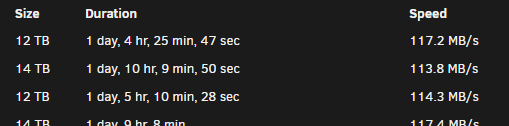
Every time I upgrade/replace a drive, all 24 are used to re-build it - and it already takes over 30 hours
-
Your board supports up to 64G, you only have 32G installed You have a docker that's writing to the docker image instead of a disk share
-
This isn't accurate, you can use whatever SATA ports are available
-
Run it from the docker's console Hint: ignore the dot slash and just run occ preview:generate-all -vvv
-
Why can't I put 10lbs of crap in a 5lb bag? Not enough room.
-
Edit the script for whatever you need, examples are provide in the script near the beginning marked ##Settings##. Add the script via the user scripts plugin and from there you can set triggers (array start, on specific unassigned device plugged in, etc.) Dunno about the others you mentioned or whether they're bettor or not, you asked if it was possible and it is
-
Yes, but it would be better just to not use the cache drive for the share while you're doing your copy
-
That's the rub, if it's just fill and read - there's no need to 'work' with the files so any space left over is simply wasted. 50GB over 24+ drives really adds up
-
This is wrong. There's no benefit in a write once read many use case to leave 20% of it's capacity un-used, where fragmentation isn't a thing. Fill'er up.
-
SMART is an internal test, so the cable wouldn't matter. If it fails SMART, it's dead Jim
-
'Disabled'



