





Michael_P
Members
-
Joined
-
Last visited
Everything posted by Michael_P
-
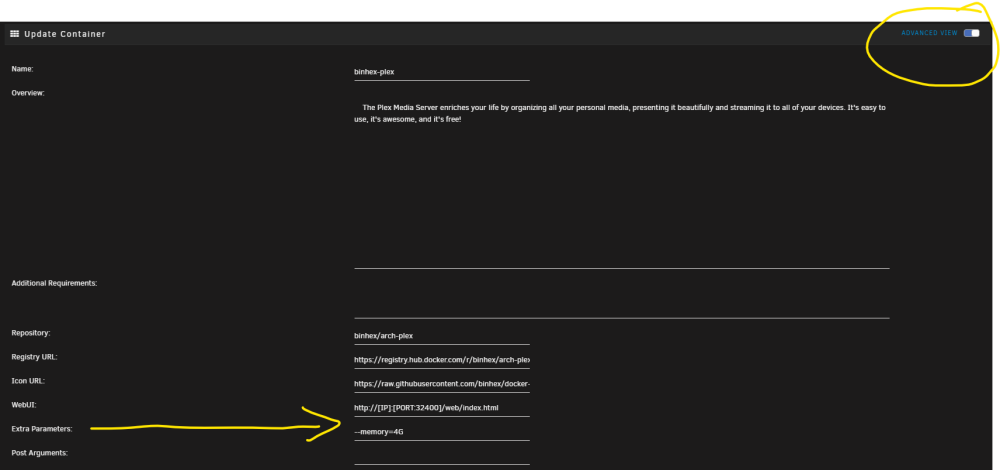
In the container's settings, toggle advanced view and add this into the extra parameters field (whatever amount of RAM you want to limit to, I just use 4G --memory=4G
-
"Need a car to commute to work? Also want crazy fast straight line runs at the track on weekends? AND you want to go to space but need an orbiter? The Fiero is the car for you! *some assembly required" -the marketing wanks at GM after watching F9

-
I'd start with large blocks of files, and narrow it down from there. Or maybe Tdarr's health check could work, too
-
This suggests its a video file that can't be properly read. If you've added media before it started acting up, start by removing those files and/or examining them, and adding them back until you find the culprit.
-
Well, you can try to figure out which file it's choking on, or just limit the RAM to the container (which is what I do)
-
Limit the Plex container to a reasonable amount of RAM and set the scheduled task to run at on the next closest hour to see it's fixed. If it is, you can change it to your regular time. If there's a media file that the scanner doesn't like, it'll cause the process to run away so limiting its RAM will restart the container instead of bringing down the system.
-
What time is your Plex maintenance scheduled? Try limiting the Plex docker's memory, that will keep it from running away if it encounters a file it doesn't like.
-
Use your phone
-
It's actually the reason I bought it, it was cheaper to buy the printer and do it myself than to pay someone else Rack mount chassis are meant to have push-pull cooling, if you cut a hole in the top you might actually make it worse. Me, I'd make another 'pull' fan panel for the rear if I didn't want the fan noise of the stock internal fans
-
I 3D printed one for the front of my Norco 4224 and it keeps the drives reasonably cool
-
Still not 100% that's the cause, but if you do need to replace it, just set all the shares to move to the array then run mover. When you have the new drive installed, set the shares back to the cache
-
In your syslog there's an error, looks the same as when my cache drive showed signs of failing Dec 10 03:18:25 NAS-Disk kernel: BTRFS error (device sdc1): bdev /dev/sdc1 errs: wr 0, rd 0, flush 0, corrupt 6, gen 0
-
Yep, docker would fail to unmount and generally hose everything until i rebooted and did a file system repair on the drive - then it would be fine again until the next time a lot of writes were made. It was also a 970 Evo Plus.
-
FWIW I had an NVME cache drive that would do that too, then after a few months any writes to it would cause it to go read only and the drive was less than a year old
-
You'd have to turn off the dockers/VMs manually - and if you forget and both try to access the GPU it will crash the host
-
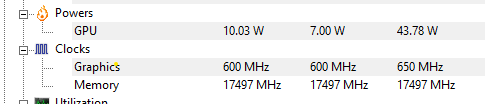
My A770 LE idles around 10W, have you tinkered with power management?
-
Yes
-
Also, from the SMART report it doesn't appear to be anything wrong with the drive itself. CRC errors are almost always connection related.
-
Looks right except yours has 8GB instead of 8G not sure it matters Set the plex scheduled task for the next closest hour, then watch the memory usage as it runs thru it (that way at least you won't have to wait overnight)
-
Can you take a screenshot of your plex container with the advanced view enabled?
-
Did you toggle advanced view?
-
Eliminate the splitters and you should be fine. The rule of thumb is no more than 4 drives per molex connector and to have more than one run back to the PSU. Toshiba drives are especially finicky in my experience about power sag and will drop offline if you look at them funny
-
Looks like a power issue, are you using splitters?
-
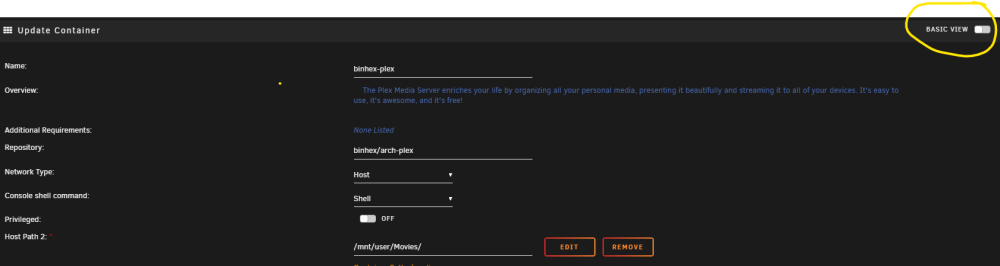
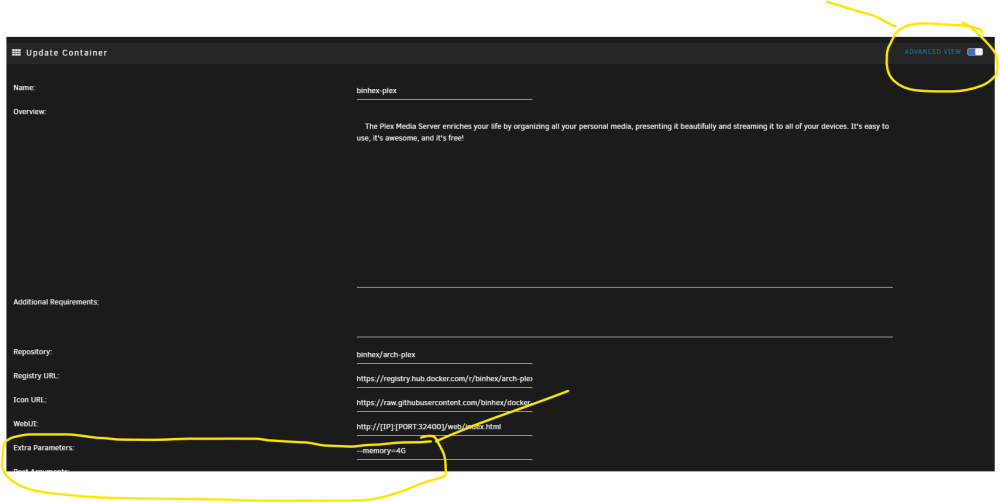
Doesn't look like you're putting it in the right spot - undo what you did and do this: Toggle basic view to advanced view Add it to the Extra Parameters line
-
Storage should never be in the DMZ. If your data is valuable enough to protect with that many layers then the storage server should not be hosting WAN facing applications





