blaine07
Members
-
Joined
-
Last visited
Everything posted by blaine07
-
https://github.com/MohamedBassem/hoarder-app
-
I wonder if they're going to roll back or what their intentions are/were here? I have a few things I can't get to work even with that argument added - can't remember how I have what setup so I am sure it's a skill issue. Can't downgrade MySWQL Container though can I?
-
Thanks for sharing; I had a few things that it evidently borked, invoice ninja, that I hadn't had time to hunt down. No telling what who or how I setup Invoice Ninja that way...sigh LOL
-
Doesn't seem to have any adverse affects...yet. But not, I have not figured it out. 😞
-
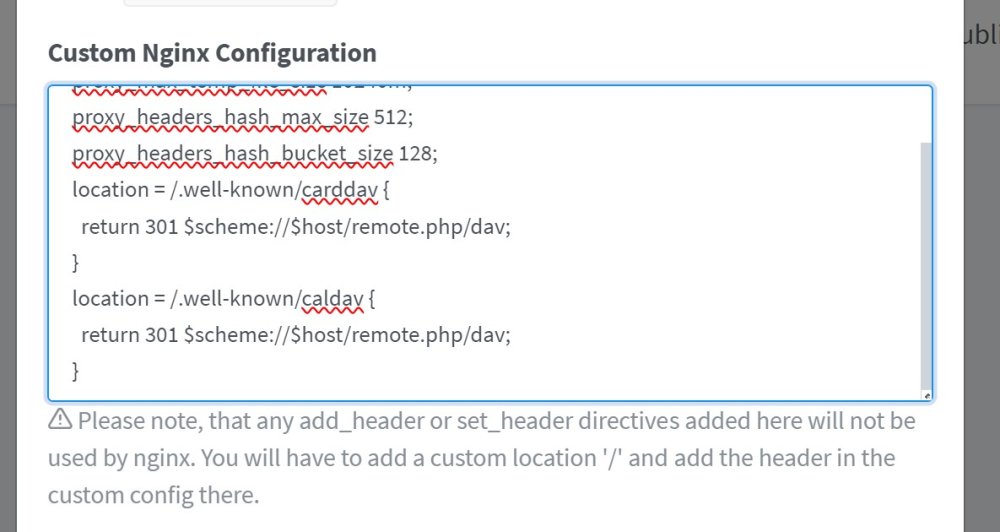
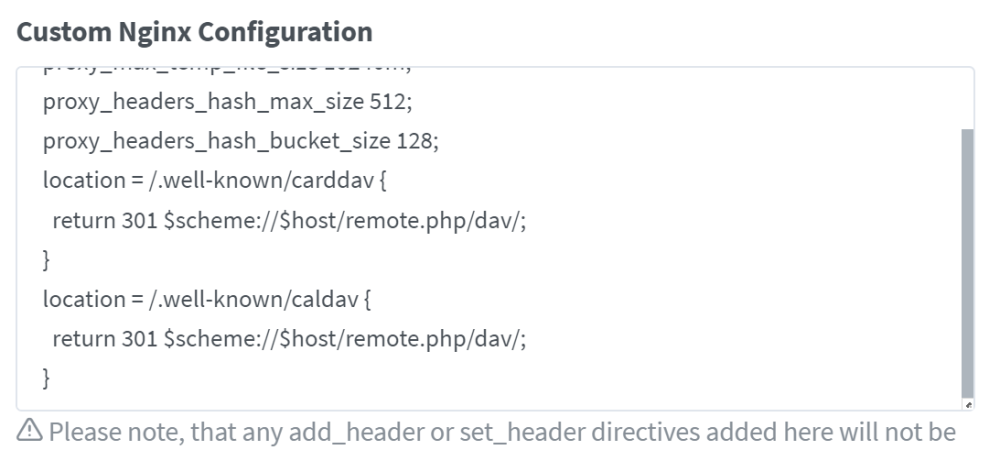
Ahh found this: https://github.com/nextcloud/server/issues/45033#issuecomment-2079306503 In HERE: https://github.com/nextcloud/server/issues/45033 Had to change THIS: To THIS:
-
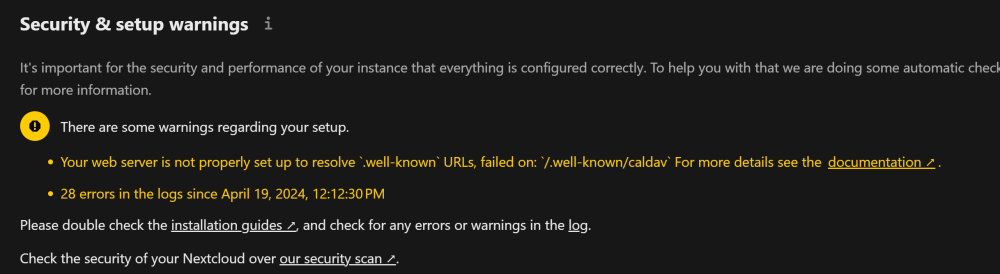
Upgraded to 29 and can't seem to figure out how to fix this. Configured exactly the same on 28 and wasn't a "error" then so not sure what I have incorrect? Any ideas? https://docs.nextcloud.com/server/29/admin_manual/issues/general_troubleshooting.html#service-discovery
-
Anyone braved upgrading to v29? How is it?
-
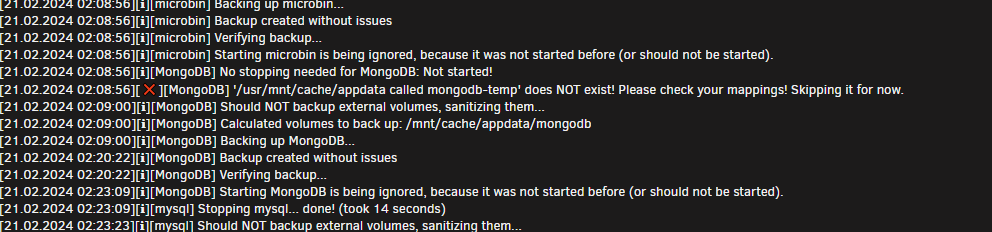
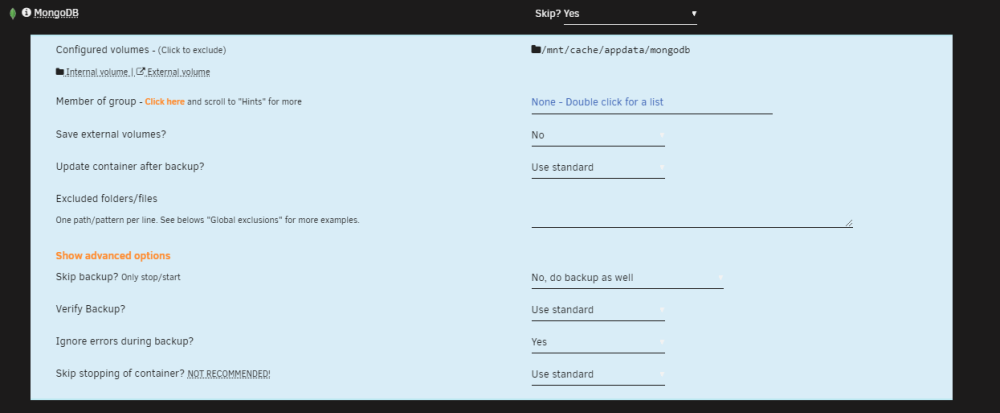
No wonder this got ignored - I forgot to put bottom line: '/usr/mnt/cache/appdata called mongodb-temp' does NOT exist! Please check your mappings! Skipping for now. But mongo is skipped, as well as Tailscale that recently started doing the same thing - any advice?
-
Having trouble getting previews to generate in Browserless: In browserless I have "TOKEN" Variable matching "CHROME_TOKEN" in Reactive Resume. In RR I also have "CHROME_URL" set as "ws://UNRAID-IP:3011" which is port I have browserless on. Any suggestions? EDIT: Resolved - I in fact do have fat cheeseburger fingers and mis-typed like a dummy head. Nevermind above... ProTIP: don't fatfinger things like I did. :sigh: LOL

-
Should I be doing anything about this error? If so what? # WARNING overcommit_memory is set to 0! Background save may fail under low memory condition. To fix this issue add 'vm.overcommit_memory = 1' to /etc/sysctl.conf and then reboot or run the command 'sysctl vm.overcommit_memory=1' for this to take effect.
-
Thank YoUUUU
-
For months off and on I get this error; frankly I am tired of seeing it despite it means nothing. What is wrong here? I don't even leave MongoDB running anymore. The error: Event: Appdata Backup Subject: [AppdataBackup] Error! Description: Please check the backup log! Importance: alert Debug Log ID: c2b88e35-5351-4b46-8572-9a8dddda2430
-
I dont have any graphics card or anything fancy - I am just trying to figure out how to NOT save my HD Home Run Tv feed in silly TS format. I have played with this, but NO idea what I am doing: https://github.com/AndrewBreyen/Jellyfin-TV-Post-Process/tree/main Are their any good guides somewhere that could help me save my recordings as MP4 formart or any of you patience enough to explain how I use the script? Please?
-
Looks like imagemagick-svg was finally fixed here: https://github.com/linuxserver/docker-nextcloud/pull/419
-
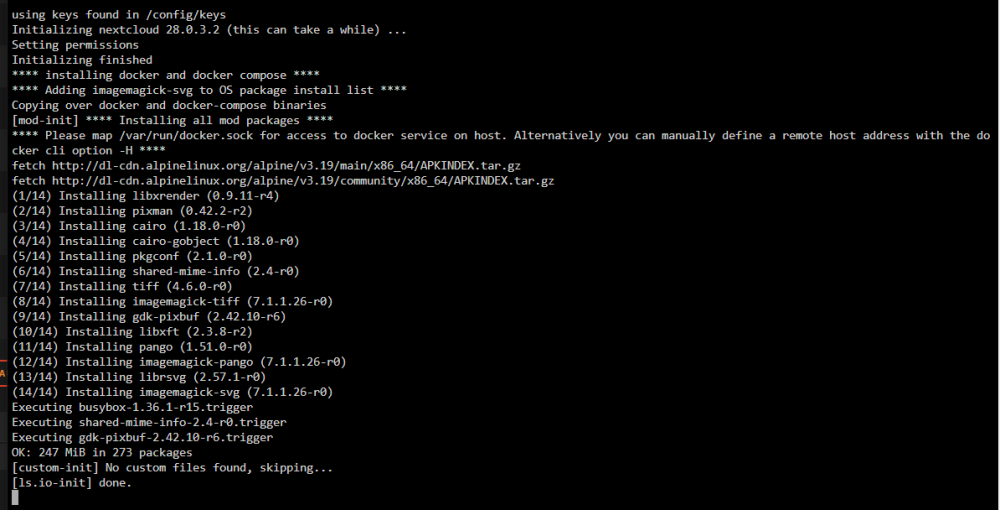
Did it like this: linuxserver/mods:universal-package-install Seemed to work WITHOUT doing : linuxserver/mods:universal-docker I think?
-
Thank you, SO MUCH! It definitely does work. I wonder if it has to install these other "extra" 13 packages though? I wonder what happens if you just did "linuxserver/mods:universal-package-install" and NOT "linuxserver/mods:universal-docker|linuxserver/mods:universal-package-install"?
-
So is Linuxserver.io NEVER going to include it either? I hate to do a bunch myself only for them to do it later? Edit: so, are you going to do this? Can you show screen shot of how you add it to your nextcloud container? Kind of confused with instructions...
-
https://github.com/linuxserver/docker-nextcloud/pull/418
-
Updated to 28.0.3 today and seeing this, below, is anyone else? "The PHP module "imagick" in this instance has no SVG support. For better compatibility it is recommended to install it. For more details see the documentation ↗." Takes me here: https://docs.nextcloud.com/server/28/go.php?to=admin-php-modules
-
Thats what I have here; Cloudflare Proxy and some stuff straight to service; some stuff through Cloudflare>NPM>Service. Quite literally can't wait! 🙂
-
Oh, awesome! Thank you so much! Keep me posted - some basic login would be very nice. I don't need Traffik or any of that though; would rather use cloudflare or NPM. Thank you!
-
Seems like the right place? Have any of you got Grist Omnibus setup/to work that includes some basic account management and login options? I have played with it; but some reason can't get it to load/boot. I think it's default Traffik thing built in. https://github.com/gristlabs/grist-omnibus
-
Anyone have any idea what I have set wrong to see this in logs? [14:20:03 WRN] Failed to determine the https port for redirect. {EventId={Id=3, Name="FailedToDeterminePort"}, SourceContext="Microsoft.AspNetCore.HttpsPolicy.HttpsRedirectionMiddleware", RequestId="0HN1N118BKSL3:00000001", RequestPath="/", ConnectionId="0HN1N118BKSL3", ThreadId=12} Seems to be working fine for me through cloudflare tunnels though so not sure what that's about?
-
I tried to migrate to "new" version unsuccessfully. Anyone have any advice? Not sure what I need/did wrong? https://github.com/immense/Remotely/releases/tag/v2024.02.22.1231
-
Pardon me if I missed it; recently this has started throwing a "alert." It has not always done this; sent a alert on this. I guess I am too stupid to understand it - but is this actually an issue or what does it mean? Did something change and this has been always been an "issue" but wasn't' alerted to it?