






Hoopster
Members
-
Joined
-
Last visited
Everything posted by Hoopster
-
Apparently, it has nothing to do with that specific Plex version number in all cases. I am running 1.28.2.6151 and just forced several local transcodes (normally everything direct plays) and asked a remote user to play some movies. Everything was properly hardware transcoded. My CPU is a Xeon E-2288 (9th generation) so perhaps there are some hardware-specific issues with the latest version of Plex but the issues are not universal.
-
Do you have a computer available in which you can put a couple of hard drives for an Unraid trial before formatting disks and mass migrating data? Make sure it meets your needs and get comfortable with the platform and play around with some docker containers/plugins from the Apps tab.
-
ECC memory support is optional and not a requirement for unRAID. Nevertheless, whenever I buy a server-grade motherboard with a Xeon processor (both my servers), I buy ECC RAM since I figure I might as well take advantage of what the MB/CPU combination supports. My main server is on 24/7 so I figure it can't hurt. There is certainly a price penalty to be paid for ECC RAM but it is not exorbitant. I would let the choice of the motherboard and CPU you think best meets you needs determine if you want to go with ECC RAM rather than deciding on ECC and then looking for other components that support it. Bottom line is that it a personal choice and not a requirement.
-
Apparently not. You might find this discussion informative.
-
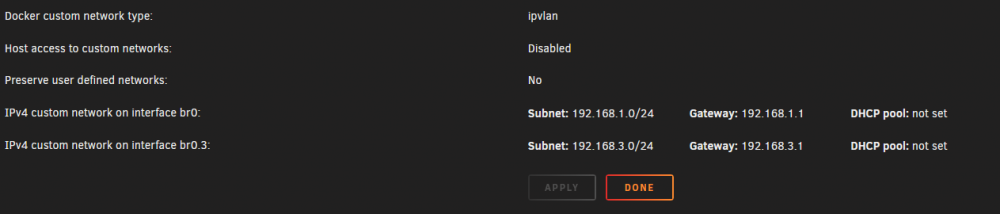
If you assign a DHCP pool of addresses for use by a docker network you must be careful that these addresses do not overlap with the DHCP pool of your router on the same subnet. If they overlap you could have the same IP address assigned by Docker DHCP and router DHCP since they do not know about each other. I have nothing but Docker using the 192.168.3.xxx subnet so this is of little concern in my situation. Manual IP address assignment to docker containers is not required; you can let them use docker DHCP to assign from the pool. I just choose to manually assign IP addresses to docker containers on my Docker VLAN rather than defining a DHCP pool.
-
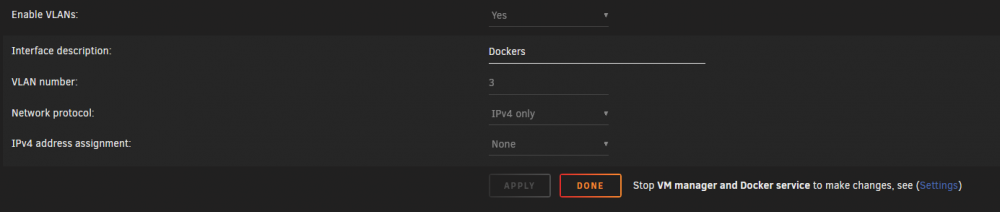
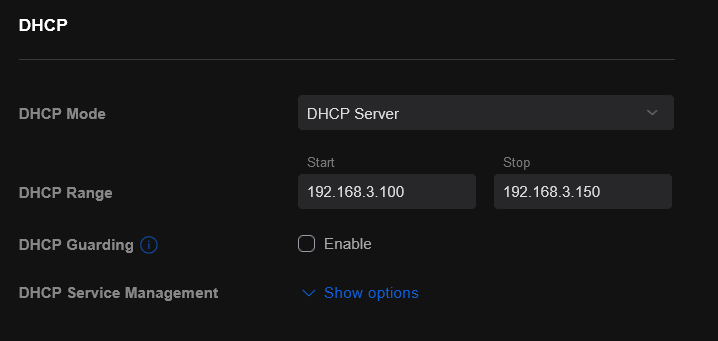
@aglyons As mentioned above by @Vr2Io, DHCP for docker and DHCP on your router cannot compete in the range of IP addresses they are allowed to assign. Docker does not know anything about your router DHCP. I assign the Docker VLAN in the USG a DHCP Range of 192.168.3.100 to 192.168.3.150. However, I do NOT enable DHCP on the docker VLAN in unRAID and manually assign addresses in this range. On the VLAN side in unRAID, I do not enable DHCP on the br0.3 interface Settings --> Network Settings --> Docker For each docker container to which I want to assign a static IP address, I specify the IP addresses beginning with 192.168.3.100 Here is my Plex container (192.168.3.110) for example: I am not sure how this differs from what you are doing but I do not run into the issues you describe.

-
I followed this guide for setting up a VLAN for my docker containers.
-
A couple of years ago, I was experiencing frequent server lockups. It was traced back to having docker containers with static IP addresses on br0. It resulted in macvlan broadcast call traces and server lockups. This was before ipvlan became an option. The solution for me was to create a VLAN for docker containers (br0.3 in my case). My router is a Ubiquiti USG and I have Ubiquiti switches as well. I have had zero lockups due to macvlan/ipvlan/br0/br0.3 since making that change. I also switched docker to ipvlan when that became an option even though the VLAN had solved my problem. The point of this being that I do not think ipvlan itself is necessarily a problem on your router. There could be other configuration issues.
-
Doing this would negate/diminish one of the main advantages of unRAID; portability of the OS/License. As it is now, you can easily upgrade hardware or move the OS to a completely different machine since the license is tied to the GUID of the USB flash drive. Of course, you could argue that you could simply remove an SSD and place it in a different machine as well but this is not as convenient as a simple USB flash drive swap. This has been debated a few times in these forums and yours is not the first request to make it possible to install the OS source files on an SSD (it will load in RAM regardless of source); however, there has never been any indication that this will be a future option for all of the reasons stated in the posts above. The USB flash drive model has proven to work very well and there is no reason to fix what is not broken Of course, this may be a non-starter for you but before you make that decision you should try the free 30-day trial of unRAID on a USB flash drive to get a better feel for how this works.
-
Version 4.7 was the released version when I started with unRAID but 5.0 was in beta. I installed version 5.0 beta 14 on my first server in late 2011 and, of course, unMenu which provided a way to expand the capabilities of the unRAID web interface. unRAID has come a very long way since then and I can't imagine what it looked like in the first release 17 years ago. Congratulations to Limetech for turning a side product into a thriving business and community. We thank you.
-
This was with Chrome.
-
The servers list reload attempt was happening but it was just a never-ending spinning icon. As mentioned, I tried it again (sign in via Plex Streams pop up) after opening the Plex Web UI and it got a token and populated the server list immediately. Everything is working as expected now.
-
Yeah, I had tried that via the popup and it got a token but still no server information was populated in Plex Streams after several minutes. I opened the Plex Web UI first and tried it again and this time it worked. Thanks.
-
@RTXonloveano As trurl said, the license is associated with the flash drive (its GUID). The flash drive can be used to boot into unRAID on any machine so there is no need to purchase another license if you change server hardware either via upgrade or an entirely different computer. In the worst case scenario, you have to do a new configuration on a different computer.
-
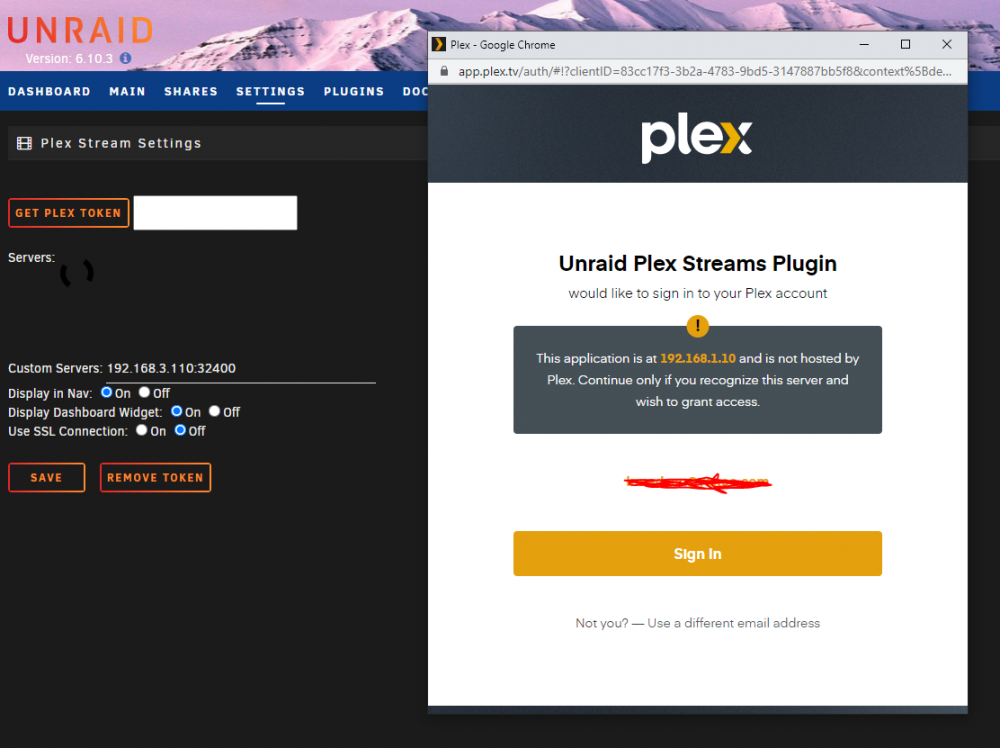
I have installed this plugin but am having trouble getting it to detect my Plex server. My server is on a docker VLAN (192.168.3.xxx) and my unRAID server is on the 192.168.1.xxx subnet. Plex Stream will not detect my server. When I tell it to get a token, it wants to login to Plex at 192.168.1.10 (my unRAID server IP). Even if I specify the custom IP:port address of my Plex server (192.168.3.110:32400) nothing happens. What am I doing incorrectly?
-
Here are more detailed instructions: https://wiki.unraid.net/Manual/Changing_The_Flash_Device
-
I just wanted to confirm that the basic.key file existed on new flash drive. If not, it was probably trying to use the expired trial key. You need to register the GUID of the new flash drive.License is tied to the GUID of the flash drive. Since you used a new flash drive, you will need to register the license with the GUID of the new flash drive. Click on the flash drive link from the main page and then the registration key manager link.Your screenshot above shows both a trial key and a basic key. Did you use the same flash drive from when you purchased the basic key or a new flash drive? Is the basic.key file in the config folder on the flash drive from which you are currently booting?Many, many months when the time between unRAID releases was much longer than it is now. With just a few exceptions, all my reboots are for installing new versions of unRAID. I have had some server lockups due to configuration issues that required reboots to resolve, but this is the exception and not the rule.Do what @trurl mentioned and copy everything you can from the config folder before recreating flash drive. Flash drive corruption does not affect array disks and data. Shares are just top-level folders on disks and should still be intact unless your power outage somehow affected the array drives. This is why a UPS is highly recommended.Yes, I was about to edit my post and mention this. You beat me to it. 😀Lacking a backup, you may have to redo some of the configuration. However, docker containers and plugins that were installed via CA Apps can be be reinstalled with with all previous settings intact via Previous Apps from the Apps tab. If you use the same USB flash drive, get the *.key file from the config folder and copy over to new config once you recreate the flash drive. Worse case scenario will allow you to register a new flash drive GUID (if you need a new flash drive) for your unRAID license without needing to purchase a new license.Do you have a flash drive backup from before the power outage? It sounds like some files on your flash drive have become corrupted (can happen with power outages). Your best bet is to create a new unraid flash drive and restore config folder from a backup if you have it. You could probably get away with reformatting/recreating unraid files on the existing flash drive unless it is physically damaged in some way.






