






Hoopster
Members
-
Joined
-
Last visited
Everything posted by Hoopster
-
@d3m3zs What @PeteAsking said is true (not that he needs my validation 😀). I have a Cloud Gateway Ultra in the network of one of my homes (the other uses this docker container). It has a built-in controller which you must use to manage the device and, logically, should use to manage the other UniFi devices in you network as well. If all you have to manage is Unifi APs and switches, just stick with this Docker-based UniFi Controller. Functionally, they are virtually identical. Before I bought a Cloud Gateway Ultra, my home network included the UniFi USG router. Since it had no built-in controller, I was managing a system with 1 USG, 3 UniFi switches and 5 APs all through this Docker-based controller. This is all you need.
-
When I did it, it did start out with a high estimate. It really picks up about 10% through. I think the average speed when it was done was reported at around 135 MB/s
-
@bally12345 Two days ago I replaced an 8TB parity drive with a 12TB WD Red. Parity sync took 25 hours which is in line with the 16-17 hours it took with the 8TB drive. Three days seems excessive unless, as noted, you have a bandwidth constraint somewhere in your system.
-
First generation Ryzen is particularly problematic with Linux/Unraid. Worked fine on Windows. See this link for some suggestions.
-
@bmartino1 Great information. I will have to experiment with some of this. Thank you.
-
I have three Unraid servers; 2 in my primary residence and one in a second home. The two in primary residence both have IPMI and one is on 24x7. Wireguard remote LAN access has worked great for several years in this situation as I have it running on the 24x7 server as well as a Raspberry Pi that hosts PiHole and Wireguard. In the second home which we have started to use much more frequently, it is a different situation. The server is only on when we are there; however, I still wanted to be able to manage it remotely when needed. This server does not have an IPMI-enabled motherboard but I did install a Geekworm Internal PiKVM in it. PiKVM docs suggest installing Tailscale for remote access. After installing that on the PiKVM and with the Tailscale integration in Unraid 7.0.0, remote access to that Unraid server is now super easy. Through remote Tailscale access to the PiKVM I can power on the Unraid server and then access the server through Tailscale running there. I have tested this several times now and it works flawlessly. I will still continue to use both Wireguard and Tailscale as the situation warrants and I am very pleased that the Unraid team has made integration and operation of these technologies with Unraid super easy. Well done.
-
Glad you got it working. I should have mentioned these were under Show More Settings.
-
Edit the MakeMKV Docker container and change these variables there:

-
Three servers updated to 7.0.0 without issue.
-
USB stick should remain inserted in server once the system boots up. Unraid loads into RAM using the system and configuration files located on the USB stick but any configuration changes are written to the stick. Unraid will complain if the USB stick is removed once the system boots. Yes, every boot into Unraid requires the USB stick to be present in the server. The licesne is just a key file. A particular version of Unraid does not come with the licence. The license can be used with any version of Unraid you install to the USB stick. Changing boot drive in the BIOS should allow you to choose to boot Unraid (USB stick) or Windows 11 (SSD). Nothing in any verison of Unraid should (or could) prevent this as far as I know.
-
The code being sent out is from Ubiquiti, not the docker container. I have my Ubiquiti credentials configured so the 2FA code is sent to my Google Authenticator app on my phone instead of an email address. I think Ubiquiti also has their own authenticator app if that is preferred by I keep everything on Google Authenticator. Look into configuring 2FA/MFA on the Ubiquiti side so it works the way you want it to. Hopefully, your defunct email address is not your Ubiquiti login.
-
On first reboot after upgrading to 7.0.0 RC1, all pool disks and unassigned devices showed as unassigned. I rebooted again and all array devices came up off-line as the system was stuck in "Starting services..." As expected with services not started, Pool devices show unassigned and unassigned device was unmounted but show the proper assignment. Rebooted again after several minutes of "Starting services..." and it is the same; array off-line, pools disks unassigned, etc. and stuck in "Starting services..." for the last 15 minutes. No ZFS pools in my system with a regular Unraid array of five disks (1 parity, four data), two single-disk pools and one "permanent" unassigned device (three show unassigned because of pool disks not being assigned on startup). UPDATE: After hours of "Starting services... and never getting anywhere, I rolled back to 6.12.14. Array started fine but pool devices were unassigned and I had to reassign them. Back and running fine on 6.12.14 for the moment. I will attempt another upgrade to 7.0.0. RC1 later and see if the same thing happens again. backupnas-diagnostics-20241208-1027.zip
-
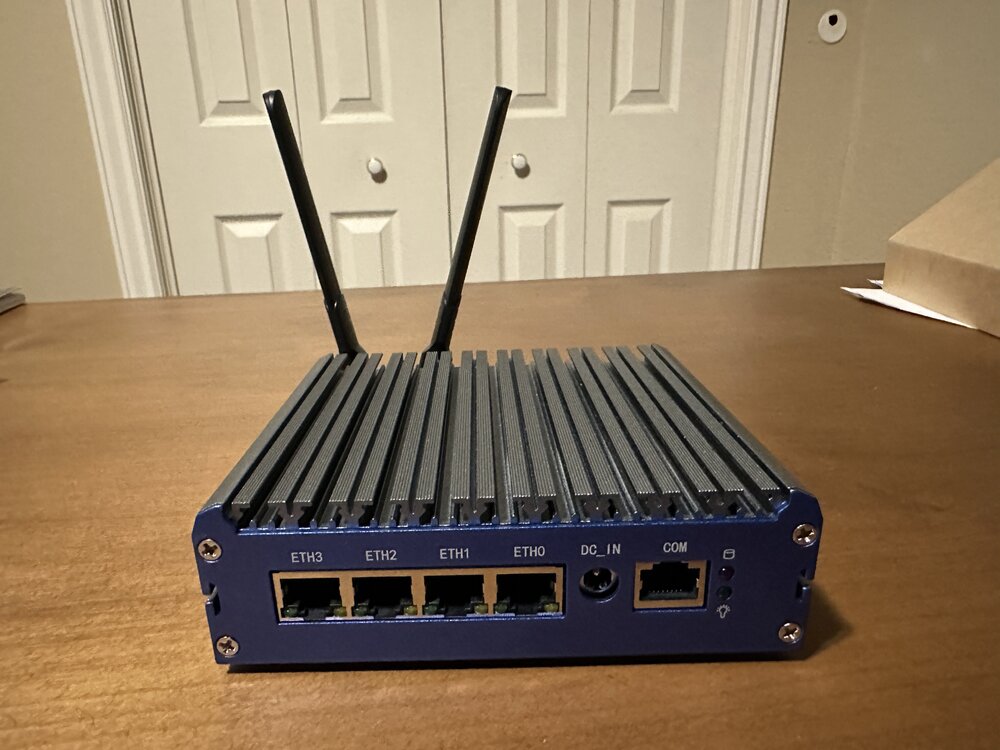
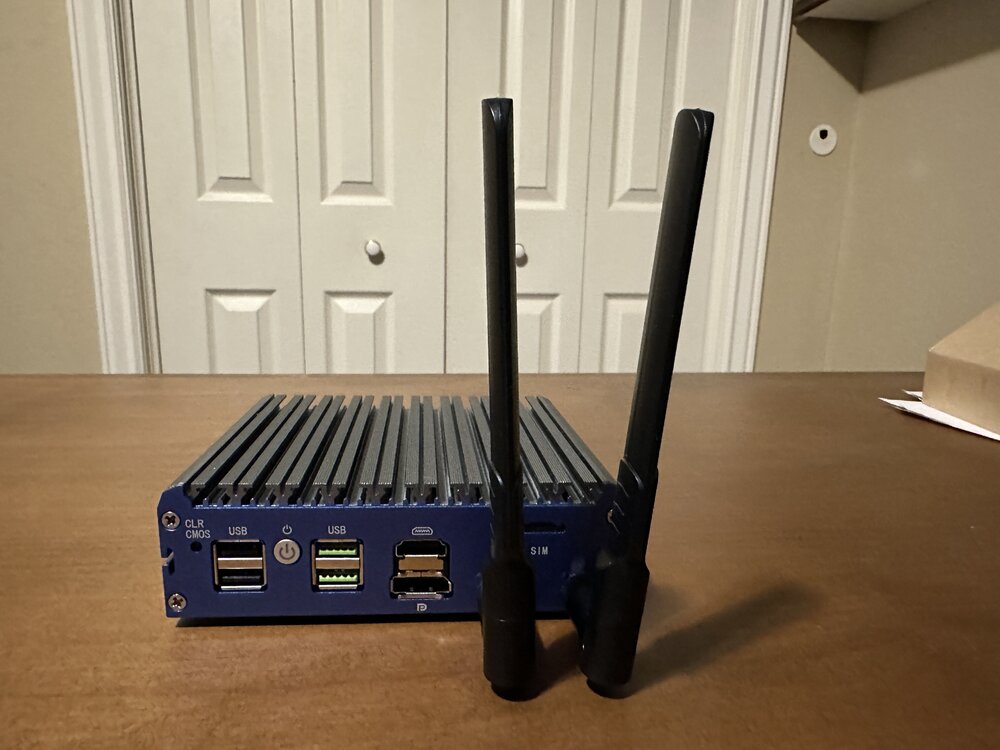
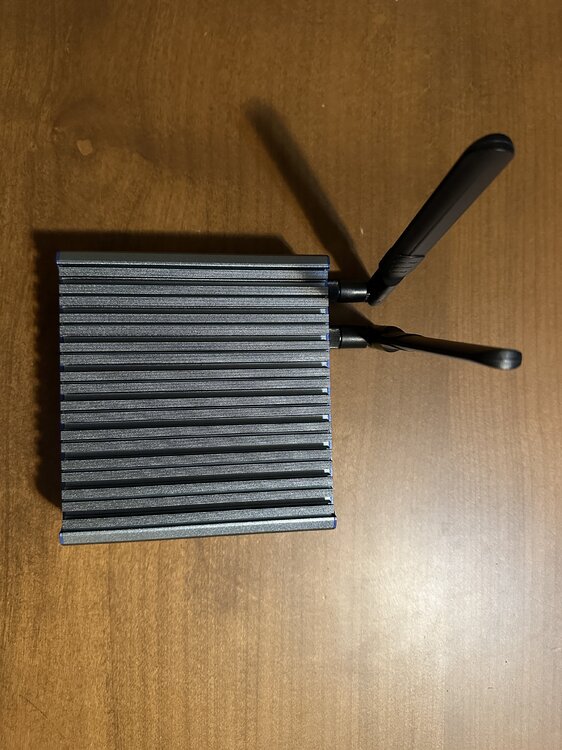
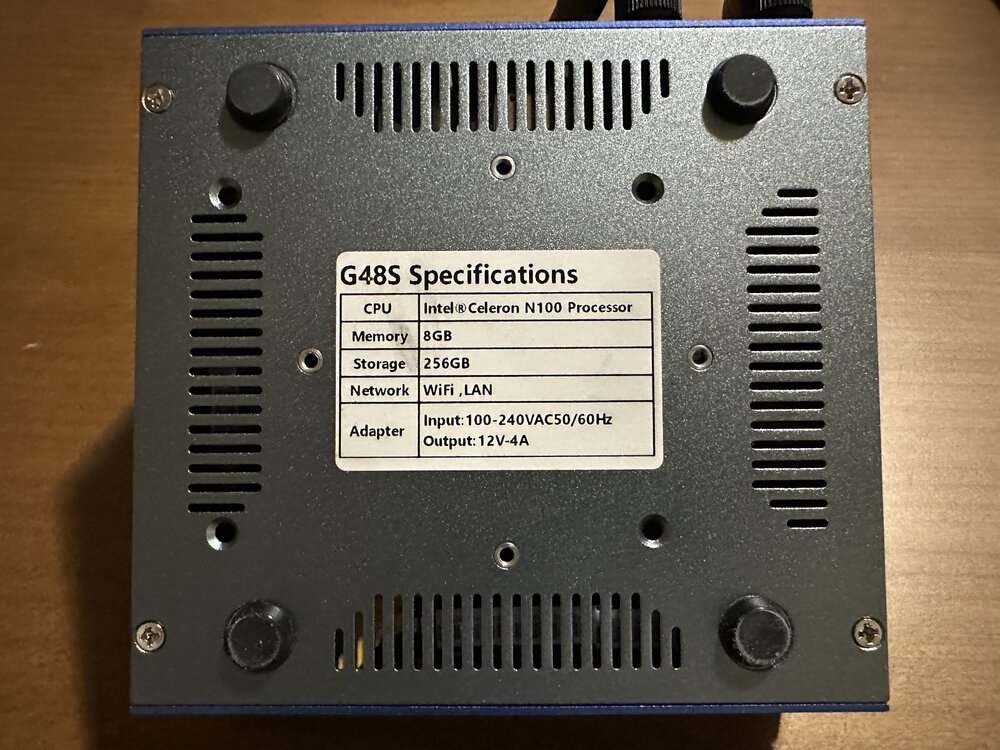
This mini PC has multiple uses. Currently, Windows 11 is installed on the 256GB NVMe SSD. It would make a great portable Unraid management PC. With its 4 2.5Gb Intel NICs, It would also be a great as an OPNsense or pfSense router/firewall. I bought it new for this purpose and decided I did not need the power/complexity of OPNsense/pfSense. It has been used a total of maybe two weeks. Specs: Intel N100 Alder Lake CPU (4 core, 3.4 GHz, 6W) 8GB DDR5 RAM Samsung 256GB NVMe SSD 4 Intel I226-V 2.5 Gb NICs Intel Wireless AC-9560 CNVi WiFi card with antennas added after purchase Bluetooth 5.1 via AC-9560 Display port and HDMI video out 4 USB ports (2 USB 2.0, 2 USB 3.x) Power supply included Case acts as CPU heatsink Payment via Venmo or Paypal friends and family accepted Free shipping to continental US address
-
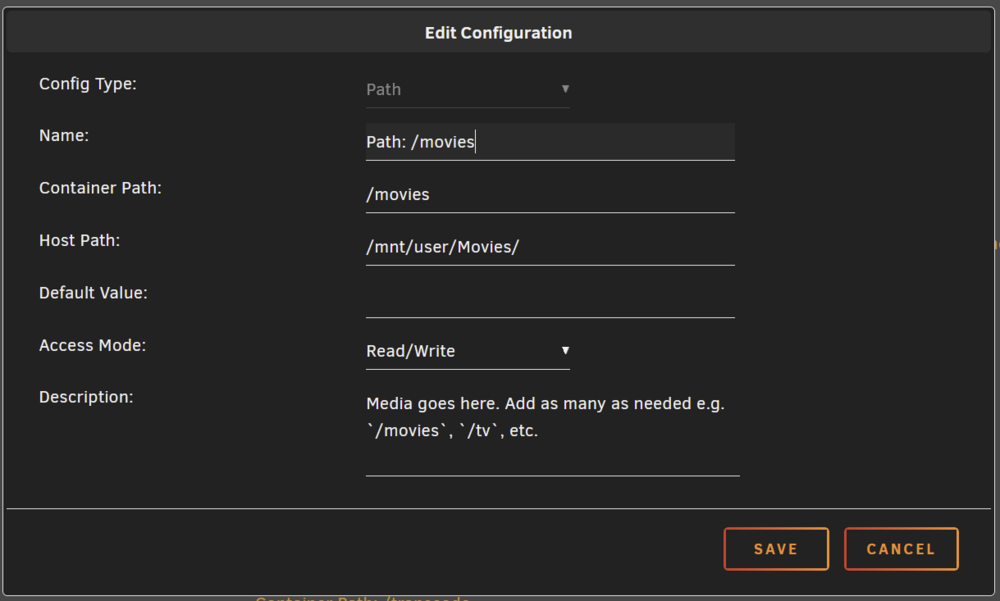
Docker mappings are comprised of two parts; container paths and host paths. If you want content stored on the host to show up in the "file system" for a container, you need a proper mapping. I do not know why you are trying to map to an audiobook location in appdata. You should definitely not be storing any actual audiobook data there. Appdata is for the docker application and configuration files. If you store audiobooks there, you are going to run into the problem of your docker.img file growing rapidly and running out of space. Below is a screenshot of a mapping I have in Plex to tell Plex how to access the movies stored on Unraid. I need to tell the Plex file system to look for movies in the Unraid file system. The container path is the path I will use inside Plex to tell it to find movies. The host path is the Unraid share path to where movie files are stored (this should never be appdata). You will need something similar for your Audiobook docker configuration.
-
For you, this is undoubtedly true as you have not yet identified the root cause of your "crashing" issues. For me and others who have been running Unraid for 10+ years, this has not been our experience in general. That's the problem with blanket statements. There certainly are a number of issues which could cause problems with Unraid systems (as I documented above). If Unraid were inherently unstable in all situations, Limetech would not still be around all these years later. Hopefully, something said in these forums will point you toward the solution for your system. Yes, I agree that the USB boot flash drive is likely the weakest part of the system and most prone to problems.
-
I've had that happen to me four times in the 12 years I have been using Unraid on three different servers and all for different reasons. I certainly cannot say that any of these are causing the issue for you, but, I can say that there are various causes for this behavior and I have no idea what they all are. 1. I was using a particular parameter with sysllinux.cfg to solve an iGPU issue. A later kernel version resolved the original issue so the syslinux boot parameter was now causing a blinking cursor and no boot. I removed that parameter and all was well. 2. A BIOS upgrade caused my system to no longer boot in legacy mode (just got a blinking cursor). I had to set Unraid to boot in UEFI and that solved the problem 3. I had to get a new motherboard under warranty as the IPMI chip failed. Same model and BIOS version as previous board. Used the same USB flash drive. With new board it simply would not boot. Sometimes I would get "no unraid device found" and sometimes just a blinking cursor. Same flash drive would boot Unraid in other servers. I rebuilt the previously working USB flash drive with a backup; nothing changed. I tried several other USB flash drives; nothing. Finally, I went out and bought a new flash drive with which other had reported success and it worked! It has been booting that Unraid system without issue for two years now. This makes no sense but my "new" motherboard simply was extremely picky about what flash drive it would accept to boot even though, supposedly, nothing changed. 4.) Power cut (before I had the system on a UPS) caused some unseen corruption on the USB flash drive. It would not boot (blinking cursor). I had to completely rebuild the flash drive and it worked again. No reason to do that as clearly there is some issue with your system. I took my shot in the dark to explain the behavior based on my experience but I don't think it is necessarily an inherent problem with the Unraid software. There is some combination of who knows what that is causing you problems. Again, I am not saying that there are no issues with Unraid, but, my experience with it has been that the problems I have had have come down to 1) hardware issues, 2) configuration issues and 3) Unraid software issues in that order. Hopefully, others with their experience may be able to provide other possible solutions.
-
You pay the "parity penalty" at some point either during the data transfer or after. As mentioned by JorgeB, another option is to enable Turbo Write. The only penalty" for turbo write is that all data disks are constantly spun up but this not a big deal during a large data transfer. A good description of turbo write and the parity write process can be found at this link
-
Is your array parity protected? If you have parity enabled on your array, 40-70 MB/s is not unexpected. When transferring large amounts of data to an Unraid array, many have parity disabled for that process so you can get the full transfer speed of each individual disk and run a parity check after data transfer.
-
Disk 2 in my case was frequently producing UDMA CRC errors. It is also in a hot-swap cage (built into the case). These errors are usually caused by data or power cabling issues. I shut down the server and simply removed the disk from the hot-swap cage making sure to reinsert it well. Since then, the errors have disappeared. I have not see one in four days and a handful used to occur almost every day. It could also be that the SATA data and power cables to the cage for that slot are not well connected or you have faulty cables. It seemed to be the connection with the disk in the hot-swap cage in my case.
-
@bloometal Yes, this plugin works to control fan speeds based on HDD temps on my E3C246D4U motherboard.
-
I have definitely noticed a lot of new threads recently about USB flash drive issues. I would have to agree with your perception that they fail more often than they used to. Fortunately, all three of my Unraid servers have "older" USB flash drives that have not had any issues. One is almost 12 years old and still going strong (I hope). Two are USB2 and one is USB3 but they work equally well in my servers. If flash drive failures continue to be an issue it will not be helpful to Limetech/Unraid so I am pleased to see they are looking into the situation.
-
The slots don't matter as Unraid tracks disks by serial number. However, particular attentions needs to be taken to not assign a current parity drive to and array slot and vice versa. For mote information on replacing the USB flash drive see https://docs.unraid.net/unraid-os/manual/changing-the-flash-device/
-
The contents of your array/pool drives is unaffected by a USB Flash drive failure. It is still intact. I see @itimpi has responded with the appropriate information from the manual. Start there.
-
I bought my E3C246D2I about two and a half years ago at nextwarehouse. They often seem to have "no longer available" boards in stock. Of course, they have the latest and greatest as well.
-
If you don't mind used and not latest tech, here is a good option: UPDATE: Oops, scratch that. Listing is for the C226 version even though I searched for C246 https://www.ebay.com/itm/204906477773?itmmeta=01J451SK7NWF9ZE08VK1HQK0KE&hash=item2fb560b8cd:g:LDYAAOSw7w9mifVq&itmprp=enc%3AAQAJAAAAwD%2BfXGso7VLtEp2X4%2ByKaUFI%2BeJvhrUueu8v%2FRAqCJQEaLfy9LXFO%2BCZr9gOxr%2B6kHPiJo008l4FCIJGrSQ6g3CG%2FAfXYSGNnppyKHJGravJJgy4oHsuMunmeGD5XH%2FOs69vzImDaz2tcAUOyajK8jV3sMYabN7xon9soF1vxK%2BYZxlBlHTWMAxrMUDDiKV02F5Ouh%2BQI4vPLkY8pe%2F0OuYeUZphRrzSJwv9ow4Ur9OxpzIL7k6WJjOjaNB9XypTvQ%3D%3D|tkp%3ABk9SR_az5qGhZA I have this Mini ITX board in my backup server (see sig for specs) and it is fantastic. IPMI uses HTML5 not that Java garbage. It supports up to E-2100 and E-2200 Xeon CPUs (also 8th/9th generation Core i3/i5/i7/i9, Pentium and Celeron) Personally, I have the E-2246G in the backup server. My main server uses the mATX version of the board (E3C246D4U) with an E-2288G CPU. Integrated graphics in these things is more than enough for 5 simultaneous transcoding streams. That is just the most I have ever had, not necessarily the limit.




