





nraygun
Members
-
Joined
-
Last visited
Everything posted by nraygun
-
I think the cron function was restored per this posting. https://github.com/linuxserver/docker-swag/pull/441 My cert cron job (and maxmind) seem to update these days.
-
Thanks @Fraddles! What's your process to pop the drives out? Do you at least unmount? @Aran - Good call on the BIOS. I'm going with an Asrock Z690 RS and a post I found says it supports "hot plug" in BIOS by port: https://forum.asrock.com/forum_posts.asp?TID=24664 So, I can get a Startech trayless 3.5 for the 5.25 bay and do what I was doing on my R710. Nice!
-
Thanks for testing @Aran! That's what I was doing on my R710. What I would do is spin it down, unmount it, then pop it out. Then I'd pop in the other drive and it picked it up. I usually leave the backup drive in the system so it backs up everyday. I'll be going with a non-server hardware config when I upgrade so I don't know if this process is officially supported. It's important backup data so I better play it safe and just power down, pop in/out, then power back on. The reboots of the server every so often might do some good too.
-
Closed due to no responses. I think I'll go with a trayless StarTech bay for the backup drive and rotate it off site. Not knowing how true hotswaps work, I'll just power down the server and remove the drive.
-
FWIW, what fixed it for me was using a new bittorrent client that uses V1 of the libtorrent library. For example, I'm using this: binhex/arch-qbittorrentvpn:libtorrentv1 Since going to that version, I've not had the problem. I'm still on 6.11.5 and considering going to 6.12.x soon.
-
bump
-
My R710 has hot swap bays. I'll be putting together a new server and I'm trying to decide what to do with the backup drive that I rotate with a drive at work. I usually spin down the drive, unmount it, then pop it out. What do folks use hardware-wise for backup on their server for the offsite part assuming no cloud services? A simple USB external drive or a (trayless) hot swap bay? If USB, I'd be concerned with the power draw from the power supply brick. I could spin down the drive, but I think the brick would still draw power. If hot swap, what would I need to support this function - just an HBA card? And the bay, of course, like a StarTech.com 5.25" to 3.5" trayless.
-
Thanks. I saw that pinned post but I thought that was for people installing the plugin for the first time on pre-6.12.x servers. I think the URL from the post installs the version I already have. I see a reference to 2023.09.30 in when I open the URL from the pinned post. Sounds like my only choice is to upgrade the server, which I will in a month or two. Then on to upgrading my server hardware.
-
I rebooted my server today and saw this plugin only supports unRaid 6.12.0 and higher. I see that 'm on 2023.09.30. I'm still on 6.11.5. Can I just stay on this older version until I upgrade?
-
Per a Discord and Reddit post, it appears a patch for this is in the works.
-
I have MaxMind setup for geoIP info but it doesn't seem to be updating its database weekly. In the container I see in /etc/crontabs/root a single line that appears to update certificate as follows 8 2 * * * /app/le-renew.sh >> /config/log/letsencrypt/letsencrypt.log 2>&1 The line above also shows if I do a crontab -l in the console. Do I need to edit this file to include the line from /config/crontabs/root that runs the weekly update of the database? Or maybe I need to replace the whole existing /etc/crontabs/root with the file that's in /config/crontabs/root so it catches all of the other periodic jobs. 0 3 * * 6 run-parts /etc/periodic/weekly Or do the scripts in /config/crontabs get processed somewhere else?
-
Assuming there's nothing wrong here.
-
FWIW, I found this method in Reddit that seemed to work for me until they fix the log bug. But note if you have qbittorrent internet facing, it's a risk. Add this line under [Preferences] in the config file, to set the default password manually to: adminadmin WebUI\Password_PBKDF2="@ByteArray(ARQ77eY1NUZaQsuDHbIMCA==:0WMRkYTUWVT9wVvdDtHAjU9b3b7uB8NR1Gur2hmQCvCDpm39Q+PsJRJPaCU51dEiz+dTzh8qbPsL8WkFljQYFQ==)"
-
Ugh. Until they get this bug fixed, can I just revert back to 4.6.0-1-01? If so, does that version use libtorrentv1?
-
Howdy! The container update overnight causes this to show up in the log after every successful IP update: "Detecting IPv4 via DuckDNS". So I get: Your IP was updated at Sat Oct 28 06:29:03 CDT 2023 Detecting IPv4 via DuckDNS Your IP was updated at Sat Oct 28 06:31:20 CDT 2023 Detecting IPv4 via DuckDNS Your IP was updated at Sat Oct 28 06:36:32 CDT 2023 Detecting IPv4 via DuckDNS etc. Is this anything to be concerned with?
-
Thanks! The revisions are the same. In fact, just about everything about the drives are the same. I guess it's just platter quality on this particular drive as you said.
-
Bingo! This is the way! Thank you very much @SimonF!!! My container is back down to 42% after deleting all of the old orphaned images that were in there. And none of the stopped containers were affected. I guess I'll add this to the list of things to do when I update a container: Update it via a specific tag, check the .conf files, remove old images.
-
I think I want to use: docker image prune -a The dox say this: To remove all images which are not used by existing containers, use the -a flag So the stopped containers are using images so these images and containers shouldn't get deleted. But I think it should delete all the extra images that are taking up space that are not in use by a container. Can someone confirm my understanding?
-
I took a risk and issued a "docker rmi <containerid>" on one of the containers that is not in my Docker list. It deleted it along with a bunch of sha256 entries. But the image shrank! I'm onto something, but need to know if I just should do this with the other containers that are in there that seem to be taking up space.
-
I did an update to a container and got a warning that my Docker image was 72%. I see this in the Memory area on the left on the main page too. I Googled here and there and found a command that lists Image Space Usage: docker system df -v It shows some old containers I don't use any more that are not in the Docker list. It also shows multiple older images for Nextcloud. Probably from upgrading it. For example, here's a bunch of prior versions of Nextcloud that I think are in the image: REPOSITORY TAG IMAGE ID CREATED SIZE SHARED SIZE UNIQUE SIZE CONTAINERS linuxserver/nextcloud 27.1.0-ls271 844b0424c706 5 days ago 881.8MB 25.43MB 856.4MB 1 linuxserver/nextcloud 27.0.2-ls269 2c40df37dcb4 2 weeks ago 828.4MB 0B 828.4MB 0 linuxserver/nextcloud 27.0.2-ls267 88802f11c09b 4 weeks ago 828.4MB 25.43MB 803MB 0 linuxserver/nextcloud 27.0.2-ls266 4994a0316a3d 5 weeks ago 828.4MB 25.43MB 803MB 0 linuxserver/nextcloud 27.0.1-ls261 2832124f79ad 7 weeks ago 825.9MB 0B 825.9MB 0 linuxserver/nextcloud 27.0.1-ls260 0d0af4c9e41a 8 weeks ago 831.1MB 0B 831.1MB 0 linuxserver/nextcloud 27.0.0-ls255 4e1044e331d0 2 months ago 822.7MB 0B 822.7MB 0 linuxserver/nextcloud 27.0.0-ls252 09e7ddf65bd8 2 months ago 822.7MB 25.42MB 797.3MB 0 There's another one in there that is not in my current Docker tab list so I think it's just eating up space. I don't want to do a prune because I think the prune would delete stopped containers, right? Container size: Total size 13.1 GB 1 GB 66.3 MB Docker volume info: Total devices 1 FS bytes used 20.58GiB devid 1 size 30.00GiB used 22.52GiB path /dev/loop2 What's the guidance here? Do I just go in and delete these old containers?
-
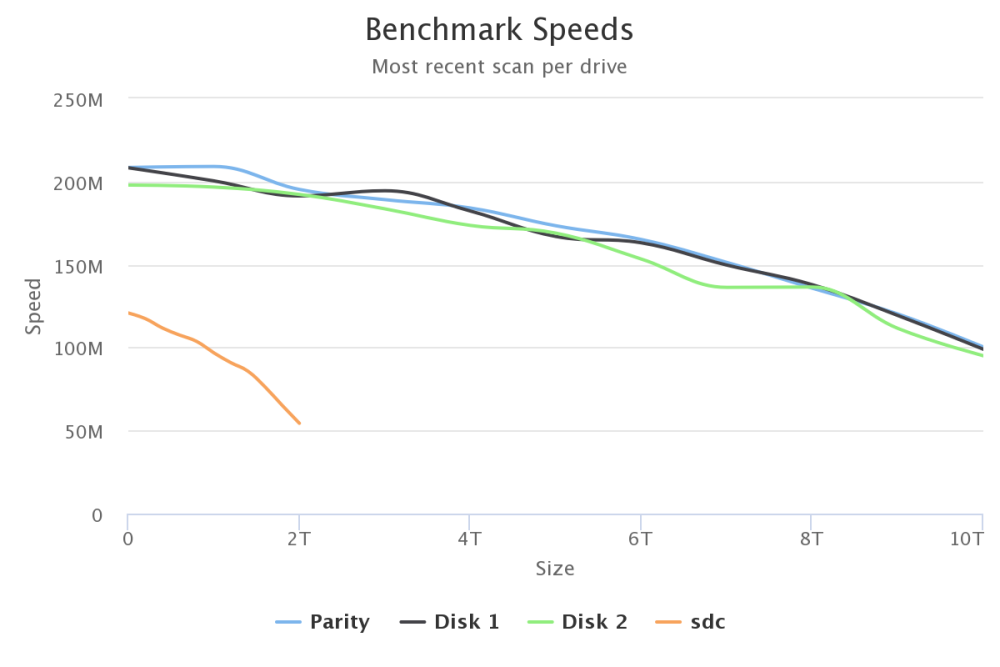
Just discovered this plugin - great job! Am I reading this right in that disk 2 (green) is a little on the wonky side because of how much it deviates from the other 2 disks? Disks 1-3 were all shucked at the same time. sdc is an unassigned older drive for backups.
-
Thanks @iXNyNe! If you have yours setup to update to the latest tag, how do you handle the updates to the .conf files? I think the updates add new .sample files, and if there are any changes to the .conf files for your configuration, I think you'd have to merge in any changes from the new .sample files.
-
I know the overall best practice for maintaining the container is to pin a specific tagged version, but what is the best practice for when to change the tagged version of the Nextcloud and MariaDB containers? On a major release, on a point release, etc.?
-
Thanks. I was able to get beta firmware for my router which solved the problem of not being able to add more IPs to the firewall rules.
-
I guess this is normal per this thread:



