





sonic6
Members
-
Joined
-
Last visited
Everything posted by sonic6
-
after i updated to 7.3.1 from 7.2.x NUT stoped working for me from time to time. my syslog is full of this: Jun 2 11:00:01 Unraid-1 move: mover: started Jun 2 11:00:01 Unraid-1 move: mover: finished Jun 2 11:47:32 Unraid-1 usbhid-ups[12652]: nut_libusb_get_interrupt: Input/Output Error Jun 2 11:47:34 Unraid-1 usbhid-ups[12652]: Reconnecting. If you saw "nut_libusb_get_interrupt: Input/Output Error" or similar message in the log above, try setting "pollonly" flag in "ups.conf" options section for this driver! Jun 2 11:47:51 Unraid-1 upsd[12656]: Data for UPS [UnraidUPS] is stale - check driver Jun 2 11:47:56 Unraid-1 upsmon[12659]: Poll UPS [[email protected]] failed - Data stale Jun 2 11:47:56 Unraid-1 upsmon[12659]: Communications with UPS [email protected] lost Jun 2 11:48:01 Unraid-1 upsmon[12659]: Poll UPS [[email protected]] failed - Data stale Jun 2 11:48:06 Unraid-1 upsmon[12659]: Poll UPS [[email protected]] failed - Data stale Jun 2 11:48:11 Unraid-1 upsmon[12659]: Poll UPS [[email protected]] failed - Data stale Jun 2 11:48:16 Unraid-1 upsmon[12659]: Poll UPS [[email protected]] failed - Data stale Jun 2 11:48:21 Unraid-1 upsmon[12659]: Poll UPS [[email protected]] failed - Data staleSyslog and nut debug is attched. unraid-1-syslog-20260602-1110.zip nut-debug-20260602131115.zip
-
so, sorry for that delay: i woulnd't use docker image... don't see any point to switch, when docker "Docker directory" is an official feature. but i followed your suggestion, deleted my docker directory and started with a new one. to keep my custom networks i just saved /mnt/user/system/docker/container/network/files/local-kv.db and moved it back after the new directory was created. @JorgeB @itimpi thank you both for you help.
-
i am not 100% sure, but if i am remeber right, i was told, that the docker storage driver option, dosen't had any impact to my setup, becaus i am using docker directory, instead of the docker image. so the problem must be somewhere else...
-
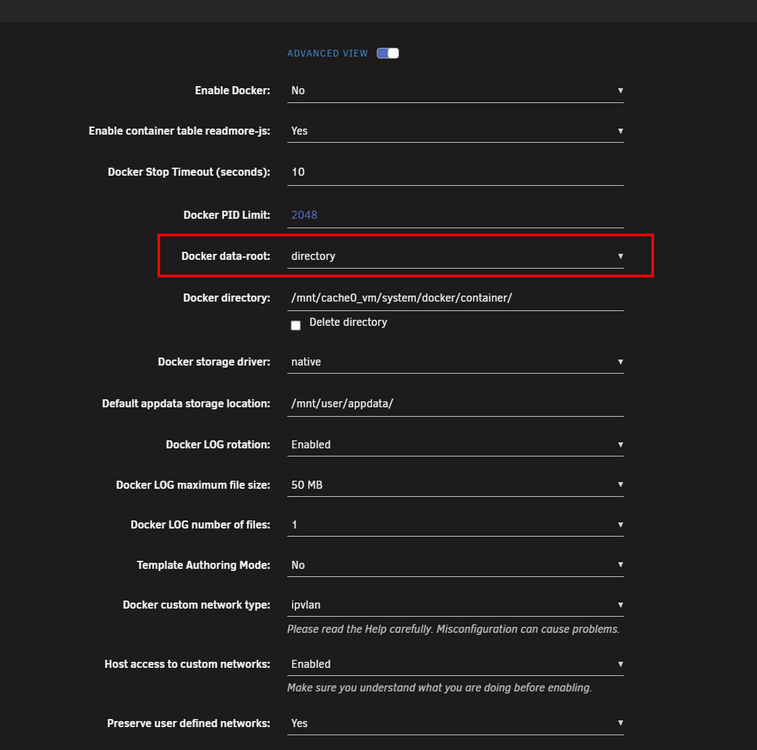
@JorgeB thank you for clarification. i dont use the docker image, i am using Docker directory... so does the driver change had any impact, when i am using Docker directory?

-
also my cache, where the docker folder is located is on a btrfs cache... why should i use a different storage driver?
-
dont get me wrong... but this doesn't sound really like addressing the problem. i can went back to 7.2.6 without any problem, so the "image" isn't corrupt.
-
here is also a diagnostic from 7.3.0 just for the case.unraid-1-diagnostics-20260522-0834.zip
-
Good morning. with the new updates 7.2.7 and 7.3.0 i got the same problem. Many of my Docker Containers are missing after update... if i interpret it correctly, my custom user bridge "proxy-net" (the custom user bridge from many SWAG user-guides), is missing and not created with the new updates. Diagnostic is attached. unraid-1-diagnostics-20260522-0639.zip
-
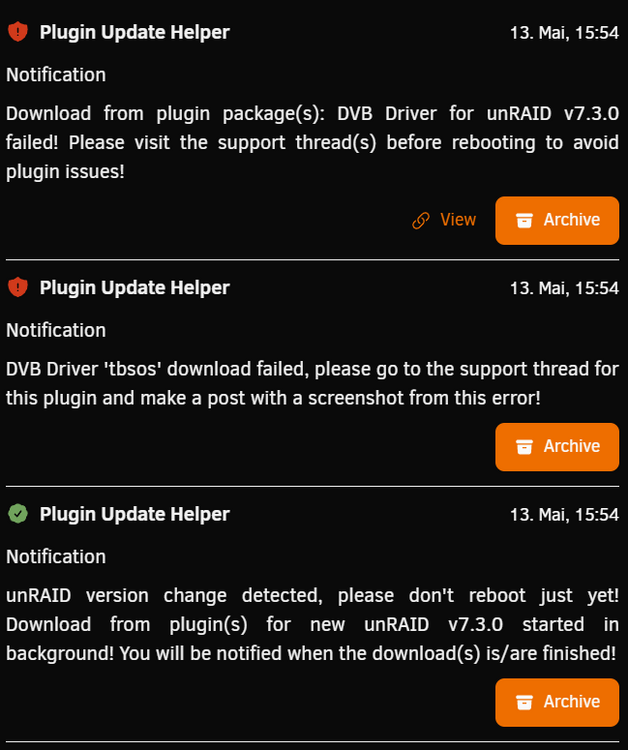
The Plugin Update Helper said i should visit this thread to avoid plugin issues. What to do now?
-
so, did a reboot all works fine now. i dont really think? because this log entry is from 19th august. all worked fine on 20th and 21th august. this problem appears today on 22th august.
-
i can try it but it worked until today... so the changes where from 19.08. and worked for 3 days until today.
-
Hi, yesterday the WebUi was usable without any problems. Today i can login into http://10.66.166.50:50080/login but after sucessfull login chrome gives me a HTTP ERROR 500 http://10.66.166.50:50080/Main . The same when i try a hard reload or icognito tab. FF is also the same. Tried restarting the WebUI with: /etc/rc.d/rc.nginx restart /etc/rc.d/rc.php-fpm restart also no effect. SSH is reachable and i know i am able to restart the server from SSH, but maybe there is another problem or bug which is fixable? Docker/LXC Containers and VMs are reachable, so i think it is only the WebUI. unraid-1-diagnostics-20250822-0935.zip
-
better using the plugin, this will work with 7.1.14 and get changes for newer version automaticly

-
okay, that was a good one but can we get an answer to our suggestion?
-
Fells like we get ignored...
-
@Squid is there a possibility for a function to filter specific devs against that flood of duplicated stuff in the CA?
-
when will be a rollback to the old license system?
-
oh yes, please!!! especially because of the problems which is noticed here:
-
workaround worked, thank you
-
@bonienl didn't worked
-
just for confirmation: -docker stop -change zu macvlan - apply -change to ipvlan - apply -docker start? will my container ip's stay the same? *edit* if someone tries this: -docker stop -change zu macvlan - apply -docker start -docker stop -change to ipvlan - apply -docker start?
-
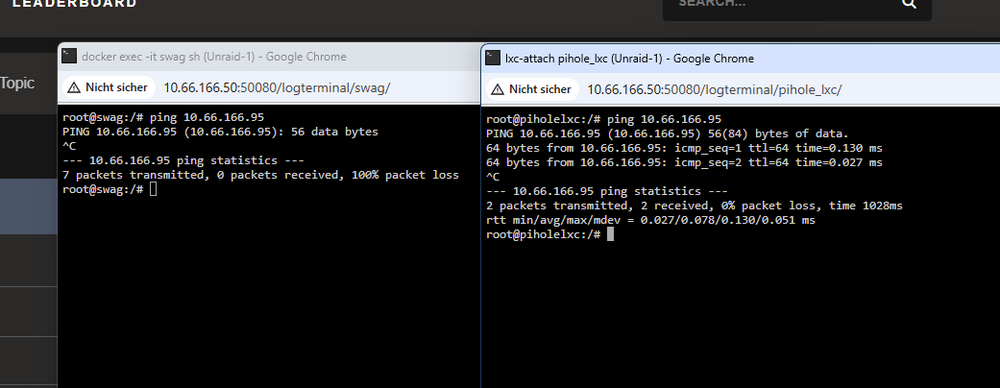
Hi, after update from 7.1.0-RC3 to 7.1.1 the Host Acces wit IPvlan seems to be broke. left is swag inside a custom user bridge, right is a lxc container. both pinging a br0 container. Diagnostic is attaced unraid-1-diagnostics-20250509-1019.zip
-
try the plugin, this should work with 7.1.0 final.

-
ich habe keine Plan von sowas, aber bisher konnte mir da tatsächlich oft ChatGPT helfen, oder mir zumindestens einen Ansatz geben, mit dem ich zur Lösung meiner Probleme kam. Einfach mal den Fehler ChatGPT geben und damit arbeiten.
-
latest version of the script/plugin works with 7.0.1





