





sota
Members
-
Joined
Everything posted by sota
-
WD/HGST. I'll never willingly use a Seagate (SATA) product ever again. (although their SAS drives have so far been reliable.)
-
Can I do, is it even safe to do, a direct from 6.7.2 -> 7.2.0 ?
-
so a little update. I wound up creating a new cache pool on a pair of newer, bigger disks. recovered my containers (mostly... shinobi still wants to give me some fits, but it's shinobi). recreated 3 of the 4 VMs. the 4th one was my SageTV server, which was (I did manage to get it back, more in a bit) a major bummer, but we're getting around it for now, since live TV is no longer a thing here (cord thoroughly cut.) after nearly a month and working with a company that does file recovery (their program is having fits with the btrfs under NTFS image files), I did manage to recover ALL of my VM images. A different program that did it for me was ReclaiMe Pro build 4322. Now... the most important thing I learned: Since day 1, my cache pool over BTRFS was WRONG. It wasn't actually mirroring stuff correctly. Here's what the new pool looked like until recently: btrfs fi df /mnt/cache Data, RAID1: total=68.00GiB, used=50.28GiB Data, single: total=1.00GiB, used=0.00B System, single: total=4.00MiB, used=16.00KiB Metadata, single: total=1.01GiB, used=43.02MiB GlobalReserve, single: total=16.00MiB, used=0.00B see anything WRONG there? That's the default unRAID 6.7.2 does. no idea if that's the case for newer versions. yea... you can't recover from a single disk when btrfs has all those items in 'single' mode. I tried. Neither disk alone would allow me to recover viable data. Both could find files with the correct 'vdisk1.img' names, but none of them contained useful data when extracted. LUCKILY for me, the corruption, while it hit both drives, didn't crash them totally. Connecting both disks to a stand-alone machine and using the aformentioned software, I was able to get it to recognize enough of the folder and data structures to successfully get it to recover the VMs, which is all I frankly needed. Running the "balance" option from the GUI did nothing to fix the problem with the pool, even though the flags listed below are supposedly 'default'. What *did* fix it, was in a terminal session running: btrfs balance start -dconvert=raid1 -mconvert=raid1 /mnt/cache After some time the following can be seen: Data, RAID1: total=51.00GiB, used=50.51GiB System, RAID1: total=32.00MiB, used=16.00KiB Metadata, RAID1: total=1.00GiB, used=44.41MiB GlobalReserve, single: total=16.00MiB, used=0.00B NOW my cache is properly protected... hopefully. I haven't yanked a disk and seen what can be found, but that sure looks better than before. Also, and I never really understood why until now, before this I noticed that disk activity on the pool drives never seemed to be identical. NOW it is. I know some will say I should upgrade to the latest version, and frankly I might after all this despite the problems i'll encounter, but hopefully this provides SOME kind of warning to people who are still on older versions and stuck with a btrfs formatted cache pool. Better File System my ***.
-
sadly at 0100 in the morning I wasn't thinking clearly, and didn't catch any logs. I have my system set to NOT auto start the array on a reboot. I manually kicked it off, and it mounted the array, minus the dockers and VMs. that's when I started looking more in depth. with the cache started, disk 1 in the pool was listed as unmountable, and disk 2 claimed it was unformatted. I tried the whole array start/stop dance with removing and adding the cache drives back in to reset stuff, but that didn't work. I tried all the btrfs repair options, even the dreaded --repair, ALL of which kicked out claiming they couldn't do anything.
-
long story short (as I can)... had to take both main servers down tonight, to clean both and replace a failed cache module/battery in the other (non-unRAID box). unRAID seemed to start up normally, and it allowed me to start the array. what I DIDN'T KNOW was it tossed one of the cache drives out of the pool, and that caused all kinds of hell. No, I don't have a backup of the stuff stored on cache permanently (dockers, VMs, ISOs). Yes i'm a moron. Looks like I might have found a paid tool that can help me recover some of the files, but of course the directory tree is all FUBAR. Tentatively appears I can get the VM IMG files, as well as the docker.img and some other files. Can someone take a tree snapshot of their 'domain' so I can look for and possibly partially reconstruct stuff to toss on the new cache i'll be obviously making? Any specific files/folders I should try and recover to make my life easier? I have "Community Applications appdata backup / restore module" backups ready to go with those.
-
reminds me... I gotta get rid of my MD1200 I have here.
-
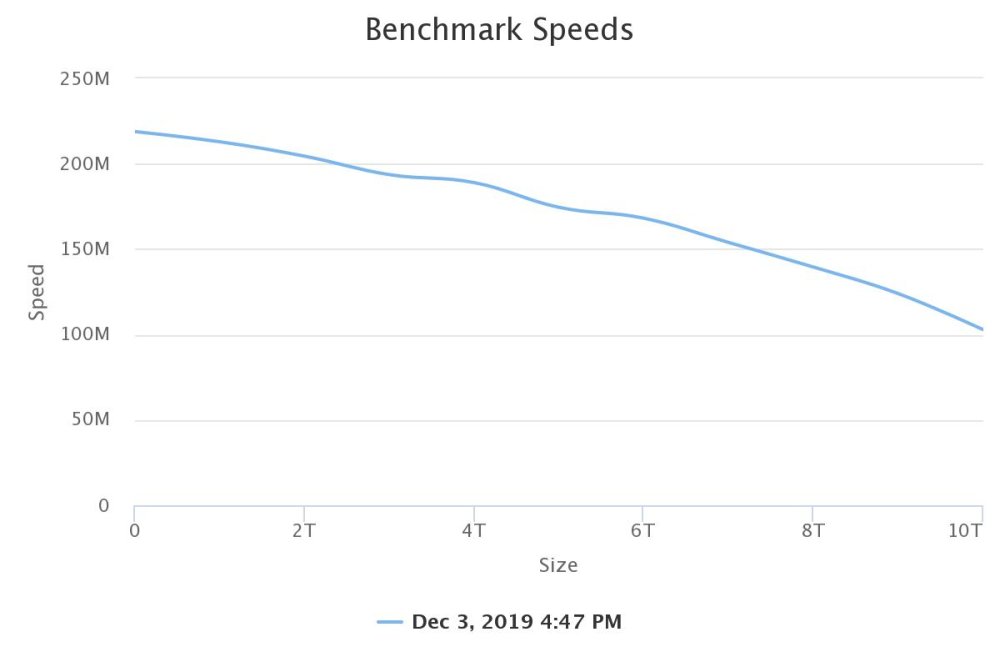
starts at 218, drops to 103 at the end. my last parity check of 5+1 drives... Duration: 18 hours, 9 minutes, 19 seconds. Average speed: 153.0 MB/sec
-
I have no idea, as the only machine I run unRAID on has ECC
-
we talking commodity memory, or ECC? if the latter, run the following... grep "[0-9]" /sys/devices/system/edac/mc/mc*/csrow*/ch*_ce_count it'll show you if any chips have been having correctable faults.
-
(was going to post this as a question, but since it's now resolved, i'm posting as a documentation of my journey.) This has been an on going problem for a long time for me, but i'm just now able to deal with it. /var/log/syslog no longer populates. as such http://server/logging.htm never populates. if I delete the /var/log/syslog file, I get... /usr/bin/tail: cannot open '/var/log/syslog' for reading: No such file or directory /usr/bin/tail: no files remaining and it never recreates the files. tmpfs 128M 18M 111M 14% /var/log so I have plenty of space. /etc/rc.d/rc.rsyslogd restart does no good. restarting the machine does no good. finally tried this... deleting the file AND rebooting appears to have solved it for me. deleting the file AND ONLY restarting the service does not work. not sure what background process(es) are also affected, but I figured I'd post this as how it worked for me.
-
Since the still working data disks were mounted on another UNRAID machine under UD and as Ready Only, I'm hoping things are pretty decent, but I'm willing to accept some potential data loss. I'll give that a shot in the next couple days, so thank for that @JorgeB
-
UNRAID 6.9.2 long story short, had 2 drives in a 6+1 array die (one of which was parity). Since I needed to get the box working RIGHT NOW, I yanked all 7 disks, build a new system, copied everything I could from the working drives, and set these disks to the side. Now, I'm trying to see if I can't recover something extra. Parity "failed", but with some effort on my part (HDD REGEN tool) I got it back and working, for now. that leaves 6 data disks. 5 of them work. I want to try and recreate the array, and somehow get it to rebuild the data from the 6th drive. What steps do i need to take to convince a trial version of UNRAID that this array is a valid, but 1 disk is listed as "missing", so I can force the rebuild to a replacement when I add it in? I know which drives are which (thank god for good note taking!) I stupidly did NOT save a copy of the CONFIG before blowing the original box up, so that's on me. I'm sure there's details i'm missing that needed providing, so just let me know and I'll do my best to gather that info. thanks!
-
ok I don't know what the he double hockey sticks was going on there, as i've been trying to fix notifications on this server for 3 days now, and been getting nothing but 534 and 535 errors, no matter what I tried. NOW, it works!
-
(v6.9.2) So, Gmail seems to no longer work for sending notifications, due to security settings on their end. What alternate and free email service providers are people using I can sign up for to send out system notifications? Thanks!
-
that's exactly how I'd do it if I needed to upgrade to several bigger disks all at once.
-
Honestly... leave the array intact, copy the data from disk to disk as files, do that 7 times, swap 'em all out, and rebuild the parity drives. that'll put the least amount of stress on the rest of the disks.
-
Given my backup methodology relies on a Windows VM to execute the backup, I went with NTFS. See sig for link to what i do.
-
yea. that was the free space. the problem is the disk only was using 77GB until recently, when I moved the VMs off of it. it clearly hasn't been TRIMming on a regular basis.
-
fstrim -v /mnt/cache /mnt/cache: 444 GiB (476746616832 bytes) trimmed that's on a 500GB SSD with 6.9.2 running. we've had performance issues on the system recently, and when I copied the VMs off the drive, it was barely moving data. then I ran the command above. something tells me it's not TRIMming the drive like its supposed to.
-
Apr 21 23:14:44 Tigger kernel: e1000e 0000:00:19.0 eth0: Detected Hardware Unit Hang: Apr 21 23:14:44 Tigger kernel: TDH <2d> Apr 21 23:14:44 Tigger kernel: TDT <44> Apr 21 23:14:44 Tigger kernel: next_to_use <44> Apr 21 23:14:44 Tigger kernel: next_to_clean <2c> Apr 21 23:14:44 Tigger kernel: buffer_info[next_to_clean]: Apr 21 23:14:44 Tigger kernel: time_stamp <13a8c3651> Apr 21 23:14:44 Tigger kernel: next_to_watch <2d> Apr 21 23:14:44 Tigger kernel: jiffies <13a8c3f00> Apr 21 23:14:44 Tigger kernel: next_to_watch.status <0> Apr 21 23:14:44 Tigger kernel: MAC Status <80083> Apr 21 23:14:44 Tigger kernel: PHY Status <796d> Apr 21 23:14:44 Tigger kernel: PHY 1000BASE-T Status <3800> Apr 21 23:14:44 Tigger kernel: PHY Extended Status <3000> Apr 21 23:14:44 Tigger kernel: PCI Status <10> Apr 21 23:14:46 Tigger kernel: e1000e 0000:00:19.0 eth0: Detected Hardware Unit Hang: Apr 21 23:14:46 Tigger kernel: TDH <2d> Apr 21 23:14:46 Tigger kernel: TDT <44> Apr 21 23:14:46 Tigger kernel: next_to_use <44> Apr 21 23:14:46 Tigger kernel: next_to_clean <2c> Apr 21 23:14:46 Tigger kernel: buffer_info[next_to_clean]: Apr 21 23:14:46 Tigger kernel: time_stamp <13a8c3651> Apr 21 23:14:46 Tigger kernel: next_to_watch <2d> Apr 21 23:14:46 Tigger kernel: jiffies <13a8c46c0> Apr 21 23:14:46 Tigger kernel: next_to_watch.status <0> Apr 21 23:14:46 Tigger kernel: MAC Status <80083> Apr 21 23:14:46 Tigger kernel: PHY Status <796d> Apr 21 23:14:46 Tigger kernel: PHY 1000BASE-T Status <3800> Apr 21 23:14:46 Tigger kernel: PHY Extended Status <3000> Apr 21 23:14:46 Tigger kernel: PCI Status <10> Apr 21 23:14:48 Tigger kernel: e1000e 0000:00:19.0 eth0: Detected Hardware Unit Hang: Apr 21 23:14:48 Tigger kernel: TDH <2d> Apr 21 23:14:48 Tigger kernel: TDT <44> Apr 21 23:14:48 Tigger kernel: next_to_use <44> Apr 21 23:14:48 Tigger kernel: next_to_clean <2c> Apr 21 23:14:48 Tigger kernel: buffer_info[next_to_clean]: Apr 21 23:14:48 Tigger kernel: time_stamp <13a8c3651> Apr 21 23:14:48 Tigger kernel: next_to_watch <2d> Apr 21 23:14:48 Tigger kernel: jiffies <13a8c4ec0> Apr 21 23:14:48 Tigger kernel: next_to_watch.status <0> Apr 21 23:14:48 Tigger kernel: MAC Status <80083> Apr 21 23:14:48 Tigger kernel: PHY Status <796d> Apr 21 23:14:48 Tigger kernel: PHY 1000BASE-T Status <3800> Apr 21 23:14:48 Tigger kernel: PHY Extended Status <3000> Apr 21 23:14:48 Tigger kernel: PCI Status <10> Apr 21 23:14:49 Tigger kernel: e1000e 0000:00:19.0 eth0: Reset adapter unexpectedly Apr 21 23:14:50 Tigger kernel: bond0: (slave eth0): link status definitely down, disabling slave Apr 21 23:14:50 Tigger kernel: device eth0 left promiscuous mode Apr 21 23:14:50 Tigger kernel: bond0: now running without any active interface! Apr 21 23:14:50 Tigger kernel: br0: port 1(bond0) entered disabled state Apr 21 23:14:53 Tigger kernel: e1000e 0000:00:19.0 eth0: NIC Link is Up 1000 Mbps Full Duplex, Flow Control: None Apr 21 23:14:53 Tigger kernel: bond0: (slave eth0): link status definitely up, 1000 Mbps full duplex Apr 21 23:14:53 Tigger kernel: bond0: (slave eth0): making interface the new active one Apr 21 23:14:53 Tigger kernel: device eth0 entered promiscuous mode Apr 21 23:14:53 Tigger kernel: bond0: active interface up! Apr 21 23:14:53 Tigger kernel: br0: port 1(bond0) entered blocking state Apr 21 23:14:53 Tigger kernel: br0: port 1(bond0) entered forwarding state Started having this problem recently. Not physically at the machine right now, but does this look like a faulty card, bad port on the switch, or a bad cable? Or, something else software related. Machine is basically a glorified file cabinet, running a single Windows 7 x64 VM for SageTV (haven't gotten the docker to work to my liking, and i'm under a time crunch with a failing physical SageTV server and a 4/25 "hard" cut over date for Cablevision switching to encrypted.) Everything seemed to be working fine until a couple days ago, when while I was remoted into the VM (anydesk) I kept and keep getting disconnected. Finally tried to watch the log, only to discover /var/log was full. I caught the above after the most recent disconnect. diagnostics and syslog.1 are attached. syslog.zip tigger-diagnostics-20220421-2322.zip
-
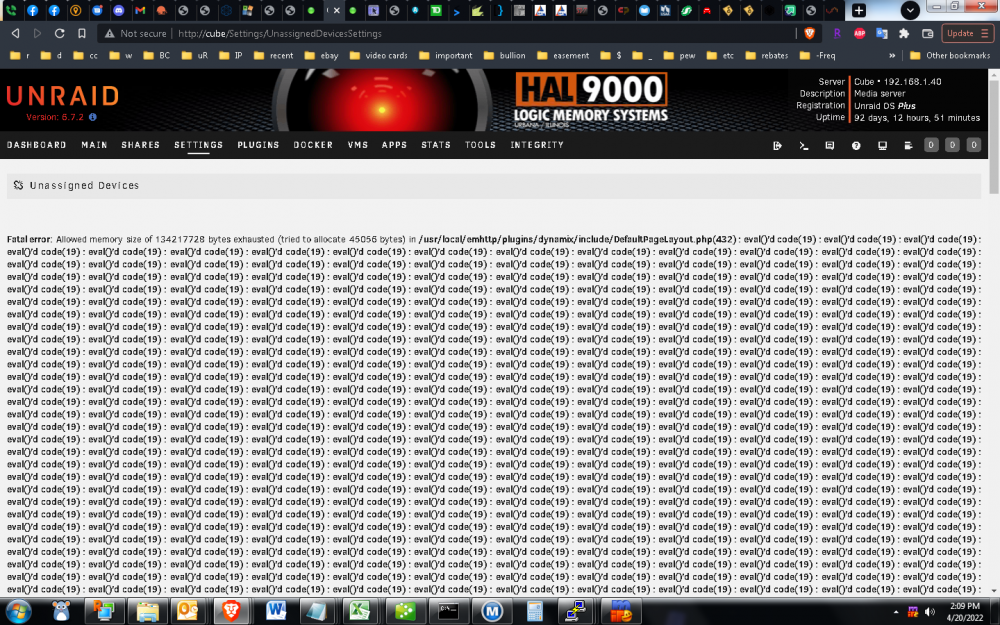
I'd appreciate it, as the warning does prevent UD from working. note: i just got a notification of a new version. applying it now. eta: applied 2022.04.20 update. now it appears to be working again.
-
cube-diagnostics-20220419-2302.zipdone
-
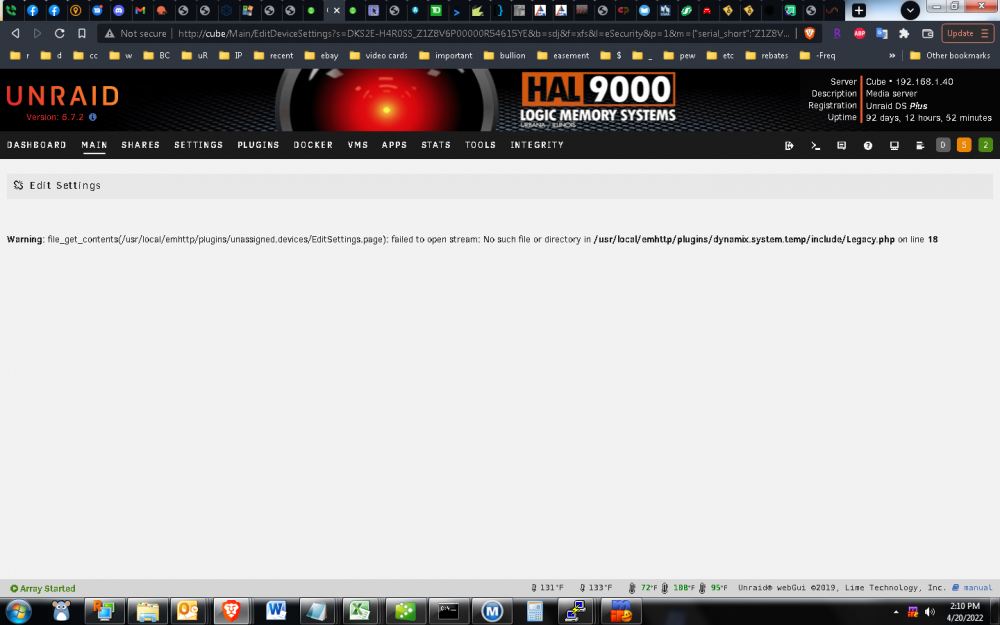
Warning: file_get_contents(/usr/local/emhttp/plugins/unassigned.devices/EditSettings.page): failed to open stream: No such file or directory in /usr/local/emhttp/plugins/dynamix.system.temp/include/Legacy.php on line 18 when I try to change settings for a specific device. just started happening after updating to 2022.04.18
-
unsupported configuration: Emulator '/usr/local/sbin/qemu' does not support virt type 'kvm' HP Z420 workstation Hewlett-Packard 1589, Version 0.00 Hewlett-Packard, Version J61 v03.96 BIOS dated: Tue 29 Oct 2019 12:00:00 AM EDT Intel® Xeon® CPU E5-1660 @ 3.30GHz build is pretty virgin/plain, so no idea what's wrong. BIOS settings are set to allow virtualization. thanks! ETA: nevermind, i'm an idiot. they moved the VT-X function to the Security -> System Security tab, instead of bundling it with the rest of the CPU settings.
-
Good to know. I'm guessing I had to have added that at some point? I honestly don't remember ever doing it. Also trying to figure out what could have changed to cause it to be a problem now, as i'm very much an Ain't Broke Don't Fix type of guy... still on 6.7.2 for that reason.




