Nanobug
Members
-
Joined
-
Last visited
Everything posted by Nanobug
-
I started over today, and did the same thing. Now it works. I don't know why it didn't work the first time.
-
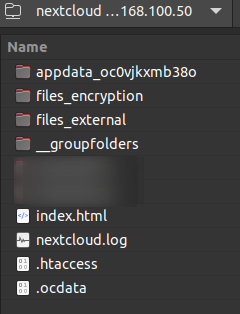
Hello, I've just set up Nextcloud, by following Space Invader One's video's about it. When I was done with his videos it came up with the error about untrusted domains, and gave me this link: https://docs.nextcloud.com/server/20/admin_manual/installation/installation_wizard.html#trusted-domains So I went in, and added my subdomain, and rebooted. Then it gave another error I forgot, so I tried to reverse it, by removing the sub domain, and now it says; "Your data directory is invalid Ensure there is a file called ".ocdata" in the root of the data directory." - So I checked if the file was missing, and it's not. I tried googling the error, and some places it says something about cron jobs. I'm not sure how to proceed from now on, and I would prefer not to set it up again. Does anyone have a solution?
-
It can take up to 30 minutes for it to show up.
-
No worries. I just thought I'd give you the information, in case someone asks in the future
-
They're quick at answering in the Valheim Discord. The whitelist is parsed by default, so if you fill something in it, and reboot it, it's going to use the whitelist. I assume it's the same with the admin and banned list as well.
-
No worries. Thank you for your work again
-
Alright. I'll donate some money for you at my next payment, you deserve it - Another question: How do you make the server use the whitelist? Is it just on by default?
-
I'm an idiot.... I missed the dot for hidden files. Thank you Is there a way to support you a bit?
-
Awesome! There should be a adminlist, bannedlist and permittedlist (whitelist). I just can't seem to find those lists anywhere. Do you know where they are?
-
Hello, First of all: ich777, thank you so much for your game server containers, I really appreciate it, and I know my friends do too. Two questions: 1. Does your containers only run on unRAID? - I'm planning on changing my setup down the line, and I would really love to keep your containers. 2. For Valheim, is it possible to use the whitelist? - I can't find it in any of the files.
-
I know that you need to reverse it, I'm asking on how to do that.
-
How can I revert those changes I just made here? I don't want to pay a year upfront for Pulseway because I have more than 2 devices I want to run it on, so I just want to delete it again.
-
I used the default I think. I only change the port if it's used by something else.
-
I've added it again so it says: http:\/\/300.300.300.300:9876 (300 is not my real IP, I just changed it, just in case) When I start it, it says this in the log: I get this in the browser (Google Chrome): I tried disabling the firewall as well. Any ideas?
-
I haven't gotten any further with the XBackBone. So I've put it on standby. Instead I'm trying to get the UniFi-Poller to work, but it doesn't write anything to the database, and I can't find any information on the wiki to help me. I might be missing it though. Can anyone help? EDIT: I need to learn how to spell....
-
That's great! But.... How do I install it?
-
Hello, I can't figure out how to set up XBackBone. I looked at the Github link and the XBacBone documentation. I tried Googling for a guide to it, but when I try to access it, it just says: Just in case, I restarted the docker, and the log says: I haven't changed any settings, but the two \ in the URL. I can't figure it out. Can anyone help?
-
I'm having a rough time trying to sort out my databases with the correct name and all, since it's a pain to use the commands. I really tried looking at the documentation, but for some reason, it's not working. After spending some time on Google, I found out that some command works if I type influx -execute before the command database command. Like this: influx -execute 'SHOW DATABASES' And when you're creating a user with the quotation marks, it doesn't work. Can someone link me the correct documentation, or tell me how it's done properly?
-
I know, but if there isn't another option, I might have to.
-
Damn.... Do you know if it will run in a Windows 10 VM?
-
I haven't read all 82 pages, so I don't know if it has been asked or not. Is it possible to get DayZ?
-
I'll PM/DM you with what I have, and possibly some more questions on things so I can try to write it down.
-
That worked like a charm! I don't know if it will be a help. But I can write down some documentation for you, that you can use however you like. Just to help and, and ease up your work a bit. The Slack/Discord Webhook, is that a general thing that you just add /slack at the end, and it will work? I've tried to set up other Webhooks, but it doesn't work, and if it's a general thing, then that could be why.
-
So, if I have this webhook (I've typed in random numbers and letters as well) https://discord.com/api/webhooks/762977726444863498/GQkvghrdhf3242345OwURTBvcOthrethhsIOKF5mUI6xNw-BNCMXB8AjTt7lG_2WRGwE7MtzGjD9n_p I need to add /slack at the end, so it looks like this: https://discord.com/api/webhooks/762977726444863498/GQkvghrdhf3242345OwURTBvcOthrethhsIOKF5mUI6xNw-BNCMXB8AjTt7lG_2WRGwE7MtzGjD9n_p/slack And I'm good to go?
-
Entered the Discord Webhookin the Slack Webhook field in the Speedtest Tracker settings.