





DontWorryScro
Members
-
Joined
-
Last visited
Everything posted by DontWorryScro
-
I switched to using PIA WireGuard instead of OpenVPN and rutorrentvpn and my speeds doubled almost tripled Sent from my iPhone using Tapatalk
-
+1 Been noticing that the little port checker icon on the bottom has been giving me lots of yellow triangles or straight up red exclaimation circles telling me ports are unverified or closed with a 127.0.0.1:[port] showing often. I have to assume something has changed with PIA OpenVPN servers recently. I was using Berlin flawlessly for years. Now I cant even find port forwarded location list on the PIA site. They seem to make it hard to find. But I only ask here to see if this is not in fact a PIA thing and that something may have changed in the client. Anyone solve this yet?
-
I too am seeing this right now. Did update to 6.11.5 last week or so and did change minimum space requirements on a share but I can't be sure if this has been there all along or if I just happened to only notice it this morning.
-
If I want to add multiple subdomains to the Authelia config would I format it like this? access_control: default_policy: deny rules: ## bypass rule - domain: - "auth.domain.com" policy: bypass ## catch-all - domain: - "radarr.[mydomain].org" - "sonarr.[mydomain].org" subject: - "group:admins" policy: one_factor Also is the encryption key entry found in the storage section just any key you generate using a generator over 20 chars?
-
where is this toggle you speak of? im getting this error and i cant for the life of me figure out how to fix it
-
No, I get it. But from my experience the drives I am speaking of are, in my particular case for example, externally labelled as 14TB drives. So visually I would see 14TB on the label, but looking on Disk Location I'd see 13.7TB and that could potentially confuse me. So then to further help confirm I would look at the device in question over on Array Devices to maybe help clarify which drive is which and I would see it as 14TB over there, too. So that would be two visual confirmations of 14TB but DL showing me 13.7TB and so my gut would tell me that that is not the correct drive I am trying to locate. Most drives do NOT have this PI protection formatting, of course, so to be clear it's on a case by case basis and essentially a niche issue. (For me I mostly find them on SAS3 HDDs pulled from servers.) But in this very particular case the rationale you provide would seemingly not come to bear. On the flipside, I also understand the perils of just letting DL read current capacity size no matter what. The other argument is someone could do the opposite of what I am asking and add partitions or change block size or whatever and effectively make actual capacity and labelled capacity not match and in that case DL would not be able to perform its intended duties. In any case you have confirmed it is working as intended and have clarified the reasons why. Thanks for taking the time to respond and keep up the good work.
-
Hi i appreciate your plugin. Thanks for making it. It is incredibly useful. To your reply, sure, but why does the Unraid Array Devices list read current drive capacity accurately? Is this something Disk Location is incapable of doing as well? I understand it reads SMART data to get it's info regardless of formatting, etc... but if Unraid can figure it out, can't DL too?
-
I notice in Disk Location that installing hard drives with PI that need to be formatted to gain full capacity retain their pre-formatted Capacity info (ex. 13.7TB as opposed to 14TB) even though capacity is reflected accurately in the Array Devices list on the Main tab.
-
In the past when I’ve had vnc issues after reworking configurations, clearing cache in my web browser would sometimes fix it. Try the url in an incognito/private browsing window to test it.
-
i had added an SSD to a loose hanging breakout connector and sata power in the DAS so that i could prep it to replace my other app data ssd. looks like unraid did not appreciate me adding another drive. maybe i hit some sort of connection threshold on the expander or controller or who knows what. removing the SSD drive got my Disk 21 back. unfortunately i now need to allow it to rebuild data for the next 2 or 3 days.
-
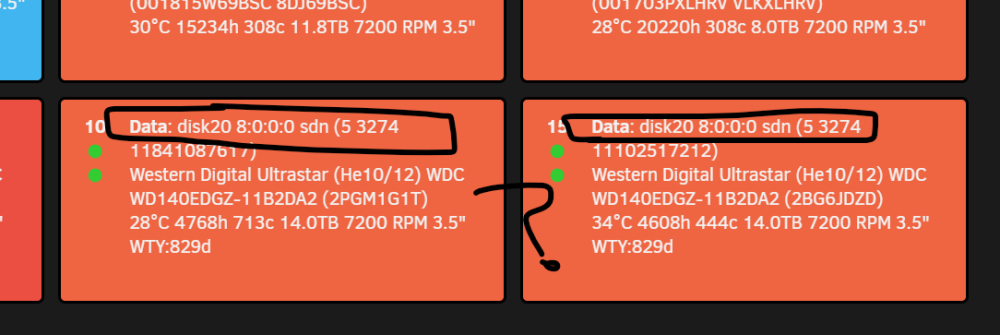
I've had a plethora of issues after updating to 6.11.1. To be fair these were most likely pre-existing and the reboot is what brought things to light. Initially I was getting read/write errors on my Disk 11 while it would usually not show up at all on reboot. I swapped position of the mini sas breakout connectors and sata power connectors with the other drives in that cluster of drives in my DAS and it seemed to have fixed it. Until it didn't. Thought maybe I'll just need to replace the drive so in the meantime I removed it from the array and shrunk it to not include disk 11 (it was empty anyways). Made a New Config without Disk 11 but preserved all assignments and Unraid set on rebuilding parity for the next couple days. Then I started getting similar errors on Disk 10. Chalked this up to potentially bad cables. So I replaced the cable from the HP expander of the DAS to my NAS and also the breakout cables for the 4 drives that belonged to the problematic cluster. On reboot, I now have a disk on a completely different part of the DAS showing up as missing. Oddly, when I look in midnight commander I see that Disk 21 is present. But when looking in Disk Location I can see that Disk 21 is being identified as Disk 20 now. So I have two disks in my array that, according to Disk Location, are showing as Disk 20. It seems the more steps I take to fix whatever is going on with my server the deeper in the hole I fall. I fear I'm about to tank my entire server and could sure use some assistance here. thanks. Diagnostics attached. snuts-diagnostics-20221024-1147.zip
-
im having a heck of a time getting a drive to be recognized. snuts-diagnostics-20221009-0106.zip
-
ok on next reboot the disk is back but im back to "No Docker containers installed" oh, rather its presenting now as an unmountable disk asking me if i want to format it
-
I ran the Update assistant from 6.10.3 and passed with flying colors. After the update and reboot I was presented with "No Docker containers installed" So I rebooted since this sometimes fixes weird one-off anomalies and on reboot I had a missing drive. Testing a reversion to see if it fixed the issue it did not. So I have a missing drive now that does show up when i console: lsscsi This drive was fine, zero SMART errors or anything until attempting this update. Now it's apparently dead? The timing of this is suspect. Attaching Diagnostics in the hope someone can tell me what's going on. I'm currently dead in the water. Thanks. diagnostics-20221008-2017.zip
-
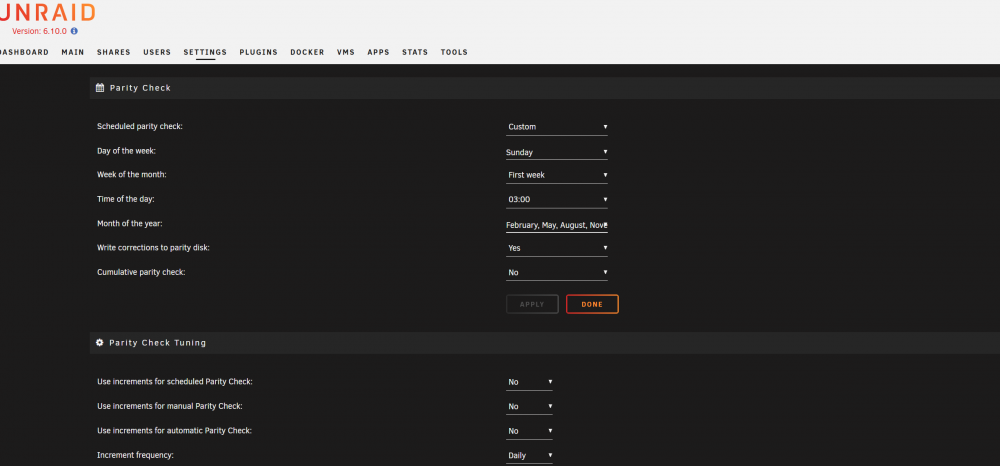
ah "Fixed Schedules" was added to all the scheduled tasks and scripts. Got it. Looks to be things that I have set to run at certain intervals in User Scripts. Makes sense now. Thanks
-
"Dynamix Schedules"
-
Weird, i have it installed but i do not have those tabs I see in your screenshot. Maybe another plugin I have is interfering with that.
-
Installed Schedules and I have no idea how to use it, where it lives, anything. I see it in my plugin list but when I go to Scheduler in settings (I assumed this might be where I'd see something different as I dont see "Schedules" anywhere) nothing is different. Someone clue me in here, thanks
-
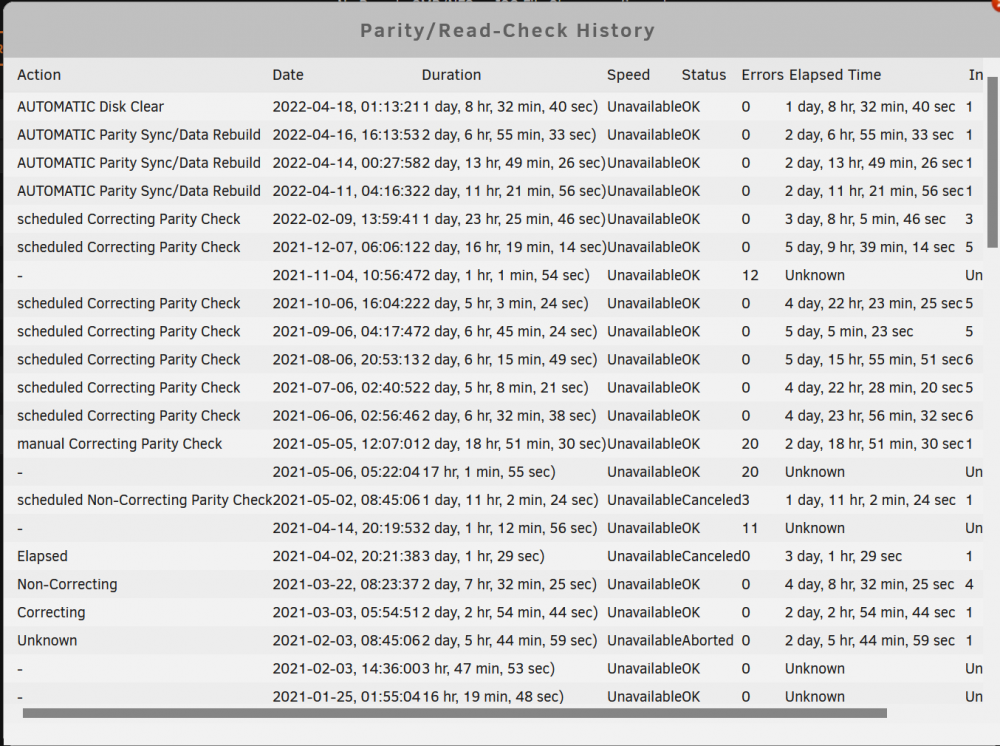
I had purchased 6 14TB drives and so much of what you are seeing are an added parity drive and swapping out 3 8 TB drives for 14 TB drives and having them rebuild. Then the final 2 additions were strictly add-on drives, not any sort of swap or upgrade to already existing ones.
 Just run this without the check mark I assume?
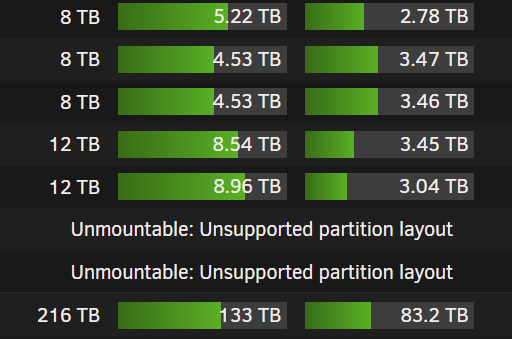
 Nevermind, I figured it out. These 2 drives were shucked Western Digital Elements drives. I had to stop the array, unassign the drives so that I could access whatever partitions were in there manually in Unassigned Devices. I saw that there were "Elements" partitions on each drive. I deleted them, reassigned, and then they formatted ok.I added two new data drives to the array a couple days ago and they went through the clearing process after I assigned them to Disk 20 and Disk 21. Once the Clear completed I see the message "Unmountable: Unsupported partition layout" which I took for a grain of salt as I knew I hadn't formatted yet. I move down Main/Array Operation - and select the Format check box which then asks me to confirm I want to do this. Yes, yes I do. The screen refreshes as the above message switches to "Formatting". However after a few seconds the screen auto refreshes again and reverts back to the previous message of being Unmountable. Why is this? Please feel free to ask me any questions in order to better gather details for a solution.
 Does anyone have a guide on how to get a VM running older OS's like Tiger?I have an issue where the date seems to drift in my rutorrentvpn display. My Unraid server is locked in to sync and shows the correct date and time when i use console command "date". The same correct date and time also is reflected in my motherboard's BIOS. In the container setting itself I do have the PHP_TZ variable set to America/Los_Angeles When I force an update on the container it tends to recorrect itself but just like the old digital clock in my early 2000's SUV, over time, the date/time drifts further and further into the future. As of today, the date of completion of my last torrent shows as 11/9 (It is 11/4) How can I keep this thing synced up?




